


Engineers paste into Markdown destinations all day — GitHub Issues, dev.to, Notion, Obsidian — but the browser's "Copy" command writes HTML to the clipboard, and that HTML lands as escaped tags or stripped formatting. Here's a Chrome MV3 extension that does the obvious thing: convert the selection to Markdown before it hits the clipboard.
230 lines of vanilla JS, 35 jsdom-backed tests, no
host_permissions.
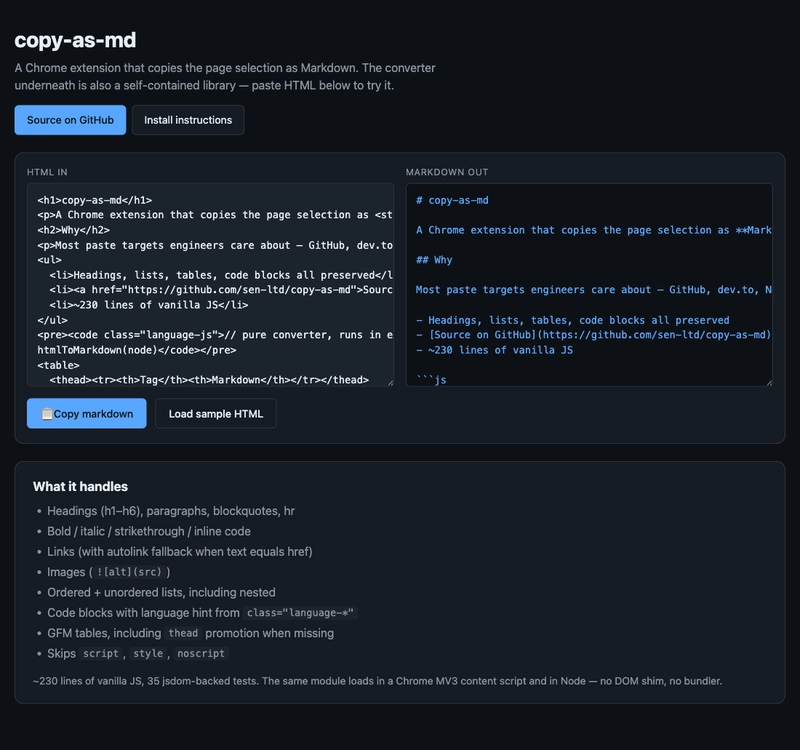
🧩 Demo: https://sen.ltd/portfolio/copy-as-md/
📦 GitHub: https://github.com/sen-ltd/copy-as-md
Why the browser's clipboard isn't enough
Chrome's "Copy" puts both text/plain and text/html on the clipboard. Whichever the destination accepts, Chrome serves. The problem is that almost every text destination engineers care about ignores both:
| Destination | What it actually wants |
|---|---|
| GitHub issues / PRs | Markdown |
| dev.to / Zenn / Qiita | Markdown |
| Notion | Notion's own format (Markdown is plain text on paste) |
| Obsidian / Bear / Joplin | Markdown |
| Slack | a Markdown subset |
Pasting HTML into a GitHub issue gets you escaped tags. Pasting into Notion gets you plain text with the formatting stripped. The fix is obvious: write Markdown to the clipboard before the paste happens.
Architecture — MV3 service worker + executeScript
Three triggers all funnel into the same code:
[ user action ]
   │
   ├─ Right-click → "Copy selection as Markdown"  (contextMenus)
   ├─ Cmd/Ctrl + Shift + M                         (commands)
   └─ Toolbar icon → popup → "Copy" button         (runtime.sendMessage)
              │
              ▼
   [ service worker (background.js) ]
              │
              ▼
   chrome.scripting.executeScript twice:
     1) files: ["html-to-md.js"]   ← inject the converter
     2) func: runner                ← read selection, convert, write clipboard
The combined helper:
async function runOnTab(tabId) {
  await chrome.scripting.executeScript({
    target: { tabId },
    files: ["html-to-md.js"],   // defines globalThis.htmlToMarkdown
  });
  const [{ result }] = await chrome.scripting.executeScript({
    target: { tabId },
    func: runner,
  });
  return result;
}

function runner() {
  const sel = window.getSelection();
  if (!sel || sel.rangeCount === 0 || sel.isCollapsed) {
    const md = globalThis.htmlToMarkdown(document.body);
    navigator.clipboard.writeText(md).catch(() => {});
    return { source: "page", markdown: md };
  }
  const fragment = sel.getRangeAt(0).cloneContents();
  const md = globalThis.htmlToMarkdown(fragment);
  navigator.clipboard.writeText(md).catch(() => {});
  return { source: "selection", markdown: md };
}
Important: no host_permissions
The default reflex for "an extension that runs on every site" is "host_permissions": ["<all_urls>"]. That's a strong permission. Chrome Web Store reviewers flag it. The user sees "Read and change all your data on the websites you visit" at install time and bounces.
Replace it with activeTab + scripting:
- No
host_permissionsdeclaration at all - The install warning is much milder
- Semantically: the extension can only touch a tab the user just acted on — clicking the toolbar icon, hitting the keyboard shortcut, or selecting the context menu item. That's exactly what
activeTabwas designed for
{
  "manifest_version": 3,
  "permissions": ["activeTab", "scripting", "contextMenus"],
  "background": { "service_worker": "background.js" },
  "action": { "default_popup": "popup.html" },
  "commands": {
    "copy-selection-as-markdown": {
      "suggested_key": { "default": "Ctrl+Shift+M", "mac": "Command+Shift+M" }
    }
  }
}
No host_permissions, no web_accessible_resources. This is the modern minimum-permission shape for this category of extension.
Popup → service worker, not popup → tab
The popup is its own browsing context. Calling chrome.tabs.query({active: true, currentWindow: true}) from the popup can return the popup window itself depending on browser timing. Route through the service worker:
// popup.js
chrome.runtime.sendMessage({ type: "copy-as-md/run" }, (resp) => { /* … */ });

// background.js
chrome.runtime.onMessage.addListener((msg, _sender, sendResponse) => {
  if (msg?.type !== "copy-as-md/run") return;
  (async () => {
    const [tab] = await chrome.tabs.query({ active: true, currentWindow: true });
    const md = await runOnTab(tab.id);
    sendResponse({ ok: true, markdown: md });
  })();
  return true;  // keep the message channel open for async sendResponse
});
The return true is the magic value that keeps sendResponse alive across the await. Forget it and the popup's callback never fires — every MV3 dev hits this exactly once.
The HTML→Markdown converter — tag dispatch in 230 lines
Pure logic, takes any DOM-like tree (Element / DocumentFragment / Document.body), returns a string:
function htmlToMarkdown(node) {
  const out = [];
  walk(node, { listDepth: 0 }, out);
  return collapseBlankLines(out.join("")).trim() + "\n";
}

const HANDLERS = {
  H1: (n, c, o) => heading(n, 1, c, o),
  // … H2-H6
  P: (n, c, o) => o.push("\n\n", innerMarkdown(n, c).trim(), "\n\n"),
  A: (n, c, o) => {
    const text = innerMarkdown(n, c).trim();
    const href = n.getAttribute("href");
    if (!href) o.push(text);
    else if (text === href) o.push("<", href, ">");
    else o.push("[", text, "](", href, ")");
  },
  STRONG: (n, c, o) => emphasize(n, "**", c, o),
  EM:     (n, c, o) => emphasize(n, "*",  c, o),
  CODE: ..., PRE: ..., BLOCKQUOTE: ...,
  UL:    (n, c, o) => list(n, "ul", c, o),
  OL:    (n, c, o) => list(n, "ol", c, o),
  TABLE: ..., IMG: ..., DEL: ...,
  SCRIPT: () => {}, STYLE: () => {}, NOSCRIPT: () => {},
};
walk visits each node. If HANDLERS[tagName] exists, dispatch; otherwise recurse into children. Edge cases live with their tag, which keeps the diffs small when you find a new one.
Trap 1: pretty-printed inter-block whitespace
Source HTML formatted across multiple lines:
<h1>Title</h1>
  <p>…</p>
Naïve walk emits whitespace text nodes between blocks → # Title\n\n \n\n… — those leading spaces on a blank line make some Markdown parsers think it's an indented code block.
Fix at text-node time: drop pure-whitespace text that contains a newline:
if (/^\s+$/.test(text) && /\n/.test(text)) return;
The newline check matters. It preserves intentional inline spaces like <span>x</span> <span>y</span> (which don't contain a newline) while killing pretty-print formatting (which does).
Trap 2: nested-list double-indent
<ul><li>a<ul><li>b</li></ul></li></ul>
CommonMark expects:
- a
  - b
Two spaces of indent for the nested item. If both "outer LI continuation lines get indented" and "inner UL emits its own depth-based indent" are turned on, you get - b — four spaces, wrong.
Resolution here: nested lists self-indent via " ".repeat(depth), the outer LI does not add continuation indent. Multi-paragraph LIs become slightly less pretty but still parse correctly under CommonMark; nested lists, which appear far more often in real web content, render exactly right.
Trap 3: GFM tables need a header that the source HTML may not have
GFM requires a header row:
| h1 | h2 |
| --- | --- |
| a | b |
But many <table> elements in the wild ship with no <thead>, or with <th> cells in the first row of <tbody>, or all cells as <td>.
Promotion logic:
let headerRow = null;
const rows = [];
for (const tr of allTrs) {
  const cells = ...;
  const isHeader = Array.from(tr.children).some((c) => c.tagName === "TH");
  if (isHeader && !headerRow) headerRow = cells;
  else rows.push(cells);
}
if (!headerRow && rows.length > 0) headerRow = rows.shift();   // promote first row
The trade-off: a header-less data table loses its first row to the header pretender. Acceptable, because real-world tables almost always have a heading row that just isn't marked as one.
The same code runs in Node tests
Because the converter is pure, you don't need a browser to test it — supply a DOM:
import { test } from "node:test";
import { JSDOM } from "jsdom";
import "../html-to-md.js";  // side effect: sets globalThis.htmlToMarkdown

const { document } = new JSDOM().window;
const md = (html) => {
  document.body.innerHTML = html;
  return globalThis.htmlToMarkdown(document.body);
};

test("nested ul indents inner list", () => {
  assert.equal(md("<ul><li>a<ul><li>b</li></ul></li></ul>"), "- a\n  - b\n");
});
35 cases run under node --test in 0.3 seconds. The MV3 lifecycle bits (service worker boot, popup messaging, context menu registration) still need a manual smoke test in actual Chrome — but the 90% of LOC that's the converter is fully covered without touching a browser.
Takeaways
- Skip
<all_urls>.activeTab + scripting + contextMenusis enough for this whole class of extension; the install warning shrinks and Chrome Web Store reviewers stop flagging it. - The "two-call
executeScript" pattern (inject the library, then a runner) is reusable and avoids any module-loading dance in the content script world. - Popup → service worker →
tabs.queryis the safe path to "the tab the user was just looking at."onMessageasync handlers mustreturn trueorsendResponseno-ops. - A tag-dispatch HTML→Markdown converter fits in 230 lines. The traps to know are pretty-print whitespace, nested-list indent doubling, and header promotion for tables without
<thead>. - Pure logic + jsdom +
node --testcovers the converter end-to-end. Browser is for smoke testing only.
Full source on GitHub — html-to-md.js is the converter, background.js is the SW, tests/ is 35 cases. MIT licensed.
Hosted playground lets you try the converter without installing the extension.