





Cursor is an AI-assisted IDE with AI features baked-in, such as agent-based coding assistance, predictive autocomplete, and MCP support. It is a fork of Visual Studio Code, bringing a familiar environment with AI functionalities built directly in the editor.
It can quickly speed up your development process, allowing you to discuss your codebase with the agent in natural language, request modifications, plan architectural changes, schedule repetitive multi-step tasks and so on.
Let’s look at how these capabilities fit into day-to-day development, what Cursor changes compared to a standard editor setup, and how to start using its AI features effectively.
Working with Agents
The main interface in Cursor is the Chat window, where you can prompt the coding agents.
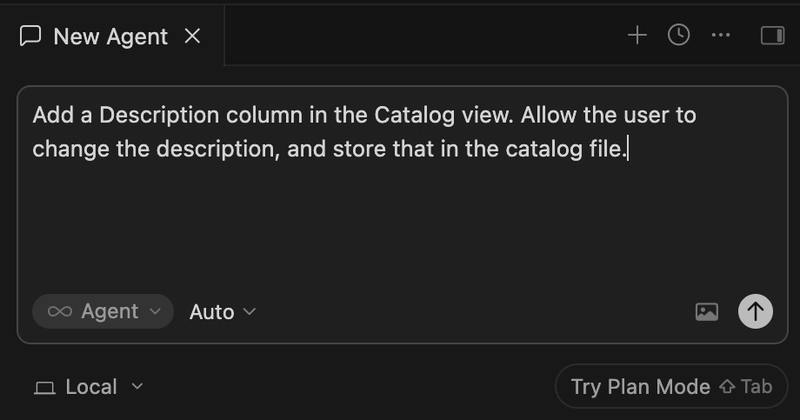
By default, the Chat will be in Agent mode, so the agent will directly go ahead and write code as you write prompts.
You can switch mode by using the dropdown on the bottom left.
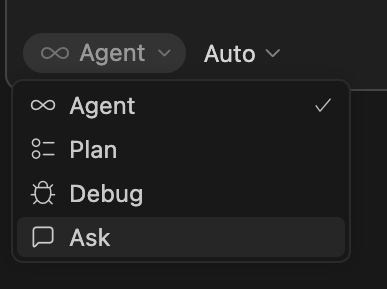
When you want to make larger changes, such as defining the architecture of your project, or a larger refactor, switch to Plan Mode. This lets the agent create a plan, analysing the codebase and asking questions, before it goes ahead and actually writes code.
If you just want to discuss your codebase with no intention to make changes to it, you can switch to Ask mode.
Finally, Debug Mode allows you to focus on bugfixing, by letting the agent analyse your log files. You first describe the bug, and the Agent will create a few hypotheses as to why it might be happening. It then adds relevant log lines in the codebase to test those, and asks you to reproduce the bug, while it checks the logs in real time. It then validates those hypotheses and attempts to generate a fix.
Cursor shows its reasoning while the agent is working. If you see something that does not make sense, or it’s not what you intended, you can stop it and send another prompt to steer it in the right direction. After the agent makes changes, you can choose to Keep them, Undo, or Review them.
You can also drag images into the chat window, to provide examples of what you are looking for, design ideas and sketches, or even screenshots and visual bugs in your application. In my experience, Cursor can reliably make sense of them with relatively little context.
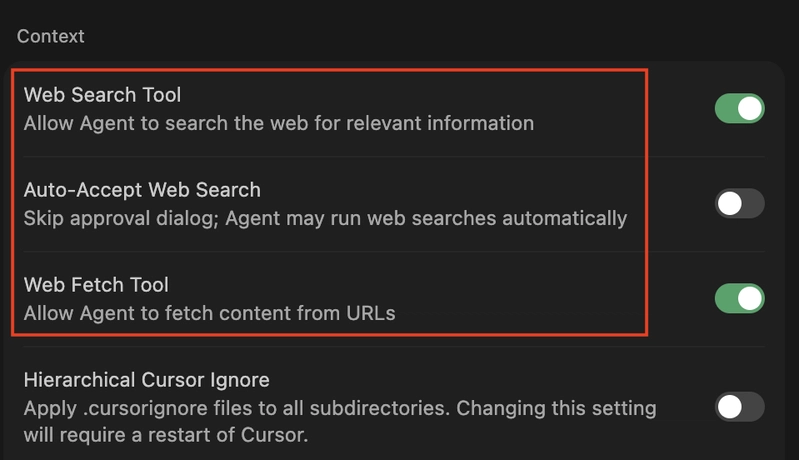
In the Cursor Settings, under Agents > Context, you can define whether Cursor should be able to search the web and fetch content remotely.
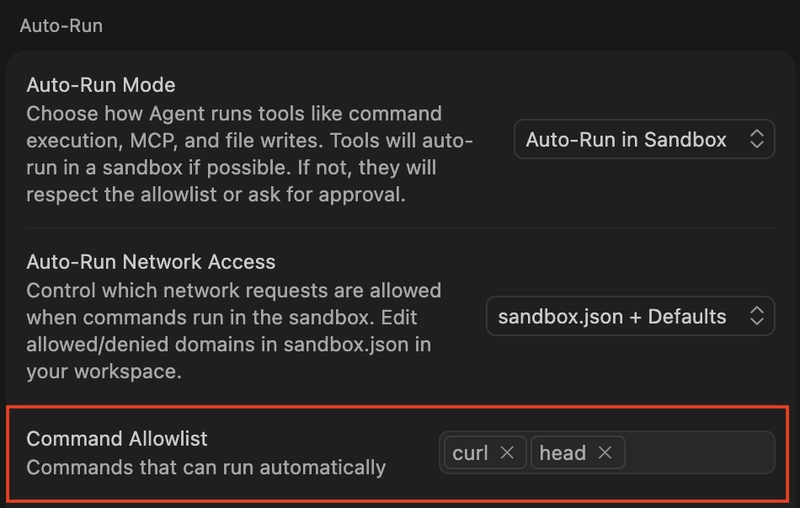
In some cases, Cursor will need to run CLI commands, such as curl or head, to fetch files or manipulate directories. The agent will then stop and wait for you to approve it. You can choose to whitelist that command directly from the chat, or you can do it beforehand from Cursor Settings > Auto-Run > Command Allowlist.
You can duplicate a chat, for example if you want to fork it and try different approaches, by pressing the … button at the bottom of the chat and selecting Fork Chat. This tends to use a high number of tokens, again because every prompt will carry over the whole chat as context, so consider whether it’s better to just create a new chat and provide just the context you require. Alternatively, you can rollback a conversation by pressing the arrow icon on an earlier prompt.
You can review and resume past chats from the Agents window, on the left. Cursor stores chat transcripts in the ~/.cursor/projects//agent-transcripts/ folder.
Models and Token Consumption
When working with agents, you have the option to select which model you’d like to use to run inference and generate code. Each model will offer a different balance between accuracy, speed, context window size, and pricing.
By default, Cursor sets the Model to Auto, which means it will pick a model best suited for your task. You can override that by unselecting Auto, then picking a specific model from the list. Cursor offers its own model, called Composer 2, but you can select other models such as Claude Sonnet/Opus or GPT.
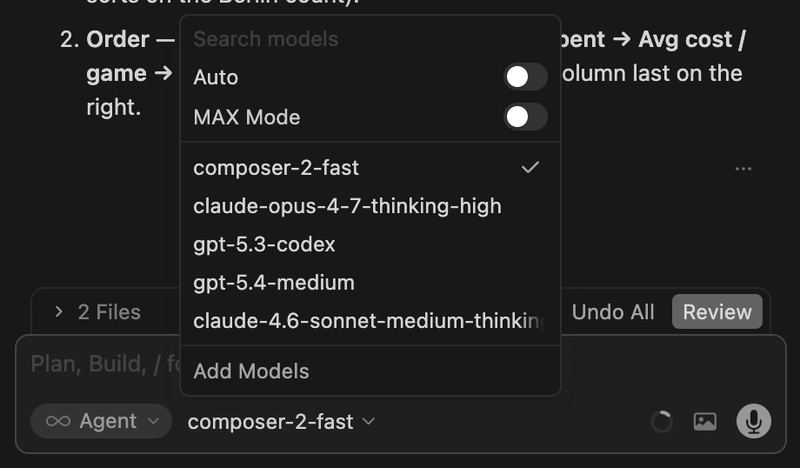
Go to Settings > Cursor Settings > Models to see what models are available and enabled. From there, you can also set up API keys for each provider.
Each model will have a different pricing structure. You can check each model pricing here.
In order to save tokens, you can switch between models depending on the task complexity. For example, you can use a more powerful model to plan out the work, then pass the output to a cheaper model to write the code.
Whenever you make a request to the agent, you will consume tokens. You can go to https://cursor.com/dashboard/usage to see how many tokens you consumed on each day, and other API billing information.
Context
The context is where your agent stores information regarding the current session, including details about your codebase, the chat history, skills descriptions, rules and so on. Think of it as a cache.
As the chat goes on, the context window keeps filling up. Different models will have different context window capacity. You can see how much it’s currently used up on the bottom right of the chat window.
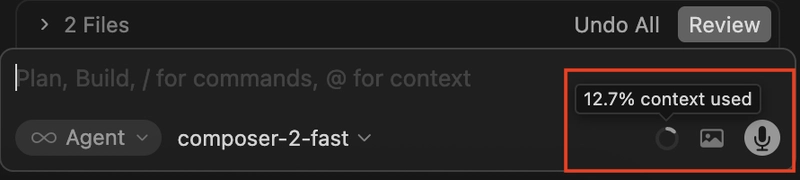
The results you get from the agent will start to deteriorate as the context gets full. Token usage will also increase, as the agent needs to process a larger set of information during the chat. For this reason, it’s recommended to keep chats brief, and start a new one whenever you move to a different feature and the previous context is no longer needed.
If you prefer to keep the same chat going, you can use the /summarize command to let Cursor compact the current conversation, reducing the size of its context.
If you need some specific information to always be available in the Context between chats, you can use a rule for it, as I will explain shortly.
Commands
Commands are essentially saved prompts. They are a good fit for repeatable tasks that don’t need additional context.
Commands are normally invoked manually, while Skills are autonomously initiated by the agent. In the chat window, you can type @ and select a command. For example, you can use @branch to let Cursor review all changes in the current branch against the main branch.
You can define custom commands by creating a .md file in the .cursor/commands folder. For example, here is a command I created to validate a list of sheets references:
Check all the Google sheets listed in the sheetsConfig file, and validate that they exist, are publicly accessible, and are in the correct format.
Rules
Rules provide additional, reusable context to the agent prior to every interaction. They are useful to define team conventions and coding style for example. This saves you time as you don’t need to provide this information every time you start chatting with the agent.
You can create a rule by going to Cursor Settings > Rules, Skills, Subagents > Rules, selecting New and choosing which type of rule you want to add. Project Rules are meant to be stored in version control and used by everyone working in the project, while User Rules are meant only for your workspace and session.
You then write a title, the rule body, and specify whether the rule should always apply, or just when the agent is working on specific files.
For example, here is a rule I created to ensure the agent creates reactive visual element layouts:
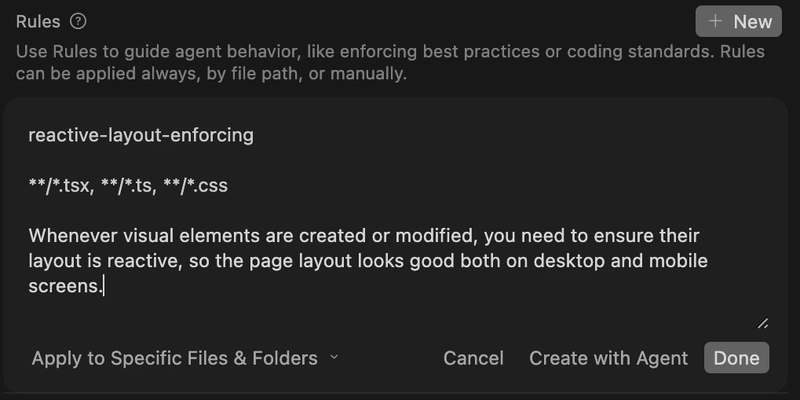
When you are done, the new rule will be stored in the .cursor/rules folder.
Skills
Skills provide specialised capabilities to the agent, including domain specific knowledge and documentation, scripts, and assets. Skills in Cursor follow the open standard, so you can port your skills from and to other AI tooling such as Claude Code, acquire them from the marketplace, and so on.
When a new chat starts, the agent checks the list of skills just so it is aware of what is available, without actually loading the whole content into its context. Then, during the conversation, if it determines that a skill might be a good solution to a particular problem, it loads it up into the context and runs it. You also have the option to explicitly run a skill by using the / command, similarly to Commands.
You can define new skills by adding them into the .cursor/skills/ folder, with the name of the skill as the folder name, a SKILL.md describing the skill, and optionally additional reference, scripts and asset files. For example, here’s how a skill directory to upload files to AWS S3 looks like.
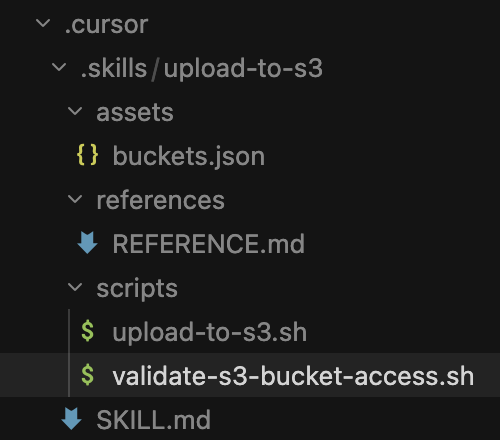
And here’s how the actual skill looks like:
---
name: upload-to-s3
description: "Deploy provided assets to a S3 bucket"
disable-model-invocation: false
---

# Upload to S3

Deploy assets to a S3 bucket using the provided scripts.

## Usage

Run the S3 upload script: `scripts/upload-to-s3.sh <bucketname>`

## Pre-upload Validation

Before deploying, run the validation script to ensure you have access to the bucket: `scripts/validate-s3-bucket-access.sh <bucketname>`
You can use the disable-model-invocation parameter to define whether the skill can be invoked by the agent directly. If that is set to true, the skill will only run when invoked manually using the / command.
Hooks
Hooks allow you to run automated checks when certain events occur, such as when the agent is done editing your code, a new session is created, or after a shell command is executed. They are useful for example to ensure no secrets, credentials, or PII have been added to the project.
You can define hooks in a .cursor/hooks.json, either within your project or in your home directory (for global hooks).
Hooks can either run commands, defined in shell scripts, or prompts. Here is an example where we check for secrets whenever a file is edited using a shell script, and ask the agent to check if the project still adheres to our styling guideline when a subagent session ends.
{
  "version": 1,
  "hooks": {
    "afterFileEdit": [
      {
        "command": "./hooks/check-secrets.sh"
      }
    ],
    "subagentStop": [
      {
        "type": "prompt",
        "prompt": "Ensure the new code adheres to the project styling guidelines",
        "timeout": 20
      }
    ]
  }
}
For more complex scenarios, you can have hooks execute Typescript code.
Subagents
Subagents are launched from the main agent to run specialised tasks. They start with an empty context and receive a prompt from the main agent.
They allow you to run specialised workloads using fewer tokens by using a specialised model that is focused on that individual task.
Cursor comes with three subagents built-in - Explore to analyse your codebase, Bash to run CLI commands, and Browser to fetch and retrieve results from the internet.
You can create custom subagents by adding a markdown file in the .cursor/agents/ folder. You can also request the agent to create one for you directly.
Each subagent contains a header with some metadata, then an actual prompt, as shown below:
---
name: physics-performance-auditor
description: Used when integrating Physics game logic. Ensures usage does not introduce performance issues.
model: inherit
readonly: false
is_background: true
---

You are a senior physics programmer auditing code for performance.

When invoked:
1. Ensure Physics logic is correct
2. Ensure it does not introduce CPU bottlenecks
3. Ensure it does not use old or deprecated ApiS

Report up to 10 findings, sorted by severity.
The is_background field defines whether the sub-agent runs in the Foreground, so the main agent will wait for it to complete its task, or in the Background, where the main agent will carry on while the sub-agent does its work in parallel.
You can define whether the subagent should be able to make modifications to the project by setting the readonly flag. If that is true, it will just present its findings in the chat window.