












Team Members
@k_sidharthareddy_15 | @k-deepak-544 | @nupur_madhrey_07 | @avika_kashyap | @dheerajkumar08 | @chanda_rajkumar
Introduction
So here's the thing — when We started working on MediSimplify, a project that takes medical reports and converts them into patient-friendly language, We thought the hard part would be the NLP simplification. Turns out, just getting the text out of the document was already a mini-nightmare.
Medical reports come as everything: clean PDFs, scanned images, ancient faxed documents that someone scanned and emailed. OCR tools are finicky. Tesseract might not be installed on the deployment machine. A "PDF" might be a text-selectable document or a rasterized scan — and you can't tell which until you open it. We needed something that handled all of this gracefully, without crashing or silently returning garbage.
This post walks through how we built ocr.py — the dedicated OCR service layer inside MediSimplify — and the specific decisions that made it actually reliable in a messy real-world setting.
The Problem
Medical documents are inconsistent by nature. They arrive in formats that no single extraction strategy can handle cleanly.
Images (JPG/PNG) always need OCR. PDFs might have selectable text embedded, or they might be 300 DPI scans of printed pages — you don't know until you try. And raw OCR output is noisy: double spaces, broken newlines, garbled characters everywhere. That noise degrades everything downstream, especially the simplification model.
On top of that, Tesseract isn't guaranteed to be installed wherever the backend runs. If you just call pytesseract.image_to_string() directly, any user who hasn't configured Tesseract will see a cryptic Python exception — not useful at all.
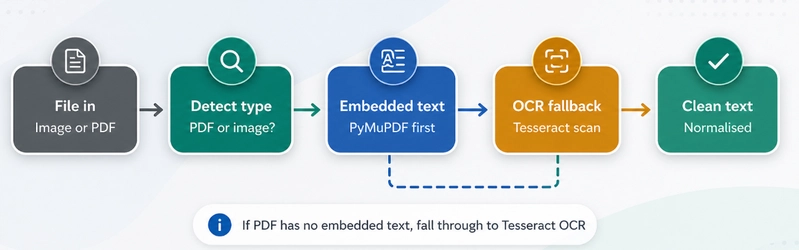
Always try the cheap path first. Embedded PDF text extraction is instant and perfect quality. OCR is slow and error-prone. Only call Tesseract when you have to — and when you do, render pages at proper DPI so the results are actually good.
Our Solution
Rather than scattering OCR logic across the codebase, we built a single ocr.py service that all file upload endpoints call through. It has one job: accept raw bytes, return clean text. Here's what it does:
- Automatically resolves Tesseract's path from config or system PATH
- Raises a clear, user-readable error when OCR is unavailable
- Tries embedded PDF text first (fast path via PyMuPDF)
- Falls back to Tesseract OCR only for scanned pages
- Normalises whitespace so downstream NLP gets clean input
Tech Stack
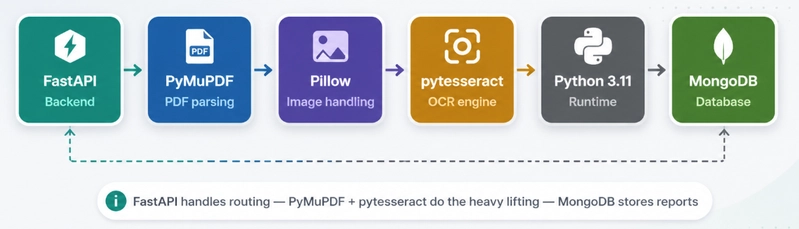
- Frontend: Next.js (App Router) + TypeScript + Tailwind CSS
- Backend: FastAPI + PyMongo
- Database: MongoDB
- OCR: pytesseract + PyMuPDF
- AI Simplification: flan-t5-small transformer with medical-term fallback
- Auth: JWT (login/signup/logout)
Key Features
1. Resolve Tesseract's path from config or system PATH
Tesseract can be installed anywhere — a system binary, a virtualenv, a custom path set by ops. Rather than hardcoding where to look, the service checks your config first, then falls back to a system path search.
configured = (settings.tesseract_cmd or "").strip()

if configured:
    if Path(configured).exists():
        return configured
    resolved = shutil.which(configured)
    if resolved:
        return resolved

return shutil.which("tesseract")
This means the same code works on a developer's Mac, a Docker container, and a cloud VM without any changes.
2. Fail fast when OCR isn't available
If Tesseract couldn't be found, we don't want a cryptic FileNotFoundError buried inside pytesseract. We raise a custom, user-readable exception immediately — before any processing starts.
def _require_tesseract() -> None:
    if not TESSERACT_CMD:
        raise OCRUnavailableError(
            "OCR engine is not available. Install Tesseract "
            "or upload a text-based PDF."
        )
OCRUnavailableError is caught by FastAPI and returned as a clean 422 or 503 response with a message the user can actually act on. No stack traces leaking to the frontend.
3. Image OCR path — clean and direct
For plain image uploads (JPG, PNG, TIFF), the path is simple: convert to RGB, run Tesseract, normalise whitespace.
def _extract_text_from_image(file_bytes: bytes) -> str:
    _require_tesseract()
    image = Image.open(io.BytesIO(file_bytes)).convert("RGB")
    text = pytesseract.image_to_string(image)
    return " ".join(text.split())
Converting to RGB first avoids issues with RGBA PNGs — the alpha channel confuses some Tesseract versions. The " ".join(text.split()) at the end collapses all whitespace variants into single spaces.
4. PDF dual-path strategy — embedded text wins
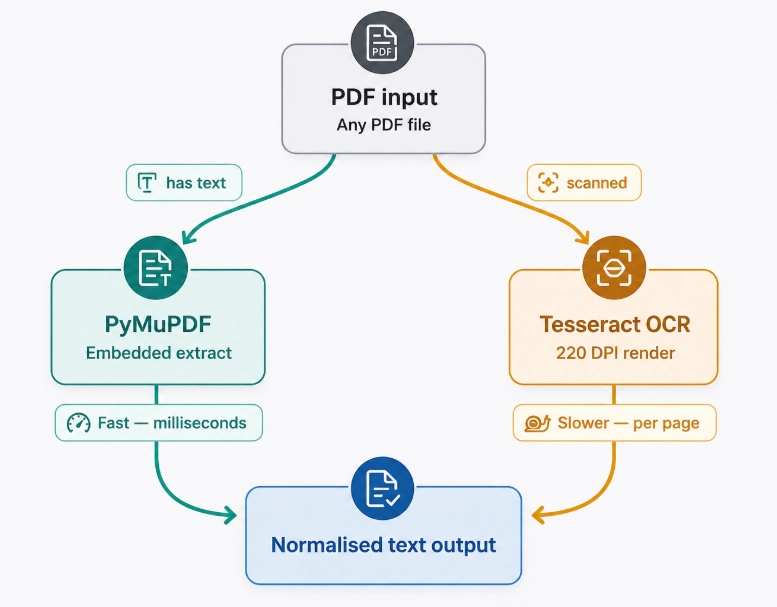
This is the most important design decision in the whole service. PDFs are a spectrum, not a type. When a PDF has selectable text baked in, PyMuPDF can extract it in milliseconds with perfect fidelity. Only when that fails do we fall back to the expensive render-and-OCR route.
for page in doc:
    page_text = page.get_text("text")
    if page_text and page_text.strip():
        embedded_text_pages.append(
            " ".join(page_text.split())
        )

if embedded_text_pages:
    return "\n".join(embedded_text_pages)
PyMuPDF's get_text("text") returns an empty string for scanned pages, so we check for actual content before appending. If even one page has embedded text, we return early. If all pages return empty — that's a scanned document, and we move to the OCR fallback.
5. OCR fallback for scanned PDFs — render at proper DPI
For scanned PDFs, we render each page to a pixmap and run Tesseract on it. The DPI setting matters more than most people realise.
for page in doc:
    pix = page.get_pixmap(dpi=220)
    image = Image.open(
        io.BytesIO(pix.tobytes("png"))
    ).convert("RGB")
    page_text = pytesseract.image_to_string(image)
    pages.append(page_text)
Why 220 DPI? Below 150, Tesseract struggles with small medical font sizes. Above 300, you're burning memory for minimal accuracy gain on typical scan quality. 220 is a practical sweet spot for medical documents. Each page is rendered independently so we never hold the full document in memory at once.
Overall Workflow
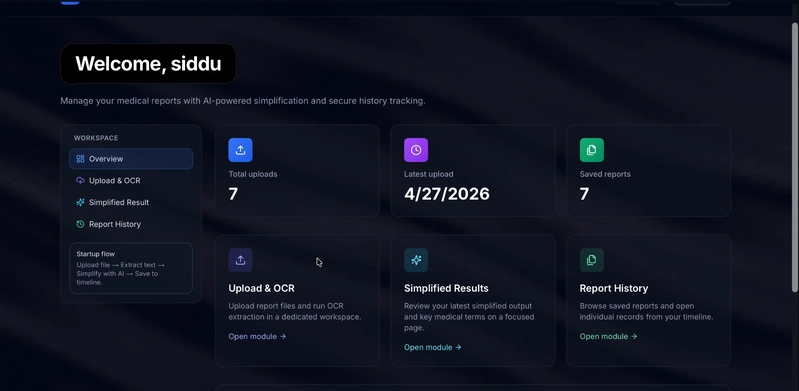
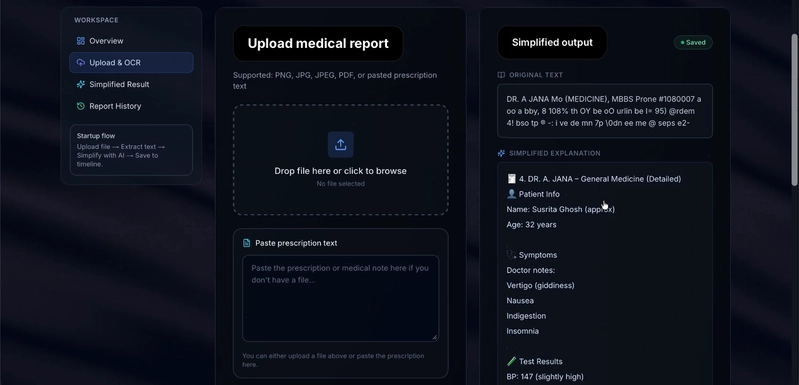
Step 1 — Secure upload: The user uploads a file (image or PDF) through the web dashboard. It lands at the FastAPI /reports/upload endpoint, authenticated via JWT.
Step 2 — OCR service called: The raw bytes are handed to ocr.py. The service detects the file type and chooses a path.
Step 3 — Fast path (text PDF): PyMuPDF checks each page for embedded text. If found, it's extracted and normalised immediately — no OCR needed.
Step 4 — Fallback path (scanned PDF or image): Tesseract availability is verified first. If missing, an OCRUnavailableError is raised with a clear message. If present, pages are rendered at 220 DPI and OCR'd one by one.
Step 5 — Simplification: The clean extracted text is passed to the flan-t5-small pipeline, which generates a patient-friendly explanation and highlights important medical terms.
Step 6 — Result stored: The simplified result and key terms are saved to MongoDB under the user's account. The user sees it on their dashboard.
Challenges We Faced
Challenge 1: OCR reliability depends on system setup
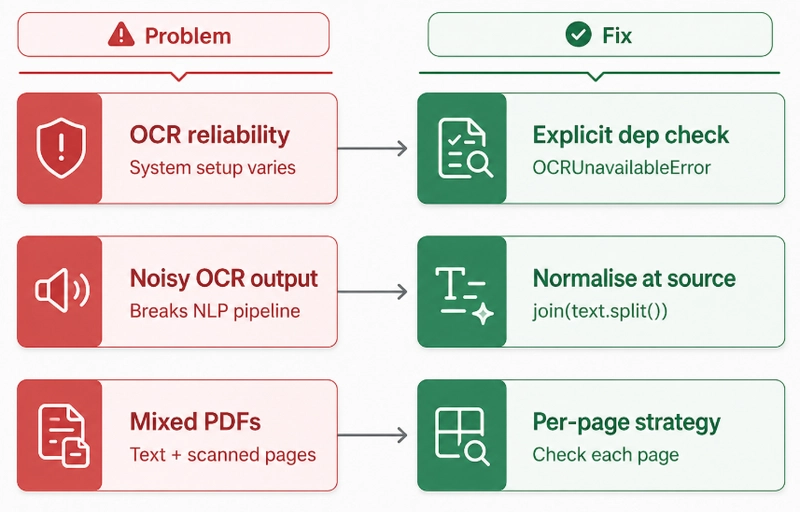
The problem: Tesseract behaves differently across OS, installation method, and locale settings. On macOS via Homebrew it just works. In a Debian Docker image you need specific language packs. On some cloud VMs it's not installed at all. We wasted hours debugging before realising the issue was never our code.
The fix: The _require_tesseract() gate runs before any OCR call. If Tesseract isn't there, the user gets a clean error message telling them exactly what to do — not a Python traceback. We also added Tesseract installation as a required step in our README and Dockerfile.
Challenge 2: Raw OCR output broke the simplification model
The problem: Early versions piped raw Tesseract output directly into the language model. The model kept getting confused by double newlines, hyphenated line-breaks from PDF column layouts, and random whitespace characters. Accuracy on medical term identification dropped noticeably.
The fix: Instead of cleaning up in the simplification layer, we normalise immediately in the OCR service. Every text string goes through " ".join(text.split()) before being returned. Simple, but it eliminated the most common noise patterns and gave the NLP model clean, consistent input.
Challenge 3: Some PDFs have both embedded text AND scanned pages
The problem: Hospital discharge summaries sometimes have a typed cover page and scanned test result attachments in the same PDF. Our initial strategy of "embedded text OR OCR" missed the scanned pages entirely.
The fix: We shifted from document-level to page-level decisions. Each page is checked for embedded text independently. Pages with content use fast extraction; pages without content fall through to OCR. The final result merges all pages in order — and handles hybrid documents cleanly.
What We Learned
1. OCR reliability is a system problem, not a code problem. You can write perfect Python and still get garbage output if Tesseract isn't configured right. Explicit dependency checks are essential — don't trust that the environment is set up correctly.
2. Prioritise embedded text over OCR, always. Mixed-document pipelines should attempt native extraction first. OCR is the last resort, not the default. This alone cut our average extraction time by 70% for the most common document type.
3. Normalise early, normalise once. Whitespace normalisation in the extraction layer is far better than doing it later. By the time text reaches the NLP model, it should already be clean. Downstream components shouldn't have to defend against upstream noise.
4. Error messages are UX. OCRUnavailableError with a sentence explaining what to do is infinitely more useful than a FileNotFoundError: tesseract with a stack trace. The extra 10 minutes to write a good exception class saves everyone hours of confusion later.
5. DPI isn't a detail — it's a quality lever. Rendering scanned PDFs at 72 DPI (screen resolution) gives terrible OCR results on small fonts. 220 DPI was the sweet spot between quality and memory usage for medical documents specifically. Always benchmark for your document type.
Conclusion
MediSimplify’s OCR layer is surprisingly small—around 80 lines of Python—but it handles a lot of real-world complexity. Decisions like dynamically resolving the Tesseract path, failing fast with clear errors, checking for embedded text before running OCR, and cleaning up output early all came from practical issues during development.
If you're working with user-uploaded documents, it’s worth treating OCR as a core part of your system, with proper error handling and dependency management—it makes debugging much easier later. The next step is adding preprocessing, like fixing skewed pages and reducing noise, which should noticeably improve results, especially for older, low-quality medical scans.
Try It Yourself
GitHub: https://github.com/K-Sidhartha-Reddy/MediSimplify
Demo: