
Introduction
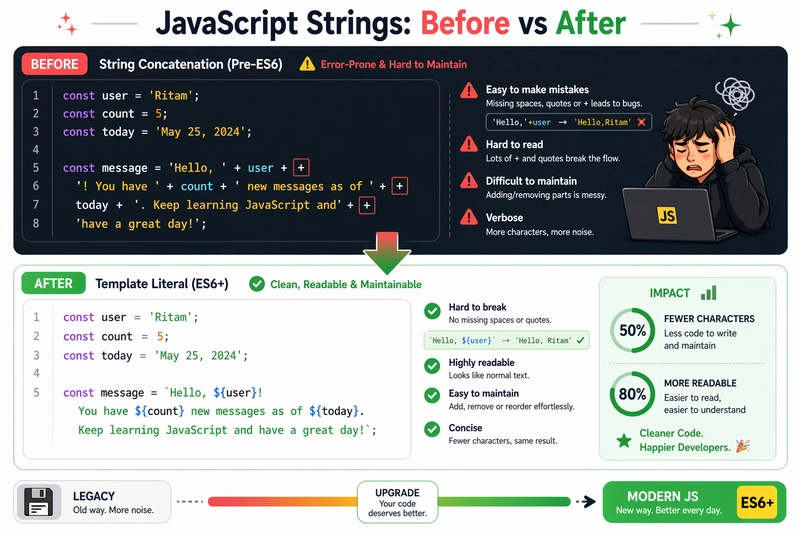
Imagine you're building a dynamic dashboard for your full-stack app. You need to greet users like "Welcome back, Ritam! Your last login was on April 24, 2026, at 4:28 PM IST." In the old days, you'd glue strings together with plus signs, escaping quotes, managing calculated spaces and praying for no typos. It quickly turns into a headache—unreadable for devs also, error-prone, and a maintenance nightmare.
Now enters template literals, JavaScript's elegant solution since ES6. They make string building feel natural, boosting your code's readability and productivity. Let's dive in and see why they're a game-changer.
The Pain of Traditional String Concatenation
Before template literals, we relied on concatenation with + or arrays joined by join(''). It works, but it's clunky and wasn't a good experience for the developers.
Example: Old-school greeting
const name = 'Ritam';
const lastLogin = 'April 24, 2026, 4:28 PM IST';
const greeting = 'Welcome back, ' + name + '! Your last login was on ' + lastLogin + '.';
// Output: "Welcome back, Ritam! Your last login was on April 24, 2026, 4:28 PM IST."
Problems abound:
- Readability suffers as strings grow;
- spotting variables amid quotes is tough.
- Easy to miss spaces or add extra ones (e.g.,
'back,' + namevs.'back, ' + name). - No native multi-line support—forces ugly escape-sequence
\nor+across lines. - Debugging? Typos in long chains are brutal.
This scales poorly in real apps, like API responses or HTML generation.
Template Literal Syntax: Backticks Unlock the Magic
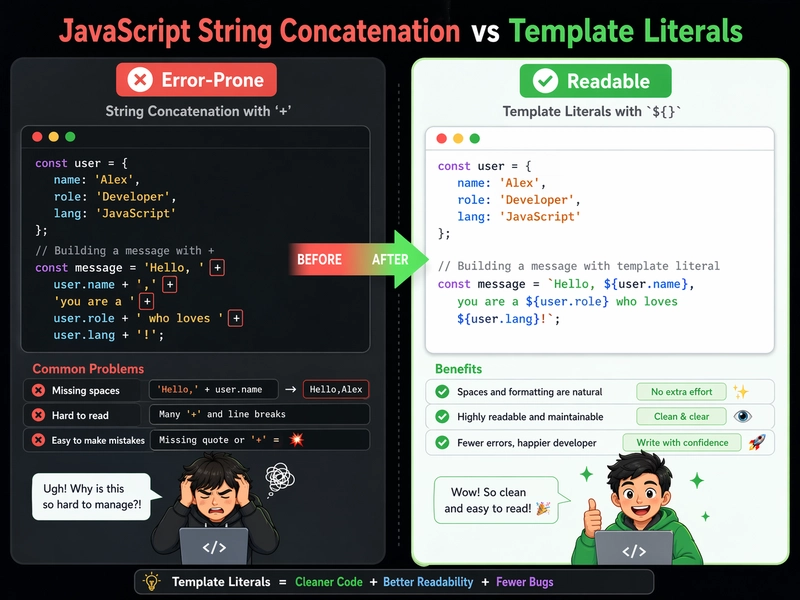
Template literals use backticks (`) instead of single (') or double (") quotes. Key features:
-
Interpolation: Embed expressions with
${expression}. - Multi-line: Spans lines without escapes.
-
Expression support:
${}evaluates anything—variables, functions, math.
const greeting = Hello, world!; // Simple string
Embedding Variables: String Interpolation Made Simple
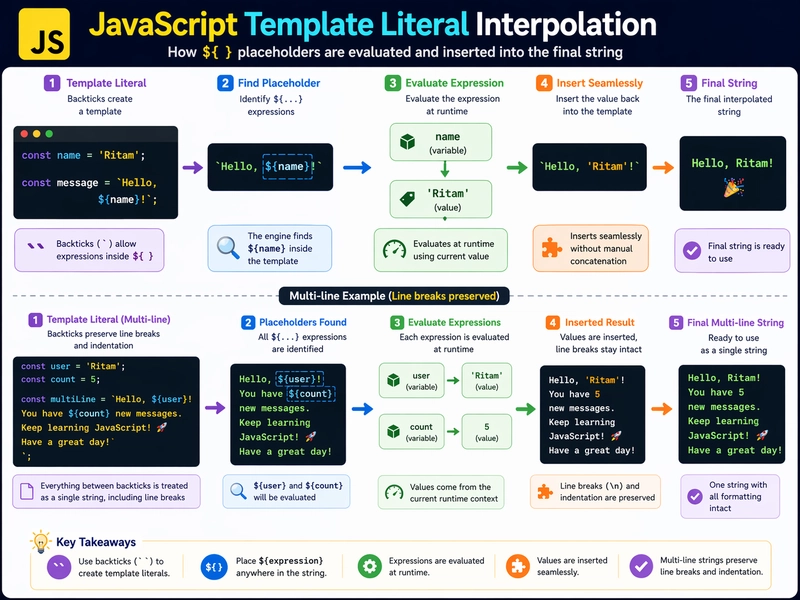
Interpolate with ${}—JavaScript evaluates and inserts the result/expression. It's dynamic and concise.
const name = 'Ritam';
const city = 'Kolkata';
const greeting = Welcome back to your dashboard, ${name} from ${city}!;
// Output: "Welcome back to your dashboard, Ritam from Kolkata!"
Technical Breakdown:
-
${name}callstoString()onnameimplicitly. - Even supports complex expressions:
${name.toUpperCase()}or${2 + 2}yields "RITAM" or "4".
Compare with concatenation:
const oldGreeting = 'Welcome back to your dashboard, ' + name + ' from ' + city + '!';
// Template literal (clean and readable)
const newGreeting = Welcome back to your dashboard, ${name} from ${city}!;
Template literals win on readability—scan for ${} to spot variables instantly.
Multi-Line Strings: No More Escapes
Need formatted text, like emails or SQL? Backticks handle newlines naturally.
const user = 'Ritam';
const emailBody = `
Dear ${user},
Your portfolio project deployed successfully on Vercel.
Next steps:
- Review PR on GitHub
- Test Node.js backend
Happy coding!
Team
`;
// Output preserves exact formatting, including indents.
Use Cases in Modern JavaScript
Template literals shine in full-stack dev:
-
API Responses:
const response =User ${userId} logged in at ${new Date().toISOString()}; -
HTML Templating (pre-React):
Hello, ${name}!(sanitize for security). -
Tagged Templates (advanced): Libraries like styled-components use them for dynamicity, e.g.,
styled.divHello ${name}. -
Debug Logs:
console.log(Error in ${functionName}: ${error.message}); -
SQL Builders:
SELECT * FROM users WHERE id = ${userId}(use params to prevent injection).
Conclusion: Level Up Your JS Strings Today
Template literals transform string handling from a chore to a joy—readable, flexible, and modern. Ditch concatenation; embrace backticks for cleaner code that scales with your projects. Next time you're building that portfolio app or prepping for interviews, reach for ${}. Your future self (and teammates reviewing your PRs) will thank you.