


This is a submission for the OpenClaw Challenge.
Everyone's talking about OpenClaw like it's witchcraft.
You set it up, connect your Telegram, and suddenly it's scheduling standups, summarizing your RSS feeds, transcribing voice notes, and remembering a conversation you had three weeks ago. People in forums describe it with words like "it feels alive" or "I don't even know how it did that."
I'm a CTO building AI-powered products. That kind of mystery bothers me.
So I spent several weeks pulling OpenClaw apart. Reading the source. Tracing every request. Building a competing prototype. And what I found changed how I think about AI agents entirely — not because it's more complex than I expected, but because it's radically simpler.
Here's what I learned.
The Illusion Factory
Let me start with the punchline: OpenClaw has no magic. Zero. It uses patterns that have existed in software for decades — event loops, cron jobs, file-based config, tool calling. The "intelligence" you perceive is almost entirely the underlying LLM doing its job. OpenClaw is the scaffolding around that LLM, and once you see the scaffolding, you can't unsee it.
That's not a criticism. That scaffolding is genuinely clever. But understanding it changes everything about how you use, configure, debug, and trust the system.
What OpenClaw Actually Is: Three Components
Strip away the marketing and you have three things:
1. Channels — The Mouth and Ears
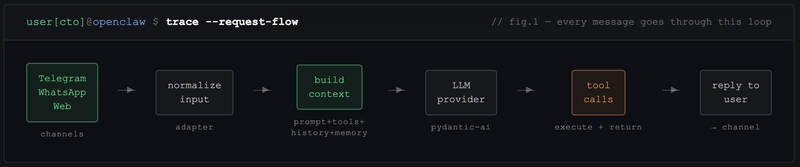
OpenClaw doesn't natively "understand" Telegram. Or WhatsApp. Or web chat. Each platform is just an adapter — a thin layer that converts platform-specific events (a Telegram message, a WhatsApp voice note) into a normalized internal format. When you message your agent on Telegram, OpenClaw literally doesn't know it's Telegram. It sees structured input. That's it.
This matters because it means adding new channels is straightforward: build an adapter, normalize the input, plug it in. The agent doesn't change.
2. Context Window — The "Memory"
Like every LLM-based system, OpenClaw builds a context window and sends it to the model. The context includes:
- System prompt (who the agent is, what it can do)
- Tool descriptions (what functions it can call)
- Conversation history (the back-and-forth so far)
- Injected memory snippets (retrieved from files when relevant) That last one is the trick. When your agent "remembers" something from last month, it didn't remember anything. It retrieved a snippet from a Markdown file and injected it into the current context. There's no persistent memory in any neural sense — it's selective file retrieval.
3. Tools — The Hands
Tools are functions the LLM can call:
send_message(channel, text)
read_file(path)
exec(command)
memory_write(content)
memory_search(query)
cron_create(schedule, task)
When your agent "decides" to send you a summary, it's not deciding anything. The LLM pattern-matched on its training to output a tool call. OpenClaw intercepts that call, executes the function, and feeds the result back into context. Same loop, over and over.
The Memory System: It's Just Markdown
The thing that makes OpenClaw feel alive is its memory. Let me break down exactly how it works — because this was my biggest "aha" moment.
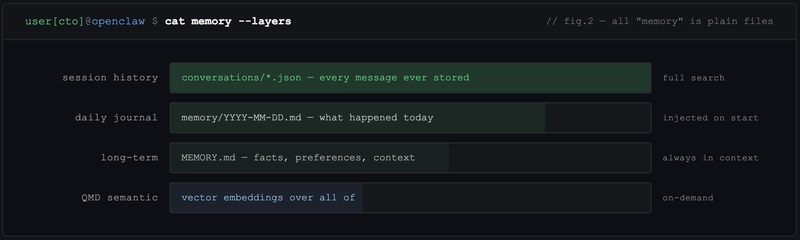
Three Layers of Storage
Daily journals — every day, the agent writes a log file:
# 2026-04-25

- Discussed new features for trading dashboard
- Set reminder for Friday deploy window
- User mentioned they're in Wiesbaden
Long-term memory (MEMORY.md) — a flat Markdown file where the agent writes facts it considers important. User preferences, project context, recurring patterns.
Full session history — every conversation stored as JSON. The agent can search back through any past session.
QMD: The Secret Sauce
OpenClaw includes an experimental utility called QMD (Query Memory Database). It's a semantic search layer over all that Markdown — vector embeddings plus keyword search combined.
When you say "remember that idea I had about the auth flow?" — QMD doesn't search for those exact words. It finds conversations that are semantically similar, even if you used completely different vocabulary. This is why retrieval feels uncannily accurate sometimes.
QMD can be used standalone (CLI tool) or as an MCP server plugged into other agents. I've started using it outside of OpenClaw entirely.
Proactive Behavior: How It Acts Without Being Asked
This is OpenClaw's most distinctive feature — and the one most people don't fully understand.
Heartbeats
Every 30 minutes, OpenClaw reads a file called HEARTBEAT.md and sends its contents to the LLM for evaluation:
# HEARTBEAT.md

- Check for new GitHub PRs needing review
- Scan content backlog for anything overdue
- Monitor RSS for relevant tech news
If nothing requires action, the agent responds HEARTBEAT_OK and goes back to sleep. If something needs attention, it acts.
30-minute precision is a real limitation — you can't trigger something at exactly 14:37. But for most "ambient awareness" tasks, it's more than sufficient.
Cron Jobs
For precise timing, OpenClaw writes JSON task files to a chrome/ directory:
{
  "schedule": "0 9 * * MON-FRI",
  "task": "Fetch open PRs from GitHub, summarize, send to Telegram"
}
When the schedule fires, it loads the task context, sends it to the LLM, executes any tool calls, and sends you the result.
I have this running for my daily async standup. It pulls tickets, checks PRs, and sends a formatted briefing to Telegram at 9am. I set it up once in natural language. It just works.
The Workspace: Natural Language as Configuration
Here's the architectural decision that I think explains most of OpenClaw's appeal: behavior is configured in Markdown, not code.
When OpenClaw starts, it reads a workspace directory containing files like:
-
SOUL.md— personality, tone, how it speaks -
USER.md— who you are, your preferences, your context -
TOOLS.md— what integrations are available -
AGENTS.md— behavioral rules and constraints -
HEARTBEAT.md— proactive tasks Change these files, change the agent. No restarts, no code deploys.
My SOUL.md contains things like: "Be direct. Skip affirmations. If you disagree, say so. Prefer short messages unless depth is explicitly requested."
That one file eliminated about 80% of the AI assistant behaviors that annoy me.
One curiosity I noticed: the system prompt is structured to mimic Claude Code's format. My guess — it's to avoid Anthropic flagging subscription accounts for "unauthorized use." The agent looks like Claude Code to the API. Whether that's clever or risky is a question worth thinking about.
The Security Problem Nobody Wants to Talk About
Here's where I get uncomfortable about OpenClaw in production.
To send a Telegram message, your bot token lives in the context window. To access Gmail, your OAuth credentials are there too.
Everything is accessible to the LLM.
LLMs are non-deterministic. They can be prompt-injected. A sufficiently crafted input can theoretically coerce the model into leaking credentials in its response. This isn't theoretical — there are documented attacks.
For personal automation and experimentation, this risk profile is acceptable. For anything touching sensitive business data, healthcare, finance — it's not.
This is why I find the alternative implementations more interesting than OpenClaw itself.
The Alternatives: What the Community Built Next
NanoClaw — Radical Minimalism
NanoClaw's thesis: most of OpenClaw's features are noise. It strips everything down to the minimum — no sprawling integrations, no built-in channels. Just a clean runtime where you add exactly the skills you need, isolated in containers (Docker or Apple sandbox).
It only supports Anthropic SDK, which is a real limitation. But the codebase is tiny, auditable, and does exactly what it says.
For developers who know what they want, this is compelling.
IronClaw — Security-First Architecture
IronClaw tackles the credentials-in-context problem head-on using WebAssembly sandboxing:
[Telegram WASM sandbox] ←→ protocol ←→ [Brain/Orchestrator] ←→ protocol ←→ [LLM WASM sandbox]
Each tool runs in an isolated WASM container. The orchestrator communicates via protocol — it can request "send Telegram message" but never sees the bot token. Credentials stay in the tool, never exposed to the LLM.
The implementation is in Rust, uses Postgres for vector search, and currently only works with Near AI as a provider — which limits adoption. But the architecture is sound and points at where this ecosystem needs to go.
My Own Experiment: What I Actually Built
While pulling OpenClaw apart, I prototyped my own modular architecture to test whether credential isolation was worth the complexity cost.
I split it into three Docker containers with protocol-based communication:
- Brain — orchestrator, context management, routing
- LLM — provider interface (swappable: Anthropic, local Ollama, etc.)
- Telegram — messaging adapter
{
  "from": "brain",
  "to": "telegram",
  "action": "send_message",
  "data": { "text": "PR review needed: auth-refactor branch" }
}
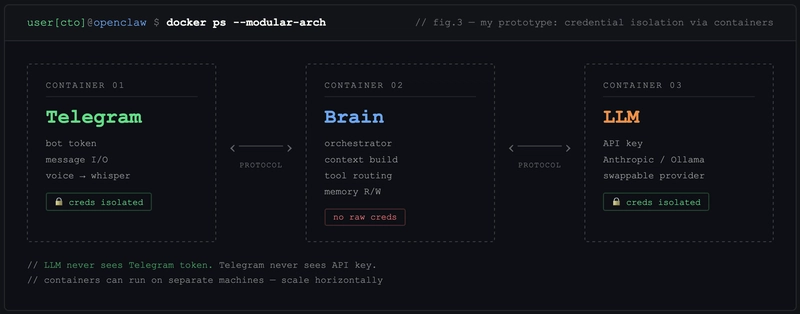
The LLM module never sees Telegram credentials. The Telegram module never sees LLM API keys. Each container is independently deployable — they can run on different machines entirely.
What I learned:
The security improvement is real. The complexity cost is also real. Debugging cross-container message flows is significantly harder than debugging a monolith. And network latency between modules adds up in high-frequency conversation flows.
My conclusion: the modular approach makes sense for production deployments handling sensitive data. For personal automation and experimentation, the added overhead isn't worth it.
I haven't released this yet — but if enough people are interested, I'll clean it up and publish. Drop a comment if you want to see it.
Real Workflows I Actually Set Up
Enough architecture. Here's what I'm running in practice.
Daily Standup via Telegram
Every weekday at 9:00, OpenClaw pulls open PRs from GitHub and checks updated tickets in YouTrack. It sends a single Telegram message:
📋 Morning briefing — Mon Apr 28

🔴 Blocked: auth-refactor PR waiting review (2 days)
🟡 In progress: payment module — Dmytro
✅ Ready to take: 3 tickets in backlog

2 PRs need your attention.
No browser. No tab-switching. I read it with coffee, decide what matters, start working. Setting this up took one cron entry and a HEARTBEAT.md update.
Before: 20 minutes every morning across GitHub, YouTrack, Telegram chats.
After: 90 seconds to read and act.
Voice Tickets on the Go
I walk a lot. Good ideas arrive at bad times — mid-street, at the gym, away from the keyboard.
Now: record a voice message in Telegram → OpenClaw transcribes via Whisper API → extracts the task → creates a YouTrack ticket with priority and assignee inferred from project context.
The assignee part surprised me. I never configured this explicitly — OpenClaw figured out from USER.md who owns what area and assigns accordingly. About 80% accuracy. The other 20% I fix in 10 seconds.
Before: "I'll create the ticket when I get back." (I didn't.)
After: Ticket exists before I reach the next corner.
Hardware Debug Monitor
This one is specific to a project I've been running — getting an NVIDIA H100 on a non-standard board via a custom SXM-to-PCIe adapter. The debugging involves watching UART logs for specific error patterns, which means either staring at a terminal or missing the signal entirely.
I set up an OpenClaw heartbeat that watches a log file and pings me in Telegram when a target pattern appears — specifically GPU0_PWR_GOOD state changes and I2C error sequences.
# HEARTBEAT.md

- Check /var/log/uart-debug.log for GPU0_PWR_GOOD or I2C_ERR
- If found: send full context line + timestamp to Telegram
- Otherwise: HEARTBEAT_OK
Result: I can work on other things while the hardware does its thing. When something changes, I know immediately. No babysitting the console.
This is where OpenClaw's "boring" heartbeat mechanism earns its keep — not for productivity workflows, but for async technical monitoring.
Pre-Meeting Intel
Before important calls — investor conversations, partner meetings, vendor negotiations — I was spending 15-20 minutes scrambling to remember what we discussed last time, what the current project status was, what they asked for.
Now I have a scheduled task that runs 30 minutes before any calendar event tagged [prep]. It pulls the last 3 conversations with that contact, checks project status in YouTrack, and sends a briefing to Telegram:
📅 Call with [Partner] in 30 min

Last conversation: March 14 — discussed API rate limits, they asked for SLA docs
Current status: SLA draft ready, waiting legal sign-off
Open question from them: pricing for enterprise tier

Suggested talking points:
→ SLA is ready, share during call
→ Enterprise pricing: we haven't finalized yet, buy time
The quality of the briefing depends entirely on what's in the context files. But even at 70% accuracy, showing up with this is dramatically better than showing up blank.
After all of this research, here's my actual take on where OpenClaw sits:
OpenClaw is a brilliant proof-of-concept. It demonstrated that a persistent, proactive, memory-equipped AI agent is achievable with existing tools. The design decisions — Markdown workspace, heartbeats, cron scheduling — are genuinely good ideas that will outlive OpenClaw itself.
It's also overly complex for most long-term use cases. The codebase has accumulated patterns that made sense during rapid development but create real maintenance overhead. The security model is a liability at scale. The subscription abuse workarounds are a ticking clock.
My prediction: developers who can will build custom agents tailored to their specific workflows. Non-developers will wait for polished products from OpenAI, Anthropic, or Google — which are coming, and which will abstract all of this complexity away behind a consumer interface.
OpenClaw is the Mosaic browser of AI agents. Not the final form. But the thing that showed everyone what was possible.
What This Means for You
If you're a developer exploring AI agents, OpenClaw is worth running locally for a week. Not necessarily to keep using it — but to understand the patterns. Context window construction, tool routing, memory retrieval, proactive scheduling. These primitives will appear in every serious agent system you build or encounter.
The specific thing I'd encourage you to study: the Workspace file system. Natural language configuration is underrated. The ability to reshape an agent's behavior by editing a text file — no redeploy, no code change — is a UX pattern that should become standard.
And if you're building agents: think about credential isolation from day one. Don't wait until you have a production incident. IronClaw's WASM approach is one path. Docker-based module separation is another. The specific implementation matters less than the principle: credentials should never live in the LLM's context.
What's Next
I'm continuing to build out the modular architecture and am considering a deeper dive into QMD — the semantic memory search utility is genuinely useful outside of OpenClaw and deserves its own writeup.
If you're building something in this space, drop a link in the comments. The ecosystem is moving fast and I want to see what directions people are exploring.
And if something in here was wrong or oversimplified — tell me. I'd rather be corrected than confidently mistaken.