












We use domain names every day.
We type google.com, facebook.com, or linkedin.com into a browser, press Enter, and the website opens in seconds. It feels simple. Almost boring.
But under the hood, something very important happens before your browser can even start talking to that website.
That thing is DNS.
And here is the part many developers miss early on: if you want to understand TLS/SSL, networking, deployment, or even why a request is slow, you need to understand DNS first.
Because before secure communication begins, your browser has to answer one basic question:
"Where is this website actually hosted?”
Let's break it down in the simplest possible way.
First, let's understand the URL
Take this URL:
https://blog.example.com
It has a few parts:
-
https→ the scheme or protocol -
blog→ the subdomain -
example→ the main domain -
.com→ the top-level domain (TLD)
Another example:
https://engineering.linkedin.com
Here:
-
httpsis the protocol -
engineeringis the subdomain -
linkedinis the domain -
.comis the TLD
This structure matters because DNS works with these names.
Before we go into DNS, we need to understand one thing clearly:
a domain name is not the real machine address.
It is the human-friendly name for that machine.
Why domain names exist
Humans are good at remembering words.
Machines are good at working with numbers.
That is the heart of the whole idea.
You can easily remember:
facebook.com
But remembering something like this is much harder:
157.240.22.35
That number is an IP address.
An IP address is the real network address of a machine or server.
So when you type a domain name into a browser, your system has to find the IP address behind that name.
That translation is what DNS does.
A simple real-life example
Think about your home address.
If someone knows your address, they can find your house.
Computers work in a similar way.
Every machine connected to a network needs an address. On the internet, that address is the IP address.
Now imagine you built an app locally on your laptop. Maybe it runs on:
localhost:3000
That works on your own machine because your machine knows what localhost means.
But if you deploy that app to a server on AWS, DigitalOcean, or anywhere else, people cannot visit it using localhost.
They need the address of that server.
That real address is the IP address.
But asking users to remember IP addresses is a terrible experience.
So instead of telling people:
Visit 142.250.183.206
we give the server a domain name like:
myapp.com
Now people can remember the name, and machines can still connect using the IP.
That mapping between a human-friendly name and a machine-friendly IP is the whole point of DNS.
So what is DNS?
DNS stands for Domain Name System.
Let's keep it simple:
DNS is the system that converts a domain name into an IP address.
For example:
- You type
facebook.com - DNS finds the IP address behind
facebook.com - Your browser uses that IP to contact the correct server
It is called a system because it is not just one thing.
It involves multiple parts working together:
- your browser
- your operating system
- DNS caches
- a DNS resolver
- root name servers
- TLD name servers
- authoritative name servers
That is why it is not called just "domain name lookup.”
It is a system.
Before DNS goes to the internet, it checks cache
This is one of the most useful things to understand.
When you visit a website, your computer does not always start from scratch.
It first checks whether the answer is already stored somewhere.
This stored answer is called cache.
Think of cache like a shortcut memory.
If the system already knows the IP address for a domain, it can skip a lot of work.
That makes everything faster.
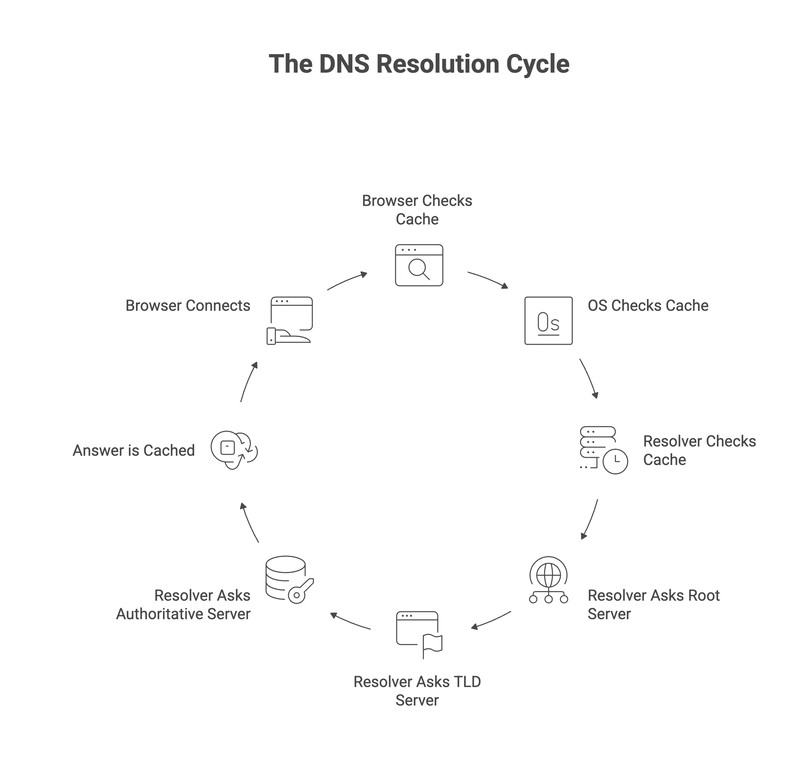
Usually, the lookup goes through these layers:
- Browser cache
- Operating system cache
- DNS resolver cache
- If not found, then the full DNS lookup starts
That is why websites often open very quickly the second time you visit them.
The full DNS journey, step by step
Now let's walk through what actually happens when you type:
facebook.com
into your browser.
1. The browser checks its own cache
Your browser first asks:
"Do I already know the IP for this domain?”
If yes, great. It uses that IP immediately.
If not, it moves to the next step.
2. The operating system checks its cache
If the browser does not have the answer, your operating system checks whether it has that domain-to-IP mapping stored.
If the OS already knows it, it returns the IP to the browser.
If not, the request continues.
3. The system asks a DNS resolver
Now the request goes to a DNS resolver.
In many cases, this resolver belongs to your ISP, though it could also be a public DNS service.
Its job is to find the answer for you.
And just like the browser and OS, the resolver also checks its own cache first.
If the resolver already knows the IP for facebook.com, it returns it immediately.
If not, now the real DNS lookup begins.
The resolver starts asking other DNS servers
This is where many learners get confused, but the logic is actually very clean.
The resolver does not magically know every IP address in the world.
Instead, it asks the right servers in the right order.
4. It asks a root name server
The resolver asks a root name server something like:
"I need information about .com. Where should I go next?”
Notice something important:
It is not asking for the final IP address yet.
It is asking where the .com information is managed.
The root server replies with the address of the TLD name server for .com.
5. It asks the TLD name server
Now the resolver goes to the .com TLD server and asks:
"Who is responsible for facebook.com?”
Again, this server usually does not return the final website IP directly.
Instead, it returns the address of the authoritative name server for that domain.
That server is the source of truth for the domain's DNS records.
6. It asks the authoritative name server
Now the resolver asks the authoritative name server:
"What is the IP address for facebook.com?”
This server returns the actual DNS record, such as the IP address.
Now the resolver finally has the answer it needs.
7. The answer comes back and gets cached
Once the resolver gets the IP address, it does two useful things:
- it returns the answer to your operating system
- it stores the answer in cache for future requests
Then the OS may cache it too.
Then the browser may cache it too.
That means the next lookup can be much faster.
8. The browser can finally contact the server
Now your browser has the IP address.
At this point, it can finally open a network connection to the actual server and send the real HTTP or HTTPS request.
That is the moment when the website request truly begins.
So yes, DNS happens before the browser can talk to the web server.
And that is exactly why DNS matters when learning TLS/SSL.
A simple mental model
If all the server names sound too abstract, use this mental model:
-
Root server → "I do not know the full answer, but I know who handles
.com.” -
TLD server → "I do not know the full answer, but I know who handles
facebook.com.” - Authoritative server → "I am responsible for this domain. Here is the actual answer.”
That is the chain.
Why DNS is called "resolution”
You may hear the phrase:
DNS resolution
This simply means:
the process of resolving a domain name into an IP address
So if someone says:
"The DNS resolution failed”
they mean:
"The system could not turn the domain name into an IP address”
No IP, no connection.
No connection, no website.
Where subdomains fit into this
Let's say you have a domain like:
example.com
You can create subdomains like:
blog.example.com
api.example.com
admin.example.com
This is useful because one domain can support multiple services.
For example:
-
blog.example.com→ blog website -
api.example.com→ backend API -
admin.example.com→ internal admin dashboard
Same parent domain.
Different subdomains.
Different purposes.
That is why learning domain structure matters before learning DNS deeply.
Why websites feel fast after the first visit
A lot of developers notice this but do not always connect it to DNS.
The first request may take a bit longer because the system needs to find the IP.
Later requests are faster because the answer may already exist in:
- browser cache
- OS cache
- resolver cache
That means the system can skip most of the lookup chain.
So if a website opens instantly the second time, caching is often part of the reason.
Does DNS use TCP or UDP?
In simple learning material, DNS is often explained with UDP, and that is a good starting point.
Why?
Because UDP is lightweight and fast. It does not need a full connection setup like TCP.
For many standard DNS queries, that makes it a great fit.
A simple way to think about it is:
- DNS wants to ask a quick question
- get a quick answer
- and move on
That said, in real systems, DNS can also use TCP in some cases.
But when you are first learning how DNS feels fast and lightweight, starting with UDP gives you the right intuition.
Why DNS matters before TLS/SSL
This is the part many people skip.
They jump into HTTPS, SSL certificates, and TLS handshakes without asking a more basic question:
How did the browser even find the server in the first place?
Before secure communication starts, the browser needs to know where to connect.
That means:
- resolve the domain name into an IP address
- connect to the server
- then begin TLS/SSL and HTTP communication
So if DNS is unclear, TLS/SSL will always feel a little foggy too.
Understanding DNS first makes the next networking topics much easier.
Why developers should care about this
It is easy to think:
"Do I really need to know all this? I can just build apps.”
You can. For a while.
But sooner or later, deeper understanding starts to matter.
Maybe:
- your production request is slow
- your domain is not pointing to the right server
- your subdomain is broken
- your SSL setup is failing
- your infrastructure behaves differently across environments
- a tool's official docs feel harder than they should
This is where fundamentals help.
When you understand DNS, you stop treating networking like magic.
You start seeing the path.
And once you can see the path, debugging becomes easier.
A small story every developer can relate to
Imagine this.
You deploy your app.
The code is fine.
The server is running.
But the site still does not open.
At first, you think:
- is the backend broken?
- is the port wrong?
- is Nginx failing?
- is HTTPS misconfigured?
But the real problem turns out to be simple:
the domain is not resolving correctly.
That one small DNS issue can make the whole app feel "down.”
This is why solid developers do not only learn frameworks.
They learn what happens around the request too.
The big lesson: do not skip the basics
A lot of hard topics become easier when your basics are strong.
Docker makes more sense.
Kubernetes makes more sense.
TLS/SSL makes more sense.
Load balancers, CDNs, proxies, reverse proxies, and hosting all make more sense.
Not because they are easy.
But because you already understand the ground they stand on.
Many developers struggle with official docs not because their English is bad, but because the underlying computer science concepts are still shaky.
That is normal.
And the fix is not shortcuts.
The fix is going back, learning the core ideas properly, and revisiting them again and again until they feel natural.
That is how real confidence is built.