





Accessibility testing requires more than an automated scanner. A scanner catches roughly 30-50% of WCAG issues. The rest requires manual testing with a keyboard, a screen reader, and a process that covers every state of the application.
This guide is tool-agnostic. Whether the team uses Cypress, Playwright, Selenium, or another framework, the practices apply. Tool-specific implementation guides are linked at the end.
The compliance landscape has shifted. Over 5,000 accessibility lawsuits were filed in the US in 2025, and nearly half targeted companies that had already been sued before. The European Accessibility Act started enforcement in June 2025. For QA teams, accessibility testing is no longer optional in most organizations. It is a compliance requirement with real consequences.
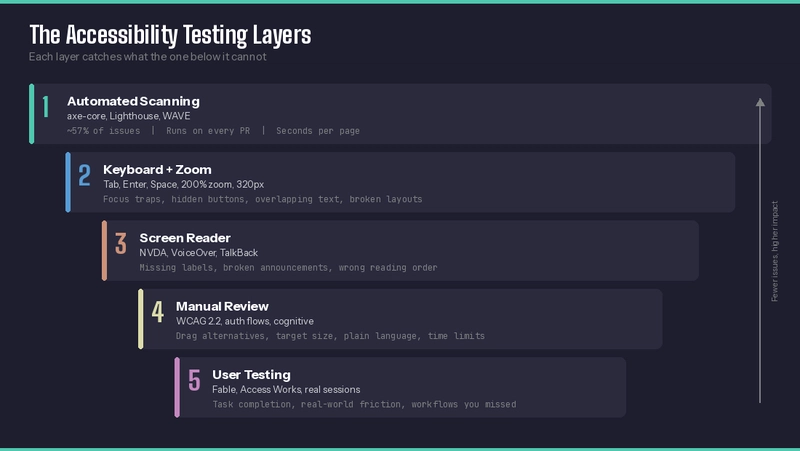
Start with the keyboard
Before running a scanner, unplug the mouse.
Tab through every interactive element on the page. Press Enter and Space on buttons and links. Open dropdowns with the keyboard. Navigate modals. Complete the same user flows tested functionally: sign up, search, checkout, submit a form.
Four things to verify. Can every interactive element be reached by tabbing? Is there a visible focus indicator? Can each element be activated with Enter or Space? Can the user leave every component without getting trapped?
Keyboard-only testing and screen reader testing are different tests. A screen reader might activate an element with Enter, giving a false sense of keyboard accessibility. Without the screen reader running, that same Enter keypress might do nothing. Test both separately.
Keyboard testing accounts for about 10% of a full accessibility evaluation, according to Deque's methodology. It should always come first because it answers the most basic question: can someone who doesn't use a mouse operate this page at all?
Test at 200% zoom
WCAG 1.4.4 requires that text can be resized to 200% without losing content or functionality. WCAG 1.4.10 goes further: at 400% zoom (or equivalently, a 320px-wide viewport), there should be no horizontal scrolling for vertical content. These criteria matter for every user with low vision who enlarges their screen rather than using a full-screen magnifier.
The test takes seconds. Open the page in Chrome, press Ctrl+Plus (Cmd+Plus on Mac) until 200%, and try to complete the main user flow. Then set the viewport to 320px wide in DevTools and check for horizontal scrollbars. Fixed-width containers and absolute positioning are the usual culprits.
Run this check alongside keyboard testing on every new feature. It catches layout problems that no automated scanner reports.
Pick two screen readers and learn the basics
The goal is to complete the same user flows tested functionally with a screen reader running.
The two most common pairings are NVDA with Chrome on Windows and VoiceOver with Safari on macOS. NVDA is free. VoiceOver ships with every Mac.
NVDA essentials: Insert+Space toggles between browse and focus mode. Tab moves between focusable elements. The down arrow reads the next item. H jumps between headings. The screen reader announces element roles, names, and states during navigation.
VoiceOver essentials: Cmd+F5 turns it on. VO+Right Arrow (VO is Ctrl+Option) moves to the next element. VO+Space activates an element. Rotor (VO+U) navigates by headings, links, or landmarks.
Marcy Sutton, who built the Testing Accessibility workshop series and worked on axe-core at Deque, makes an important point: the learning curve is steep, and without a disability, the tester's experience will differ from users with disabilities. That is expected. The purpose is to catch broken announcements and missing labels, not to simulate a disabled person's experience. The purpose is to catch engineering failures.
Automate what automation can actually catch
Automated scanners like axe-core and Lighthouse are good at finding missing alt text, broken ARIA references, contrast ratio failures, and missing form labels. They are fast and consistent. They belong in the CI pipeline on every pull request.
They cannot tell whether alt text is meaningful. They cannot judge whether the tab order makes sense. They cannot hear what a screen reader announces. They cannot complete a multi-step form and check whether error messages are accessible.
The value of automation is coverage. Hundreds of pages can be scanned in minutes. No human can match that. But a passing automated scan does not mean the page is accessible. It means the page passed the checks that can be automated. Treat it as a floor, not a ceiling.
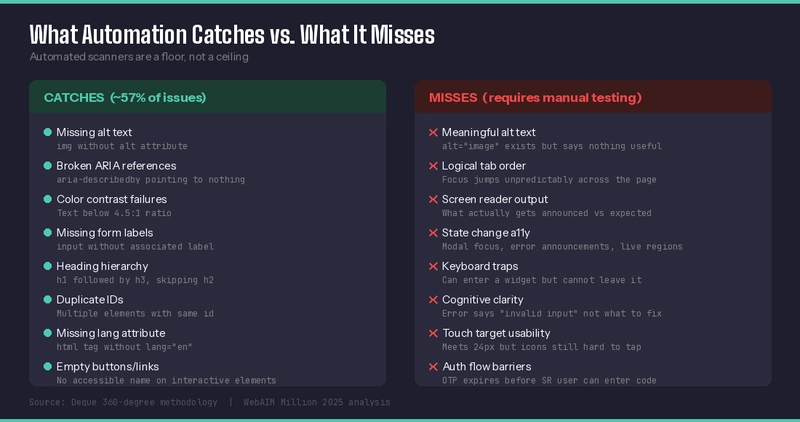
Deque's 360-degree methodology puts it this way: use automated testing for breadth and manual testing for depth. Run the scanner on everything. Do keyboard and screen reader testing on the pages that matter most.
ARIA misuse is a common problem. WebAIM's annual analysis found that pages using ARIA attributes averaged more than double the accessibility errors of pages without ARIA. Adding role or aria-label to elements that don't need them creates problems that screen reader users have to work around. Use native HTML elements first. A <button> does not need role="button". A <label> does not need aria-label. Reach for ARIA only when HTML cannot express what is needed.
Test after every state change
A page can have zero violations on load and introduce five the moment a user triggers a form validation error. The error messages might lack aria-live regions, so a screen reader never announces them. The invalid fields might be missing aria-invalid and aria-describedby, so a screen reader user does not know which field has the problem or what the error says.
Modals are another common source. The modal itself might be accessible, but when it opens, does focus move into it? When it closes, does focus return to the trigger?
Run accessibility checks after every meaningful interaction. Page load, modal open, modal close, form submission with errors, search results rendering, accordion expand, and empty state. Each creates a new DOM. Each can introduce new violations.
Know what WCAG 2.2 added
WCAG 2.2 landed in October 2023 and added nine new success criteria. The ones teams miss most often:
Focus not obscured (2.4.11) requires that the keyboard focus indicator is not hidden behind sticky headers, cookie banners, or chat widgets. Focus appearance (2.4.13) requires the indicator to have a minimum size and contrast. Dragging movements (2.5.7) requires that any action performable by dragging has a non-dragging alternative. Target size minimum (2.5.8) sets 24x24 CSS pixels as the floor for interactive elements.
Two criteria affect forms directly. Redundant entry (3.3.7) states that users should not have to re-enter information they have already provided in the same process. Consistent help (3.2.6) requires that help mechanisms appear in the same relative location across pages.
Add these to the test checklist as a separate pass. Most automated scanners do not cover them yet. The dragging and focus obscured checks in particular require a human with a keyboard.
Test authentication flows
OTP and 2FA implementations frequently create accessibility barriers, as documented by Sheri Byrne-Haber, an assistive technology user and accessibility consultant.
OTP codes often expire in 30 to 60 seconds. A screen reader user navigating to the input field, reading the label, and typing six digits can easily run out of time. WCAG 2.1 Success Criterion 2.2.1 requires that users can turn off, adjust, or extend time limits unless the limit is essential. A 30-second OTP expiry is rarely essential.
The input field itself is where many implementations break. Multiple individual character boxes are difficult to navigate with a screen reader or keyboard. A single text input with inputmode="numeric" and autocomplete="one-time-code" is more accessible and lets browsers offer autofill from SMS on supported devices. Add a descriptive aria-label like "Enter the 6-digit code sent to your phone" so screen reader users know what is expected.
State changes during authentication need ARIA live regions. When a code is sent, when it expires, and when submission fails. Use aria-live="polite" for informational messages and aria-live="assertive" only for errors that need immediate attention.
If the system recommends an authenticator app, test it with VoiceOver on iOS and TalkBack on Android. Many authenticator apps have small tap targets and poor contrast on countdown timers. WCAG 2.5.5 sets the minimum tap target at 44x44 pixels.
The long-term direction is passkeys and OAuth. Passkeys based on FIDO2/WebAuthn replace typed codes with biometric or device-based authentication. OAuth reduces the number of login forms a user has to navigate. Both reduce friction for users with motor and cognitive disabilities.
Do not stop at the login page. Account recovery flows often have the same problems with worse fallbacks. Test those too.
Consider cognitive disabilities
Accessibility testing often focuses on screen readers and keyboard navigation, targeting blind and motor-impaired users. But cognitive disabilities cover more ground than any other category. A person with ADHD who loses focus when an animation loops, or a person with dyslexia who cannot parse a dense error message, faces real barriers.
WCAG has been slow to address this group, but WCAG 2.2's redundant entry and consistent help criteria are a start. Cognitive barriers are things automation cannot flag.
Check that error messages say what went wrong and what to do about it, in plain language. Check that navigation is consistent across pages. Check that animations can be paused or disabled (WCAG 2.3.3 and the prefers-reduced-motion media query). Check that time limits allow extension. Look at the reading level. If a critical instruction requires a university reading level to parse, it is a barrier.
An error that says "invalid input format" fails the user. "Please enter your phone number as 555-555-5555" works. Add a "plain language" pass to accessibility reviews.
Include people with disabilities in testing
Marcy Sutton recommends paid user testing with organizations like Fable Tech Labs and Access Works. These services connect teams with people who use assistive technology daily. They test the product and report what works and what does not.
This is the step most teams skip. It is also the one that permanently changes how a team thinks about accessibility. An automated scan reports that a button is missing a label. A user testing session shows a person unable to complete a task the team thought was simple. The second one gets the budget allocated.
If a full user testing engagement is not feasible, start smaller. Invite a screen reader user to walk through the product for an hour. Record the session. Share it with the team. One session is worth more than a hundred automated scan reports.
Build accessibility into the definition of done
Marcy Sutton's Testing Accessibility framework makes the case that accessibility needs to be part of the definition of done for design and development, alongside QA. If it is only the QA team's responsibility, it arrives too late and costs too much to fix.
For designers, this means contrast checks for color tokens and focus-state designs for every interactive component.
For developers, it means semantic HTML first. A <button> instead of a <div onclick>. A <label> associated with its input. ARIA attributes only when native elements cannot do the job.
For QA, it means a keyboard walkthrough on every new feature and a screen reader pass on the most critical flows. An automated scan in CI that fails the build on critical violations covers the rest.
When all three roles share the responsibility, accessibility issues surface earlier and cost less to fix.
Document what gets tested and how
Without a written plan, accessibility testing depends on individual motivation. When that person leaves the team, the practice leaves with them.
A lightweight accessibility test plan covers which pages get manual testing (prioritized by traffic and risk) and which user flows get screen reader passes. It should also specify how often each type of testing runs and who is responsible.
The format does not matter. A wiki page, a markdown file in the repo, a Notion document. What matters is that it exists and someone updates it when the product changes.
Do not forget mobile
Mobile accessibility testing is its own discipline.
VoiceOver on iOS and TalkBack on Android are the two screen readers to use. The interaction model differs from the desktop. On mobile, users swipe left and right to move between elements. Double-tap activates. There is no Tab key.
WCAG 2.2 sets the minimum touch target size at 24x24 CSS pixels. That sounds small, but icon buttons and close buttons on mobile frequently fail this. A 16x16 icon with no padding is unusable for someone with a motor impairment.
The other common mobile failure: content that works with a mouse hover but has no equivalent on touch. Tooltips triggered by hover disappear entirely on mobile. If the tooltip contains information the user needs, that information is gone.
Test critical flows on a real device with the screen reader running. Emulators do not always behave the same way.
Handle PDFs and documents
If the application generates, displays, or links to PDFs, test them with a screen reader.
A PDF created from a scanned image has no text layer. A screen reader reads nothing. The fix is either to add a text layer (OCR) or to provide an accessible HTML alternative alongside the PDF.
Even PDFs with a text layer can have accessibility problems. Missing heading structure, missing alt text on embedded images, tables with no header associations, and incorrect reading order. Adobe Acrobat Pro has a built-in accessibility checker. The free PAC (PDF Accessibility Checker) from the Access For All Foundation is another option.
This applies to Word documents, PowerPoint files, and any other content the team publishes. If users with disabilities need to access it, it needs to be tested.
Check third-party components
Embedded third-party code is a common source of accessibility failures.
Chat widgets that trap keyboard focus. Cookie consent banners that cover the focus indicator on the page beneath them. These issues do not show up in code reviews because the code is not yours.
Deque's vendor management guidance makes a straightforward point: embedding third-party software means inheriting its accessibility failures. Users do not know or care which part of the page came from a vendor.
Before integrating a third-party component, test it with a keyboard and a screen reader. If the vendor cannot provide a VPAT (Voluntary Product Accessibility Template) or show results of their own accessibility testing, that is a red flag. Build accessibility requirements into procurement contracts. Require vendors to fix accessibility issues within a defined timeframe after they are reported.
For components already in production, include them in regular accessibility scans. Axe-core flags violations in vendor code the same way it flags first-party code. File the results with the vendor and track them.
Test video and audio content
Any product that includes onboarding walkthroughs, help videos, or embedded media content needs caption and transcript testing.
WCAG 1.2.2 requires captions for prerecorded video with audio. WCAG 1.2.5 requires audio descriptions for prerecorded video where visual information is not conveyed in the existing audio track. Transcripts are required for audio-only content.
The test: play every video in the product with the sound off. If the content cannot be followed from captions alone, a deaf user cannot follow it either. Check that captions are synchronized and accurate, with speakers identified. Auto-generated captions from YouTube or similar services get technical terms and proper names wrong regularly. Someone needs to review them.
Build captioning into the production workflow. Retrofitting captions after the fact is slower and more expensive than adding them during editing.
Make results visible to the whole team
Accessibility findings that live in a QA tool nobody checks do not get fixed.
Share HTML reports from tools like wick-a11y or axe with designers. These reports include annotated screenshots showing which elements failed and why. A designer can look at the report and know what to change without a meeting.
File violations as tickets with screenshots. Each violation becomes a trackable item with an owner and a status. Include the WCAG success criterion and the affected page in the ticket.
Bring accessibility findings into sprint reviews. Show the team a screen reader navigating a page that has problems. Show them the same page after the fix. That kind of demo sticks longer than a ticket.
Resources
- Deque's 360-degree accessibility testing methodology
- Marcy Sutton's Testing Accessibility workshop
- Paul J. Adam's web accessibility testing techniques
- WebAIM screen reader testing resources
- Fable Tech Labs (user testing with people with disabilities)
- NVDA screen reader (free)
- PAC PDF Accessibility Checker (free)
- WCAG 2.2 quick reference (W3C)
- Sheri Byrne-Haber: Locked Out — Why OTP and 2FA Often Fail Users with Disabilities
- Deque: Third-party vendor management for accessibility
- WebAIM Million annual accessibility analysis
For tool-specific implementation guides, see the companion articles:
- Accessible web testing with Cypress and Axe Core
- Accessible web testing with Playwright and Axe Core
- Accessible web testing with Cypress and wick-a11y
Find me on LinkedIn.