





Your MCP server has 12 good tools. Business users are getting value. Then someone asks for a request you did not package: "Find the top 20 customers whose spend fell for three consecutive months, compare them to support ticket volume, and give me only the accounts that have not been contacted in the last 14 days."
That question hides a join, a window function, a filter, and a ranking — and your backend is a database that already knows how to run exactly that. The LLM could try to chain five tools, burn tokens on intermediate results, and still get the arithmetic wrong. Or you could let it write the single query the database is designed for, and let the database do the work.
The misdirection is to add five more tools, then ten more, then eventually wrap the whole database or API. That is how teams end up with bloated MCP surfaces, low task completion due to LLM confusion, and a security boundary they do not really understand.
The right direction is code mode, but only as a controlled extension of the design work you already did in the earlier articles. Code mode is a long-tail escape hatch for data-system interfaces, not a replacement for curated tools, prompts, and resources.
In the PMCP SDK, that boundary is intentionally narrow: two tools (validate_code and execute_code), policy evaluation, approval tokens, and optional human approval. The narrowness is the point. It expands coverage without turning the server into an ungoverned remote shell for your database or API estate.
The recent enthusiasm around code mode is well earned. Cloudflare argues that "LLMs are better at writing code to call MCP", and Anthropic shows how code execution can reduce token usage from 150,000 to 2,000 tokens in a Google Drive to Salesforce workflow while improving composition efficiency source. Anthropic also notes that the benefits "should be weighed against these implementation costs". That is exactly the gap this article addresses. Those articles make the upside clear. This article focuses on the balancing framework they mostly leave implicit: why code mode belongs on top of curated tools, why sandboxing is not the primary security boundary for data systems, how to give the LLM enough power to handle long-tail requests quickly, and who inside the organization actually owns the levers that keep all of that safe.
What Is MCP? (The 30-Second Version)
The Model Context Protocol (MCP, spec 2025-11-25) defines three primitives for connecting AI models to external services: tools, prompts, and resources. The first article covered tools, the second article covered prompts and resources, and the third article covered how to test a server that uses all three. This article covers code mode, the controlled execution pattern that extends those three primitives when a request falls outside the scope of any curated tool.
The enterprise mental model is the same one from the earlier articles. MCP for AI is what HTTP-based applications are for humans. An MCP server is the AI-facing interface to your organization's internal systems, just as a web server or mobile app is the human-facing interface to those same systems. In practice, those internal systems are usually data systems: a SQL database, a REST API described by OpenAPI schema, or a GraphQL service, and the MCP server is a thin, remote, mostly stateless interface layer in front of them.
That framing matters here because code mode raises the stakes. If MCP is your AI-facing interface, then code mode is the part of that interface where the client is asking to send a program, query, or execution plan rather than a fixed tool call. You should therefore treat it like any other security-sensitive interface surface: explicit contracts, least privilege, strong policy enforcement, auditability, and safe defaults.
The operating model from the previous articles still applies: domain-led, engineering-implemented, platform-governed. Code mode, as we will see, is where the "platform-governed" part of that model gets more teeth.
Code Mode Is A Data-System Problem
Most production MCP servers sit in front of one of the following kinds of backend:
- a relational database — typically MySQL, PostgreSQL, Oracle, Snowflake, BigQuery, or a cloud warehouse.
- a REST API described by an OpenAPI spec — a system of record, a ticketing system, a CRM, a cost and billing service.
- a GraphQL API — Invented by Facebook to simplify API access for mobile devices, and grew to wrap different API in a consistent query language.
There are other interfaces, such as MongoDB and Elasticsearch, that can have a similar code-mode layer; however, they are not covered in this article.
These backends already have expressive query languages that solve exactly the problems the LLM is weakest at: joins, aggregations, filters, sorting, windowing, selective field projection, and batched calls. When a business user asks a long-tail analytical question, the right execution engine is almost always the backend itself, not the LLM choreographing a chain of ordinary tool calls.
That is why PMCP's code mode is organized around three interpreter modes that line up with these three backend shapes:
- SQL code mode pushes joins and window functions into the database, where they are cheap and correct.
- OpenAPI code mode (JavaScript) lets the LLM orchestrate several REST calls server-side, with one approval step instead of many tool rounds.
- GraphQL code mode lets the LLM request precisely the fields and edges it needs in one round trip instead of a deep chain of field-by-field reads.
In all three cases, the MCP server stays thin. It does not become the database or the API. It becomes a validated gateway into them, and code mode is the narrow slot through which a long-tail request passes on its way to the right execution engine.
The Capability Pentagon: A New Corner For Code Mode
The first article introduced the Capability Square: four parties around every MCP tool — the Business Analyst who designs the server, the Business User who invokes it, the LLM inside the MCP client that interprets intent, and the MCP Server that executes deterministically. The second article showed how prompts sit across the two human corners of that square. For code mode, the Square is not quite enough.
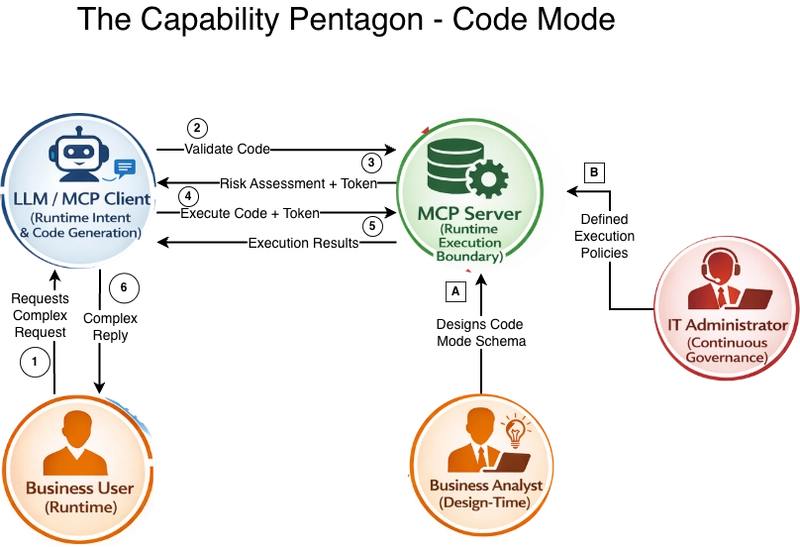
Code mode is not just another primitive. It is an exposed execution surface that grants the LLM more power over your data system than any single tool does. Tools are fixed contracts. Code mode is a narrow programming interface whose allowed behavior depends on continuously maintained policies rather than code baked in at design time. That shift in shape requires a party that was implicit in the earlier articles to become explicit: the IT Administrator.
The Pentagon has the four corners you already know, plus one new corner that becomes load-bearing the moment code mode is enabled:
- Business Analyst (design-time domain expert). Decides which operations are named and exposed, which risk levels can auto-approve, which output fields are blocked, and which roles should see which slice of the data system. Same corner as before; now with code mode–specific choices.
- Business User (runtime domain expert). Brings the specific question inside the specific business context. Can now ask questions that go beyond the curated tool set, but only within the policy set by the IT Administrator.
- LLM / MCP Client (runtime intent and code generation). Translates the user's request into a bounded SQL statement, JavaScript execution plan, or GraphQL operation. Works from the schema and instructions the server publishes, not from guesses about the backend.
- MCP Server (runtime execution boundary). Validates the code, classifies the action, computes a risk level, signs an approval token, and executes only the exact validated code against least-privilege backend credentials.
- IT Administrator (continuous governance). Owns the policy surface: the Cedar (or AVP, or custom) policies that decide whether a particular user in a particular role may perform a particular action against a particular server configuration. Also owns the signing secret, token lifetime, execution limits, allow and block lists, and the approval workflow. This corner is where security posture is tuned over time rather than only specified up front.
| Pentagon Corner | When They Act | What They Bring To Code Mode |
|---|---|---|
| Business Analyst | Design-time | Which operations are named; which risk levels auto-approve; which fields are blocked |
| Business User | Runtime | The long-tail request that goes beyond curated tools |
| LLM / MCP Client | Runtime | The generated SQL, JavaScript, or GraphQL code |
| MCP Server | Runtime | Validation, action classification, signing, bounded execution |
| IT Administrator | Continuous governance | Cedar/AVP policies, signing secrets, role scoping, approval workflow, audit review |
Tools never really needed an explicit IT Administrator corner because the allowed behaviors were baked into the tool schema at design time. Code mode is different. Remove the IT Administrator from the picture, and you either lock code mode down so hard that nobody uses it, or you leave it open enough that a single bad policy change becomes a production incident.
A useful way to read the Pentagon:
- The two human corners (Analyst, User) provide the domain
- The two machine corners (LLM, Server) provide the execution
- The IT Administrator corner provides the continuous governance that makes code mode safe to leave on
If any corner is weak, code mode fails in a characteristic way. Weak Analyst: The exposed operation surface does not match the real requests. Weak User: nobody triggers anything, and code mode is unused. Weak LLM: generated code drifts outside the schema. Weak Server: validation is a rubber stamp. Weak IT Administrator: The policy is wrong, stale, or the same for every role.
Code Mode Is Additive, Not Foundational
The easiest way to misuse code mode is to treat it as the foundation of the server rather than the long-tail extension. That usually sounds like one of these:
- "Why not just expose the whole OpenAPI spec and let the model script against it?"
- "Why not give it direct SQL access and let it figure things out?"
- "Why bother designing tools if code mode can do anything?"
Because the whole point of the earlier design work was to remove unnecessary choice and unnecessary risk. For the common tasks, dedicated tools still win:
- They are easier for the LLM to select correctly.
- They are easier for the business analyst to describe in domain language.
- They are easier to test, benchmark, and audit.
- They are easier to secure because the allowed behavior is explicit.
Prompts still win for repeatable workflows:
- They encode recurring business processes once.
- They move deterministic orchestration to the server side.
- They reduce model failure modes on multi-step work.
Resources still win for the governed context:
- They let you publish instructions, schemas, templates, and policy summaries.
- They reduce guessing before the model writes code.
Code mode exists for what remains after you have done those three things well. That is the design stack:
- Curated tools for the common high-frequency tasks.
- Prompts and resources for known workflows and governed context.
- Code mode for the long tail.
If you invert that stack and start with code mode, you are pushing core design responsibility into the runtime behavior of an LLM that does not understand your business, your controls, or your risk tolerance.
It is much easier for the LLM to choose a well-defined tool and use it correctly than to write perfect code to achieve the same goal.
The Real Threat Model: Assume A Hostile Client
Most discussions of naive code mode assume a cooperative client. That is not a serious production threat model. You should assume the MCP client can be compromised, misconfigured, prompt-injected, or simply wrong. The server must therefore treat every validate_code request as untrusted input and every execute_code request as an attempted privileged action.
This has a practical consequence: sandboxing is not the primary security boundary for code mode.
A runtime sandbox can be useful as a defense-in-depth for the interpreter itself. But if the code is allowed to run a dangerous database statement or call a destructive API operation, the damage is already authorized at the business system boundary. No sandbox around the interpreter fixes that. For real data systems, such as databases, OpenAPI-backed services, and GraphQL APIs, the primary controls have to be:
- restricted schema exposure, as designed by the business analyst.
- explicit operation categorization, which can be deduced from the data system schema syntax (GET vs. PUT, SELECT vs. UPDATE, etc.), and can be overridden by the business analyst.
- policy evaluation against business actions
- cryptographic binding between what was validated and what is executed
- optional human approval for higher-risk actions, which is optional as the MCP client might ignore the risk level and continue to the
execute_codecall without human approval. - least-privilege credentials on the downstream systems, with the business user's OAuth access token permissions, as discussed in the security article.
That is the PMCP design point. Code mode is not "run arbitrary code safely in a sandbox." It is "validate a bounded program against a bounded policy surface, then execute only the exact approved code against bounded downstream permissions." Most of those controls are owned by the IT Administrator's corner of the Pentagon, which is why that corner becomes load-bearing the moment code mode is turned on.
The PMCP Security Envelope
The PMCP SDK keeps the code mode interface intentionally small:
validate_codeexecute_code
Everything else happens behind those two tools.
LLM reads the bounded schema and policy context
        |
        v
validate_code(code)
        |
        +--> parse and classify the code
        +--> analyze data access, complexity, and action type
        +--> evaluate policy (Cedar, AVP, or custom)
        +--> generate business-language explanation
        +--> issue HMAC-signed approval token
        |
        v
optional human approval
        |
        v
execute_code(code, approval_token)
        |
        +--> verify signature
        +--> verify code hash
        +--> verify expiry
        +--> verify user/session/context binding
        +--> execute through the server-side execution layer
Layer 1: Two-step execution.
The client cannot jump straight to execution. The PMCP handler exposes validate_code and execute_code separately, and the generated tool descriptions explicitly tell the model that validate_code must come first.
Layer 2: Policy evaluation during validation.
The validation pipeline parses the code, classifies the action, analyzes access patterns, and calls the server's authorization backend before any approval token is issued.
Layer 3: Approval tokens bind code to context.
PMCP uses HMAC-signed approval tokens that bind the validated code hash to user ID, session ID, server ID, context hash, risk level, and expiry time. If the code changes after validation, execution is rejected.
Layer 4: Optional human approval.
Low-risk read operations can be auto-approved. Higher-risk operations can require explicit approval before execute_code is called.
Each layer compensates for a different failure mode:
- policy evaluation answers "should this kind of operation be allowed?"
- token binding answers "is this the exact code that was validated?"
- human approval answers "does this high-risk action have accountable oversight?"
None of these layers is sufficient on its own. Together, they form a credible boundary.
Why The Token Matters
The approval token turns validation into a verifiable contract. Without token binding, an attacker could submit a harmless, read-only script to validate_code and obtain a positive validation result for that exact code, then alter the script and attempt to call execute_code with the modified version — an attack that token binding is specifically designed to prevent by tying the approval to the canonicalized code hash and contextual metadata so any mismatch is rejected at execution time.
PMCP prevents that by hashing the canonicalized code during validation and embedding that hash in the token. During execution, the code is hashed again and compared to the token's hash. The token also expires quickly by default and is tied to the user, session, and validation context.
In the SDK, the token binds at least these elements:
- code hash
- user ID
- session ID
- server ID
- schema and permissions context hash
- risk level
- creation time and expiry
This is why code mode in PMCP is safer than a single "run_query" or "run_script" tool. The server does not trust the client to faithfully carry validation state forward.
Policies Must Be About Business Actions, Not Just Syntax
One of the strongest parts of the PMCP design is the move away from language-specific permission models and toward a unified action model: Read, Write, Delete, and Admin.
That is a better abstraction than "GraphQL query vs mutation," "GET vs POST," or "SELECT vs UPDATE" because it maps directly to how the IT Administrator actually thinks about risk. A Cedar policy written in these four terms is something an administrator can read and defend. A policy written in HTTP verbs, SQL keywords, and GraphQL operation types quickly becomes something only the original author understands.
The PMCP SDK infers these actions from the underlying code: GraphQL queries map to reads; mutations map to writes or deletes; HTTP methods map to reads, writes, or deletes; and SQL statements map to reads, writes, deletes, or admin operations. Whether the data system sits behind the server, the IT Administrator writes policies using the same four verbs.
This gives you a portable permission model across server types and supports a staged rollout strategy that fits real organizations. It also maps cleanly to role-based access inside the organization. Standard users might be limited to read-only code mode. Power users might get access to a narrow write allowlist for the workflows they own. Administrators might be allowed to run broader maintenance or approval-oriented actions. The important point is that code mode does not have to be one global policy for every user. The same MCP server can apply different policy decisions based on who is asking and what role they hold — and the IT Administrator is the corner of the Pentagon that, in practice, decides where those lines sit.
In practice, a rollout often looks like this:
- Allow reads for everyone.
- Deny writes, deletes, and admin by default.
- Observe how business users actually use code mode.
- Add a small write allowlist for specific roles where the value is high, and the risk is acceptable.
- Keep deletes and admin heavily restricted or fully denied unless there is a compelling reason and a clearly accountable role that should hold them.
That is much better than starting from full access and trying to claw it back later. It is also the shape of a rollout that the IT Administrator can actually defend to an auditor: writes, deletes, and admin were denied by default and opened only against documented business need.
In practice, the useful question for an MCP server author is not "which Rust types do I instantiate?" but "what code mode surface do I expose?" A good pattern used in our cost-coach server is to define that surface explicitly in the server config: enable code mode, set execution limits, and declare the operations that scripts are allowed to call.
[code_mode]
enabled = true
server_id = "cost-coach"
openapi_allow_writes = false
token_ttl_seconds = 300
max_api_calls = 10
max_loop_iterations = 50
execution_timeout_seconds = 30
auto_approve_levels = ["low"]

[[code_mode.operations]]
id = "getCostAndUsage"
category = "read"
description = "Historical cost and usage data by service, region, tag, or account"
path = "/getCostAndUsage"

[[code_mode.operations]]
id = "getCostForecast"
category = "read"
description = "Forecast future costs with confidence intervals"
path = "/getCostForecast"

[[code_mode.operations]]
id = "getCostAnomalies"
category = "read"
description = "Detect unusual spending patterns via Cost Anomaly Detection"
path = "/getCostAnomalies"
That is the level where most server authors should think. Which actions are enabled? Which operations are named and exposed? What limits apply to a script? Which risk levels can be auto-approved? The PMCP SDK then turns those declarations into the validation and policy boundary.
In the same cost-coach server, code mode is also paired with a start_code_mode prompt that loads the schema into context before the model writes JavaScript. That is an important design point: even with code mode, you still want to give the client bounded instructions and a bounded schema rather than expecting it to infer the server's code surface from scratch.
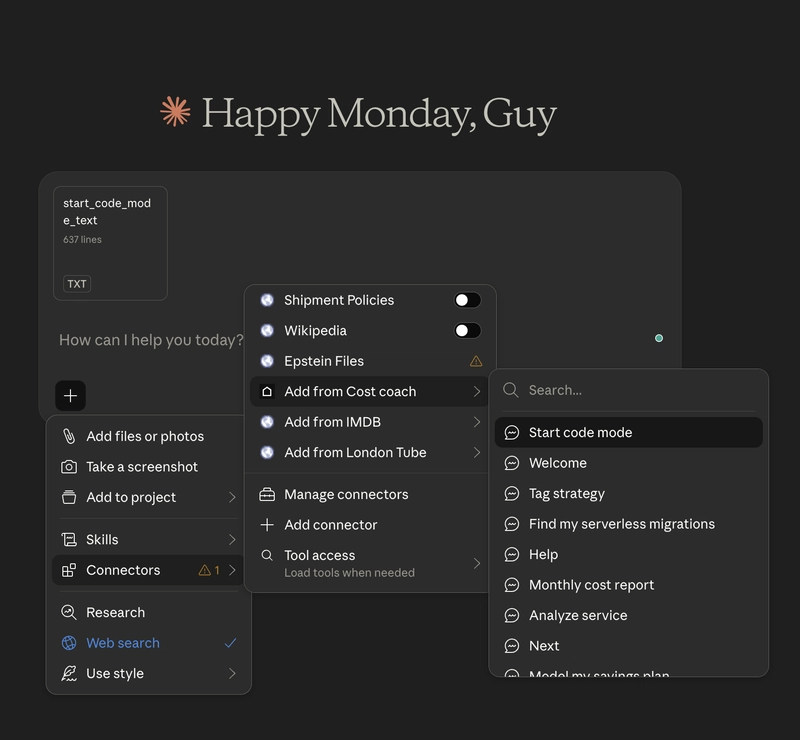
This is the governance story you want in production: start narrow, expand deliberately, and keep policy changes observable.
If you are using Cedar with PMCP today, the key design choice is who serves as the Cedar principal. In classic authorization terms, the principal is the actor, who is the entity whose permissions are being evaluated. For code mode, that actor is the authenticated user (or the group they belong to), not the generated script. The script is something the user produced; it is not itself the party being authorized.
The cleanest model for code mode Cedar policies, therefore, looks like this:
-
principal = the authenticated user, with group memberships like
Admins,PowerUsers, orStandardUsers -
resource = the
CodeMode::Serverconfiguration being accessed (cost-coach,cost-coach:power-user,cost-coach:administrator, and so on) -
action = the unified business action (
Read,Write,Delete,Admin) - context = the structural facts about the generated code (called operations, accessed fields, statement type, estimated cost, output fields)
With that shape, role-based policies read naturally:
// Anyone in the StandardUsers group can read
permit (
    principal in CodeMode::Group::"StandardUsers",
    action == CodeMode::Action::"Read",
    resource
);

// Power users can perform narrow writes against named operations only
permit (
    principal in CodeMode::Group::"PowerUsers",
    action == CodeMode::Action::"Write",
    resource
)
when {
    resource.serverId == "cost-coach" &&
    resource.allowWrite == true &&
    context has script &&
    context.script.calledOperations.contains("update_budget_note") &&
    resource.allowedOperations.contains("update_budget_note")
};

// Only members of the Admins group may run admin-grade code mode actions
permit (
    principal in CodeMode::Group::"Admins",
    action == CodeMode::Action::"Admin",
    resource
)
when {
    resource.serverId == "cost-coach" &&
    resource.allowAdmin == true
};

// Regardless of group, never let a script leak blocked output fields
forbid (
    principal,
    action,
    resource
)
when {
    context has script &&
    context.script.outputFields.containsAny(resource.outputBlockedFields)
};
That reads the way an IT Administrator thinks about authorization: "members of the Admins group can perform Admin actions against this server, as long as the server allows it." The code-artifact details, called operations, accessed fields, output fields, and live in context because they describe the request, not the actor.
Cedar Is A Good Fit Because The Problem Is Authorization
PMCP's use of Cedar is not incidental. Cedar is a policy language designed for authorization, and Amazon Verified Permissions uses Cedar as its policy foundation. That matters for code mode because the real question is not "can I parse this SQL?" or "can I scan this JavaScript?" The real question is "should this principal be allowed to perform this action on this resource in this context?"
The PMCP SDK supports:
- local Cedar evaluation through its built-in Cedar integration
- cloud-backed policy evaluation through AVP integrations
- custom policy backends for teams that need a different authorization layer
This gives you two important properties:
- auditability: policy changes become explicit artifacts rather than hidden branches in application code.
- portability: the same read/write/delete/admin model can be evaluated locally in Rust or through a managed authorization system when deployed on AWS.
There is also a pragmatic Rust point here. PMCP is a Rust SDK, and Cedar is also implemented as a Rust library. That improves integration quality, performance, and operational simplicity compared to bolting an unrelated policy engine onto the server.
What The IT Administrator Actually Controls
At this point, it is worth naming, in one place, what the IT Administrator corner of the Pentagon actually touches on a day-to-day basis. If you are an administrator adopting a PMCP code mode server, these are the levers you will own:
- Policy set. The Cedar policies (or AVP policy store) that decide which actions are permitted for which roles against which server configurations. This is where the role-specific rules — standard user, power user, administrator — are codified.
-
Role-to-server routing. Which
Serverconfiguration and policy store each authenticated role is evaluated against. This is how you express "power users usecost-coach:power-user, administrators usecost-coach:administrator" without duplicating logic in application code. - Operation allowlist. Which named operations scripts are allowed to call at all? Adding an operation is a deliberate change, not a side effect of adding a tool.
- Blocked output fields. The fields that must never appear in a script's response, regardless of which operation produced them.
-
Execution limits.
max_api_calls,max_loop_iterations,execution_timeout_seconds,token_ttl_seconds. - Auto-approval thresholds. Which risk levels skip human approval and which require it?
- Signing secret. The HMAC secret used to bind approval tokens. Managed like any other production credential, rotated on a schedule, and never shared with the client.
- Audit trail. The logs of what was validated, what was approved, what was executed, and by whom. This is what turns code mode from a trust statement into an auditable one.
These are not "developer knobs left over after the server ships." They are the continuously administered controls that determine whether the code mode remains within the security/administration/power balance described above. The Business Analyst chooses the shape of the surface; the IT Administrator chooses how tightly the surface stays over time.
Field Privacy Control
We briefly mentioned the *Blocked output fields *. This is one of the main risks of free-form queries and scripts generated on the fly by a potentially compromised LLM. But the problem is not only to prevent the code from using their sensitive fields, such as SSN, Credit Card numbers, or other privacy-enforced fields. Internal or external IDs (such as SSNs) are critical for allowing JOINs between relational database tables, and we don't want to block the LLM from using them in its queries and scripts; however, we want to block them from appearing in the query results.
Adding Code Mode To A PMCP Server
The PMCP SDK keeps the integration path small on purpose, but for a server author, the important question is not how the SDK wires itself internally. The important question is what you need to define in your server so code mode has a safe, understandable shape that both the Business Analyst and the IT Administrator can work with.
In practice, that usually means four things:
Define the code mode surface in config.
The Business Analyst decides which operations exist, which categories they belong to, what execution limits apply, and which risk levels can be auto-approved.
Give the model a bounded starting point.
Expose a prompt like
start_code_modethat loads the code mode schema and instructions into context before the model writes a script or query. This is the same prompt/resource pattern from the previous article, applied to code mode.Bind validation to real identity.
The approval path should be scoped to the authenticated user, the current session, and the current permission state. Do not treat code mode as anonymous. This is how the IT Administrator's role-based policies actually take effect.
Use a real policy backend and a real signing secret.
In production, code mode should sit behind Cedar, AVP, or another real authorization layer, and the approval tokens should be signed with a real secret managed like any other production credential. Both are IT Administrator concerns, not developer defaults.
That is exactly the pattern used in cost-coach: the config defines the allowed operations, a start_code_mode prompt loads the schema into the context, the validation flow is bound to the authenticated request, and the server exposes only the two code-mode tools rather than a sprawling, ad hoc scripting surface.
Start Read-Only First
The best first production rollout of code mode is usually read-only.
For an OpenAPI-backed server, that can be as simple as:
[code_mode]
enabled = true
openapi_reads_enabled = true
openapi_allow_writes = false
openapi_allow_deletes = false
token_ttl_seconds = 300

# Fields that must never appear in script output
openapi_output_blocked_fields = ["ssn", "password", "salary"]
That configuration is not the whole security story, but it is the right starting posture:
- reads enabled
- writes disabled
- deletes disabled
- sensitive output fields blocked
- short token lifetime
You can then move to targeted allowlists once you understand actual usage and risk. Start with the smallest useful surface and expand only where the observed value justifies the additional risk. In the Pentagon diagram, this is where the IT Administrator and the Business Analyst iterate together: the analyst sees which real requests fall through the cracks, and the administrator decides which of those can be opened without breaking the security/administration/power balance.
Code Mode Still Needs Resources
One of the easiest mistakes is to think code mode makes prompts and resources irrelevant. It does not. If the model is going to write code, give it a bounded context:
- a derived code mode schema rather than the full backend schema.
- instructions describing the expected style of code.
- a summary of policy boundaries and prohibited operations.
- examples of safe query patterns.
The PMCP code mode crate includes standard resource URIs for this purpose:
code-mode://instructionscode-mode://policies
This ties directly back to the previous article on prompts and resources. Code mode works better when the LLM is not guessing about the available operations or the policy boundaries.
Performance Is The Other Reason To Add Code Mode
So far, we have focused on security and governance. But code mode also exists because it can be materially faster and cheaper than forcing the client model to orchestrate a long sequence of ordinary tool calls. The gains come from three places:
- fewer round-trips between client and server.
- fewer intermediate results sent back into the model context.
- less orchestration burden on the model.
That matters because multi-step tool chaining compounds cost and error probability. Every step adds latency, tokens, and another chance for the model to get lost. Code mode can collapse that choreography into one server-side program.
SQL Example: One Statement Instead Of Five Calls
Suppose the user asks:
"Show me the five sales reps whose accounts had the steepest revenue drop this quarter, but only if their customers opened more than three support tickets in the same period."
With ordinary tools, the model might need:
- a revenue query
- a support ticket query
- a customer JOIN step
- a ranking step
- a formatting step
With SQL code mode, the model can ask the database directly for the final shape:
SELECT *
FROM (
    SELECT
        rep_id,
        customer_id,
        quarterly_revenue,
        LAG(quarterly_revenue) OVER (
            PARTITION BY customer_id
            ORDER BY quarter
        ) AS previous_quarter_revenue,
        ticket_count,
        quarter
    FROM account_quarterly_metrics
)
WHERE quarter = '2026-Q1'
  AND previous_quarter_revenue IS NOT NULL
  AND ticket_count > 3
ORDER BY
    (quarterly_revenue - previous_quarter_revenue) ASC
LIMIT 5;
The point is not that SQL is magical. The point is that the database is the right execution engine for joins, ranking, filtering, and window functions.
OpenAPI Example: Bind, Fan Out, And Shape Server-Side
The same logic applies to OpenAPI-backed servers that support JavaScript-based execution plans.
Suppose the user asks:
"For the top ten budgets that are forecast to exceed target, fetch the owner details and return only name, team, amount, and forecast delta."
Without code mode, the model may need to:
- fetch budgets
- select the top ten
- loop over them
- fetch each owner
- combine the responses
- shape the output
With JavaScript code mode, that becomes one plan:
const budgets = await api.post("/budgets/listForecasts", {
  month: args.month
});

const top = budgets.items
  .filter(b => b.forecast > b.limit)
  .sort((a, b) => (b.forecast - b.limit) - (a.forecast - a.limit))
  .slice(0, 10);

const owners = await Promise.all(
  top.map(item => api.get(`/users/${item.ownerId}`))
);

return top.map((item, i) => ({
  budget: item.name,
  owner: owners[i].name,
  team: owners[i].team,
  amount: item.limit,
  forecast_delta: item.forecast - item.limit
}));
This is exactly the sort of long-tail request that is awkward to capture as one dedicated tool but inefficient to force through a half-dozen round-trip requests.
GraphQL Example: One Operation Instead Of A Field-by-Field Walk
The same pattern applies to GraphQL-backed servers, where the LLM can describe the exact shape of the data it wants in a single operation rather than a chain of lookups.
Suppose the user asks:
"For the three most recently onboarded customers, give me their name, segment, their last two orders with total, and any open support tickets."
With ordinary tools, the model might need one call to list recent customers, then, for each customer, a call to list orders, a call to fetch order totals, and a call to fetch open tickets. That is roughly nine round-trip for three customers, each feeding back into the model context.
With GraphQL code mode, that collapses into one operation:
query RecentCustomersSnapshot {
  customers(orderBy: { createdAt: DESC }, limit: 3) {
    id
    name
    segment
    orders(orderBy: { placedAt: DESC }, limit: 2) {
      id
      total
      placedAt
    }
    supportTickets(filter: { status: OPEN }) {
      id
      subject
      priority
    }
  }
}
The MCP server validates this operation against the GraphQL Code Mode policy: the principal is CodeMode::Operation with attributes like operationName, depth, and accessedFields; the resource is the server configuration; the action is Read. Blocked fields never leave the server. One authenticated request, one validated operation, one shaped response.
That is why code mode improves:
- latency, as the users don't need to wait too long.
- token efficiency, where the LLM only generates one request and processes only a single response.
- task coverage, as most LLMs are optimized to generate working code snippets, and less on complex workflow orchestration.
- reliability on complex long-tail requests
Across all data-system shapes (SQL, OpenAPI, GraphQL, for example), the story is the same: move the computation into the execution engine built for it, and let the MCP server remain a thin, validated gateway.
The Design Rule: Let The Best Engine Do The Work
This is the same theme that ran through the previous articles:
Let the server do deterministic work.
Let the database do database work.
Let the API gateway do API work.
Let the authorization engine do authorization work.
Let the LLM do language work.
Code mode is good when it moves computation into the right execution engine without expanding the exposed capability surface too far. It is bad when it becomes a shortcut around careful interface design.
A Practical Rollout Playbook
For most teams, the safest way to add code mode is:
- Design the normal tools first.
- Add prompts and resources for the known workflows.
- Measure the requests that still fall through the cracks.
- Add code mode in read-only mode.
- Bind validation to real user, session, schema, and permission context.
- Use Cedar or AVP-backed policy evaluation from day one.
- Auto-approve only low-risk reads.
- Require human approval for writes, deletes, and admin-level actions.
- Expand the allowlists only when real usage data justifies it.
This is the operating model that keeps code mode from becoming an uncontrolled second API. It also keeps the responsibilities of the Pentagon clear:
- the Business Analyst decides what should stay as tools versus move to code mode, and which operations are worth naming.
- the Business User brings the long-tail requests that guide where the surface should expand next.
- the LLM / MCP Client generates the SQL, JavaScript, or GraphQL code against the bounded schema.
- Engineering and the MCP Server implement the validation, signing, and execution boundary.
- the IT Administrator governs the Cedar / AVP policies, signing secrets, role routing, approval thresholds, and audit trails — continuously, not just at launch.
When that five-way handoff is working, code mode becomes a governed part of the platform instead of an ad hoc backdoor.
Key Takeaways
Code mode is a data-system problem, not a generic "let the LLM code" problem. The point is to speak the native query language of the database, OpenAPI-backed service, or GraphQL API behind the MCP server. That is where the LLM and the backend both get real leverage.
Code mode extends the Capability Square into a Capability Pentagon. The four original corners: Business Analyst, Business User, LLM/MCP Client, and MCP Server, are joined by the IT Administrator, who owns the continuously administered security policies that keep code mode safe over time.
Design for the three-way balance: security, administration, and LLM power. Lock down too hard and nobody uses code mode; open up too wide, and it becomes an ungoverned remote shell; skimp on administration, and you cannot tell a standard user from an admin. PMCP's validate/execute split, role-aware Cedar policies, and bounded schemas are there to keep all three dials workable at once.
Code mode is additive, not foundational. Use curated tools, prompts, and resources for the common requests. Use code mode for the remaining long tail.
Do not treat code mode as arbitrary backend access. Assume the client can be hostile or compromised. The server must enforce policy at the business-system boundary, not just inside a sandboxed interpreter.
The PMCP SDK secures code mode through layers.
validate_code,execute_code, policy evaluation, approval tokens, and optional human approval each address a different failure mode.The approval token is a core security primitive. It binds the validated code to the user, session, server, context, risk level, and expiry, preventing post-validation code substitution.
Permission design should be based on unified business actions. Read, Write, Delete, and Admin are the right categories for governing code mode across SQL, OpenAPI, and GraphQL servers — and the right vocabulary for the IT Administrator's policies.
Cedar is a strong fit because this is an authorization problem. Local Cedar evaluation and AVP-backed evaluation both give you a policy system that administrators can reason about and audit over time.
Start read-only. Deny writes, deletes, and admin actions first, then open narrowly scoped allowlists only after observing real usage and evaluating the risk.
Code mode also improves performance. For long-tail analytical requests, a server-side query or execution plan often beats multi-step tool chaining on latency, tokens, and reliability.
Continue the Series
This article covered code mode as the controlled long-tail mechanism in a well-designed MCP server, and the IT Administrator's corner of the Pentagon that keeps it governed over time. The rest of the series goes deeper.
- Need the foundation first? Read Tool Design for the Capability Square, outcome-oriented tools, and why fewer tools perform better.
- Need workflow support? Read Prompts and Resources for the control-plane model and hybrid execution patterns that code mode builds on.
-
Need production validation? Read Testing MCP Servers for the five-gate testing lifecycle, including explicit tests for
validate_codeandexecute_code. - Concerned about security architecture? MCP Security covers authn, authz, secret handling, and the threat model behind these controls in more depth.
- Need long-running execution? Tasks for MCP covers the explicit task lifecycle for work that should not happen in a single request.
For hands-on practice with these patterns, the Advanced MCP course provides guided exercises building production MCP servers in Rust with the PMCP SDK.