


Choosing the right UI framework can make a big difference to your project's success. Vue and React are two of the most popular frameworks for UI development, and both offer huge improvements in development speed and useful functionality over vanilla JavaScript. Both are lightweight and modular with a component-based architecture and rely on a virtual DOM to improve performance. But which is best?
The truth is that there isn't one clear winner for all possible use cases, but it's likely that one will be better than another for your specific project. So, to understand which framework will work best for you, you'll need to consider which is the best fit for the developers in your team, and for the type and size of your particular application.
This post provides detailed, practical comparisons between React and Vue that will help you make an informed decision about leveraging either for your project's specific needs.
What is Vue?
Vue.js is a front-end framework for building UIs, developed by Evan You (a former Google engineer) in 2014, and is particularly well suited for building single-page applications (SPAs). It's a progressive framework, which means you can adopt it incrementally, starting by plugging just one part of it into an existing application. This incremental approach makes it easy to integrate into existing projects as well as new ones.
Vue is known for having a gentle learning curve. One reason behind this is its HTML-based template syntax, which is easier to get started with than learning a new syntax from scratch. Another reason is its use of single file components — files with a .vue suffix that contain HTML, CSS, and JavaScript all together. An example of the template syntax within a single file component is shown below.
<template>
  <div>
    <h1>{{ message }}</h1>
    <button v-on:click="changeMessage">Click me</button>
  </div>
</template>

<script>
export default {
  data() {
    return {
        message: 'Hello, World!'
    };
  },
  methods: {
    changeMessage() {
        this.message = 'You clicked the button!';
    }
  }
}
</script>
<style scoped>
  h1 { color: blue; }
</style>
In the example above, you'll notice the use of one of Vue's directives.
Directives tell Vue to do something to a DOM element, and are prefixed with a v-. In the above example, the v-on:click directive handles the button being clicked. There are a wide variety of directives for different use cases, ranging from v-bind (which allows you to dynamically bind a variable to an HTML element) to v-for (which allows you to iterate over a list).
As well as the standard HTML-based components like <div> and <img>, Vue has its own built-in components, such as for managing animation effects like fading a component in or out.
The project structure of a Vue app looks like this:
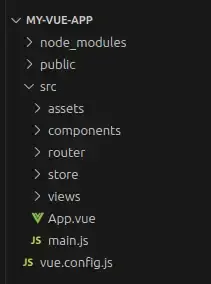
The public directory is for static assets that are not processed by Webpack (like index.html — the main HTML template), whereas assets processed by Webpack (such as images and fonts) live in the assets directory.
The main.js file is the entry point for your application and App.vue is the root Vue component. All child components go in the components directory except page components, which go in views. The router directory is for your Vue router configuration and store is for state management. Finally, vue.config.js is an optional configuration file for the Vue CLI.
What is React?
React is a JavaScript library, originally developed by Facebook in 2013. Like Vue, it's also used for building UIs and SPAs, as well as more complex web applications.
Although React is technically considered to be more of a library than a full-fledged framework, this distinction doesn't mean that it's less comprehensive than Vue, as the extra features that make Vue a framework (such as routing and state management) are still available to be used with React; they’re just not part of the core library. Instead, you could use Redux for state management and React Router for routing.
Like Vue, React has a component-based architecture and uses a virtual DOM to improve performance. It also uses declarative syntax, however, instead of templating it uses JSX, a syntax extension of JavaScript allowing you to describe UI elements in React.
The code example from Vue above would look like this in React:
import React, { useState } from 'react';
import './MyComponent.css'; // Import the CSS file for styling

const MyComponent = () => {
  const [message, setMessage] = useState('Hello, World!');

  const changeMessage = () => {
    setMessage('You clicked the button!');
  };

  return (
    <div>
    <h1>{message}</h1>
    <button onClick={changeMessage}>Click me</button>
    </div>
  );
};

export default MyComponent;

/* MyComponent.css */
h1 {
  color: blue;
}
As we can see above, the HTML tags are included as part of JSX, but the CSS is separate. (There are alternative approaches to this, such as styled-components, a library that allows you to add CSS as part of your React code, but this isn’t part of the core React library.)
You can also create custom components in React:
//Greeting.jsx
import React from 'react';

Greeting = ({ name }) => {
return <h1>Hello, {name}!</h1>;
};

export default Greeting;
And then refer to them in another JSX file:
<Greeting name={name} /> React projects typically have this structure:
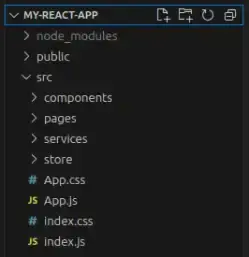
The public directory is for static assets (like index.html or the favicon). The index.js file is the entry point for your application, and App.js is the root React component. All child components go in the components directory and pages go in pages. Finally, the services directory is for service logic such as API calls and the store directory is for state management (e.g. Redux).
How do Vue and React differ?
| Vue.js | React |
|---|---|
|
More opinionated Vue offers a single integrated solution with libraries that work together seamlessly. It has its own built-in tools for things like state management and routing. |
More customizable It's a library, not a framework — with a massive ecosystem of third-party libraries to choose from. React uses these third-party libraries to handle state management and routing. |
|
HTML templates React uses HTML templating syntax with directives (by default). It's possible to configure Vue to use JSX but this is less common. |
JSX This is essentially just JavaScript, so you have the full power of JavaScript in your application. Dynamic rendering is easier in JSX. |
|
Less commonly used In terms of market share, Vue is used by 1.1% of all JavaScript websites. |
More commonly used React is used by 5.1% of all JavaScript websites. While it might not sound like a lot, this is 5x the usage of Vue. |
|
Less community support and backing Vue has a decent amount of community support but not as much as React. It doesn't have a huge corporate backer like Meta in React's case, but does have sponsorship from some medium-sized companies. Notable users: Alibaba, GitLab, Upwork, Wizz Air |
More community support and backing React is supported by a massive community and has corporate backing from Meta. Notable users: Instagram, Reddit, Airbnb, Netflix |
|
A combination of one-way and two-way data binding v-model, a directive for form input fields, does two-way data binding, which simplifies the handling of form inputs. The v-bind directive does one-way data binding. |
One-way data binding Data flows in one direction — from parent to child via props. You can still implement things that require bi-directional data flows, such as with forms, but such functionality requires managing state, which adds some complexity to your application. |
How to choose: React vs. Vue for your project
You need to make informed framework selection decisions to avoid wasting time and resources and introducing technical debt. Thorough understanding of your needs (as much as that’s possible up front) and planning for them makes app development more straightforward and predictable.
For new projects
React is best for large complex projects: Complex and large projects usually benefit from flexible tooling, so that, over time, development teams can adapt the tooling to fit their needs and their scale exactly. React is a good fit for such projects because it has a smaller amount of built-in functionality in its core library. Teams can pick and choose additional tooling to suit their own needs. React also has an extensive ecosystem, making it more flexible, which is often required with larger or more complex projects.
Vue is easier to learn: For smaller projects that don't require the flexibility of React, Vue is the better choice as it's simpler and easier to learn. If you're not familiar with either framework you'll probably find Vue easier.
For existing projects
Vue is easier to integrate: As Vue is a progressive framework, you can just add one small part to your application at a time, making it easy to start integrating into your existing JavaScript projects. It's fairly easy to add a single file component to an existing project.
Compare this to React, where you have to create many more files and import a root component into your code. It's often simpler to start from scratch and create a whole new React project, migrating all the old code from your old project into the new one.
For rapid prototyping
Vue is easier to learn: If you already have experience with either React or Vue, stick with the one you know, but otherwise use Vue as it has the simplest learning curve.
For server-side rendering (SSR)
It's a tie: Both have adequate solutions for SSR. You can either use React with Next.js or Vue with Nuxt.js. So, it really comes down to other considerations that you might care about — such as whether you're looking for a more opinionated or a more flexible framework.
For long-term reliability
React has more support and backing: Most importantly, it has corporate backing from one of the big tech giants (Meta), but it's also used more, by some of the biggest companies in the world, and has a bigger community of support.
How to create a Vue project
You can use the Vue CLI to create a new Vue project:
- Install Node and NPM.
- Install the Vue CLI:
npm install -g @vue/cli - Use the Vue CLI to create your new project:
vue create my-vue-app - Enter your new project directory:
cd my-vue-app - Start the Vue development server:
npm run serve - Navigate to http://localhost:8080/ in your browser.
How to create a React project
The simplest way to create a React project is to use the Create React App.
- Install Node and NPM.
- Use Create React App to create your new project:
npx create-react-app my-react-app - Enter your new project directory:
cd my-react-app - Start the React development server:
npm start
Navigate to http://localhost:3000/ in your browser.
Best practices for Vue and React development and maintenance
TypeScript: Whether you're using React or Vue, there are some best practices that are relevant for both. For example, we recommend using TypeScript instead of JavaScript for all React and Vue projects as its static typing will help catch many errors early (at compile time) and will also give you features like improved automatic code completion that will speed up your development.
GraphQL: A potentially helpful practice for both types of projects is to use GraphQL. GraphQL enables you to fetch all the data you need from a single endpoint, which is much more efficient than having to use multiple REST queries to get the same data. Using GraphQL for fetching data can massively increase your performance, although there is a learning curve.
Vue best practices
Use the key attribute with lists: When it comes to using listing items, Vue uses the v-for directive, and as this isn't plain JavaScript, it can be harder to understand exactly what it's doing, which can lead to unintended side effects. For example, items in a list can lose their state when they're updated, as their order isn't necessarily preserved. To avoid this, add a key attribute to your list. React also has a similar key property for dealing with lists.
<template>
  <!--Don't do this-->
  <div v-for="item in items">{{ item }}</div>

  <!--Do this-->
  <div v-for="item in items" :key="item.id">{{ item }}</div>
</template>
Don't use v-if with v-for:
If you want to filter a list or array, don't use the v-if directive with v-for, as this is very inefficient. Vue gives priority to v-for over v-if, meaning that every single element will be looped over before the v-if conditional is checked.
<!--Don't do this-->
<div
   v-for='item in items'
   v-if='item.available'
>
Instead, extract this logic to your JavaScript code and use a filter within there.
<!--Do this-->
<template>
  <div v-for="item in availableItems">{{ item }}</div>
</template>

<script>
export default {
  computed: {
    availableItems() {
      return this.items.filter(item => item.available);
    },
  },
}
</script>
React best practices
React hooks: Using hooks allows you to simplify your code by managing state, side effects, and context all from within functional components. Without this, you'd have to use class components, which contain a lot more boilerplate code and are less performant.
The most common React hooks are useState and useEffect, but you can also create your own custom hooks. useState is responsible for managing state, and it returns the current state value along with a function to update it.
import React, { useState } from 'react';

function Counter() {
  const [count, setCount] = useState(0);

  return (
    <div>
      <p>You clicked {count} times</p>
      <button onClick={() => setCount(count + 1)}>Click me</button>
    </div>
  );
}
useEffect focuses on separating side effects from your main code logic, which makes your code more modular, readable, and maintainable. The code below runs useEffect after every render, and the side effect is that it updates the title of the web page.
import React, { useState, useEffect } from 'react';

function Counter() {
  const [count, setCount] = useState(0);

  useEffect(() => {
    document.title = `You clicked ${count} times`;

    // Optional cleanup function
    return () => {
      console.log('Cleanup on unmount or before next effect');
    };
  }, [count]);

  return (
    <div>
      <p>You clicked {count} times</p>
      <button onClick={() => setCount(count + 1)}>Click me</button>
    </div>
  );
}
React Suspense: This allows you to display a fallback component when waiting for your main components to load. Suspense is particularly useful when your components rely on data that you're fetching from an API that may not have loaded yet.
StrictMode: Wrapping a component (or your entire application) in StrictMode will add extra checks and warnings to that component and its descendents, allowing you to identify potential problems and catch them early on.
<React.StrictMode>
    <App />
</React.StrictMode>