


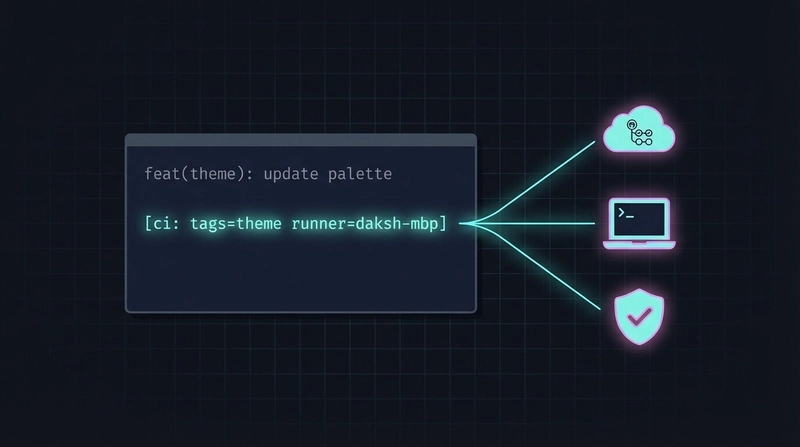
If you're building an iOS app with GitHub Actions, you're probably burning through macOS runner minutes like they're free.
Spoiler: they're not — macOS runners cost 10x more than Linux runners, and a 25-minute test run that fires on every push adds up fast.
We run a Swift/SwiftUI app with 3000+ tests across BLE integration, calibration logic, snapshot testing, and more. Here's how we went from "run everything on every push" to an opt-in, routable, self-hosted-friendly CI.
TL;DR — you can get the speed of self-hosted runners without the usual operational overhead, and in a way that's completely developer-independent:
- No shared build box to maintain,
- no daemons running on anyone's laptop,
- no hardcoded machine names in CI configs.
Every developer's Mac is self-aware: it reads its own identity from the runner config on disk, auto-starts in single-job mode only when a commit explicitly asks for it, and shuts down the moment the job finishes. One line in a commit message routes the build to the right machine — and the same workflow works unchanged whether you're running on GitHub's cloud or on someone's M-series laptop.
The rest of this post walks through how we got there: a commit-driven CI system where the commit message controls exactly what runs, where it runs, and whether it runs at all.
The Problem
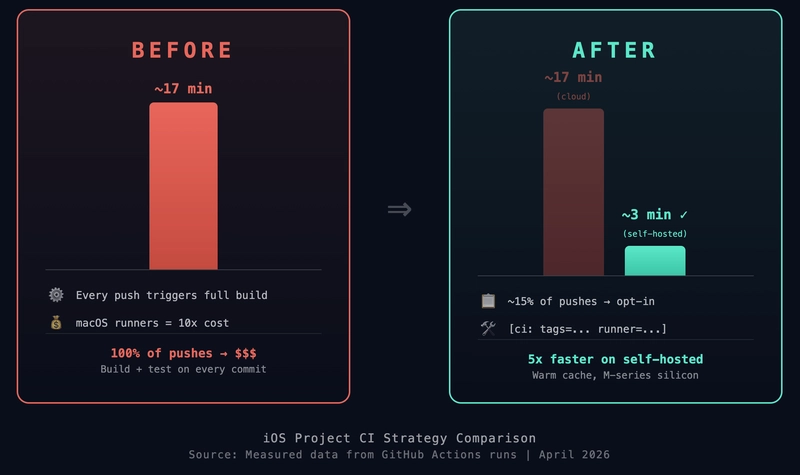
Our test suite takes ~25 minutes on GitHub-hosted macOS runners — and that's not even running all the tests, just a subset. Most of that time is build time; the actual tests finish in seconds. But every push triggered that same partial suite, even for a one-line copy change.
We were spending hundreds of dollars a month on CI that mostly told us "yes, the code you didn't touch still works."
The Solution: [ci: ...] Commit Directives
We put CI control directly in the commit message body. One line, declarative, readable in git log:
feat(theme): update color palette

[ci: tags=theme exclude=snapshot]
That's it. This commit runs only the theme-tagged tests and skips snapshot tests. Total CI time: ~3 minutes instead of 25.
The Full Directive Syntax
[ci: tags=<t1,t2> exclude=<t1,t2> runner=<name> final record-snapshots]
Every key is optional:
| Key | What it does |
|---|---|
tags=theme,calibration |
Run only these Swift Testing tags |
exclude=snapshot |
Skip these tags |
final |
Run the full test suite (pre-merge gate) |
runner=<name> |
Route to a self-hosted runner (dynamically resolved — see below) |
record-snapshots |
Re-record snapshot reference images |
No directive = no CI run. Normal development commits don't burn any minutes.
How the Parsing Works
Both our workflows (targeted-tests.yml for scoped runs, regular-tests.yml for full suite) share a parse-directive job that runs on a cheap ubuntu-latest runner. It:
- Checks out the repo (needs git history)
- Reads the latest non-merge commit message
- Extracts the
[ci: ...]block with a simple grep/sed pipeline - Outputs structured values (
tags,exclude,runner-name, etc.) for downstream jobs
# Parse [ci: ...] block from commit message
CI_BLOCK=$(echo "$MSG" | grep -oE '\[ci:[^]]+\]' | head -1)
TAGS=$(echo "$CI_BLOCK" | grep -oE 'tags=[^ ]+' | sed 's/tags=//')
RUNNER=$(echo "$CI_BLOCK" | grep -oE 'runner=[^ ]+' | sed 's/runner=//')
The expensive macOS jobs only start if the parse job says so. If there's no directive, the workflow exits cleanly with a green check — no wasted minutes, no red X.
Tag-Based Test Scoping with Swift Testing
Swift Testing's @Test(.tags(...)) system makes this possible. Every test is tagged by feature area:
@Test(.tags(.calibration))
func calibrationConvergesWithinTolerance() { ... }

@Test(.tags(.bluetoothManager))
func connectDisconnectCycle() { ... }
Our test runner script translates comma-separated tags into xcodebuild flags:
# tags=calibration,homePage becomes:
xcodebuild test \
  -only-testing-tags calibration \
  -only-testing-tags homePage
This means a developer working on calibration only runs calibration tests. A theme change only runs theme tests. The feedback loop goes from 25 minutes to under 3.
Self-Hosted Runners: Your Machine, Your Speed ⚡
GitHub-hosted macOS runners are decent machines, but your M-series MacBook Pro is probably faster — especially since it already has a warm DerivedData cache and resolved SPM packages.
We added a runner=<name> directive that routes the CI job to a specific self-hosted runner:
fix(ble): stabilize BLE tests

[ci: tags=bluetoothManager,bptManager runner=daksh-personal]
But how does a developer — or a Claude Code agent composing a commit — know what name to use? They don't hardcode it. We wrote a tiny helper script:
$ scripts/ci/runner-name.sh
daksh-personal
It reads the name from the runner's own config file (more on that below). So a commit looks like this:
git commit -m "fix(ble): stabilize tests

[ci: tags=bluetoothManager runner=$(scripts/ci/runner-name.sh)]"
The shell substitutes the real name at commit time. No one memorizes anything, and AI agents use the same script.
How It Works
- Each developer registers their Mac as a GitHub Actions self-hosted runner, picking any name they want (
daksh-personal,janes-studio,build-mac-01— whatever) and adding that name as a runner label - When you run
./config.sh, the GitHub Actions runner writes a.runnerJSON file to the runner directory. This is a standard part of the runner infrastructure — we didn't create it. It looks like this:
   {
     "agentId": 22,
     "agentName": "daksh-personal",
     "poolId": 1,
     "poolName": "Default",
     "serverUrl": "https://pipelines...",
     "gitHubUrl": "https://github.com/your-org/your-repo",
     "workFolder": "_work"
   }
The agentName field is whatever you typed at the "Enter the name of the runner" prompt. Both runner-name.sh and the post-push hook read it dynamically — nothing is hardcoded in CI configs or documentation:
   # runner-name.sh — prints the local runner name
   python3 -c "
     import json
     config = open('actions-runner/.runner', 'rb').read().decode('utf-8-sig')
     print(json.loads(config)['agentName'])
   "
You set the name once during setup and never think about it again. Each machine knows its own identity.
- The workflow uses a dynamic
runs-on— if the commit saysrunner=daksh-personal, the job lands on exactly that machine:
runs-on: ${{ inputs.runner-name != '' && inputs.runner-name || 'macos-26' }}
- On self-hosted runners, we skip
setup-xcodeand cache steps (unnecessary — everything's already there) - A post-push hook automatically starts the runner in single-job mode (
./run.sh --once)
The runner picks up one job, runs it, and exits. No permanently running service. No wasted resources when you're not using it.
The Auto-Start Hook — This Is Where It Gets Magical
Here's the part that feels like cheating.
A self-hosted runner is useless if you have to remember to start it. "Let me open a terminal, cd into the runner directory, run ./run.sh --once, wait for the job, then Ctrl-C" — nobody's doing that twenty times a day. The whole value proposition collapses the moment it requires manual effort.
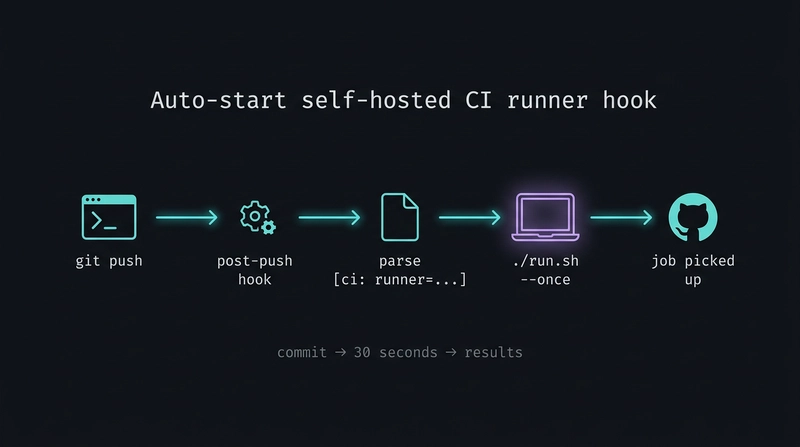
So we made it disappear. A Claude Code hook (checked into .claude/settings.json) fires automatically after every git push:
{
  "hooks": {
    "PostToolUse": [
      {
        "matcher": "Bash",
        "if": "Bash(git push*)",
        "hooks": [
          {
            "type": "command",
            "command": "./scripts/ci/start-self-hosted-runner.sh"
          }
        ]
      }
    ]
  }
}
The script does three things, in order:
-
Reads the last commit message and extracts the
runner=<name>field from the[ci: ...]block. -
Reads the local runner name from
actions-runner/.runner— a JSON config file written once during./config.shsetup — and checks if it matches the directive. If this machine isn't the target (or there's no directive at all), it exits silently. No noise, no side effects. Every developer's machine is self-aware: the script doesn't need to know who you are, it reads the identity from the runner config that already exists on disk. -
If this machine is the target, it launches the runner in background, single-job mode:
./run.sh --once &. The runner registers with GitHub, picks up exactly one job, executes it, and exits.
That's the entire interaction. You write a commit message with runner=<your-runner-name>, you push, and by the time you've switched back to your editor, your laptop is already building. The feedback loop for BLE tests went from ~25 minutes (cloud runner cold start + build + test) to ~30 seconds (warm cache, already-resolved SPM packages, M-series silicon). A 50x speedup, triggered by a line in a commit message.
And because it's --once, there's no daemon, no background service, no "did I remember to stop the runner?" It's entirely demand-driven: it exists only while your job needs it.
The hook is the glue that makes the rest of the system feel invisible. Without it, self-hosted runners are a clever-but-annoying option. With it, they're the default path for anything hardware-adjacent — and you stop thinking about CI altogether. You just commit, push, and the right machine runs the right tests.
The Build-Once, Test-Many Pattern
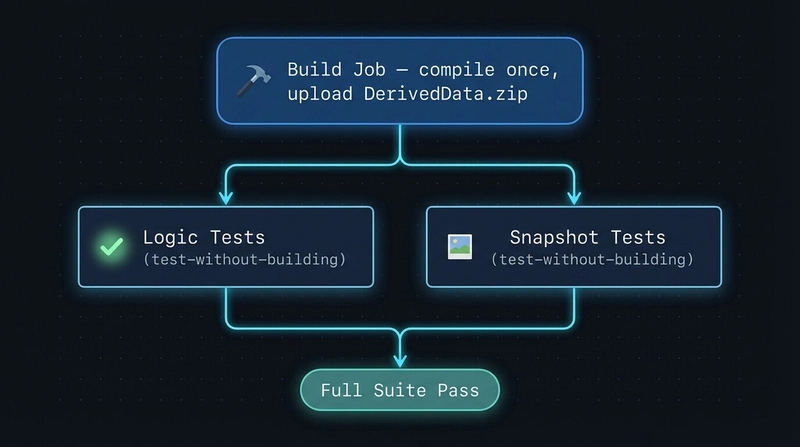
For the full test suite ([ci: final]), we don't want to build the project three times. Our regular-tests.yml workflow:
- Build job: Compiles once, packages DerivedData as an artifact
-
Logic tests job: Downloads the artifact, runs
xcodebuild test-without-building - Snapshot tests job: Same artifact, runs only snapshot-tagged tests
Jobs 2 and 3 run in parallel. Total wall time is build + max(logic, snapshots) instead of build * 3.
Why Self-Hosted Runners Are Even Faster: Warm DerivedData
On GitHub-hosted runners, every job starts clean — no DerivedData, no resolved SPM packages. The build job has to compile everything from scratch every time. On a self-hosted runner, DerivedData persists in $HOME/DerivedData/CI between CI runs. That means:
-
SPM packages stay resolved. No re-downloading, no re-linking. The
-skipPackageUpdatesflag in quick mode skips the resolution step entirely. - Incremental builds. If you changed one file, xcodebuild recompiles that file — not the entire project.
-
Build-graph validation, not recompilation. Test jobs run
build-for-testingbeforetest-without-buildingto validate that the build products are still valid. This takes 65–90 seconds — not zero, but far less than a cold build.
We measured this over 5 consecutive CI runs on the same self-hosted runner:
| Run | Build job | Notes |
|---|---|---|
| 1 (cold-ish) | 3m 1s | First run after the DerivedData path fix |
| 2 | 1m 6s | Warm cache — SPM resolved, most objects cached |
| 3 | 1m 44s | Small code change, incremental recompile |
| 4 | 1m 44s | Same pattern |
| 5 | 1m 39s | Consistent ~1.5 min steady state |
The first run pays the cold tax. Every subsequent run benefits from the warm cache. On GitHub-hosted runners, every run is Run 1.
The Safety Net: When We Still Run Everything
To be clear — we're not skipping tests, we're scheduling them. The full suite is still the source of truth, and it absolutely runs at the moments that matter:
-
Before a PR merges. A
[ci: final]commit (or the equivalent on the merge commit) runs the entire suite as the pre-merge gate. Nothing lands onmainwithout it. - On a regular cadence for long-lived branches, so drift doesn't pile up silently.
- Always before an App Store submission. Shipping to users is the one place where "fast feedback" loses to "zero surprises" — the full suite runs, snapshots and all, no exceptions.
The point of commit directives isn't to avoid testing. It's to find the middle ground between rapid iteration and stability: don't pay the 25-minute tax on a typo fix, do pay it when the blast radius justifies it. CI is still the source of truth — we're just choosing when to consult it.
Results
| Metric | Before | After |
|---|---|---|
| Average CI time per push | 25 min | 0-3 min |
| Monthly macOS runner minutes | ~2,000 | ~300 |
| Time to BLE test feedback | 25 min (cloud) | ~30s (self-hosted) |
| Commits that trigger CI | 100% | ~15% |
| Build job (self-hosted, warm) | n/a | ~1.5 min |
| Build job (cloud, cold) | ~3 min | ~3 min |
| Full suite wall time (self-hosted) | n/a | ~13 min |
The key insight: most commits don't need CI at all. When they do, they rarely need all the tests. And when you need fast feedback on hardware-adjacent code (BLE, sensors), your own machine is 50x faster than waiting for a cloud runner to boot, build, and test.
The second insight: DerivedData persistence is the real speedup on self-hosted. The build-once-test-many pattern saves one redundant build, but the warm DerivedData cache across CI runs saves the SPM resolution and cold compilation that dominates cloud runner time. A self-hosted build job consistently finishes in ~1.5 minutes versus ~3 minutes on a cold cloud runner — and that gap widens as your dependency graph grows.
Getting Started
You don't need our exact setup. The pattern is:
- Tag your tests by feature area (Swift Testing, pytest markers, Jest tags — whatever your framework supports)
- Parse the commit message in a cheap Linux job before spinning up expensive runners
- Default to not running — opt-in is cheaper than opt-out
- Let devs use their own machines for fast iteration via self-hosted runners in single-job mode — read the runner identity from the local config so nothing is hardcoded per-developer
The commit message is the interface. It's visible in git log, reviewable in PRs, and doesn't require any dashboard or config file changes. Just write your message and push.
What You Need After Cloning the Repo
The CI directives ([ci: tags=...], [ci: final]) work out of the box — they're parsed by GitHub Actions workflows already in the repo. But if you want to use runner=<name> to run tests on your own machine, here's the one-time setup:
Self-hosted runner setup (one-time, ~5 min)
1. Install the GitHub Actions runner
cd /path/to/your-project/..   # parent of the repo
mkdir actions-runner && cd actions-runner

# Go to repo Settings → Actions → Runners → "New self-hosted runner"
# Select macOS / ARM64, then follow the download + extract instructions:
curl -o actions-runner-osx-arm64-X.Y.Z.tar.gz -L <URL_FROM_GITHUB>
tar xzf ./actions-runner-osx-arm64-X.Y.Z.tar.gz
2. Configure the runner
./config.sh --url https://github.com/your-org/your-repo --token <TOKEN_FROM_SETTINGS_PAGE>
# Pick any name you want (e.g. "daksh-personal", "janes-studio")
# This name gets written to .runner and is what you'll use in commit messages
3. Add your runner name as a label
This is the step you'll miss the first time. GitHub's runs-on matches labels, not runner names — and ./config.sh only assigns generic labels (self-hosted, macOS, ARM64). You need to add your runner name as a custom label:
cd /path/to/your-repo
RUNNER_NAME=$(scripts/ci/runner-name.sh)
RUNNER_ID=$(gh api repos/your-org/your-repo/actions/runners \
  --jq ".runners[] | select(.name==\"$RUNNER_NAME\") | .id")
gh api -X POST repos/your-org/your-repo/actions/runners/$RUNNER_ID/labels \
  --input - <<< "{\"labels\":[\"$RUNNER_NAME\"]}"
4. That's it
Everything else is already in the repo:
-
.claude/settings.json— a post-push hook that auto-starts the runner when your commit includesrunner=<your-name> -
scripts/ci/runner-name.sh— reads your runner name from the local config so you never hardcode it -
scripts/ci/start-self-hosted-runner.sh— matches the commit directive against the local runner and starts it in single-job mode
Your first self-hosted CI run:
git commit -m "fix(ble): stabilize

[ci: tags=bluetoothManager runner=$(scripts/ci/runner-name.sh)]"
git push
# Hook fires → runner starts → picks up the job → exits when done
No daemon, no background service, no config files to edit. Clone, configure once, push.
What's Your Take?
This is the setup that worked for us — a small team, an iOS app, a specific test suite. But I'm genuinely curious how other teams are solving the same problem. What tradeoffs did you make that we didn't? What's broken about this approach that I'm not seeing?
Some things I'd love POV on:
-
Path-based triggers vs commit directives — we picked commits because they're explicit and reviewable, but
paths:filters are simpler. When has one clearly beaten the other for you? - Self-hosted runners at scale — we have a handful of developer Macs. Does this pattern hold up with 20+ engineers, or does it fall apart on coordination?
- The "no CI by default" call — is this reckless on a larger team, or is the pre-merge gate enough of a safety net?
- Something we haven't even considered — Bazel remote cache? Merge queues? Monorepo-style affected-test detection? Tell me what we're missing.
Let's improve this together so anyone reading it later walks away with the best possible playbook — not just ours.
We're building a health-tech companion app at Denver Life Sciences. If you have questions about this setup or want to see the workflow files, drop a comment below.