


This is a submission for the OpenClaw Challenge.
If you've been around the OpenClaw conversation lately, you've probably heard some version of this advice:
"Just buy a mac mini and run it over there."
The translation is, "OpenClaw might do something to my main machine that I don't want, so I should keep a separate computer that I can afford to break." Real money. Real friction. And — when you actually look at it — not actually safer.
This post is about flipping that piece of advice on its head. The two real reasons people hesitate to run OpenClaw — security and installation — can be solved without a second machine, without developer skills, in about a minute.
The thing I built to solve them is nilbox — an open-source desktop sandbox that runs the same way on Windows, macOS, and Linux, installs in one click, and never lets OpenClaw see your real API token while still letting it work normally.
What I Built
The problem in one sentence:
OpenClaw is a powerful desktop AI agent, but two real barriers stop normal people from adopting it safely.
- The security barrier — there is essentially no sandbox out there that controls both tokens and network egress. Most "AI agent sandboxes" stop at process and file isolation. A mac mini doesn't fix this either.
- The install barrier — installing OpenClaw cleanly on Windows is, in practice, "first prepare a Linux environment." Enable virtualization, set up WSL, install dependencies, finally paste the one-line install command. Nothing for a developer. A cliff for everyone else.
What I built is a desktop sandbox that takes both barriers down at once.
- Name: nilbox (open source — github.com/rednakta/nilbox)
- What: A GUI-based, cross-platform desktop sandbox. The same one-click install on Windows, macOS, and Linux.
- For whom: Anyone who wants to run OpenClaw safely without knowing what a VM, a container, or WSL is.
- One-line value: It lets someone who has never heard of mac minis, WSL, or Docker run OpenClaw safely in about a minute.
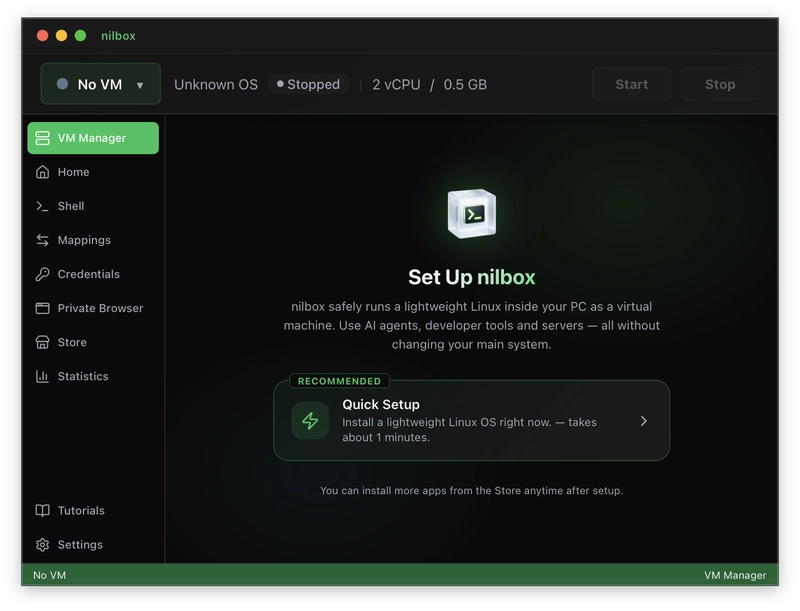
The nilbox desktop app — one click and a dedicated Linux sandbox for OpenClaw is provisioned.
How I Used OpenClaw
This is the substance of the post. Two real problems people hit when they try to run OpenClaw seriously, and how I solved each.
Real Problem 1 — Security: "Process Isolation Is Not Where the Story Ends"
Let's be honest first. There's no shortage of sandboxing options for an agent like OpenClaw. VMs, Docker, Firecracker-based OSS sandboxes, hosted code interpreters — the menu is long. The reason people still tell you to "just buy a mac mini" anyway is that almost every option on that menu leaves two things wide open.
What's missing 1: Token isolation
Most sandboxes isolate the process and the filesystem. The token walks straight in.
# Inside the environment OpenClaw runs in
OPEN_API_TOKEN=sk-proj-1a2b3c4d5e...
One prompt injection, one malicious package, one curious env call — and the real token is gone. This is exactly as true on a mac mini as anywhere else. The token is inside, so isolating the box around it doesn't help.
nilbox tackles this head-on. We never put the real token inside the sandbox that OpenClaw runs in.
# What OpenClaw actually sees inside nilbox
OPEN_API_TOKEN=OPEN_API_TOKEN
Not a typo. The variable's value is its own name. OpenClaw reads it, builds an Authorization: Bearer OPEN_API_TOKEN header, makes the call. Outside the sandbox, nilbox's boundary proxy intercepts the request, recognizes the placeholder, swaps in the real token, and forwards upstream. The response flows back unchanged. From OpenClaw's point of view, it's a perfectly ordinary API call.
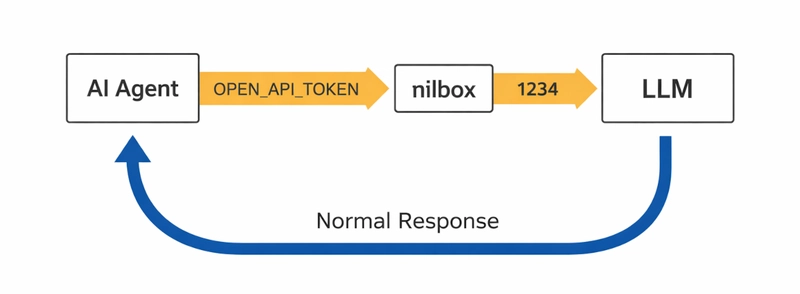
Zero Token Architecture — OpenClaw holds only a placeholder. The boundary proxy substitutes the real token outside the sandbox.
The consequence is simple:
Even if OpenClaw is breached and "the token leaks" — what leaks is the fake one. The real token never existed in the world OpenClaw lives in.
A mac mini doesn't give you this. A mac mini is just a separate computer; the token is still sitting in plaintext inside it. In other words, nilbox is more secure than a mac mini on the token axis.
The longer argument behind this design lives in the Zero Token Architecture write-up.
What's missing 2: Network egress control
Stopping the token leak isn't enough on its own. If OpenClaw can POST to any host on the internet, your data exfiltration risk is still there. Most sandboxes ship with egress wide open by default. Locking it down means writing iptables rules or running a proxy sidecar — fine for ops engineers, unrealistic for everyone else.
People sometimes go the other way: "just block the network." That stops exfiltration cold, sure, but now OpenClaw can't talk to the LLM and it can't do anything. Not a serious answer either.
nilbox treats this the way a firewall does:
- Block everything by default (default-deny).
- Allow only the hosts you explicitly allow.
- The single allowed path is the nilbox boundary proxy itself — so every outbound request becomes observable and controllable at one point.
Here's the part that's a little more interesting: the sandbox doesn't ship with a normal TCP/IP networking driver inside it. No code in OpenClaw — no malicious dependency, no injected payload, nothing — has the standard "open a socket to the real internet" path available. If a request doesn't go through the legitimate boundary proxy, it can't go anywhere. Not a policy decision. A physical one.
No exploit can route around the boundary, because there is no other route to take.
A mac mini is, again, different. It's a normal desktop OS with a normal network stack. By default OpenClaw running on a mac mini has full reach into the public internet — and your LAN. nilbox is more secure than a mac mini on the network axis too.
"Why not just use a VM or a container?"
It's a fair question. Honest answer:
| Process isolation | Token protection | Network control | One-click install for non-developers | |
|---|---|---|---|---|
| Plain VM (VirtualBox, etc.) | ✓ | ✗ | ✗ | ✗ |
| Docker container | Partial (shared kernel) | ✗ | ✗ | ✗ |
| Cloud OSS sandbox (E2B, etc.) | ✓ | ✗ | Varies | ✗ |
| nilbox | ✓ (VM-grade) | ✓ | ✓ | ✓ |
A VM or a container gives you a "room" for OpenClaw to live in. Inside that room, the token is still in plaintext, the network is still wide open, and — most importantly — none of those tools is one-click for someone who has never heard of them. Security tools that nobody installs are not security tools.
I went deeper into this comparison in a separate piece: Which Sandbox Should You Use for Your AI Agent? — VM vs Docker vs OSS vs nilbox.
Real Problem 2 — Installation: "Hope Is Not a Threat Model"
The real bottleneck on security turns out to be usability.
Write down, honestly, the path a Windows user has to walk to run OpenClaw cleanly:
- Enable hardware virtualization (some people end up in BIOS).
- Install WSL or a separate VM.
- Install a Linux distribution inside it.
- Resolve dependencies — Node, Python, Playwright browser binaries, and so on.
- Now paste the one-line OpenClaw install command.
Trivial for a developer. For someone without a development background, that whole path is the challenge. A "one-line install" is only one line on the surface; underneath it sits a stack of assumptions. If any of them goes sideways, the user shrugs, decides "this isn't for me," and runs OpenClaw directly on their main OS. That's the scariest outcome of all.
nilbox's answer is small.
- Download the nilbox desktop app on Windows (or macOS, or Linux).
- Click once.
- OpenClaw is installed inside a safe sandbox, alongside Playwright (browser automation environment) ready to go.
That's it. No WSL, no BIOS detour, no Docker daemon, no dependency triage. The virtualization layer is something nilbox sets up; the OpenClaw install itself is encapsulated as a vetted one-liner inside the nilbox catalog.
The catalog will keep growing. Adding more open-source projects that pair well with OpenClaw — one-click installable from inside nilbox — is the next part of the roadmap. Security tools are only security tools when someone actually runs them, and powerful tools like OpenClaw are only powerful when someone is actually able to install them.
Demo
A demo of nilbox installing OpenClaw in one click and running it safely with no real token inside the sandbox:
One-click nilbox install + OpenClaw running safely inside the sandbox.
Supplementary material:
- GitHub repo (boundary proxy, VM image, store manifest — all open source): github.com/rednakta/nilbox
- Site: nilbox.run
- Docs: docs.nilbox.run
What I Learned
A few things I didn't quite expect going in.
- The real bottleneck on sandbox security was usability. "More secure tooling" loses to "tooling more people can actually use." The reason "buy a mac mini" became a folk answer wasn't that it was actually safe — it was that "a physically separate machine" is the most intuitive isolation model for a non-technical user. The real work was carrying that same intuition into a single click on the user's existing computer.
- VMs and containers are spoken about as if they were synonyms for "sandbox," but they're empty on two important axes — token isolation and egress control. Just naming those two axes separately changed how the conversation went.
- Default-deny networking is the sweet spot between safety and usability. Block everything is unusable; allow everything is unsafe. "Block, then explicitly allow" is a model normal users already understand from firewalls.
- Open-sourcing the boundary mattered more than I expected. Users don't have to "trust me" — they can read the code that swaps the token, and the code that decides which requests are allowed out. That is a much stronger default than a marketing claim.
ClawCon Michigan
I did not attend ClawCon Michigan.
Further reading
- Which Sandbox Should You Use for Your AI Agent? — VM vs Docker vs OSS vs nilbox
- Zero Token Architecture — full write-up
- Install nilbox
- github.com/rednakta/nilbox — source, issues, releases
Let's stop telling people to buy a mac mini because OpenClaw makes them nervous. One click, one minute, and a sandbox that actually controls tokens and network — that's the home OpenClaw deserves.