








Ever recorded several short clips and wished you could just glue them into one file? Maybe a bunch of vacation footage, a series of screen recordings, or several takes of the same scene. Most video editors make you import everything, drag clips onto a timeline, render the whole thing, and wait. That is overkill when all you want is to put file A before file B.
We built a video merger that runs entirely in your browser. Upload your clips, drag them into the right order, hit merge, and download a single continuous video. The best part? Since all your clips are already in the same format, we do not re-encode anything. We just concatenate them. That means no quality loss and lightning-fast processing.
Why Merge Videos in the Browser?
Traditional video editing software is powerful but heavy. For simple concatenation, it is like using a chainsaw to cut a sandwich:
- No upload queue: Your clips stay on your machine. No waiting for a server to process them.
- No quality loss: We use FFmpeg's concat demuxer with stream copying. The video and audio streams are copied as-is, frame for frame.
- Instant reordering: Drag clips around in the list to change the order. No timeline, no layers, no keyframes.
- Privacy: Your footage never leaves your device.
- Actually fast: Because we are not re-encoding, merging is mostly just file I/O. Even several large clips process quickly.
The catch? This tool is specifically for joining videos that are already compatible — same resolution, same codec, same frame rate. If you try to merge a 1080p clip with a 720p clip, FFmpeg will complain. For those cases, you need a full re-encode, which our tool does not do by design.
How It Works
Here is the full flow from upload to merged download:
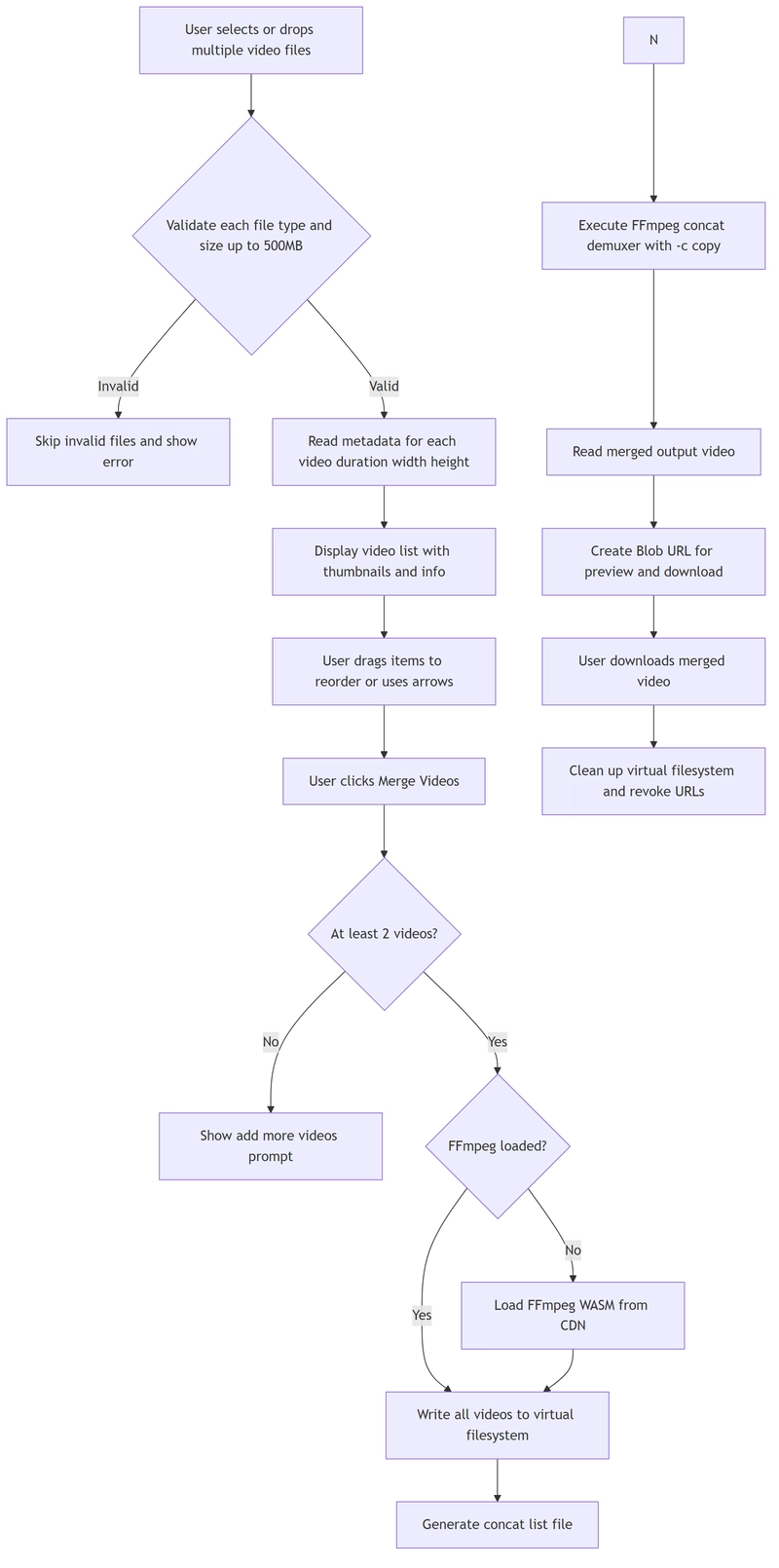
The Data Model
Instead of a single file, we manage a list of segments:
interface VideoSegment {
  id: string;
  file: File;
  previewUrl: string;
  duration: number;
  videoWidth: number;
  videoHeight: number;
}
Each segment stores its own preview URL and metadata. The list order determines the final merge order.
Uploading and Validating Multiple Files
We support both clicking to select files and drag-and-drop. Importantly, we allow multiple files at once:
const addVideos = async (files: FileList | null) => {
  if (!files || files.length === 0) return;

  const validTypes = ["video/mp4", "video/webm", "video/quicktime", "video/x-msvideo", "video/ogg"];
  const maxSize = 500 * 1024 * 1024;
  const newSegments: VideoSegment[] = [];

  for (const file of Array.from(files)) {
    if (!validTypes.includes(file.type)) {
      setError("Please select valid video files (MP4, WebM, MOV, AVI)");
      continue;
    }

    if (file.size > maxSize) {
      setError("Video file is too large. Maximum size is 500MB.");
      continue;
    }

    const info = await validateVideo(file);
    if (info) {
      newSegments.push({
        id: `${file.name}-${Date.now()}-${Math.random()}`,
        file,
        previewUrl: info.previewUrl!,
        duration: info.duration!,
        videoWidth: info.videoWidth!,
        videoHeight: info.videoHeight!,
      });
    }
  }

  if (newSegments.length > 0) {
    setSegments(prev => [...prev, ...newSegments]);
    setError(null);
  }
};
The validateVideo helper reads metadata without loading the entire file:
const validateVideo = async (file: File): Promise<Partial<VideoSegment> | null> => {
  return new Promise((resolve) => {
    const videoUrl = URL.createObjectURL(file);
    const video = document.createElement("video");
    video.preload = "metadata";
    video.onloadedmetadata = () => {
      resolve({
        duration: video.duration,
        videoWidth: video.videoWidth,
        videoHeight: video.videoHeight,
        previewUrl: videoUrl,
      });
    };
    video.onerror = () => {
      resolve(null);
    };
    video.src = videoUrl;
  });
};
This creates a hidden video element, loads just the metadata, and extracts duration and dimensions. Invalid files are silently skipped.
Reordering with Drag and Drop
The video list supports native HTML5 drag and drop:
const handleDragStart = (index: number) => {
  setDraggedIndex(index);
};

const handleDragOverItem = (e: React.DragEvent, index: number) => {
  e.preventDefault();
  if (draggedIndex === null || draggedIndex === index) return;

  moveSegment(draggedIndex, index);
  setDraggedIndex(index);
};

const moveSegment = (fromIndex: number, toIndex: number) => {
  if (toIndex < 0 || toIndex >= segments.length) return;

  setSegments(prev => {
    const newSegments = [...prev];
    const [removed] = newSegments.splice(fromIndex, 1);
    newSegments.splice(toIndex, 0, removed);
    return newSegments;
  });
};
For users who prefer precision over dragging, we also provide up and down arrow buttons on each item. The list shows a running total duration so you know exactly how long the final video will be.
The Concatenation Trick: No Re-encoding
This is where things get interesting. Most people assume merging videos requires re-encoding everything. It does not — if the videos are compatible.
We use FFmpeg's concat demuxer:
const mergeVideos = async () => {
  if (segments.length < 2 || !ffmpegRef.current) return;

  setIsProcessing(true);
  setError(null);
  setProgress(0);

  try {
    const ffmpeg = ffmpegRef.current;
    const segmentFiles: string[] = [];

    // Write all input files
    for (let i = 0; i < segments.length; i++) {
      const segment = segments[i];
      const inputName = `input_${i}.mp4`;
      segmentFiles.push(inputName);

      const fileArrayBuffer = await segment.file.arrayBuffer();
      await ffmpeg.writeFile(inputName, new Uint8Array(fileArrayBuffer));
    }

    // Create concat file list
    const concatList = segmentFiles.map(f => `file '${f}'`).join("\n");
    await ffmpeg.writeFile("concat_list.txt", concatList);

    // Concatenate segments
    const outputName = "output.mp4";
    await ffmpeg.exec([
      "-f", "concat",
      "-safe", "0",
      "-i", "concat_list.txt",
      "-c", "copy",
      "-y",
      outputName
    ]);

    // Read output file
    const data = await ffmpeg.readFile(outputName);
    const uint8Data = data instanceof Uint8Array ? data : new Uint8Array();
    const buffer = new ArrayBuffer(uint8Data.length);
    new Uint8Array(buffer).set(uint8Data);
    const blob = new Blob([buffer], { type: "video/mp4" });
    const url = URL.createObjectURL(blob);

    setOutputUrl(url);
    setOutputFileName(`merged_${Date.now()}.mp4`);

    // Cleanup
    for (const segmentFile of segmentFiles) {
      try {
        await ffmpeg.deleteFile(segmentFile);
      } catch (e) {
        console.log("Failed to delete segment file:", segmentFile);
      }
    }

    try {
      await ffmpeg.deleteFile("concat_list.txt");
      await ffmpeg.deleteFile(outputName);
    } catch (e) {
      console.log("Failed to delete temp files");
    }
  } catch (err) {
    console.error("Merge error:", err);
    setError("Failed to merge videos");
  } finally {
    setIsProcessing(false);
  }
};
Let us break down why this works:
-
-f concat: Tells FFmpeg to use the concatenation demuxer instead of treating the input as a single video. -
-safe 0: Allows file paths in the concat list that do not follow strict naming rules. Without this, FFmpeg might reject files with spaces or special characters. -
-i concat_list.txt: The input is a text file listing all the videos to join, in order. -
-c copy: Copies the video and audio streams without re-encoding. This preserves original quality and runs much faster than transcoding.
The concat list file looks like this:
file 'input_0.mp4'
file 'input_1.mp4'
file 'input_2.mp4'
Why -c copy Is So Fast
When you re-encode a video, FFmpeg has to decode every frame, process it, and encode it again. That is CPU-intensive and slow. With -c copy, FFmpeg simply reads the compressed data from each input file and writes it sequentially into the output file. No decompression, no recompression. The operation is bounded by disk I/O speed, not CPU power.
For a set of 5-minute clips at 1080p, a full re-encode might take 10-15 minutes. With stream copying, it takes seconds.
The Compatibility Requirement
The trade-off is that all input videos must share the same:
- Video codec (e.g., all H.264)
- Audio codec (e.g., all AAC)
- Resolution
- Frame rate
If you try to merge a 1080p clip with a 720p clip, FFmpeg will fail with an error about incompatible streams. This is by design — the concat demuxer is not a transcoder. For our use case, this is actually a feature. Most people merging videos shot them on the same device with the same settings, so compatibility is guaranteed.
Loading FFmpeg on Demand
As always, we load FFmpeg lazily:
// utils/ffmpegLoader.ts
import { fetchFile, toBlobURL } from "@ffmpeg/util";

let ffmpeg: any = null;
let fetchFileFn: any = null;

export async function loadFFmpeg() {
  if (ffmpeg) return { ffmpeg, fetchFile: fetchFileFn };

  const { FFmpeg } = await import("@ffmpeg/ffmpeg");

  ffmpeg = new FFmpeg();
  fetchFileFn = fetchFile;

  const baseURL = "https://cdn.jsdelivr.net/npm/@ffmpeg/core@0.12.6/dist/umd";

  await ffmpeg.load({
    coreURL: await toBlobURL(`${baseURL}/ffmpeg-core.js`, "text/javascript"),
    wasmURL: await toBlobURL(`${baseURL}/ffmpeg-core.wasm`, "application/wasm"),
  }, {
    corePath: await toBlobURL(`${baseURL}/ffmpeg-core.js`, "text/javascript"),
  });

  return { ffmpeg, fetchFile };
}
Dynamic import keeps the initial page load snappy. Blob URLs sidestep CORS issues. Caching the instance avoids paying the startup cost on subsequent uses.
Progress Tracking
Even with -c copy, progress events fire as FFmpeg works through the files:
ffmpeg.on("progress", ({ progress }: { progress: number }) => {
  setProgress(Math.round(progress * 100));
});
This gives users feedback that something is actually happening, which is important when processing multiple large files.
Cleanup
We are careful about memory management. Each segment has its own preview URL, and the output has another:
const reset = () => {
  segments.forEach(segment => {
    URL.revokeObjectURL(segment.previewUrl);
  });
  if (outputUrl) {
    URL.revokeObjectURL(outputUrl);
  }
  setSegments([]);
  setOutputUrl(null);
  setProgress(0);
  setError(null);
};
And after merging, we delete the temporary files from FFmpeg's virtual filesystem:
for (const segmentFile of segmentFiles) {
  try {
    await ffmpeg.deleteFile(segmentFile);
  } catch (e) {
    console.log("Failed to delete segment file:", segmentFile);
  }
}
What We Learned
Building a video merger taught us a few things:
- The concat demuxer is surprisingly picky: If one file has a different codec profile or audio sample rate, the whole merge fails. We initially tried to catch and normalize these differences, but that requires re-encoding — which defeats the purpose. Instead, we let FFmpeg fail and show a clear error.
- Drag and drop reordering feels magical: Users love being able to drag clips around to change the order. It is one of those UI patterns that seems obvious in retrospect but makes the tool feel significantly more polished.
-
-safe 0is essential: Without it, FFmpeg rejects concat list entries that contain spaces, hyphens, or other characters commonly found in filenames. This caused mysterious failures until we added the flag. - Preview URLs add up: Each uploaded video gets an object URL for its thumbnail. With 20+ clips, that is a lot of memory. The reset function revokes all of them at once.
- Concatenation is not the same as blending: Some users expect transitions between clips. Our tool does hard cuts only — the concat demuxer does not support fades, cross-dissolves, or any effects. For that, you need a real video editor.
Give It a Try
Got a bunch of clips that need to become one video? You can merge them right now. No upload, no rendering queue, no quality loss.
Upload your clips, drag them into order, and download the merged result. Everything happens on your machine — your videos never leave your browser.