








Someone tried to scare me with a security audit. It backfired.
A few days ago, a stranger on the internet found PC Workman — my open-source system monitor — downloaded the .exe, and before running it, did what any sane person should do in 2026: they ran a full security audit.
Not a quick VirusTotal check. A proper audit. They used Claude to analyze the codebase, the build pipeline, the permissions model, the network behavior, everything.
Then they sent me the results. I think they expected me to panic.
Instead I replied: "Can I see the full report?"
They shared it. The audit confirmed what I already knew — clean code, no telemetry, no hidden network calls, no suspicious behavior. They ended up becoming a tester.
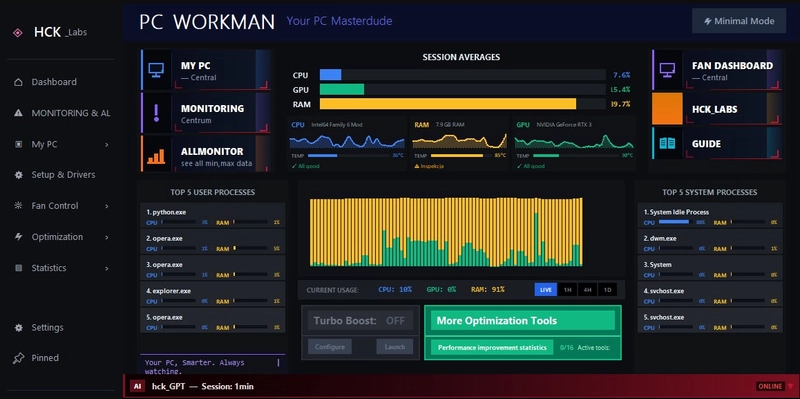
This is the story of PC Workman v1.7.2, the biggest release in the project's history, and why security isn't something I added after the fact. It's baked into how I build.
Why Nobody Trusts .exe Files Anymore (And Why They Shouldn't)
Let's be honest. Downloading a random .exe from GitHub in 2026 is a trust exercise most people fail. And they're right to fail it.
Open-source doesn't mean safe. It means auditable. The code being public is step one. But if you're shipping executables, you need to prove that the .exe you're distributing was actually built from that public code, wasn't tampered with, and doesn't phone home.
Most solo developers skip this entirely. They push a PyInstaller build to releases, write "trust me bro" in the README, and wonder why downloads stay low.
I decided early on that if PC Workman was going to ask for system-level access — reading CPU temperatures, monitoring processes, scanning Windows registry — then security couldn't be an afterthought.
What Security Actually Looks Like in PC Workman
Sigstore Digital Signatures
Every release gets signed with Sigstore. This is the same signing infrastructure used by Kubernetes, npm, and PyPI. It creates a cryptographic proof that ties the executable to my GitHub identity and logs it in a public transparency ledger.
Anyone can verify it:
sigstore verify github PC_Workman_HCK_1.7.2.exe --bundle sigstore.bundle
If the signature doesn't match, the file was tampered with. Don't run it.
VirusTotal — 70+ Engines, Every Release
Before any .exe goes public, it gets uploaded to VirusTotal and scanned against 70+ antivirus engines. Current result for v1.7.2: 0 detections.
You don't have to take my word for it. Go to virustotal.com, upload the file yourself, and check.
GitHub CodeQL — Automated on Every Commit
CodeQL runs on every push to main. It scans for common Python vulnerability patterns: injection attacks, path traversal, insecure deserialization, hardcoded secrets. If something triggers, it blocks the commit.
This isn't something I run occasionally. It runs on every single commit, automatically.
SECURITY.md — 445 Lines of Policy
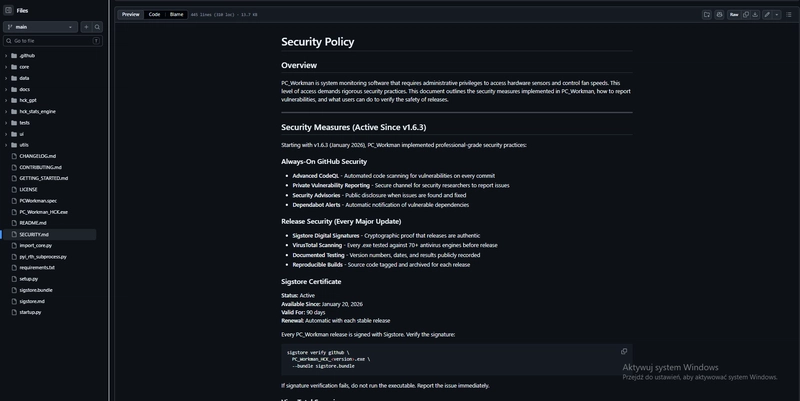
Most GitHub repos either don't have a security policy, or they have a template that says "email me." PC Workman's SECURITY.md is 445 lines covering:
- Supported versions and update timeline
- How to report vulnerabilities (private GitHub reporting + email)
- Response timeline (24h acknowledgment, 72h validation, 7 days for critical fixes)
- CVSS severity classification
- Dependency management process
- Detailed verification instructions for every release
- FAQ addressing trust questions directly
It exists because if you're asking users to run your code with admin privileges, you owe them a complete answer to "why should I trust this?"
What PC Workman Does NOT Do
- No telemetry. Zero. Nothing phones home.
- No analytics. No tracking. No user profiling.
- No cloud dependency. Core monitoring is 100% offline.
- No data leaves your machine unless you explicitly use the optional AI features.
The network section of the audit came back clean because there's nothing to find.
v1.7.2 — What Actually Changed
Now for the release itself. The last downloadable .exe was v1.6.8 from March. That was a monitoring tool that collected data and showed it to you.
v1.7.2 is a different animal. It acts on what it finds.
Hybrid AI Engine (Complete hck_GPT Rewrite)
The AI layer went from a single chat_handler.py file to a modular engine with 5 subpackages: engine/, intents/, memory/, context/, responses/.
The routing logic is simple: known intents (stats, alerts, temperature, processes) hit the rule engine first. Fast, predictable, zero external dependency. Open-ended questions ("why is my PC slow right now?") get forwarded to Ollama — a local LLM that runs on your machine. No cloud API. No API key. No tokens.
If Ollama isn't installed, the engine falls back gracefully. No crashes, no error messages about missing services. It just uses what it has.
Every response is bilingual. Polish or English, auto-detected per message. The parser uses ASCII-fold dual scoring to handle Polish diacritics without breaking intent matching.
There's also a proactive monitor running as a background daemon. It watches for sustained CPU pressure (>80% for 30 seconds), RAM warnings (>85%), throttling, low disk space, and long session uptime. When something triggers, it pushes an alert to the chat panel. You don't have to ask. It tells you.
Startup Manager
Full page that reads from three Windows registry hives (HKCU, HKLM, WOW6432Node). No admin rights needed for reading. Knowledge base of 30 common programs with impact ratings (High/Medium/Low). Three panels: programs to optimize, programs safe to disable, and the full list.
Disable means real winreg.DeleteValue() — but only after a confirmation dialog. Nothing gets removed silently. User choices persist to JSON between sessions.
Services Manager
Catalogue of 40+ Windows services sorted into four categories: Essential (locked, can't be touched), Recommended, Optional, and Likely Unnecessary. Each row shows current status, startup type, and action buttons (Stop/Start/Restart).
The interesting part is the TURBO Mode integration. You select which non-essential services should auto-stop when TURBO activates. When TURBO deactivates, they restore to their previous state. Selections persist between sessions. All changes get logged.
Admin detection is built in — if you're not elevated, the manager shows a warning banner instead of pretending the buttons work and failing silently.
Optimization Hub
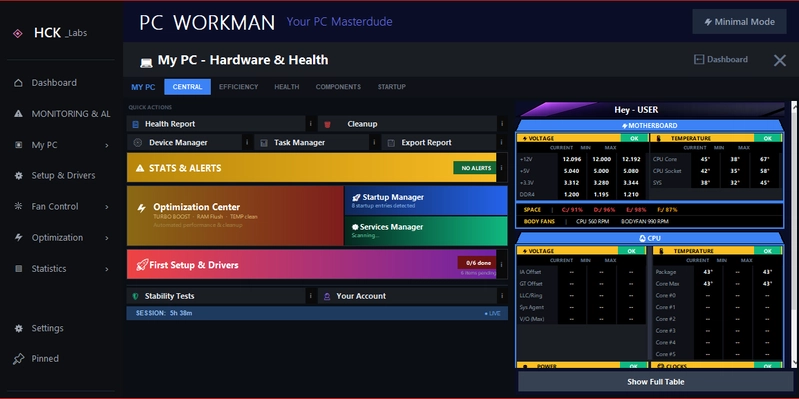
The old single "Optimization & Services" button in My PC Central got replaced with a 3-zone interactive Canvas widget. Left zone: Optimization Center. Top-right: Startup Manager with live registry entry count. Bottom-right: Services Manager with running service count. Hover brightens the active zone. Metrics update from a background daemon thread.
Everything Else
- First Setup & Drivers page with arc gauge health score computed from driver ages and startup count. Reads directly from Windows registry. No internet, no third-party API.
- Dashboard nav buttons fully redesigned — dark gradients, bordeaux brackets, 7 vector icons drawn on Canvas (zero image files).
- Inter font via GDI32 with Segoe UI fallback.
- HCK_Labs and Guide pages redesigned as full blog layouts.
- Efficiency tab fixes: correct physical core count, per-core session stats, side-by-side TOP CPU/RAM consumers.
- 4 new
query_apimethods: temperature history, temperature summary, top processes lifetime, weekly comparison with trend detection. - hck_GPT language bug fixed, temperature fallback fixed, unconditional TURBO tip removed.
- Complete .exe packaging rewrite: 25+ hidden imports, settings directory bundled, proper output naming.
The Numbers
- Version: 1.7.2
- Commits since last .exe: ~60
- New modules: 8
- GitHub stars: 25
- Downloads: ~100+
- Hours logged: 800+
- VirusTotal: 0/70 detections
- Sigstore: Signed and verified
- CodeQL: Active on every commit
- SECURITY.md: 445 lines
- Telemetry: None. Zero. Nothing.
Why I Ship .exe Files (And Why More Developers Should)
Most open-source projects live and die on GitHub. The README says "clone the repo, install dependencies, run startup.py." That's fine for developers. For everyone else, the project doesn't exist.
Shipping an executable is harder. You deal with PyInstaller nightmares (8 hours debugging hidden imports for v1.6.8), false positive antivirus detections, signing infrastructure, and the constant question of "how do I prove this is safe?"
But it's also where the real feedback comes from. Source code users are patient. They expect rough edges. .exe users click the button and expect it to work. That's the standard worth building toward.
v1.7.2 is the second .exe I've ever shipped. The first was v1.6.8 in March — a monitoring tool with placeholder buttons and a neon green Turbo Boost card. The app barely resembles that version now.
If you want to try it, the .exe is on GitHub Releases. If you want to audit it first, the source is right there. If you want to verify the signature, the instructions are in SECURITY.md. If you find something wrong, the reporting process is documented.
That's how it should work.
What's Next
v1.7.3 through v1.7.8 will build out the TURBO suite: suspending inactive background processes, auto power plan switching, CPU core unparking, and full integration testing.
v2.0 targets Microsoft Store publishing and Ollama as a first-class local AI option.
Next week I start Umiejętności Jutra 3.0 — Google's AI certification program through SGH. First structured learning since I finished technikum. Curious how it'll shape the roadmap.
PC Workman is open source, MIT licensed. 800+ hours of solo development between retail shifts. Still shipping. Still signing. Still scanning.
Star the repo: github.com/HuckleR2003/PC_Workman_HCK
All my links: linktr.ee/marcin_firmuga
I'm Marcin Firmuga, solo developer and founder of HCK_Labs. Building PC Workman publicly, honestly, between Żabka shifts. Follow the build: GitHub · LinkedIn · X/Twitter · Medium