









SQL: What is it?
First of all, it stands for Structured Query language. It is one of the programming languages used to communicate with relational databases. It's used to store, extract and manipulate data in a database.
There are different SQL command categorizaions used to facilate the different uses of SQL.
These are:
1. DDL (Data Definition Language)
2. DML (Data Manipulation Language)
3. DQL (Data Query Language)
4. DCL ( Data Control Language)
5. TCL ( Transactional Control Language)
In this article, we'll be covering the first three types. Why? We are only just beginning and I'd like to take you step by step.
Say you've been tasked with building a database to store data, manipulate it and query it(retrieve). Which type of commands will you use?
Data Definition Language (DDL)
These are commands for defining and managing database structures.
They are:
- CREATE: When you want to build something new like schemas and tables, this is the command to use.
Example;
        CREATE SCHEMA nairobi_academy;

        CREATE TABLE students (
            student_id SERIAL PRIMARY KEY,
            first_name VARCHAR(50),
            last_name VARCHAR(50)
       );
- ALTER: When you want to modify your existing table structure, say you forgot one column and would like to add it to your table without having to create the table afresh, this is the command to use.
Example;
       ALTER TABLE students
       ADD COLUMN phone_number VARCHAR(20);
You later realize you don't need the phone numbers after all and would like to do away with them, this is the command to use.
Example;
       ALTER TABLE students
       DROP COLUMN phone_number;
- DROP: When you want to remove permanently.
Example;
DROP TABLE students;
- TRUNCATE: This is used when you want to remove all rows from your table but retain the table structure.
Example;
TRUNCATE TABLE students;
Data Manipulation Language (DML)
These are commands for working with data. So you have your tables ready and you want to input your data.
- INSERT: We use this commands to fill in our records.
Example;
     `INSERT TABLE students (student_id, first_name, last_name)
     VALUES ('Clare', 'Mwangi');
The reason as to why I have not included the student ID in my statement is because when 'CREATING' our table above, I used the function SERIAL which will auto-populate our ID's starting from the number 1. We'll talk about functions and constraints (primary key) later.
- UPDATE: used when you want to modfify existing data e.g change a student's location because they relocated.
Example;
    ` UPDATE students
      SET city = 'Nairobi'
      WHERE student_id = 5;
- DELETE: This used when you want to remove specific data from your table because you no longer need it.
Example;
    ` DELETE FROM students
      WHERE result_id = 9;
Data Query Language (DQL)
These are commands for retrieving data. You want to extract information from your database or rather ask questions so as to conduct your analysis and gain insights, this is the command to use:
- SELECT:
Example;
    SELECT *
    FROM students;
This command will enable you view the entire students'table with its data.
   `SELECT *
    FROM students
    WHERE city = 'Nairobi';
This command will extract data only for students who come from Nairobi.
    SELECT result_id, student_id, grade
    From exam_results
    Where grade = 'A' AND grade = 'B';
This command will return data from the exam_reults table of students who scored an A or B.
By now, you've noted we've been using where quite a bit to extract specific information from our tables. That is exactly what the WHERE CLAUSE is used for to filter datasets.
You may also need to categorize you data without altering the tables you created and are wondering what command to use;
CASE WHEN:
Example;
    SELECT *
    CASE
        when marks >= 80 then 'Distinction'
        when marks >= 60 then 'Merit'
        when marks >= 40 then  'Pass'
        else 'Fail'
    END as Performance
    FROM exam_results;
This is a big one, I know! It may look complicated but it's okay, I'll walk you through it.
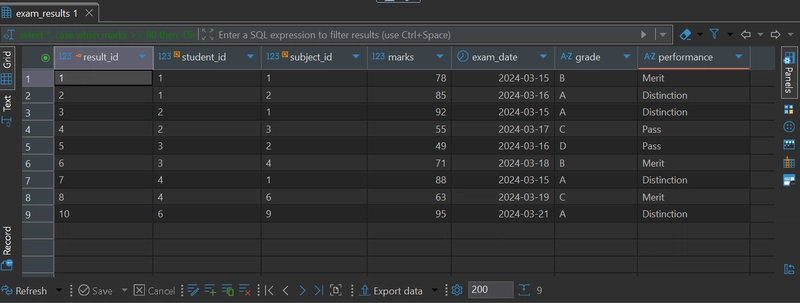
What this command is doing is: First, it want to extract all columns' data from the exam_results table. Second, it wants to label the marks, this is where CASE WHEN comes into play. Anybody who scored an 80 and above will be labelled as having a 'Distinction' and so on and so forth. The END as performance gives the label column a name 'Performance'
This would be the output of our query:
So far so good! I would say. There is more coming.