






OpenAI's GPT 5.5 is one of the most capable models available for agentic coding - writing code, using tools, running commands, and iterating on complex tasks autonomously. In this guide, you'll learn how to set up GPT 5.5 in AgentOne and start using it for agentic coding workflows.
What Is Agentic Coding?
Agentic coding is when an AI model doesn't just suggest code, it actively writes, runs, debugs, and iterates on code using tools. Instead of copy-pasting snippets from a chatbot, you give the agent a task and it handles the implementation end to end.
GPT 5.5 excels at this because of its strong tool use capabilities, large context window, and ability to follow multistep instructions reliably.
Prerequisites
- AgentOne desktop app installed
- An OpenAI API key with access to GPT 5.5
If you don't have an OpenAI API key yet, head to platform.openai.com to create one.
Step 1: Open Provider Settings
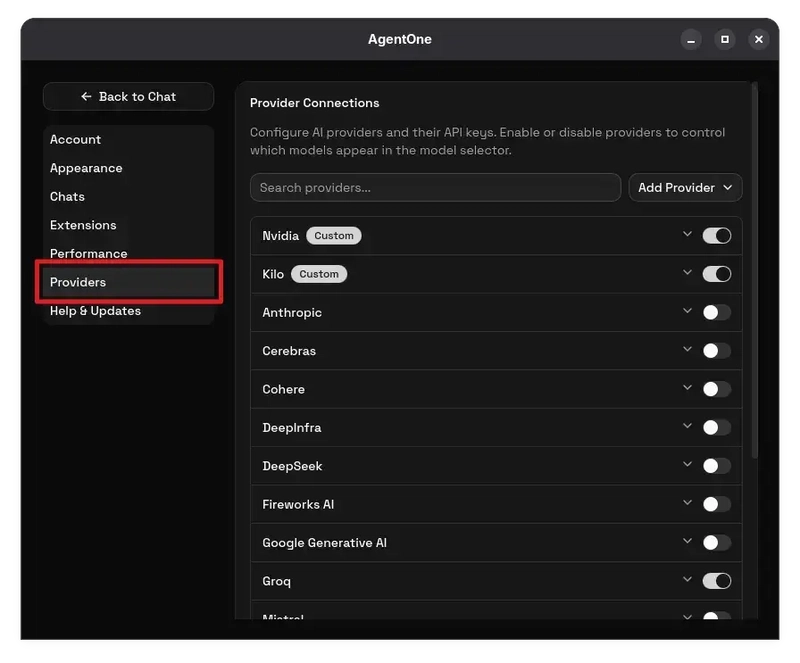
Launch AgentOne and open Settings. Navigate to the Provider section. This is where you manage all your AI providers and API keys.
Step 2: Add a Custom OpenAI-Compatible Provider
GPT 5.5 isn't in AgentOne's built-in model list yet, so you'll add it as a custom provider. Click the Add Provider button in the top right, then select OpenAI Compatible from the dropdown.
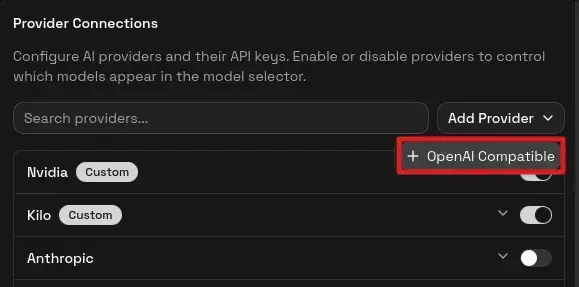
A dialog will appear with fields to configure the new provider.
Step 3: Configure the Provider
Fill in the following fields:
-
Name:
GPT 5.5(or whatever you'd like to call it) -
Base URL:
https://api.openai.com/v1 - API Key: Your OpenAI API key
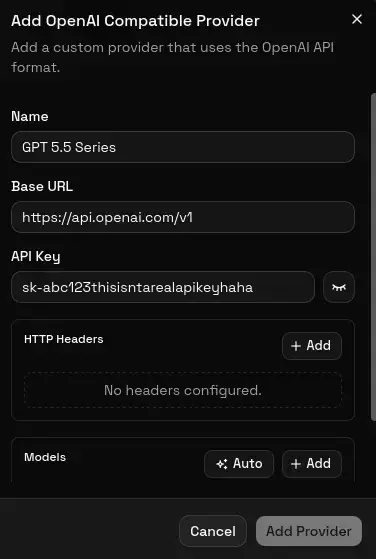
You can leave the Custom Headers section empty, as it's only needed for providers that require extra authentication headers.
Step 4: Add the Model
In the same dialog, scroll down to the Models section. You have two options:
Option a: Auto-Fetch Models
Click the Auto button. AgentOne will call OpenAI's /models endpoint and pull in all available models. Find gpt-5.5 in the list and remove any models you don't need.
Option B: Add Manually
Click the Add button to open the model form. Fill in:
-
Model ID:
gpt-5.5 -
Display Name:
GPT 5.5(optional, for a cleaner label in the UI)
Make sure both Supports Tools and Supports Images are toggled on… GPT 5.5 supports both!
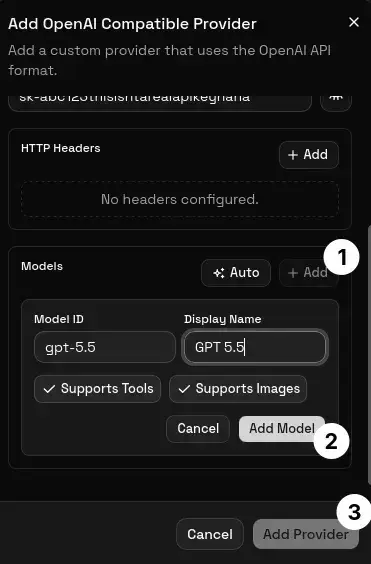
Click Add Model, then click Add Provider to save everything.
Step 5: Select GPT 5.5 in the Model Selector
Go back to the main chat view. Click the model selector (the model name shown near the input area) and you should see GPT 5.5 listed under your custom provider. Select it.
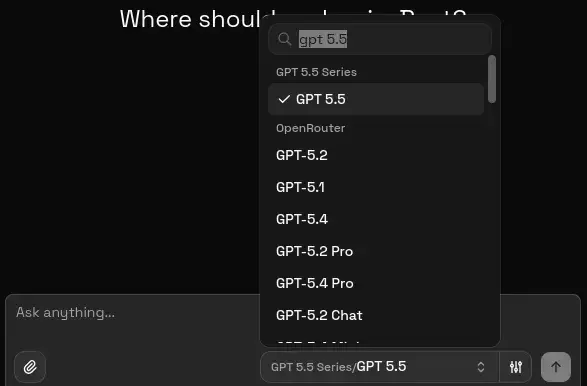
That's it. You're now using GPT 5.5 for all your conversations in AgentOne.
Step 6: Start Agentic Coding
With GPT 5.5 selected, you can give AgentOne tasks like:
- "Create a REST API with Express and PostgreSQL"
- "Refactor this component to use React hooks"
- "Write tests for the auth module"
- "Find and fix the bug in the payment flow"
GPT 5.5 will use AgentOne's tool system to read your files, write code, run terminal commands, and iterate until the task is done.
Tips for Getting the Best Results
- Be specific. Instead of "make it better," say "add input validation to the sign-up form and return proper error messages."
-
Give context. Mention the framework, language, and any constraints. "Use TypeScript, Prisma, and the existing database schema in
prisma/schema.prisma." - Let it iterate. Agentic coding works best when you let the model run commands, see errors, and fix them on its own.
Adding Other GPT 5.5 Variants
OpenAI offers several GPT 5.5 model variants. You can add multiple model IDs to the same provider:
| Model ID | Best for |
|---|---|
gpt-5.5 |
General agentic coding tasks |
gpt-5.5-pro |
More expensive, but smarter |
To add more models, go to Settings > Providers, expand your GPT 5.5 provider, and use the Add button in the Models section.
Wrapping Up
Setting up GPT 5.5 in AgentOne takes less than a minute. Once configured, you get a powerful agentic coding environment where GPT 5.5 can read, write, and run your code autonomously.
If you run into issues, make sure your OpenAI API key has access to the gpt-5.5 model and that your base URL is set to https://api.openai.com/v1.
Give it a try! Download AgentOne and start building with GPT 5.5 today. Need help? Join the AgentOne Discord server.