







The first thing anyone reaches for when building a pitch detector in the browser is
AnalyserNode.getFloatFrequencyData()— the FFT magnitude spectrum. It works, and then it fails the instant you plug in a guitar and play the low E. Here's why, and what to do about it.Sub-cent-accurate tuning from ~80 lines of autocorrelation. No dependencies. Plain JS.
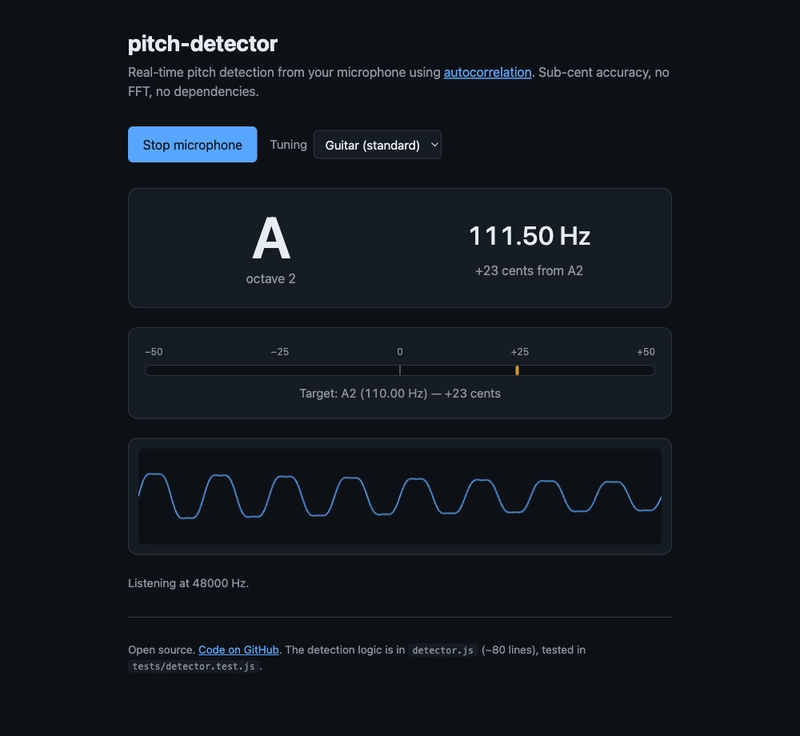
🎙 Demo: https://sen.ltd/portfolio/pitch-detector/
📦 GitHub: https://github.com/sen-ltd/pitch-detector
The symptom — FFT-based tuners can't read low notes
The canonical Web Audio pitch detector looks like this:
const ctx = new AudioContext();           // default sampleRate = 48000
const analyser = ctx.createAnalyser();
analyser.fftSize = 2048;                  // the default
const spectrum = new Float32Array(analyser.frequencyBinCount);

requestAnimationFrame(function loop() {
  analyser.getFloatFrequencyData(spectrum);
  const maxBin = argmax(spectrum);
  const freq = maxBin * ctx.sampleRate / analyser.fftSize;
  // turn freq into a note name…
  requestAnimationFrame(loop);
});
Play an A4 (440 Hz) and it lights up around 440. Perfect. Then play the low E on a guitar (E2 = 82.41 Hz) and the readout jumps between "82 Hz" and "105 Hz" like a broken cursor. The reason is bin width:
bin width = sampleRate / fftSize = 48000 / 2048 = 23.4375 Hz
And the distance between semitones scales with frequency, so low notes are closer together:
| Note | Frequency | Distance to next semitone |
|---|---|---|
| E2 | 82.41 Hz | 4.90 Hz (to F2) |
| A2 | 110.00 Hz | 6.54 Hz |
| A4 | 440.00 Hz | 26.16 Hz |
| A5 | 880.00 Hz | 52.33 Hz |
E2 and F2 are less than one-fifth of a bin apart. The FFT literally cannot tell them apart. That "I tuned my guitar and it sounded wrong" feeling? That was your tuner.
The workarounds and their limits
-
Crank up
fftSize: 32768 gets bin width down to 1.46 Hz, butfftSize >= 2 * N, so you need 32768 samples (~0.68 s at 48 kHz) of latency and memory per frame. Rough for a live display. - Zero padding: increases resolution in appearance only. You're not measuring anything more; you're interpolating.
- Parabolic interpolation: fit a quadratic to the three bins around the peak and estimate the apex. Classic trick, gets you closer, but doesn't help if two peaks are blurred into one.
And there's a deeper problem.
Pitch is not frequency
An A4 isn't pure; it contains partials at 880, 1320, 1760 Hz and up. In an FFT magnitude spectrum, depending on the instrument and the moment of the recording, the second harmonic can be louder than the fundamental. Plucked guitar, right after the pick attack, is a famous case. Naïve argmax returns 880 Hz — A5, an octave off.
You can patch around this (HPS = Harmonic Product Spectrum, or peak-picking with harmonic constraints) but none of these patches are about pitch, they're about cleaning up the mess that FFT handed you. And they don't fix the bin-width problem.
The physical definition of pitch is the period at which the waveform repeats. If a signal repeats every 480 samples at 48 kHz, that's a 100 Hz pitch. Harmonics don't change the period — they change the shape of each cycle. So measure the period directly.
Autocorrelation — measuring the period directly
The autocorrelation function (ACF) is the buffer's inner product with a copy of itself shifted by τ samples:
r[τ] = Σ_{i=0..N−τ−1} buffer[i] · buffer[i + τ]
- At τ = 0, every term is
buffer[i]², sor[0]is the max (signal energy). - When τ hits one period, the shifted copy lines up with itself again and
r[τ]peaks. - The location of the first prominent peak is the period.
Frequency = sampleRate / τ. That's the whole idea.
export function detectPitch(buffer, sampleRate) {
  const N = buffer.length;
  const minLag = Math.floor(sampleRate / 1500); // upper freq bound 1500 Hz
  const maxLag = Math.floor(sampleRate / 60);   // lower freq bound 60 Hz

  // RMS gate — don't run on silence
  let sumSq = 0;
  for (let i = 0; i < N; i++) sumSq += buffer[i] * buffer[i];
  if (Math.sqrt(sumSq / N) < 0.01) return null;

  const r0 = acf(buffer, 0, N);

  // Skip past the initial descent from r[0]
  let lag = minLag;
  while (lag < maxLag && acf(buffer, lag, N) > acf(buffer, lag + 1, N)) lag++;

  // Find the highest local maximum in the remaining range
  let bestLag = -1, bestVal = -Infinity;
  while (lag < maxLag - 1) {
    const a = acf(buffer, lag - 1, N);
    const b = acf(buffer, lag, N);
    const c = acf(buffer, lag + 1, N);
    if (b > a && b >= c && b > bestVal) { bestVal = b; bestLag = lag; }
    lag++;
  }
  if (bestLag < 0 || bestVal / r0 < 0.5) return null;  // reject weak periodicity

  // Parabolic interpolation for sub-sample precision
  const a = acf(buffer, bestLag - 1, N);
  const b = bestVal;
  const c = acf(buffer, bestLag + 1, N);
  const shift = (a - c) / (2 * (a - 2*b + c));
  return sampleRate / (bestLag + shift);
}

function acf(buf, lag, N) {
  let s = 0;
  for (let i = 0; i < N - lag; i++) s += buf[i] * buf[i + lag];
  return s;
}
Three things matter:
1. Choose maxLag from your lower frequency bound. A lower limit of 60 Hz means maxLag = 800 samples at 48 kHz. You want at least two periods inside the buffer, so maxLag ≤ N / 2 is the practical cap. Pushing too low starves the estimator.
2. Skip the initial descent. r[τ] is a plateau around τ = 0, then dips, then rises back at the period. Walk forward until the values stop decreasing before you start peak-hunting — otherwise you'll pick τ = 1 and report 48 kHz.
3. Reject weak peaks by ratio to r[0]. Noise doesn't have a clean period, so it doesn't produce a sharp peak. bestVal / r0 < 0.5 says "we don't have a confident period" and returns null. This is what lets the tuner stay quiet on background hiss instead of guessing wildly.
Parabolic interpolation for sub-sample precision
Integer lags are discrete, so raw ACF gives you integer-sample period resolution. For A4 (440 Hz, period ≈ 109 samples) one sample off is 48000/109 - 48000/110 = 4 Hz, about 15 cents. Not good enough.
Fit a parabola through (bestLag-1, bestLag, bestLag+1) and solve for the apex. Standard trick, ~4 lines of code, and the tests show it nails pure sines to under 1 cent.
test("detects 440 Hz sine within 1 cent", () => {
  const buf = sineBuffer(440, 0.04);   // 40 ms ≈ 1920 samples
  const f = detectPitch(buf, 48000);
  const cents = 1200 * Math.log2(f / 440);
  assert.ok(Math.abs(cents) < 1);
});
Wiring it to Web Audio
You want the time-domain buffer, not the FFT. AnalyserNode.getFloatTimeDomainData() hands back a Float32Array of raw samples, exactly what detectPitch consumes.
const stream = await navigator.mediaDevices.getUserMedia({
  audio: { echoCancellation: false, noiseSuppression: false, autoGainControl: false },
});
const ctx = new AudioContext();
const src = ctx.createMediaStreamSource(stream);
const analyser = ctx.createAnalyser();
analyser.fftSize = 2048;
src.connect(analyser);

const buf = new Float32Array(analyser.fftSize);
requestAnimationFrame(function loop() {
  analyser.getFloatTimeDomainData(buf);
  const f = detectPitch(buf, ctx.sampleRate);
  if (f) render(f);
  requestAnimationFrame(loop);
});
Gotcha: echoCancellation, noiseSuppression, and autoGainControl default to true. All three assume "human voice making words" and actively fight pure tones — they'll gate out your test sine wave entirely. Set them to false for any musical application.
Smooth in log-frequency space, not Hz
The readout will wobble if you display raw per-frame estimates, so you'll reach for exponential smoothing. Important: do it in log₂(Hz), not linear Hz. Human pitch perception is logarithmic — a 2 Hz wobble at A2 is a very different problem from a 2 Hz wobble at A5.
const alpha = 0.35;
const sLog = Math.log2(smoothedFreq);
const fLog = Math.log2(newFreq);
smoothedFreq = Math.pow(2, sLog * (1 - alpha) + fLog * alpha);
Result: identical responsiveness and stability across the instrument's range.
Cost vs. the alternative
ACF is O(N · L) where L is the candidate lag range. For N = 2048 and L ≈ 768 that's ~1.5M multiply-adds per frame. On a laptop Chrome this runs in well under 1 ms — negligible inside a 16.7 ms animation frame.
FFT is O(N log N), about 60× cheaper in theory. But when your ACF frame is already sub-millisecond, the win isn't compelling enough to give up the low-note accuracy.
For larger buffers, polyphonic input, or heavier denoising, look at YIN (a refined ACF variant) or CREPE (a small neural net). But for a monophonic tuner, plain autocorrelation is enough, and it fits in 80 lines.
The takeaway
- FFT tuners fail at low frequencies because the bin width (
sampleRate / fftSize ≈ 23 Hz) is larger than the semitone spacing at E2 (4.9 Hz). - Pitch is the period at which the waveform repeats. Measure it directly with autocorrelation.
- Three things make the algorithm robust: skip the initial descent, threshold the peak-to-energy ratio for noise rejection, and parabolic-interpolate the peak for sub-sample precision.
- Web Audio integration caveats: use
getFloatTimeDomainData(), disable the voice-assistant effects on thegetUserMediaconstraints, smooth in log space.
Full source on GitHub — detector.js is the algorithm, tests/detector.test.js is 14 tests covering sines, sawtooths, silence, noise, and all the tuner presets. MIT licensed.
Live demo — allow mic access and sing, whistle, or play an instrument at it.