





When people start learning cloud engineering, they often begin with Linux servers and for good reason.
But in real-world environments, Windows servers are just as important.
From enterprise applications to legacy systems and Active Directory environments, Windows workloads are everywhere. So at some point in your cloud journey, you need to answer this question:
Can you confidently deploy and securely access a Windows server in the cloud?
In this guide, I’ll Walk you through exactly how to do that using AWS EC2 based on a hands-on task I completed during my cloud engineering training.
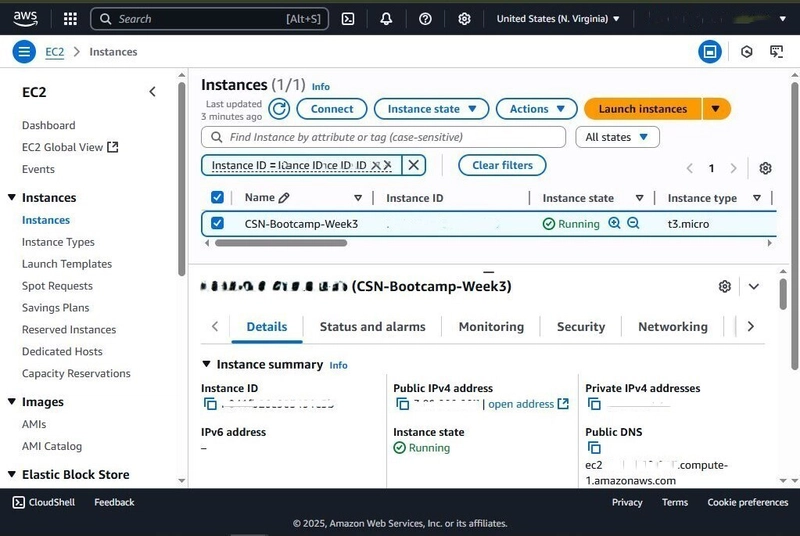
What We’ll Be Building
In this project, we will:
Launch a Windows Server EC2 instance
Deploy it in a public subnet
Configure secure access using RDP (Remote Desktop Protocol)
Restrict access to your own public IP address
Tag your instance for proper identification
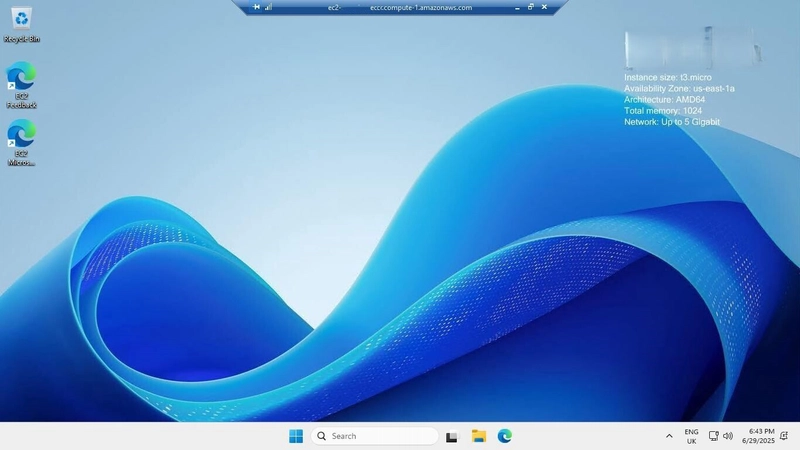
By the end, you’ll have a fully running Windows server in the cloud that you can connect to remotely.
Why This Matters
This task teaches you several core cloud concepts:
Compute provisioning (EC2)
Networking (public subnets)
Security (security groups)
Remote access (RDP)
Resource management (tagging)
These are fundamental skills every cloud engineer must master.
Step 1: Launch a New EC2 Instance
- Go to the AWS Management Console
- Navigate to EC2 Dashboard
- Click Launch Instance
Step 2: Choose Your AMI
Select:
- Amazon Windows Server 2019 Base (or newer)
This provides a ready-to-use Windows environment.
Step 3: Choose Instance Type
- Select t2.micro (Free Tier eligible)
Good for learning and basic testing.
Step 4: Add Name Tag
Give your instance a clear name, e.g.:
Name: Windows-Server-Lab
Tagging helps with:
Organization
Cost tracking
Resource identification
Step 5: Configure Networking
Make sure:
The instance is in a public subnet
Auto-assign Public IP is enabled
This ensures you can connect to it over the internet.
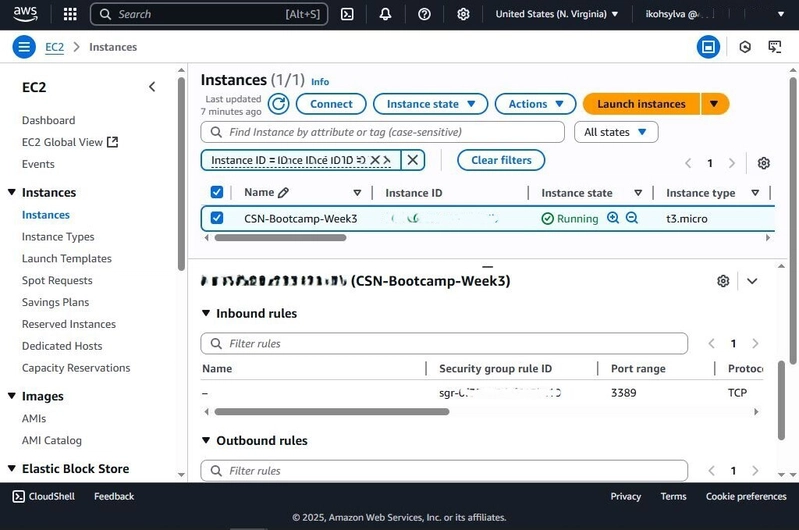
Step 6: Configure Security Group (Very Important)
Create a new security group with:
Inbound Rule
Type: RDP
Port: 3389
Source: My IP
This ensures:
✔ Only your IP can access the server
✔ The server is not exposed to the world
This is a key real-world security practice.
Step 7: Key Pair
Create or select an existing key pair
Download the .pem file
You’ll need this to decrypt the Windows password later.
Step 8: Launch the Instance
Click Launch Instance and wait for:
Instance state → Running
Status checks → 2/2 passed
Step 9: Connect via RDP
Once the instance is ready:
- Select your instance
- Click Connect
- Choose RDP Client
- Download the RDP file
- Click Get Password
- Upload your .pem key
- Decrypt the password
Then connect using:
Username: Administrator
Password: (decrypted password)
You’re now inside your Windows server!
Common Mistakes to Avoid
Opening RDP to the world (0.0.0.0/0)
This is a major security risk.Forgetting to enable public IP
You won’t be able to connect.Losing your key pair
You won’t be able to retrieve the password.
What This Project Teaches You
This isn’t just about launching a server.
It teaches you:
How to think about security first
How cloud networking actually works
How to connect to real infrastructure
How to manage compute resources properly
This is the foundation of real-world cloud operations.
Launching a Windows EC2 instance might feel like a simple task but it introduces you to critical cloud concepts that scale into enterprise environments.
If you can do this confidently, you’re already building the skills needed to:
Manage enterprise workloads
Support cloud infrastructure
Work in DevOps or Cloud Engineering roles
I’m also excited to share that I’ve been able to secure a special discount, in partnership with Sanjeev Kumar’s team, for the DevOps & Cloud Job Placement / Mentorship Program.
For those who may not be familiar, Sanjeev Kumar brings over 20 years of hands-on experience across multiple domains and every phase of product delivery. He is known for his strong architectural mindset, with a deep focus on Automation, DevOps, Cloud, and Security.
Sanjeev has extensive expertise in technology assessment, working closely with senior leadership, architects, and diverse software delivery teams to build scalable and secure systems. Beyond industry practice, he is also an active educator, running a YouTube channel dedicated to helping professionals successfully transition into DevOps and Cloud careers.
This is a great opportunity for anyone looking to level up their DevOps/Cloud skills with real-world mentorship and career guidance.
Do refer below for the link with a dedicated discount automatically applied at checkout;
DevOps & Cloud Job Placement / Mentorship Program.
If you also found this interesting and would love to take the next steps in the application process with AltSchool Africa do use my referral link below;
Apply here or use this Code: W2jBG8 during the registration process and by so doing, you will be supporting me and also getting a discount!
Special Offer: By signing up through the link and using the code shared, you’ll receive a 10% discount!
Don’t miss out on this opportunity to transform your future and also save while doing it! Let’s grow together in the tech space. Also feel free to reach out if you need assistance or clarity regarding the program.
I’m Ikoh Sylva, a passionate cloud computing enthusiast with hands-on experience in AWS. I’m documenting my cloud journey here from a beginner’s perspective, aiming to inspire others along the way.
If you find my contents helpful, please like and follow my posts, and consider sharing this article with anyone starting their own cloud journey.
Let’s connect on social media. I’d love to engage and exchange ideas with you!