


Microservices become expensive before you even build the real product.
You spend time setting up infrastructure, configs, and diagrams instead of solving the actual problem.
And most architecture diagrams are outdated before the sprint even ends.
This post is about collapsing that gap — using a Domain-Specific Language (DSL) and live architecture diagrams to prototype a working microservice system in minutes, not days.
The real cost of prototyping microservices
A standard prototype cycle looks like this:
- Sketch architecture in Miro or Excalidraw
- Scaffold three or four service repos
- Set up Dockerfiles, a Compose file, and an Nginx reverse proxy
- Write database migrations
- Implement boilerplate route handlers just to test a POST endpoint
- Update the diagram — which is already wrong
By the time you have something you can actually demo, half a sprint is gone. Worse, the diagram and the running system are already out of sync.
DSL as the single source of truth
A Domain-Specific Language lets you express intent rather than implementation. Instead of writing a route handler, a migration, and a controller, you declare what a service does:
service UserService {
  description: "Manage user profiles and creation"

  GET    "/users"
  POST   "/users"        -> action.CreateUser
  GET    "/users/:id"
  DELETE "/users/:id"

  depends_on: [AuthService]
}

action CreateUser {
  Model.save User
  QUEUE notify.welcome
}

model User {
  id:        string    @id
  name:      string
  email:     string    @unique
  createdAt: datetime  @auto
}
That block contains:
- The full HTTP surface of a service
- Its dependency on another service
- A queue event it emits
- The data model it persists, with field types and constraints
Everything downstream — the database table, the route handler, the API contract — can be derived from this declaration.
Diagrams that cannot drift
One of the most overlooked challenges in microservice architecture is keeping system diagrams up to date.
An Excalidraw file does not know that you renamed a service last Tuesday. A Confluence page does not know a new queue topic was added. Teams end up with diagrams that describe the system as it was, not as it is.
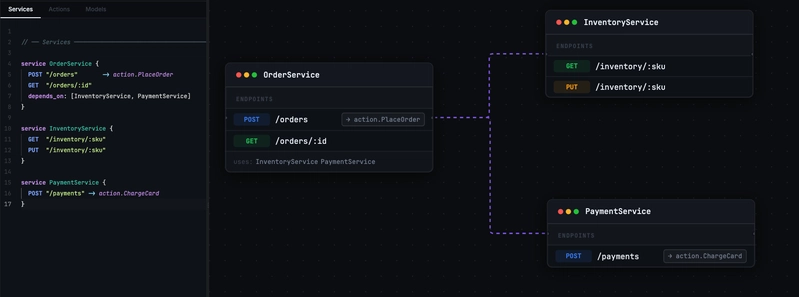
When your diagram is generated directly from the DSL, this problem disappears. The architecture is visualised from the same source that runs the system. Adding a depends_on edge in the schema immediately renders the arrow in the diagram. Removing a route removes it from the graph. The diagram is a live projection, not a separate artefact.
This matters especially during prototyping, when the architecture changes many times per day. You stop context-switching between your editor and a diagramming tool. The diagram updates as you type.
The prototype workflow in practice
Here is what a fast prototype cycle looks like when DSL and diagrams are unified:
Step 1 — Define services and dependencies
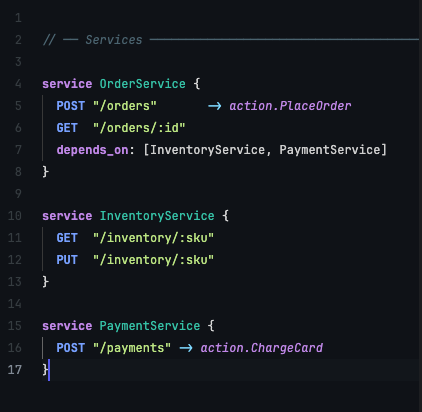
Start with the service topology. What services exist? What do they depend on? You can write this in five minutes for most prototypes:
service OrderService {
  POST "/orders"       -> action.PlaceOrder
  GET  "/orders/:id"
  depends_on: [InventoryService, PaymentService]
}

service InventoryService {
  GET  "/inventory/:sku"
  PUT  "/inventory/:sku"
}

service PaymentService {
  POST "/payments" -> action.ChargeCard
}
The diagram renders the three-service topology immediately. You can share it with a product manager or tech lead before writing any implementation.
Step 2 — Add models and actions
Flush out the data model and the side effects of each action:
action PlaceOrder {
  Model.save Order
  QUEUE inventory.reserve
  QUEUE payment.charge
}

action ChargeCard {
  QUEUE payment.charge
}

model Order {
  id:        string   @id
  userId:    string
  sku:       string
  quantity:  integer
  status:    string   @default("pending")
  createdAt: datetime @auto
}
The diagram now shows the queue topics flowing between services. The data model is visible as a node connected to its owning service.
Step 3 — Hit a real endpoint
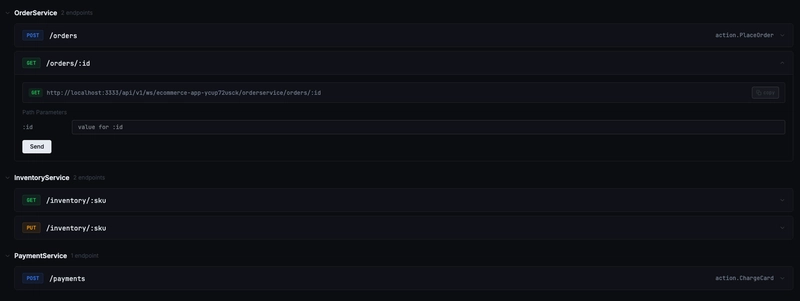
With a platform that executes the DSL, saving the schema gives you a live HTTP endpoint. You can curl it, run Postman tests against it, or connect a frontend. The database tables are provisioned automatically. You have not written a single route handler.
Why an all-in-one platform changes the equation
The DSL-and-diagram approach reaches its full potential when the same schema that generates your diagram also runs your backend. That is the promise behind platforms like Platform90.
Without a unified platform, you still have to:
- Build a DSL interpreter yourself
- Wire the interpreter output to a runtime (Express, Fastify, etc.)
- Provision a database and run migrations
- Set up an API gateway
- Deploy everything somewhere
Each of those steps is solvable, but they are not the problem you came to solve. An all-in-one platform absorbs all of it.
The engineer writes a DSL schema. The platform:
| What you declare | What the platform does |
|---|---|
service Foo { GET "/items" } |
Registers the route on the live gateway |
model Item { id: string @id } |
Creates the Postgres table |
action CreateItem { Model.save Item } |
Wires the route to the persistence layer |
depends_on: [OtherService] |
Renders the dependency edge in the diagram |
QUEUE topic.name |
Provisions the queue topic and shows it in the diagram |
The architect gets a diagram. The frontend team gets a live endpoint. Everyone is working from the same artefact.
When to use this approach
DSL-driven prototyping is most valuable when:
- The architecture is still being explored. You want to try three different service topologies without committing to six repo scaffolds.
- You need cross-functional alignment quickly. A living diagram generated from the schema is a better alignment tool than a slide deck.
- You are building an API-first product. The contract exists before the implementation — the DSL is the contract.
- Iteration speed matters more than fine-grained control. You trade some low-level customisation for a dramatic reduction in setup cost.
Summary
Slow microservice prototyping is mostly an overhead problem, not a complexity problem. The DSL-plus-diagram pattern attacks that overhead directly:
- One file describes the entire system
- The diagram is generated from the schema, so it cannot drift
- A platform that executes the schema means the prototype is also the running application
Engineers spend their time on the problem, not on the plumbing.
The next time you build a new service setup, ask yourself what you’re really trying to understand.
If it’s the architecture, data flow, or APIs — start with the schema first.
Let the tooling generate the rest.
Platform90 is a DSL-first microservice platform that generates live architecture diagrams and running HTTP APIs from a single schema file. Start a free workspace →