








I have mentioned the Oasis ROFL (runtime off-chain logic) framework on several occasions. For most people, this explainer video would be enough. But for developers and dApp builders, who want to try things out themselves, a deeper dive is worth it. In this guide, I will give a quick introduction to ROFL and then share a QuickStart tutorial to help build a ROFL-powered app.
ROFL in a nutshell
The ROFL architecture consists of these distinct components: the hardware, the application, the remote attestation, the blockchain layers, and user interaction.
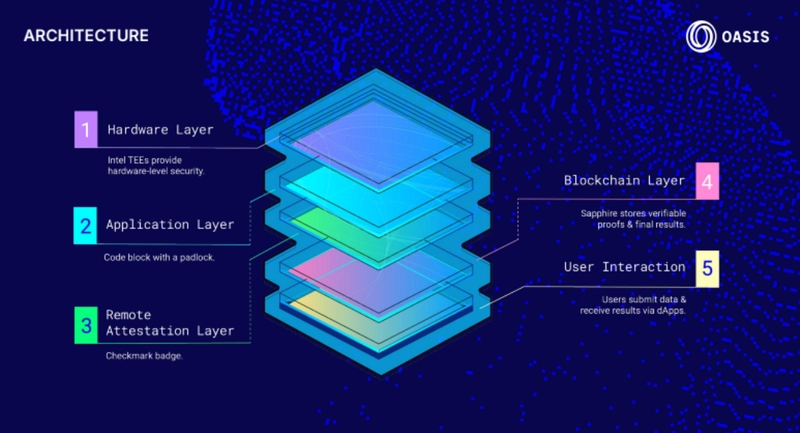
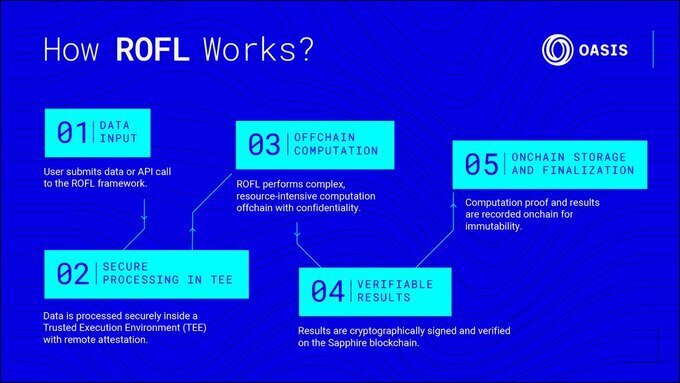
Further, this 5-part process lays out how ROFL works.
From a developer's perspective, ROFL-powered apps run on Oasis nodes inside a Trusted Execution Environment (TEE), managed through the protocol's unique production-ready EVM runtime - Sapphire.
When you use ROFL, you get the following support:
- Docker-like containers or single executable apps, based on what Trusted Compute Base (TCB) you are using, and what your threat model is
- Intel SGX/TDX ensures privacy and integrity, and also provides a full update history and auditability
- Your app is registered, managed, and deployed on a permissionless pool of ROFL nodes, which means it is not censorable
- There is a built-in Key Management Service (KMS) that stores your app's secrets as well as secures key derivation inside the TEE
- Verifiable ROFL transactions originating from integration with Oasis Sapphire that enable EVM-compatible confidential smart contracts
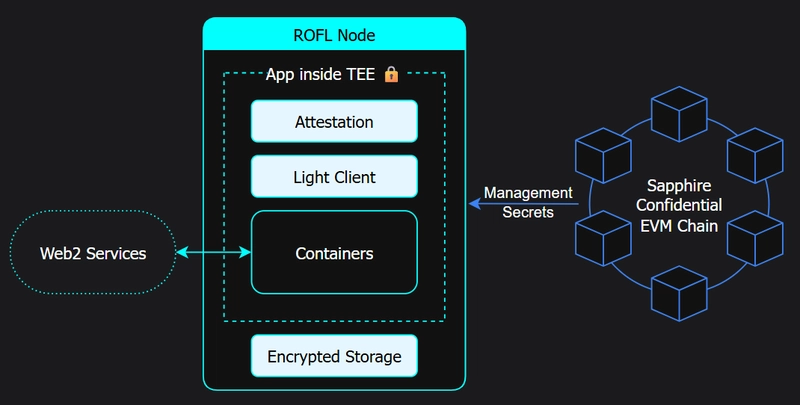
Moreover, you don't need to build from scratch - you can just wrap your existing app into a ROFL-powered app. Let's see how.
QuickStart
There are 5 steps to enhance an app with ROFL power:
- Initialize the ROFL manifest
- Create a new app on blockchain
- Build a ROFL bundle
- Encrypt secrets and store them on-chain
- Deploy your app on a ROFL node
Prerequisites
Containerized App
First thing you need is a containerized app with a downloadable Docker-like image. Any public Open Container Initiative (OCI) repository works; however, you might like to choose from Docker or GitHub container registry.
If your app is not already running inside a container and you don't know how, follow this step-by-step mini tutorial.
Oasis CLI
Next, you need the latest version of the Oasis Command Line Interface (CLI). Install it from here.
Tokens
Lastly, you will need about 150 tokens to cover ROFL registration, renting a machine, and paying for the gas fees.
Now, you can either create a new account or import an existing one. Let's check out both processes.
Create a new account ->
oasis wallet create my_account --file.algorithm secp256k1-bip44
Later, you can choose to import this account to Metamask or other Ethereum-compatible tooling, e.g. Hardhat.
Import an existing account ->
You need to export the secp256k1 private key or mnemonic from your existing wallet before running this command:
oasis wallet import my_account
Note: If you are working in a test environment, you can get free testnet tokens from the official faucet.
If you are building on the mainnet, you will need to buy ROSE tokens.
Initialize
This is the first step. You start by running oasis rofl init using compose.yaml inside your app folder. This will generate the ROFL manifest in the form of rofl.yaml.
oasis rofl init
Now, based on your requirement, you can change the memory, specify the number of cpus, and the root filesystem storage section that comes under resources.
rofl.yaml
name: my-app
version: 0.1.0
tee: tdx
kind: container
resources:
  memory: 512 # in megabytes
  cpus: 1
  storage:
    kind: disk-persistent
    size: 512 # in megabytes
artifacts:
  firmware: https://github.com/oasisprotocol/oasis-boot/releases/download/v0.6.2/ovmf.tdx.fd#db47100a7d6a0c1f6983be224137c3f8d7cb09b63bb1c7a5ee7829d8e994a42f
  kernel: https://github.com/oasisprotocol/oasis-boot/releases/download/v0.6.2/stage1.bin#e5d4d654ca1fa2c388bf64b23fc6e67815893fc7cb8b7cfee253d87963f54973
  stage2: https://github.com/oasisprotocol/oasis-boot/releases/download/v0.6.2/stage2-podman.tar.bz2#b2ea2a0ca769b6b2d64e3f0c577ee9c08f0bb81a6e33ed5b15b2a7e50ef9a09f
  container:
    runtime: https://github.com/oasisprotocol/oasis-sdk/releases/download/rofl-containers%2Fv0.8.0/rofl-containers#08eb5bbe5df26af276d9a72e9fd7353b3a90b7d27e1cf33e276a82dfd551eec6
    compose: compose.yaml
Create
The next step is to create a new app on-chain. You can use the oasis rofl create command for this.
Please note that any newly created app in this process is registered by default on the Sapphire mainnet. If you are using a test environment, you will need to change the setting. So, you will be required to pass --network testnet parameter.
oasis rofl create --network testnet
The check whether this transaction was successful is to find your app on the Oasis Explorer.
Build
In this step, we will build the ROFL bundle.
oasis rofl build
This command results in the generation of a new .orc file inside your project folder.
Secrets
This is the step where privacy is enforced. So, if there are environment variables that your app is using, you can store them on-chain privately using the oasis rofl secret command. It would look like this:
echo -n "my-secret-token" | oasis rofl secret set TOKEN -
This command populates the TOKEN secret. You can now use it in your compose file like this:
compose.yaml
services:
  python-telegram-bot:
    build: .
    image: "ghcr.io/oasisprotocol/demo-rofl-tgbot:ollama"
    platform: linux/amd64
    environment:
      - TOKEN=${TOKEN}
If you want to submit the secrets and the ROFL bundle information on-chain, you can do so with the oasis rofl update command.
oasis rofl update
Deploy
This is the final step of the process. Here, you use the oasis rofl deploy command so that your app gets deployed to a ROFL provider.
oasis rofl deploy
The command triggers the bootstrapping of a new machine that fits the required resources provided by Oasis. You can check the status of the machine using the oasis rofl machine show command.
Oasis rofl machine show
You can now also check your application logs to verify how everything works. You will need the oasis rofl machine logs command for this.
oasis rofl machine logs
Parting words
If you are a developer who likes the hands-on approach, I hope you had a good time trying out this tutorial and successfully deploying your first ROFL-powered app.
You will note that in this guide, I have provided several links to the Oasis documentation instead of elaborating on them.
- containerize your app
- latest Oasis CLI release
- oasis rofl init
- oasis rofl create
- oasis rofl secret
- oasis rofl update
- oasis rofl deploy
- oasis rofl machine show
- oasis rofl machine logs
That's because I wanted to focus on the topic here without going into details on these commands, which require separate attention, and I will prepare other tutorials explaining them later on.
For a quick chat with the Oasis engineering team for help with specific issues, you can drop your comments in the dev-central channel in the official Discord.