











📦 Runnable workflow: github.com/sm1ck/honeychat/tree/main/tutorial/04-ipadapter — a ComfyUI
workflow.json(with<tune>placeholders for IP-Adapter weight/end_at) plus a stdlib Python client that posts it to your ComfyUI instance and saves the output.
In the previous post I argued that LoRA per character is often the strongest fit for visual identity. But what happens when you want to render that character wearing a specific item — a shop product, a user-uploaded outfit, a gift from another user?
LoRA helps stabilize the character. To also preserve an arbitrary reference image, IP-Adapter is a common fit. Those two techniques can compete unless you configure them carefully.
TL;DR
- LoRA stabilizes the character's face. IP-Adapter pulls features from a reference image. If both are too strong late in sampling, the face can drift toward the reference.
- Balance: moderate IP-Adapter weight (lower half of 0–1) with early handoff (IP-Adapter releases control before the final denoising steps). The final steps belong to the LoRA.
- A useful node order:
Checkpoint → LoRA → FreeU → IP-Adapter → KSampler. Feeding IP-Adapter into the model conditioning after LoRA lets LoRA reassert on late steps.
Render your first outfit preview
This section walks you from clone to a generated image in under ten minutes.
1. Prereqs
- A running ComfyUI instance (local GPU, rented box, or a friend's)
- ComfyUI_IPAdapter_plus installed in it
-
ip-adapter-plus_sdxl_vit-h.safetensorsinmodels/ipadapter/ -
CLIP-ViT-H-14-laion2B-s32B-b79K.safetensorsinmodels/clip_vision/ - Your own SDXL base checkpoint
- A character LoRA — if you don't have one, go through the previous article first
2. Clone and install the client
git clone https://github.com/sm1ck/honeychat
cd honeychat/tutorial/04-ipadapter
pip install -e .
3. Put your outfit reference next to the client
Anything flat-lay, clean-background works best. ./my-dress.png for this example.
4. Run — start at the middle of both tuning ranges
export COMFY_URL=http://localhost:8188
export REFERENCE_IMAGE=./my-dress.png
export CHECKPOINT=your-sdxl-base.safetensors
export LORA=your-character-v1.safetensors
export IPADAPTER_WEIGHT=0.4      # lower half of 0–1
export IPADAPTER_END_AT=0.8      # upper half of 0–1

python client.py
Output lands in ./out/outfit_preview_<n>.png. First run should usually show your character wearing something that resembles the reference dress.
5. Tune
Inspect the output. Two failure modes tell you how to adjust:
-
Face drifted → lower
IPADAPTER_WEIGHTor lowerIPADAPTER_END_ATby 0.05 and re-run. -
Item doesn't resemble the reference → raise
IPADAPTER_WEIGHTby 0.05, or raiseIPADAPTER_END_ATslightly.
Sweep in 0.05 steps, not 0.1. The usable range can be narrower than expected, and a new base model may take several tuning sweeps before the balance feels stable.
6. Validate the workflow JSON with pytest
pip install -e ".[dev]"
pytest -v
Five tests make sure workflow.json stays valid JSON, every node class is still referenced, and <tune> placeholders haven't been accidentally committed with real values.
The problem
You have a character (Anna) stabilized by a custom LoRA. She appears reasonably consistent across generations. Now the user buys a specific dress in your shop. The dress is a reference image. You want:
- Anna's face — unchanged.
- This specific dress — rendered faithfully on Anna.
Prompt engineering usually can't guarantee this. "Anna wearing a red silk dress with a white collar" generates a red silk dress, not necessarily this red silk dress. SKU-level fidelity needs the reference image in the generation path.
Why naive IP-Adapter breaks the character
IP-Adapter pulls features from a reference image into the model's cross-attention. If you set it too high, it can preserve the reference image aggressively — including its face, if there is one. Even if the reference is an unworn product shot, IP-Adapter can pull in lighting, backdrop, and styling from the reference photo.
At high weight: Anna's face may start looking more like whoever (or whatever) is in the reference. Lighting and pose can bias toward the reference.
At low weight: The character is fine. The dress is approximately the right color and cut but not recognizable as this dress. Your product catalog becomes decorative rather than accurate.
The balance: moderate weight + early handoff
The two knobs that matter are weight and end_at.
Weight — the multiplier on IP-Adapter's contribution to cross-attention. Below the lower-middle of the 0–1 range, the reference is a "mood" more than a fact. Above the upper-middle, the reference dominates. Somewhere in the lower half is where you find the range that preserves item identity without killing face identity.
end_at — the fraction of denoising steps during which IP-Adapter is active. If it runs through all steps, it has a say in the final face details. If it ends earlier (say 70–90% of the way through), the last steps belong to the rest of the pipeline, and LoRA face features reassert.
In rough terms: the item gets baked in during the middle of denoising, the face re-sharpens at the end.
Workflow node order (ComfyUI)
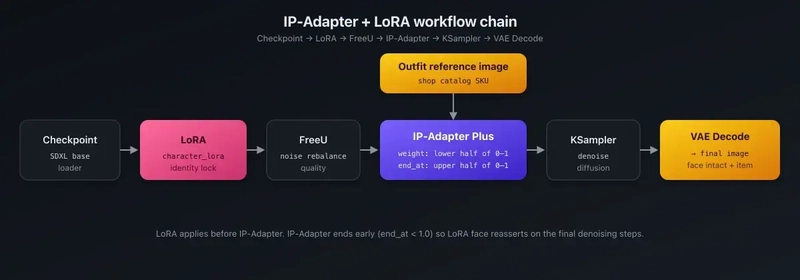
[Checkpoint Loader]
  → [LoRA Loader: character_lora]
    → [FreeU: quality touch-up]
      → [IPAdapter Advanced: reference, weight=W, end_at=E]
        → [KSampler]
          → [VAE Decode]
Two things about this order:
-
LoRA comes before IP-Adapter in the chain. The LoRA modifies the checkpoint weights; IP-Adapter modifies cross-attention during sampling. When IP-Adapter ends at step
end_at, the remaining steps operate on the LoRA-modified weights without IP-Adapter influence — this is what lets the face reassert. - FreeU is optional. It's a noise rebalance that improves quality without adding compute.
The tutorial client takes the base workflow.json, rewrites the <tune> placeholders with env-supplied values, uploads the reference image to ComfyUI, and queues the prompt:
def rewrite_workflow(wf: dict[str, Any], args: argparse.Namespace, ref_filename: str) -> dict[str, Any]:
    """Fill in the `<tune>` and `<path>` placeholders with actual values."""
    wf = json.loads(json.dumps(wf))  # deep copy

    if args.checkpoint:
        wf["1"]["inputs"]["ckpt_name"] = args.checkpoint
    if args.lora:
        wf["2"]["inputs"]["lora_name"] = args.lora
    wf["2"]["inputs"]["strength_model"] = args.lora_strength
    wf["2"]["inputs"]["strength_clip"]  = args.lora_strength
    wf["5"]["inputs"]["image"] = ref_filename
    wf["6"]["inputs"]["weight"] = args.weight
    wf["6"]["inputs"]["end_at"] = args.end_at
    wf["7"]["inputs"]["text"] = args.prompt
    wf["10"]["inputs"]["seed"] = int(time.time()) & 0xFFFFFFFF
    return wf
The full workflow.json in the tutorial folder ships with <tune> placeholders on every field you should touch. The test suite asserts those placeholders stay in the template — a safety net against accidentally committing your tuned production values.
Weight tuning loop
The practical process:
- Pick a reference item with a clean product photo.
- Pick a character with a strong LoRA.
- Render around
weight=0.3, end_at=0.8. Check face, check item. - Face drifts → lower weight or lower end_at.
- Item doesn't resemble the reference → raise weight carefully, or leave weight and raise end_at.
- Sweep in 0.05 increments, not 0.1. The usable range is narrower than you'd expect.
Several tuning sweeps on realistic and anime bases usually land you on a working pair.
Production integration
Outfit catalog as reference images. Each shop item has a reference image stored in object storage. At generation time, pass the reference URL to the GPU worker, which downloads it once and caches.
Catalog pre-rendering for previews. When a user browses the shop, they see a preview of each item rendered on their active character. These previews don't need to happen on every page load — generate them asynchronously (Celery worker), store in S3, serve from cache.
Consistency across image and video. The same IP-Adapter + LoRA pair used for images can often drive the start-frame of video generation (e.g., Kling). Tune the still-image path first, then reuse it carefully.
Fallback when the item isn't visual. Some "items" in a shop are stats buffs, relationship flags, or dialogue unlocks — things without a visual. Gate the IP-Adapter pathway to items flagged as visual-only.
Production issues that came up
Face drifted on a noticeable slice of catalog previews. Running IP-Adapter weight too high "for stronger outfit adherence." Rolled back to the lower-half range after face-drift complaints spiked. Lesson: tune one variable at a time, even when it feels slow.
Cached reference URLs expired. Shop items in S3 had time-limited presigned URLs. Generation workers fetched the URL at queue-time, but the URL expired before ComfyUI actually downloaded it. Fix: pre-fetch on the worker side, pass the ComfyUI-side filename instead of the external URL.
IP-Adapter model version mismatch with SDXL base. IP-Adapter Plus ships multiple weights keyed to specific SDXL base models. Mixing can produce worse output without an obvious runtime error — just lower fidelity. Pin the IP-Adapter version to the base in your deployment config.
Non-visual shop items crashed the workflow. The API tried to render "stat boost" items through the image pipeline. Fix: a visual: true|false flag on catalog entries, checked at the API boundary before queuing.
What I'd change if starting over
- Start with a clean catalog. Reference images with consistent backgrounds, consistent lighting, no model already wearing the item if possible.
- Version the tuning. When you move base models, your IP-Adapter weight/end_at values probably move too. Treat them as part of the deployment, not as constants.
- Cache the pre-rendered previews aggressively. A character × item grid grows multiplicatively. Pre-render on character creation and on new item add.
Where this lives
HoneyChat's shop renders outfits, accessories, and gifts on active characters using IP-Adapter Plus layered over per-character LoRA. Public architecture doc: github.com/sm1ck/honeychat/blob/main/docs/architecture.md.
References
If you've shipped an IP-Adapter + LoRA combo in production, I'm curious what weight / end_at pairs you landed on and for which base. The sweet spot seems to shift meaningfully between anime and realistic bases.