









Kotori is a strongly-typed, modular i18n library for React. It’s designed for developers who care about type safety and developer experience without the overhead.
- Size: 0.39kb gzipped.
- Dependencies: Zero.
- Setup: No JSON, no codegen, no schema files.
The "Magic": Type-Inferred Variables
The standout feature of Kotori is how it leverages TypeScript’s template literal types to parse your strings. Instead of maintaining a separate schema or running a codegen step, your primary language string becomes the type contract.
If your English string contains {{name}}, Kotori ensures that every other language also includes {{name}}, and that you provide a name value when calling the translation function.
const { dict } = kotori({
    primaryLanguageTag: 'en',
    secondaryLanguageTags: ['zh', 'ja', 'ms'],
})

// ❌ TypeScript error: missing japanese translation
const intro = dict({
    // The "Source of Truth"
    en: 'Hello {{name}}, is it {{time}} now?',

    // ❌ TypeScript error: missing key 'name'
    zh: '你好,现在是 {{time}} 吗?',

    // ❌ TypeScript error: unknown key 'nam'
    ms: 'Hai {{nam}}, adakah pukul {{time}} sekarang?'
})<{ name: string; time: `${number}:${number}` }>
// ^ Optional: Narrow your types further
By turning your strings into a strict contract, Kotori catches the most common i18n bugs during development rather than in production:
// ✅ Works perfectly
t('intro', { name: 'John', time: '12:25' })

// ❌ TypeScript error: missing { name }
t('intro', { time: '12:25' })

// ❌ TypeScript error: unknown key 'nama'
t('intro', { nama: 'John', time: '12:25' })

// ❌ TypeScript error: invalid format for 'time' (expects HH:MM)
t('intro', { name: 'John', time: '12-00' })
This approach eliminates the "string typo" category of bugs entirely. If the code compiles, you can be confident that your variables are correctly mapped across all supported languages.
Truly Modular (Tree-shakeable)
Most standard i18n libraries load one giant, centralized dictionary. Kotori flips this model. It encourages you to colocate your translations directly inside the component or feature files that use them. This might seem simple, but the architectural implications are huge.
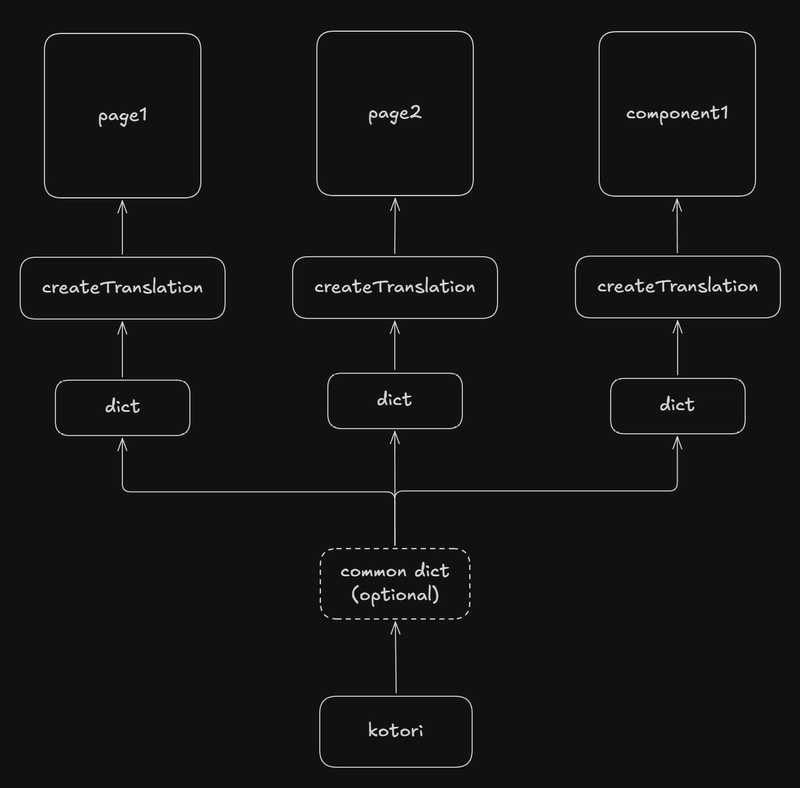
By separating definitions this way, you are leveraging the native power of modern bundlers (like Vite or Webpack) to code-split your translations automatically. A user visiting /page1 never downloads the translations for /page2.
You define the translation where you need it:
// page1.tsx
import { createTranslations, dict } from './utils'

const intro = dict({
    en: 'my name is {{name}}, I am {{age}} years old.',
    zh: '我叫{{name}},我今年{{age}}岁了。',
})

const { useTranslations } = createTranslations({ intro })
Because of this modular design, your bundler can naturally code-split your translations. You only load the strings for the page the user is actually visiting.
Global State, Local Definition
It’s important to note that while your definitions are localized to the component, the underlying language state is global. Your kotori instance (usually defined in a utility file) manages the current locale.
When you call setLanguage('jp') in a settings component on Page 1, every useTranslations hook across Page 2, Page 3, and any child component re-renders with the new Japanese strings instantly.
Give it a try
I built Kotori because I was tired of the friction in existing i18n workflows. I wanted a solution that is:
Fully Type-Safe: Catch missing variables and translation keys at compile time, not in production.
Truly Modular: Enable automatic code-splitting by colocating translations with their components.
Zero-Config: No JSON files, no external CLI tools, and no codegen. Just pure TypeScript.
If you’re looking for a lightweight, "invisible" way to handle internationalization in React, I’d love for you to check it out and let me know what you think.