








A story-driven, hands-on report about taking an existing open-source LangGraph.js agent, wrapping it in GraphOS, and learning what observability actually feels like when an agent goes sideways.
There is a moment every agent project eventually reaches.
The demo works. The graph looks clean. The tools are wired up. The prompt feels smart.
And then one run goes sideways.
Not in a dramatic, movie-scene way. In the real way.
The assistant calls the same tool again. Then again. The state grows. The trace gets noisier. The budget keeps moving in one direction. And the hardest part is not even the cost. It is the feeling that you can no longer see the system clearly.
That is the moment GraphOS was built for.
This post is not just a feature announcement. It is a field report. We took a real open-source project, wrapped it with GraphOS, ran the integration end to end, and used that exercise to answer one question:
Can an existing LangGraph.js agent — one we did not write — be made easier to observe, safer to run, and easier to explain to other developers?
The short answer is yes.
The better answer is the story below.
Before and after, in one breath
Before wrapping the agent in GraphOS:
- Every run was a black box. The first signal that something was wrong was the OpenAI bill or a stuck UI.
- Loops only surfaced as "this got slow" or "this never finished."
- Debugging meant reading log files after the fact and reconstructing a sequence the system had not preserved.
After wrapping the agent in GraphOS:
- Every step of the graph was observable in real time.
- A loop was caught at visit 7, not visit 700.
- A budget ceiling halted a misbehaving run before the credit card did.
- Every past session became time-travelable in a local SQLite-backed dashboard, no SaaS in the loop.
Same agent. Same model. Different blast radius.
The benchmark we chose
Instead of inventing a toy example, we used an existing open-source benchmark:
-
agents-from-scratch-ts: https://github.com/langchain-ai/agents-from-scratch-ts
Inside this repository, that benchmark lives at:
benchmarks/agents-from-scratch-ts
It is a strong test case because it is not a toy. It already contains:
- A working email assistant
- A Human-in-the-Loop flow
- A memory-enabled variant
- Jest-based test suites
- LangGraph wiring that looks like real application code, not a demo built for a tool launch
That makes it the right kind of pressure test for GraphOS. We did not want to ship a wrapper that only works on our own handcrafted demo. We wanted something that survives contact with someone else's architecture, state shape, tool conventions, and tests.
Why this matters
If you are reading this as a builder, imagine two options:
- Build a brand-new sample agent designed to make the tool look good.
- Take someone else's open-source agent and prove the tool against that.
We picked option 2.
That choice changes the tone of the work. Now the question is not "can GraphOS run a demo we wrote?" It becomes "can GraphOS survive contact with someone else's code?"
That is a much better story to tell — and a much better thing to ship.
What GraphOS adds to a graph
GraphOS is an observability and policy layer for LangGraph.js agents.
At a high level, it gives you three things:
- A wrapper around any compiled graph
- Composable policies (
LoopGuard,BudgetGuard, more) - A local dashboard that shows what the agent did, step by step, and lets you scrub through past runs
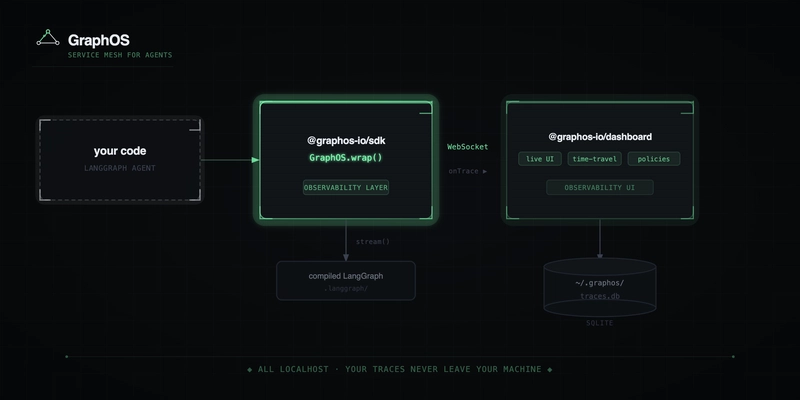
The integration stays intentionally small:
import {
  GraphOS,
  LoopGuard,
  BudgetGuard,
  tokenCost,
  createWebSocketTransport,
} from "@graphos-io/sdk";

const managed = GraphOS.wrap(myCompiledGraph, {
  projectId: "my-agent",
  policies: [
    new LoopGuard({ mode: "node", maxRepeats: 10 }),
    new BudgetGuard({ usdLimit: 2.0, cost: tokenCost() }),
  ],
  onTrace: createWebSocketTransport(),
});
That is the promise. But promises are cheap.
So we tested it against the benchmark.
How we brought GraphOS into the benchmark
There are two installation stories worth separating, because people often confuse "how we developed it inside the monorepo" with "how I should use it in my own codebase."
Story 1: how we integrated it inside this monorepo
Because the benchmark is checked into this repository, the local integration uses the built SDK directly:
import {
  GraphOS,
  LoopGuard,
  BudgetGuard,
  tokenCost,
  createWebSocketTransport,
  PolicyViolationError,
} from "../../packages/sdk/dist/index.js";
That exact integration lives in:
benchmarks/agents-from-scratch-ts/graphos-wrap.ts
This is useful for development because it lets us iterate on GraphOS and immediately retest it against the benchmark without publishing a new package every time.
Story 2: how you would install it in any outside project
If you are doing this in your own LangGraph.js project, the install is the simple part:
npm install @graphos-io/sdk
# or
pnpm add @graphos-io/sdk
Then replace the local import with the published package import:
import {
  GraphOS,
  LoopGuard,
  BudgetGuard,
  tokenCost,
  createWebSocketTransport,
  PolicyViolationError,
} from "@graphos-io/sdk";
Same code, same wrapper. The only thing that changes is where the SDK comes from.
The wrapper we added
Here is the part of the benchmark integration that mattered:
const managed = GraphOS.wrap(graph, {
  projectId: "agents-from-scratch",
  policies: [
    new LoopGuard({ mode: "node", maxRepeats: 6 }),
    new BudgetGuard({
      usdLimit: 0.5,
      cost: tokenCost({ fallback: 0.05 }),
    }),
  ],
  onTrace: createWebSocketTransport(),
});
Three details deserve a beat each.
1. We used LoopGuard in node mode
This benchmark is exactly why node mode exists.
In many real agents, the state changes every iteration because the messages array keeps growing. That means pure state-equality is not enough to detect a loop. The graph may be functionally stuck even though the raw state object is technically different each turn.
So instead of asking:
"Did we revisit the exact same state?"
we ask:
"Did we keep revisiting the same node too many times?"
That is the more practical safety rule for agents that keep appending messages as they reason.
2. We set a budget ceiling
BudgetGuard lets us cap cumulative spend per session.
new BudgetGuard({
  usdLimit: 0.5,
  cost: tokenCost({ fallback: 0.05 }),
})
tokenCost() is a drop-in cost extractor that walks the state for LangChain messages, pulls usage from usage_metadata / response_metadata.usage / tokenUsage, and applies a built-in OpenAI + Anthropic price table. For unknown models you can pass a fallback (flat USD per step or a custom price entry).
This is not just observability anymore. The run has a real boundary.
3. We streamed telemetry to the local dashboard
This line is small:
onTrace: createWebSocketTransport()
But it changes the experience completely. Instead of waiting for the final output and guessing what happened, you watch the run unfold — node by node — in the GraphOS dashboard.
The small but clever trick: a mock key path
One of the nicest touches in the integration is that graphos-wrap.ts checks whether OPENAI_API_KEY starts with sk-mock. If it does, it installs a fetch interceptor and simulates the OpenAI responses.
Why is that useful?
Because it gives us a reproducible benchmark run that is intentionally shaped to trigger the loop path. In the mock flow:
- The triage step routes the email into the response subgraph
- The agent keeps requesting
schedule_meeting - The graph cycles through
llm_call ↔ environment -
LoopGuardhalts at visit 7 with a clean policy reason
That is the kind of test harness you want when you are building safety infrastructure. You do not want to rely on "hopefully the model misbehaves today." You want a deterministic failure mode you can use on purpose.
Reproduce the setup
If you want to walk through this yourself, the full path is short.
1. Install the workspace
From the repository root:
pnpm install
2. Build the SDK
pnpm --filter @graphos-io/sdk build
3. Move into the benchmark
cd benchmarks/agents-from-scratch-ts
4. Use the benchmark normally
The upstream benchmark documents its own workflow:
pnpm agent
It expects a .env file with your API key if you want real model calls:
OPENAI_API_KEY=your_api_key_here
5. Run GraphOS alongside it
In another terminal, start the dashboard:
npx @graphos-io/dashboard graphos dashboard
# open http://localhost:4000
Then run the wrapped benchmark entrypoint:
OPENAI_API_KEY=sk-mock pnpm exec tsx graphos-wrap.ts
To run against a real provider instead of the mock path, swap in a real key and keep the same wrapper.
What we actually verified
This is where the story becomes more than marketing. We did not just wrap the benchmark and eyeball the result.
GraphOS SDK verification
From the repo root:
pnpm --filter @graphos-io/sdk test
All SDK tests pass. Coverage spans:
-
LoopGuard— bothstateandnodemodes -
BudgetGuard— cumulative cost ceiling -
tokenCost()— multiple LangChain message shapes, multiple price-table lookups -
GraphOS.wrap()— session lifecycle, error handling, sessionId continuity, listener-throw resilience
Benchmark verification
From benchmarks/agents-from-scratch-ts, the benchmark's own Jest suites still pass:
pnpm test:base
pnpm test:hitl
pnpm test:memory
That matters because it tells us something subtle but important:
GraphOS was developed alongside the benchmark without breaking the benchmark's behavior. We are not telling a story about observability by quietly degrading the agent underneath it.
What the benchmark actually exercises
This part is worth slowing down for. The benchmark is not one narrow happy path. It exercises:
- Response quality
- Expected tool calls
- Human acceptance flow
- Human edit flow
- Human rejection with feedback
- Memory persistence across later runs
So when we say we used agents-from-scratch-ts, we mean we used a compact but meaningful open-source application with real behavioral coverage — not "we ran one prompt once."
The human lesson
The benchmark is an email assistant, but the lesson is bigger than email.
Every agent team eventually needs answers to these questions:
- What node did we get stuck in?
- How many times did we visit it?
- What tool calls were made before failure?
- What did the state look like at that moment?
- Was the run expensive because it was useful, or expensive because it was looping?
Without observability, those questions become archaeology.
With GraphOS, they become part of the normal debugging workflow.
A quick interactive moment
Imagine you are looking at a run and you see the same node lighting up over and over. Which of these do you want next?
- A bigger console log
- The final model output only
- A live graph, a session timeline, and a policy halt reason that says exactly which guard fired and why
That is the difference this project is trying to create. Not more noise. Better visibility.
Why this story is stronger than a basic product post
The first version of a launch blog usually says:
- Here is what we built
- Here is the API
- Here is why it is useful
That is fine, but it is mostly a claim.
This story is better because it shows:
- The open-source project we used
- The exact link to it
- Where it lives in our repo
- How we installed GraphOS into the workflow
- How we wrapped the graph
- How we tested both the SDK and the benchmark
- What safety behavior we specifically cared about
In other words, this is not just what GraphOS is. It is how GraphOS behaves when it meets a real agent.
The files behind this story
If you want to inspect the exact pieces mentioned above, start here:
- GraphOS root:
README.md - Companion launch reference:
docs/blog/v1-launch.md - Benchmark wrapper:
benchmarks/agents-from-scratch-ts/graphos-wrap.ts - Benchmark package setup:
benchmarks/agents-from-scratch-ts/package.json - Benchmark tests:
benchmarks/agents-from-scratch-ts/tests
Final takeaway
GraphOS becomes much easier to understand when you stop describing it as a package and start describing it as a moment in a developer's day.
An agent starts drifting.
A team needs answers.
A wrapper adds policies.
A dashboard turns hidden execution into something visible.
A benchmark proves the idea against real code.
That is the story. And that is why we used agents-from-scratch-ts.
If you want to try the same path yourself:
- Benchmark: https://github.com/langchain-ai/agents-from-scratch-ts
- GraphOS: https://github.com/ahmedbutt2015/graphos
- SDK on npm: https://www.npmjs.com/package/@graphos-io/sdk
- Dashboard on npm: https://www.npmjs.com/package/@graphos-io/dashboard
npm install @graphos-io/sdk
npx @graphos-io/dashboard graphos dashboard
The next step is simple: wrap your graph, run your tests, and see what your agent was actually doing when nobody was watching.