


Through this article, I will share my real experiences, including the steps, process, and insights that helped me encourage engineers to easily and happily participate in usability 1:1 meetings to improve the KServe experience.
Power of sharing your feedback:
Before we jump in, let’s take a moment to understand the power of feedback.
Imagine you’re booking flight tickets for your entire family with an airline you really like. The overall experience is excellent—you enjoy the journey, there are plenty of entertainment options onboard, and both the complimentary and paid food and beverages are delicious. The airline even offers family-friendly meal options and services throughout the journey. From booking to boarding, everything feels smooth and well-designed. On top of that, they provide lounge access at a much more affordable price compared to other airlines.
However, there’s one issue: the online check-in app doesn’t work. Because of that, you have to check in at the airport, which means standing in long lines and wasting time. It’s frustrating.
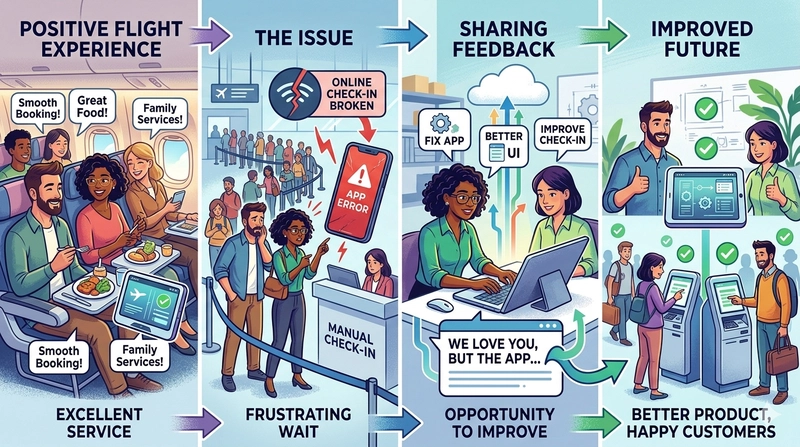
Even so, this was just a one-time issue, while the rest of your experience with the airline has consistently been great. Instead of switching to another airline, you might choose to share your feedback so they have a chance to improve.
If you don’t provide feedback, the airline may never know about the issue and won’t get the opportunity to fix it. But if you do share it, they can improve the experience—not just for you, but for many others as well. Over time, this leads to a better product, happier customers, and increased trust in the brand.
That’s the power of feedback.
A single issue like a temporary failure in the online check-in system doesn’t define the entire service. Behind the scenes, engineers and teams are constantly working to build and maintain systems that serve millions of users every day. While mistakes can happen, feedback helps identify and resolve them.
Instead of immediately switching to another airline and going through the effort of adapting to a new experience, simply sharing your feedback can lead to meaningful improvements. The next time you fly, you might find that the issue has been resolved—and your experience is even smoother.
Feedback doesn’t just fix problems—it strengthens experiences.
Number of ways to share your feedback.
There are many ways to share your feedback.
For example, an airline team might call you and ask about your experience. During this phone conversation, you can share your thoughts in detail this is known as an interview in user research.
Sometimes, they may ask you to walk through the online check-in process step by step, possibly over a video call. This allows the UX team to observe how you interact with the system in real time and identify any difficulties or pain points you encounter. This method is called a usability study.
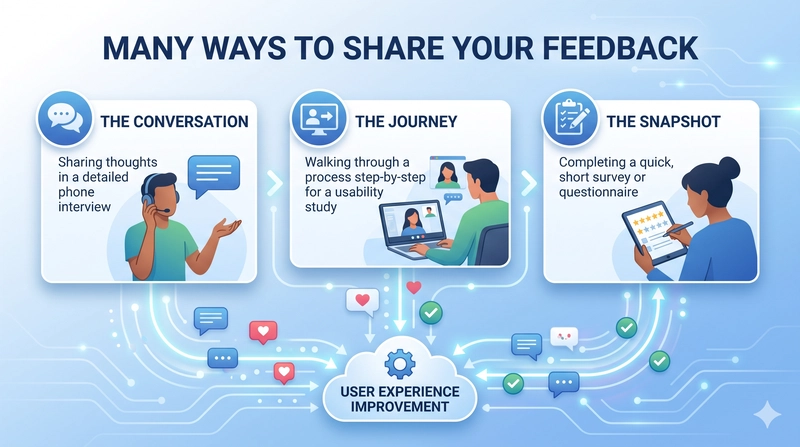
Finally, you might be asked to complete a short form in the application at the end of your journey—usually a 3–5 minute questionnaire about your recent experience. This is known as a survey in user research.
In all these ways, you are given opportunities to share your feedback, helping teams understand your experience and improve their services.
What is usability studies and how it can be conducted?
Let’s learn what usability studies (User research's method) are and how I started a usability study project with K-Serve, which is one of the CNCF incubating projects.
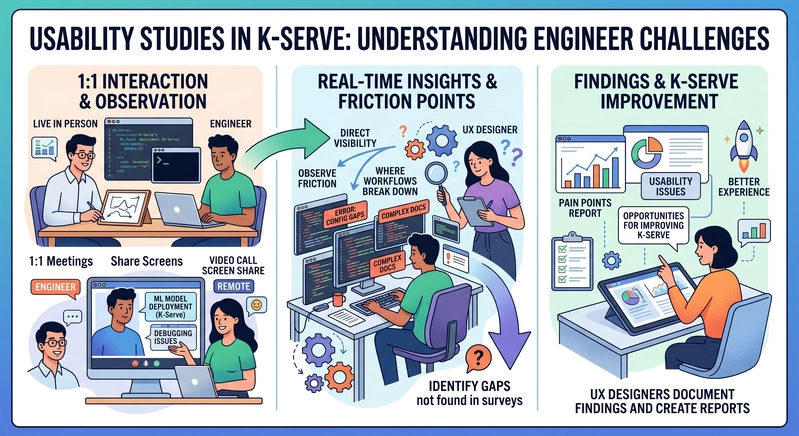
Usability studies are one of the key user research methods used to understand engineers’ challenges in real world workflows. In this approach, engineers on the video call with UX designer or live in person in 1:1 meeting to share their screens and perform tasks such as deploying ML models using K-Serve or walking through how they debug issues.
During these 1:1 meeting, UX designers don’t just listen also they observe. This gives them direct visibility into where friction occurs, which tools or documentation cause confusion, and where workflows break down. These real time observations are critical for identifying gaps that might not surface through interviews or surveys alone.
Based on these 1:1 meeting, UX designers document their findings and create reports that highlight engineers’ pain points, usability issues, and opportunities for improving the overall K-Serve experience.
How to conduct usability studies:
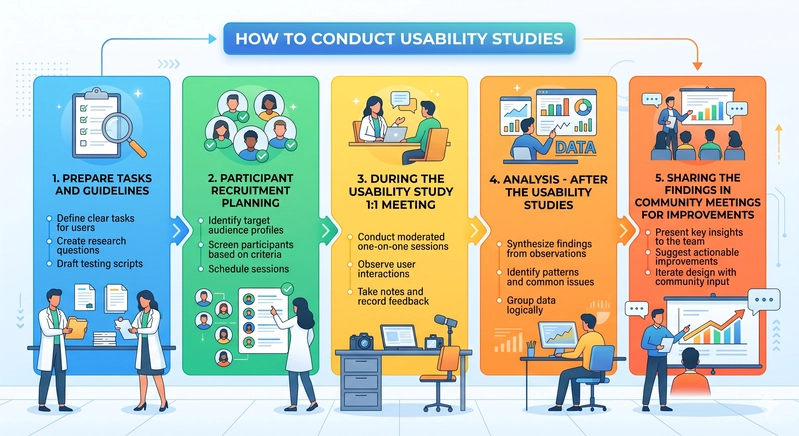
1. Prepare tasks and guidelines for usability studies
In this phase, UX designers prepare what they want to learn from the study.
First, they create a list of tasks for engineers to perform. For example, in KServe, tasks might include: Deploying an ML model, Monitoring ML workloads, Debugging issues
Once the tasks are ready, UX designers prepare follow-up questions. These questions help engineers share more details, such as:
- Did you face any problems during this task?
- Was anything confusing or difficult?
- How do you think this process can be improved?
This gives engineers a chance to share their thoughts and overall experience with K-Serve. Next, UX designers create guidelines for the study. This includes:
Choosing tools for the sessions (for example, Google Meet for 1:1 meetings), Deciding how to handle data (what can be shared publicly and what should stay confidential), Making sure any shared data is anonymous and combined (not personal or raw data), Planning the timeline for sessions and analysis, Deciding where and how to share the final results
These steps help ensure the usability study is well-organized, respectful of participants’ privacy, and useful for improving the product.
2. Participant recruitment planning
In this phase, the UX designer plans how to recruit participants and collect basic information about them.
The UX designer creates a simple survey for engineers to sign up for usability studies. This survey helps gather important details such as:
- The engineer’s role and experience
- Their availability for a 1:1 session
- How they use KServe in their work
- The main challenges they are currently facing
This information helps both the UX designer and the engineer save time. The UX designer can understand the participant before the session and prepare better.
For example, if an engineer mentions that they face challenges during deployment, the UX designer can focus on deployment-related tasks during the session.
Overall, this process makes it easier to recruit the right participants and helps the UX designer learn about their challenges in advance, leading to more focused and useful usability studies.
3. During the Usability study 1:1 meeting:
Once the usability session is scheduled, the UX designer observes the tasks the engineer performs and takes notes.
With the engineer’s permission, the UX designer may record the session for study purposes. The recording will not be shared publicly—it will remain confidential and only be used by the UX team and KServe maintainers for research.
At the beginning of the session, the UX designer will ask for consent to record. If an engineer is not comfortable being recorded, that is completely okay—they can still participate and share their experience.
4. Analysis - After the Usability studies:
Once the UX designer completes usability studies with engineers (for example, with more than 10–20 participants), they begin analyzing the data.
The UX designer uses analysis methods such as thematic analysis and pattern identification to find common themes and trends across all sessions. Based on this, they create a report that includes both key insights and metrics.
For example, the report might show that 60% of engineers faced difficulties with the deployment process. A common pattern identified could be configuration complexity.
In this way, the UX designer creates a clear summary of findings without sharing any raw data.
5. Sharing the findings in community meetings for improvements:
Once the UX designer has created the findings report, the results are shared with the KServe community to support improvements.
The insights from the report are discussed in community meetings to help identify what can be improved in K-Serve. In some cases, the findings may also be shared in CNCF KubeCon talks to highlight the challenges engineers face while using K-Serve and to encourage broader discussions and solutions.
This is how usability studies, through these five steps, can have a significant impact by making KServe easier for engineers to use.
Engineer Effort and Real-World Challenges in K-Serve:
K-Serve contributors (engineers) are building tools for other engineers who use K-Serve to deploy and manage ML models. Often, contributors make a plan on the user requirements and begin building the product based on those engineers knows.
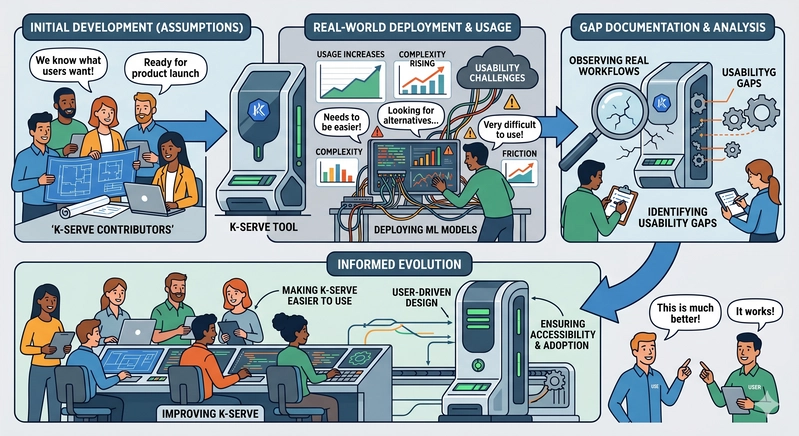
Once the product reaches production and more engineers start using K-Serve in real environments, usability challenges begin to surface. As usage increases, engineers start noticing difficulties while working with the system. In my research, I have heard users say that it is “very difficult to use,” “needs to be easier,” or that they are “looking for alternatives,” or "they are trying to figure out which approach that we can began for ML deployment"
However, there is still an opportunity to improve KServe significantly. By observing and listening closely to engineers—especially where they struggle in real workflows, we can identify meaningful usability gaps. Documenting and analyzing these insights can help make K-Serve easier to use for both current users and new engineers who are adopting it for the first time.
Ultimately, this approach ensures that K-Serve evolves based on real user experiences rather than assumptions, making it more usable, accessible, and widely adopted in production environments.
Why engineers hesitate or afraid to share feedback:
Engineers often work within environments that involve sensitive systems, production constraints, and organizational policies. Because of this, they may hesitate to participate in UX research (Usability studies), assuming it requires sharing confidential or restricted information.
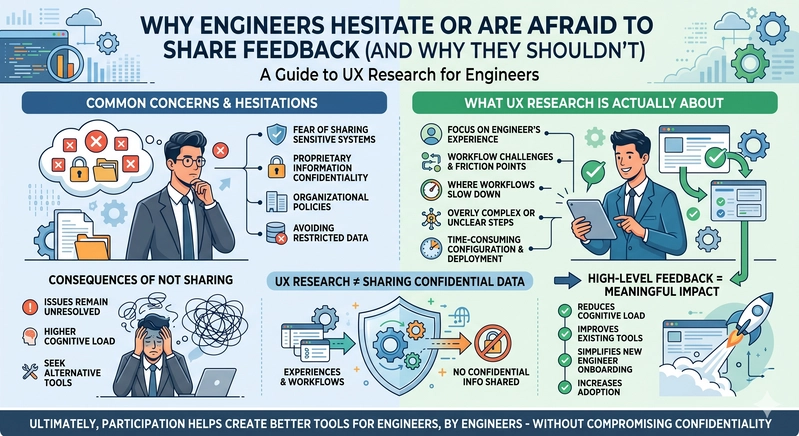
However, UX research does not focus on internal data, architecture details, or anything proprietary. Instead, it focuses on the engineer’s experience and their workflows, challenges, and friction points.
This includes:
- Where workflows slow down
- What feels overly complex or unclear
- What takes too long to configure, deploy, or debug
- What drives engineers to avoid certain features or switch tools
For example, when engineers use KServe in production, they may encounter challenges in deployment, configuration, or maintenance. These challenges can increase cognitive load and make the system feel overwhelming. Importantly, sharing these experiences does not require revealing any confidential information only the difficulties encountered during usage.
When such feedback is not shared, these issues often remain unresolved. Over time, this can lead engineers to seek alternative tools that are easier to use.
On the other hand, when engineers provide even high-level feedback, it creates meaningful impact:
- It reduces cognitive load across workflows
- It improves existing tools and platforms
- It simplifies onboarding for new engineers
- It increases overall adoption within the engineering community
UX research, in this context, becomes a way for engineers to contribute beyond code by sharing their experiences to improve the ecosystem.
Even simple insights, such as "This step was confusing" or "This process took longer than expected" can directly influence product improvements.
Ultimately, participation in UX research helps create better tools for engineers, by engineers without requiring any compromise on confidentiality.
Increase participation in usability studies:
To increase participation in usability studies, we started reaching out directly to the community. we sent messages to more than 1,000 members in Slack threads across the KServe community channel and contributor channel. we also reached out to other CNCF platforms like Kubeflow, since many of them use KServe for model serving.
To further increase reach and participation, we also started posting on LinkedIn to engage a wider audience and encourage more engineers to join the usability studies.
We are still working on usability studies to understand the challenges engineers face while using KServe. In a future article, we will share the analysis process and the results we gather from these studies.
Takeways:
It’s completely understandable that screen sharing and recordings during usability studies can feel sensitive or confidential. If you are not comfortable sharing certain information, there are still many flexible ways to participate and give feedback.
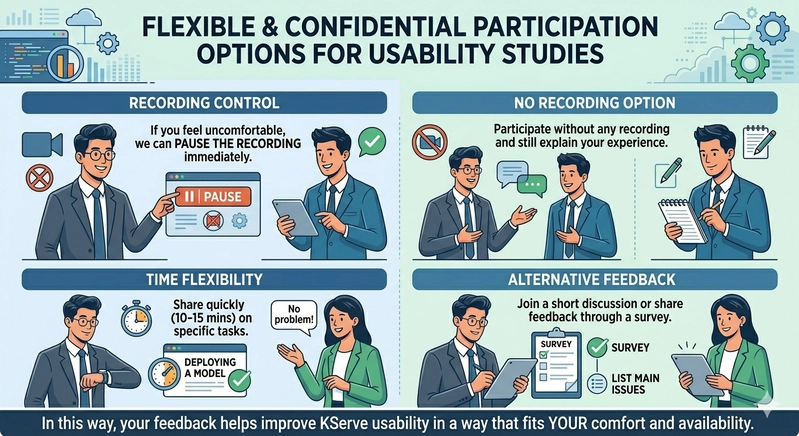
For example, if something confidential comes up during the session, you can ask the UX designer to pause the recording and then share your feedback. You can also choose to participate without any recording at all and still explain your experience. The UX designer will take notes and capture the key issues you mention.
If you don’t have much time, you can let the UX designer know in advance. For instance, you can say you only have 10–15 minutes to try a task like deploying a model and want to quickly share the challenges you face. You can also join a short discussion or share your feedback through a survey by listing the main issues you are experiencing.
In this way, your feedback can still help improve KServe usability in a way that fits your comfort and availability.
Final thoughts:
Usability studies create a strong feedback loop between engineers and UX researchers.
They help to:
Identify real-world challenges
Improve developer experience
Strengthen tools like KServe
Build systems based on actual usage, not assumptions
Most importantly, feedback turns individual experiences into shared improvements. Even small input from engineers can meaningfully shape the future of the platform.