








When building ETL workloads in AWS, one of the first problems we usually face is not the transformation logic itself.
It is connectivity.
Before writing a complex ETL job, we need to confirm that AWS Glue can actually reach the source database, authenticate correctly, resolve the endpoint, and execute a basic query.
In this article, we will configure an AWS Glue connection to a private database, attach the proper VPC networking, configure the Glue IAM role, and create a simple validation script that can be reused before building production ETL workloads.
Requirements
- AWS account
- AWS Glue
- A private database such as Amazon RDS, Aurora, PostgreSQL, MySQL, SQL Server, or Oracle
- VPC, private subnets, and security groups
- IAM role for AWS Glue
- Basic knowledge of JDBC connections
The proposed architecture
The idea is simple.
AWS Glue will run inside a VPC-connected environment and use a Glue Connection to reach a private database endpoint.
The architecture will look like this:
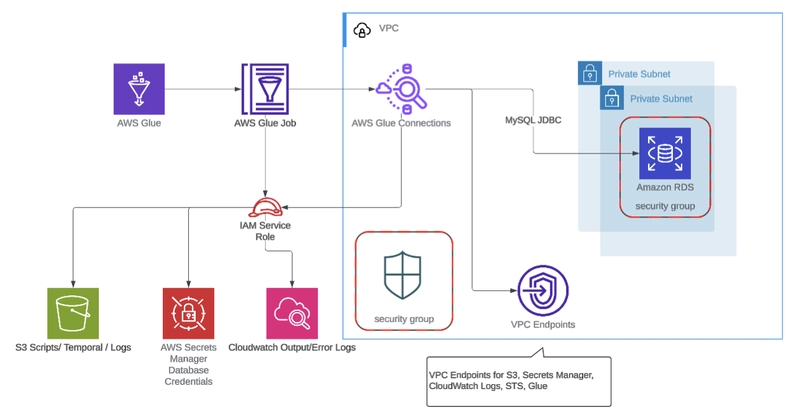
The main goal is to validate the connection before using it in a real ETL process.
This is especially useful when the final ETL job will later extract data from the database, transform it with Spark, and write the result into S3, Redshift, or another analytical target.
Why validate connectivity first?
When a Glue ETL job fails, the error is not always obvious.
Sometimes the problem is:
- The Glue job is not attached to the right VPC connection
- The selected subnet cannot reach the database
- The security group does not allow traffic
- The database security group does not allow inbound access from Glue
- The database endpoint does not resolve correctly
- The IAM role cannot read Secrets Manager
- The JDBC URL is incorrect
- The database user does not have enough permissions
- The database engine requires a specific JDBC driver Instead of testing all of this inside a large ETL script, we can create a small validation job first.
This helps isolate the problem.
Walkthrough
Our database should be reachable privately.
For example, if we are using Amazon RDS or Aurora, the database should have a private endpoint like:
database.cluster-xxxxxx.us-east-1.rds.amazonaws.com
The database should be deployed inside private subnets.
The database security group should allow inbound traffic from the Glue job security group on the database port.
Example ports:
PostgreSQL: 5432
MySQL: 3306
SQL Server: 1433
Oracle: 1521
Example security group rule:
Type: PostgreSQL
Protocol: TCP
Port: 5432
Source: sg-glue-job
This means that the database will only accept traffic coming from the security group used by AWS Glue.
Now we create a security group for AWS Glue.
Example:
Security group name: sg-glue-private-db
Description: Security group used by AWS Glue to connect to private databases
VPC: same VPC as the database
Outbound rule:
Type: All traffic
Destination: database security group or VPC CIDR
For a more restricted configuration, you can allow only the database port.
Example:
Type: PostgreSQL
Protocol: TCP
Port: 5432
Destination: sg-database
AWS also recommends adding a self referencing inbound rule for the Glue security group when using Glue with resources in a VPC.
Example:
Type: All TCP
Protocol: TCP
Port range: 0 - 65535
Source: sg-glue-private-db
This helps AWS Glue components communicate correctly within the selected VPC networking configuration.
Now we should focus on the vpc endpoints. If the Glue job is running in a private subnet without internet access, we need to think about how Glue will access other AWS services.
At minimum, for many ETL workloads, the Glue job may need access to:
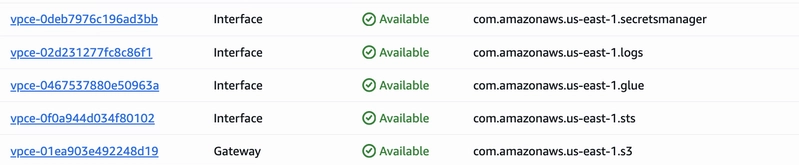
For S3, we can create a Gateway VPC Endpoint.
Service: com.amazonaws.<region>.s3
Type: Gateway
Route tables: private subnet route tables
For Secrets Manager, CloudWatch Logs, Glue, and STS, we can use Interface VPC Endpoints.
Examples:
com.amazonaws.<region>.secretsmanager
com.amazonaws.<region>.logs
com.amazonaws.<region>.glue
com.amazonaws.<region>.sts
This is important because a Glue job running in private subnets may fail if it needs to access AWS services but has no NAT Gateway or VPC endpoints.
Now we create the IAM role that AWS Glue will assume when running the job.
Example role name:
AWSGlueServiceRole
The trust policy should allow AWS Glue to assume the role:
{
  "Version": "2012-10-17",
  "Statement": [
    {
      "Effect": "Allow",
      "Principal": {
        "Service": "glue.amazonaws.com"
      },
      "Action": "sts:AssumeRole"
    }
  ]
}
Attach the AWS managed policy:
AWSGlueServiceRole
Then add permissions based on what the job needs.
If the job reads credentials from AWS Secrets Manager:
{
  "Version": "2012-10-17",
  "Statement": [
    {
      "Sid": "ReadDatabaseSecret",
      "Effect": "Allow",
      "Action": [
        "secretsmanager:GetSecretValue"
      ],
      "Resource": "arn:aws:secretsmanager:us-east-1:<account-id>:secret:<secret-name>*"
    }
  ]
}
If the job needs to write logs and temporary files to S3:
{
  "Version": "2012-10-17",
  "Statement": [
    {
      "Sid": "GlueS3Access",
      "Effect": "Allow",
      "Action": [
        "s3:GetObject",
        "s3:PutObject",
        "s3:DeleteObject",
        "s3:ListBucket"
      ],
      "Resource": [
        "arn:aws:s3:::my-glue-assets-bucket",
        "arn:aws:s3:::my-glue-assets-bucket/*"
      ]
    }
  ]
}
This keeps the role focused on the specific resources needed by the validation job.
Instead of hardcoding credentials inside the Glue job, we can store them in AWS Secrets Manager.
Example secret value:
{
  "username": "etl_user",
  "password": "StrongPasswordExample",
  "engine": "mysql",
  "host": "database.cluster-xxxxxx.us-east-1.rds.amazonaws.com",
  "port": 3306,
  "dbname": "appdb"
}
The database user should have only the permissions required for ETL.
For a validation job, this user can be very limited.
Example PostgreSQL permission:
GRANT CONNECT ON DATABASE appdb TO etl_user;
GRANT USAGE ON SCHEMA public TO etl_user;
GRANT SELECT ON ALL TABLES IN SCHEMA public TO etl_user;
For a simple connectivity test, even a user that can only execute SELECT 1 is enough.
Finally let's focus on the connection creation.
Go to AWS Glue → Data Catalog → Connections → Create connection
Select the connection type.
For example:
Connection type: JDBC
Database engine: Mysql
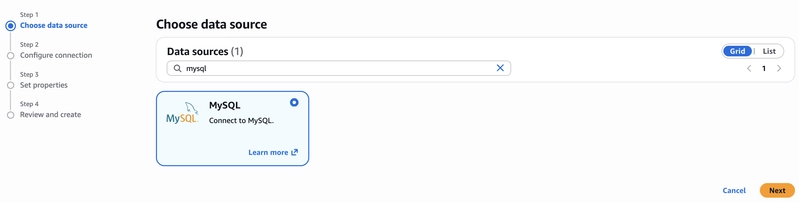
On the JDBC be sure to select your DB whenever you have it configured at RDS or Aurora, select your secret or input your username/password user of the db
Note: take into consideration that this will automatically create a secret if the credential type if username and password
Then configure the network section:
VPC: same VPC where the database is reachable
Subnet: private subnet with route access to the database
Security group: sg-glue-private-db
Save the connection.
Example connection name:
glue-private-postgres-connection
After the connection is created you can validate it by selecting the connection → Actions → Test Connection
Now we can create a simple Glue validation job
Note: When connecting to a private database, passing only JDBC parameters is not enough. The Glue job also needs an attached Glue Connection because the connection provides the VPC, subnet, and security group configuration required for private network access.
Let's create a new Glue Job by selecting Author code with a script editor, in this case we're going to use SPARK and Start fresh
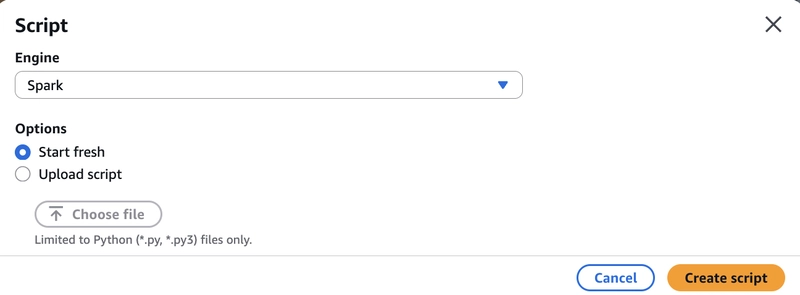
For the script we are going to use the following example:
from awsglue.transforms import *
from awsglue.utils import getResolvedOptions
from pyspark.context import SparkContext
from awsglue.context import GlueContext
from awsglue.job import Job
args = getResolvedOptions(sys.argv, ['JOB_NAME'])
sc = SparkContext()
glueContext = GlueContext(sc)
spark = glueContext.spark_session
job = Job(glueContext)
job.init(args['JOB_NAME'], args)
MYSQL_CONNECTION_NAME = "Mysql connections"
# --- Test MySQL Connection ---
print("=" * 60)
print(f"TESTING: {MYSQL_CONNECTION_NAME}")
print("=" * 60)
try:
    mysql_df = glueContext.create_dynamic_frame.from_options(
        connection_type="mysql",
        connection_options={
            "useConnectionProperties": "true",
            "connectionName": MYSQL_CONNECTION_NAME,
            "dbtable": "information_schema.tables",
        },
        transformation_ctx="mysql_test"
    )
    row_count = mysql_df.count()
    print(f"SUCCESS - MySQL connection works. Rows retrieved: {row_count}")
    mysql_df.toDF().show(5, truncate=False)
except Exception as e:
    print(f"FAILED - MySQL connection error: {str(e)}")
print("=" * 60)
print("CONNECTION TESTS COMPLETE")
print("=" * 60)
job.commit()
This script is a simple connectivity test. It initializes the standard Glue and Spark context, then attempts to read from the MySQL information_schema.tables metadata table using a pre configured Glue connection. The connection itself stores the database host, port, credentials, and VPC networking details, so the script doesn't need to hardcode any of that. If the read succeeds, it prints the row count and a sample of the data; if it fails, it catches the exception and prints the error. It's essentially a "can Glue reach this database?" health check useful for validating network paths, security groups, and credentials before building out the actual ETL logic.
Now in Job Details we can use the following configuration:
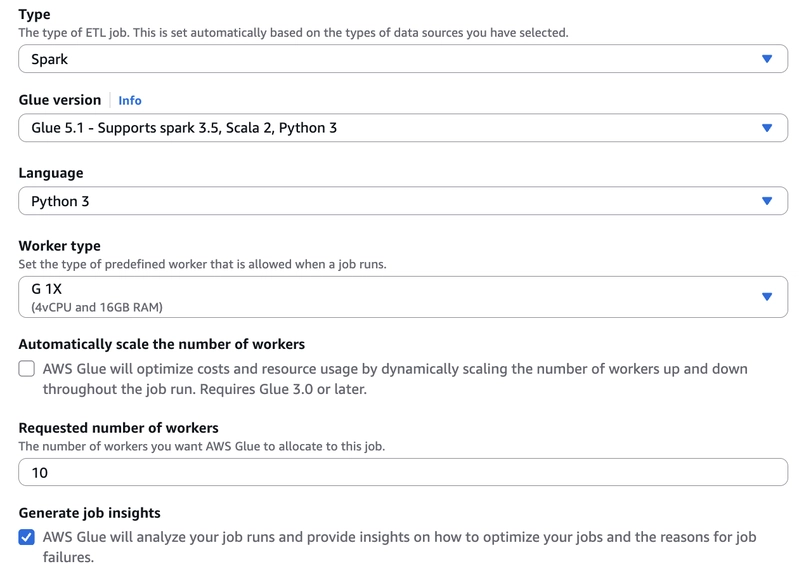
Job name: glue-private-db-connection-validation
IAM role: AWSGlueServiceRole
Type: Spark
Glue version: Glue 5.1
Language: Python 3
Worker type: G.1X
Number of workers: 2
In Advanced properties, attach the Glue connection:
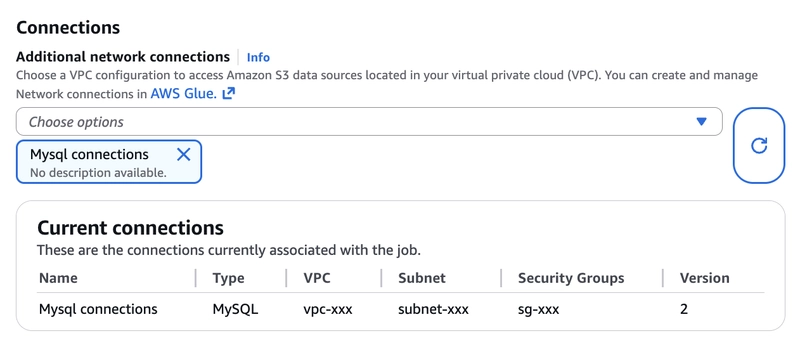
This is important because this is what makes the job use the configured VPC, subnet, and security group.
After finishing the configurations select Save and Run.

At this point, we have validated that the Glue job can connect to the private database.

Common errors and how to troubleshoot them
Timeout connecting to database: Usually this means a networking issue.
Check:
- Database security group allows inbound traffic from Glue security group
- Glue security group allows outbound traffic to the database
- The selected subnet can route to the database
- The database endpoint is private and reachable from the VPC
- Network ACLs are not blocking traffic
Authentication failed: Usually this means a credential issue.
Check:
- Username
- Password
- Secret value
- Glue connection credentials
- Database user status
- Password expiration policies
Access denied to Secrets Manager: Usually this means the Glue role does not have permission to read the secret.
Check:
- "Action": "secretsmanager:GetSecretValue"
- Also validate that the secret ARN is correct.
No route to host: This usually means Glue connection is running in a subnet that cannot reach the database.
Check:
- VPC selected in the Glue connection
- Subnet selected in the Glue connection
- Route tables
- VPC peering or Transit Gateway routing if the database is in another VPC
- DNS resolution
Could not resolve hostname: This usually means DNS resolution is not working.
Check:
- VPC DNS resolution
- VPC DNS hostnames
- Private hosted zones
- Custom DNS servers
- Route 53 resolver rules if using hybrid networking
Job cannot access S3: If the job is running in a private subnet, validate one of these options:
- S3 Gateway VPC Endpoint
- NAT Gateway route to the internet
- Correct route table association
This is important because Glue jobs usually need S3 for scripts, temporary files, logs, or output data.
Recommendations
For production ETL workloads, I would recommend:
- Use AWS Secrets Manager instead of hardcoded passwords
- Use least privilege IAM policies
- Use private subnets for Glue connectivity
- Restrict database inbound rules to the Glue security group
- Use VPC endpoints when there is no NAT Gateway
- Keep Glue validation jobs separate from transformation jobs
- Add CloudWatch logging and alarms
- Validate the connection before each major ETL deployment
- Use a dedicated database user for ETL workloads
- Avoid using database admin credentials
- Store Glue scripts in version control
- Parameterize database names, tables, and validation queries