


Ever needed to turn a quick video clip into a GIF? Maybe for a meme, a tutorial, or just to share a reaction? Most tools force you to upload your video to some server first. That means waiting for the upload, hoping the service doesn't compress your file into oblivion, and crossing your fingers that your video doesn't end up stored on someone else's hard drive.
We got tired of that. So we built a video-to-GIF converter that runs entirely inside your browser. Your video never leaves your device. Not even for a second.
This post walks through how we pulled it off — from dragging a video into the browser to downloading a shiny new GIF, all without a single network request carrying your file data anywhere.
Why Bother Doing This in the Browser?
Fair question. Server-side video processing has been the default for years. But there are some genuinely good reasons to keep everything client-side:
- Privacy actually means something: Your video stays on your machine. No third-party server ever sees it. This matters for personal clips, work footage, or anything you don't want floating around the internet.
- No upload bottleneck: A 50MB video can take ages to upload on a slow connection. Skip the upload, and you skip the wait.
- No arbitrary limits: Server-side tools often cap file sizes or conversion minutes. Browsers have their own memory limits, but for short clips, you're usually fine.
- It works offline: Once the core library is cached, you can convert videos without an internet connection.
- No server bills: Processing video is CPU-intensive. Offloading that to the user's device means we don't need a farm of video-encoding servers.
The trade-off? You're relying on the user's hardware. But for converting short videos to GIFs, modern laptops and even phones handle it surprisingly well.
The Big Picture: How It All Fits Together
Here's what happens from the moment you drop a video onto the page to the moment you save your GIF:
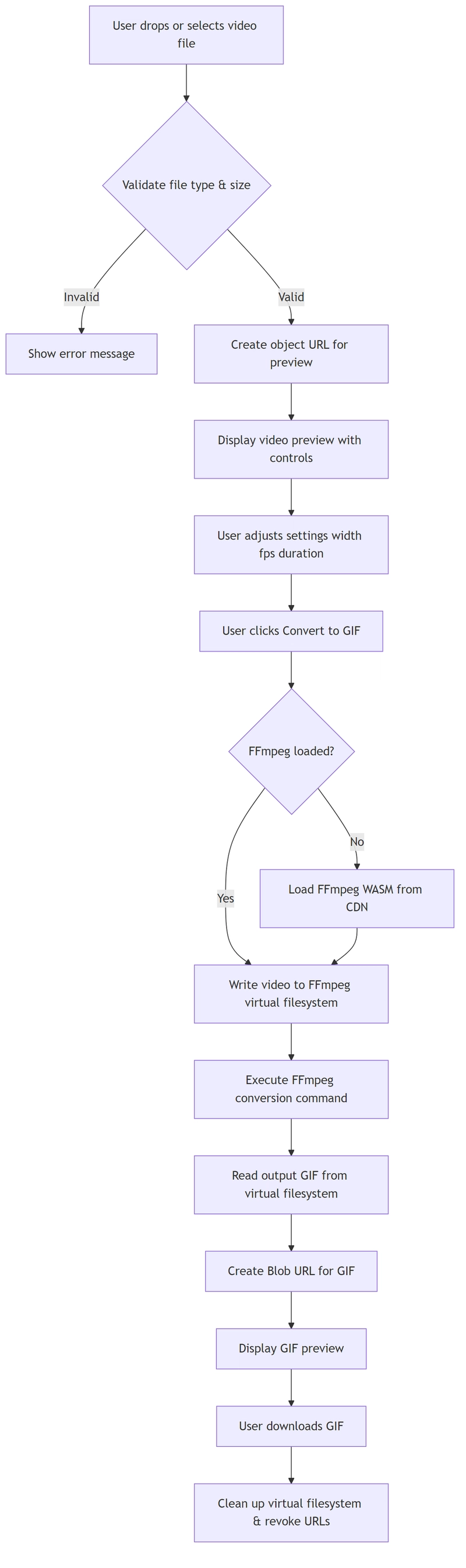
Let's break down the pieces.
The Tech Stack
We're working with a Next.js app, but the heavy lifting comes from FFmpeg.wasm — the iconic FFmpeg video toolkit compiled to WebAssembly so it can run in the browser. Here's what's in our package.json:
{
  "dependencies": {
    "@ffmpeg/ffmpeg": "^0.12.15",
    "@ffmpeg/util": "^0.12.2",
    "next": "16.1.6",
    "react": "19.2.3"
  }
}
FFmpeg itself is the same battle-tested tool that powers half the internet's video pipelines. The wasm version is admittedly slower than native, but for short GIF conversions, it's more than adequate.
One important gotcha: FFmpeg.wasm needs SharedArrayBuffer to work properly. That means your server needs to send two specific headers:
Cross-Origin-Embedder-Policy: require-corpCross-Origin-Opener-Policy: same-origin
Our next.config.ts handles this:
const nextConfig: NextConfig = {
  output: "export",
  trailingSlash: true,
  async headers() {
    return [
      {
        source: "/:path*",
        headers: [
          { key: "Cross-Origin-Embedder-Policy", value: "require-corp" },
          { key: "Cross-Origin-Opener-Policy", value: "same-origin" },
        ],
      },
    ];
  },
};
These headers lock down cross-origin interactions, which is necessary for the multi-threaded wasm build to function safely.
Loading FFmpeg Without Crushing Page Performance
FFmpeg.wasm isn't exactly lightweight. The core JavaScript and WASM files together weigh several megabytes. We definitely don't want to block the page load with that.
Our loader utility fetches FFmpeg on demand and caches the instance:
// utils/ffmpegLoader.ts
import { fetchFile, toBlobURL } from "@ffmpeg/util";

let ffmpeg: any = null;
let fetchFileFn: any = null;

export async function loadFFmpeg() {
  if (ffmpeg) return { ffmpeg, fetchFile: fetchFileFn };

  const { FFmpeg } = await import("@ffmpeg/ffmpeg");

  ffmpeg = new FFmpeg();
  fetchFileFn = fetchFile;

  const baseURL = "https://cdn.jsdelivr.net/npm/@ffmpeg/core@0.12.6/dist/umd";

  await ffmpeg.load({
    coreURL: await toBlobURL(`${baseURL}/ffmpeg-core.js`, "text/javascript"),
    wasmURL: await toBlobURL(`${baseURL}/ffmpeg-core.wasm`, "application/wasm"),
  }, {
    corePath: await toBlobURL(`${baseURL}/ffmpeg-core.js`, "text/javascript"),
  });

  return { ffmpeg, fetchFile };
}
A few things worth noting here:
- We use dynamic import (
await import("@ffmpeg/ffmpeg")) so the module doesn't end up in the initial JavaScript bundle. -
toBlobURLdownloads the core files from a CDN and turns them into blob URLs, which avoids CORS headaches. - We cache the
ffmpeginstance in module-level variables. Once loaded, subsequent conversions reuse the same instance. This matters because spawning a fresh FFmpeg process for every conversion would be painful.
The Main Data Structure
Our component tracks everything through a single VideoFile interface:
interface VideoFile {
  id: string;
  file: File;
  previewUrl: string;
  gifUrl?: string;
  gifFileName?: string;
  error?: string;
  processing?: boolean;
  progress?: number;
  videoWidth?: number;
  videoHeight?: number;
}
This keeps the state flat and simple. One video at a time, one set of conversion outputs. The previewUrl is a standard URL.createObjectURL() pointing to the original video file, so we can show a native <video> element for preview.
Upload Handling: Drag, Drop, and Validate
We support both clicking to select a file and dragging one onto the drop zone. Either way, the same validation runs:
const handleFileSelect = useCallback((e: React.ChangeEvent<HTMLInputElement>) => {
  const file = e.target.files?.[0];
  if (!file) return;

  const validTypes = [
    "video/mp4", "video/webm", "video/quicktime",
    "video/x-msvideo", "video/ogg"
  ];
  if (!validTypes.includes(file.type)) {
    setError("Please select a valid video file (MP4, WebM, MOV, AVI)");
    return;
  }

  const maxSize = 100 * 1024 * 1024;
  if (file.size > maxSize) {
    setError("Video file is too large. Maximum size is 100MB.");
    return;
  }

  const videoUrl = URL.createObjectURL(file);
  const video = document.createElement("video");
  video.preload = "metadata";
  video.onloadedmetadata = () => {
    setSelectedFile({
      id: `${file.name}-${Date.now()}`,
      file,
      previewUrl: videoUrl,
      videoWidth: video.videoWidth,
      videoHeight: video.videoHeight,
    });
  };
  video.src = videoUrl;
  setError(null);
}, []);
We create a hidden <video> element just to read the natural width and height. That aspect ratio comes in handy later when we display the generated GIF.
The Actual Conversion
Once the user hits "Convert to GIF," here's what happens under the hood:
const convertToGif = async () => {
  if (!selectedFile || !ffmpegRef.current) return;

  setIsConverting(true);
  setSelectedFile(prev => prev ? { ...prev, processing: true, progress: 0 } : null);

  try {
    const ffmpeg = ffmpegRef.current;
    const inputName = "input.mp4";
    const outputName = "output.gif";

    const fileArrayBuffer = await selectedFile.file.arrayBuffer();
    await ffmpeg.writeFile(inputName, new Uint8Array(fileArrayBuffer));

    const width = settings.width;
    const fps = settings.fps;
    const duration = Math.min(settings.duration, 10);

    await ffmpeg.exec([
      "-i", inputName,
      "-t", duration.toString(),
      "-vf", `fps=${fps},scale=${width}:-1`,
      "-y",
      outputName
    ]);

    const data = await ffmpeg.readFile(outputName);
    const uint8Data = data instanceof Uint8Array ? data : new Uint8Array();
    const buffer = new ArrayBuffer(uint8Data.length);
    new Uint8Array(buffer).set(uint8Data);
    const blob = new Blob([buffer], { type: "image/gif" });
    const gifUrl = URL.createObjectURL(blob);
    const baseName = selectedFile.file.name.replace(/\.[^/.]+$/, "");

    setSelectedFile(prev => prev ? {
      ...prev,
      gifUrl,
      gifFileName: `${baseName}.gif`,
      processing: false,
      progress: 100,
    } : null);

    await ffmpeg.deleteFile(inputName);
    await ffmpeg.deleteFile(outputName);
  } catch (err) {
    setError("Failed to convert video to GIF");
    setSelectedFile(prev => prev ? { ...prev, error: "Conversion failed", processing: false } : null);
  } finally {
    setIsConverting(false);
  }
};
The FFmpeg command itself is refreshingly simple:
-
-i input.mp4specifies the input -
-t 5limits the output to 5 seconds (we cap it at 10 to prevent massive files) -
-vf fps=10,scale=480:-1sets the frame rate and scales the width while preserving aspect ratio -
-yforces overwriting the output file if it exists
The result is read back from FFmpeg's virtual filesystem as a Uint8Array, wrapped in a Blob, and turned into an object URL for display and download.
Progress Tracking
Nobody likes a button that just sits there with a spinner. FFmpeg.wasm emits progress events, and we wire those up:
ffmpeg.on("progress", ({ progress }: { progress: number }) => {
  setSelectedFile(prev => prev ? { ...prev, progress: Math.round(progress * 100) } : null);
});
This updates a progress bar in real time. It's not frame-by-frame precision, but it's enough to let the user know something is actually happening.
Settings That Stick Around
We let users tweak three things: output width, frame rate, and duration. The defaults are:
- Width: 480px (good balance of quality and file size)
- FPS: 10 (smooth enough for most GIFs)
- Duration: 5 seconds (prevents accidentally generating a 50MB GIF)
But we didn't want users to reconfigure these every time they visited. So we built a persistent settings layer.
First, there's useAppSettings, which stores preferences in localStorage:
interface AppSettings {
  tools: {
    video2Gif?: { width: number; fps: number; duration: number };
    // ... other tools
  };
  preferences: {
    theme: "light" | "dark";
    language: string;
    autoSave: boolean;
    showSaveIndicator: boolean;
  };
  lastVisitedTool?: string;
  lastVisitTime?: string;
}
This centralizes settings across all tools in the app. When you adjust the GIF width, it gets saved under the video2Gif key and restored the next time you open the converter.
On top of that, we have a session-level auto-save hook:
// hooks/useAutoSave.ts
export function useAutoSave<T>({
  key,
  data,
  delay = 2000,
  enabled = true,
}: AutoSaveOptions<T>): AutoSaveState {
  const [state, setState] = useState<AutoSaveState>({
    lastSaved: null,
    isSaving: false,
    error: null,
  });

  const timeoutRef = useRef<NodeJS.Timeout | null>(null);
  const dataRef = useRef<T>(data);
  dataRef.current = data;

  const saveData = useCallback(async () => {
    if (!enabled) return;
    setState(prev => ({ ...prev, isSaving: true, error: null }));
    try {
      const serialized = JSON.stringify(dataRef.current);
      localStorage.setItem(key, serialized);
      setState({ lastSaved: new Date(), isSaving: false, error: null });
    } catch (err) {
      const error = err instanceof Error ? err : new Error(String(err));
      setState(prev => ({ ...prev, isSaving: false, error }));
    }
  }, [key, enabled]);

  useEffect(() => {
    if (!enabled) return;
    if (timeoutRef.current) clearTimeout(timeoutRef.current);
    timeoutRef.current = setTimeout(() => saveData(), delay);
    return () => { if (timeoutRef.current) clearTimeout(timeoutRef.current); };
  }, [data, delay, enabled, saveData]);

  return state;
}
This hook debounces writes to localStorage by one second. Drag a slider around and it only saves once you stop. The SaveIndicator component shows a tiny "Saved just now" text so users know their preferences aren't going to vanish:
// components/SaveIndicator.tsx
export function SaveIndicator({ isSaving, lastSaved, visible = true }: SaveIndicatorProps) {
  if (!visible) return null;

  const formatTime = (date: Date): string => {
    const now = new Date();
    const diff = now.getTime() - date.getTime();
    const minutes = Math.floor(diff / 60000);
    if (minutes < 1) return "just now";
    if (minutes < 60) return `${minutes}m ago`;
    return `${Math.floor(diff / 3600000)}h ago`;
  };

  return (
    <div className="flex items-center gap-2 text-xs text-gray-500">
      {isSaving ? (
        <><Loader2 className="w-3 h-3 animate-spin" /><span>Saving...</span></>
      ) : lastSaved ? (
        <><Check className="w-3 h-3 text-green-500" /><span>Saved {formatTime(lastSaved)}</span></>
      ) : (
        <><Save className="w-3 h-3" /><span>Auto-save enabled</span></>
      )}
    </div>
  );
}
"Wait, Didn't I Have Something Going On?"
Browser refreshes happen. We wanted to be nice about it. If a user had tweaked their settings and then accidentally reloaded the page, we show a small recovery toast:
// components/SessionRecovery.tsx
export function SessionRecovery({
  toolName,
  hasData,
  onRecover,
  onDismiss,
}: SessionRecoveryProps) {
  useEffect(() => {
    if (hasData) {
      const timer = setTimeout(() => onDismiss(), 30000);
      return () => clearTimeout(timer);
    }
  }, [hasData, onDismiss]);

  if (!hasData) return null;

  return (
    <div className="fixed top-20 right-4 z-50 max-w-sm bg-blue-50 border border-blue-200 rounded-lg shadow-lg p-4">
      <h4 className="font-medium text-blue-900 mb-1">
        Restore Previous Session?
      </h4>
      <p className="text-sm text-blue-700 mb-3">
        We found saved settings and progress for {toolName}.
      </p>
      <div className="flex gap-2">
        <button onClick={onRecover} className="px-3 py-1.5 bg-blue-500 text-white text-sm rounded">
          Restore
        </button>
        <button onClick={onDismiss} className="px-3 py-1.5 text-gray-600 text-sm">
          Dismiss
        </button>
      </div>
    </div>
  );
}
It auto-dismisses after 30 seconds so it doesn't hang around forever being annoying.
Memory Hygiene
Object URLs stick around until you explicitly revoke them. We clean up both the video preview URL and the GIF blob URL when the user starts over:
const reset = useCallback(() => {
  if (selectedFile) {
    URL.revokeObjectURL(selectedFile.previewUrl);
    if (selectedFile.gifUrl) URL.revokeObjectURL(selectedFile.gifUrl);
  }
  setSelectedFile(null);
  setError(null);
  clearSavedData(SESSION_KEY);
}, [selectedFile]);
Similarly, FFmpeg's virtual filesystem gets wiped after each conversion by deleting the input and output files. Without this, repeated conversions would eat up memory.
What We Learned
Building this taught us a few things:
- WASM startup cost is real: The first time you load FFmpeg, there's a noticeable pause. We show a "Loading video processing library..." message so users don't think the page is broken.
- File size validation matters: Browsers can handle surprisingly large files, but FFmpeg.wasm runs in a memory-constrained sandbox. We cap uploads at 100MB to avoid mysterious out-of-memory errors.
-
Simple FFmpeg commands often win: We started with fancy palette optimization commands, but for general use,
fps=10,scale=480:-1produces perfectly decent GIFs with smaller file sizes. - localStorage is underrated for UX: Auto-saving settings and offering session recovery feels like magic to users, but it's just a few lines of code.
Give It a Spin
If you've got a video sitting around that needs to become a GIF, you can try our converter right now. Everything happens in your browser — your file never touches our servers.
Just drag, drop, tweak your settings if you want, and download your GIF. No account, no upload, no waiting.