






In the world of modern application security, mTLS (Mutual TLS) has become a fundamental standard for protecting communications between services. Unlike traditional TLS where only the server authenticates, mTLS requires both parties (client and server) to present valid certificates, creating a much more robust security layer.
In this article, I'll show you how to implement mTLS step by step, from certificate generation to configuration in real-world applications.
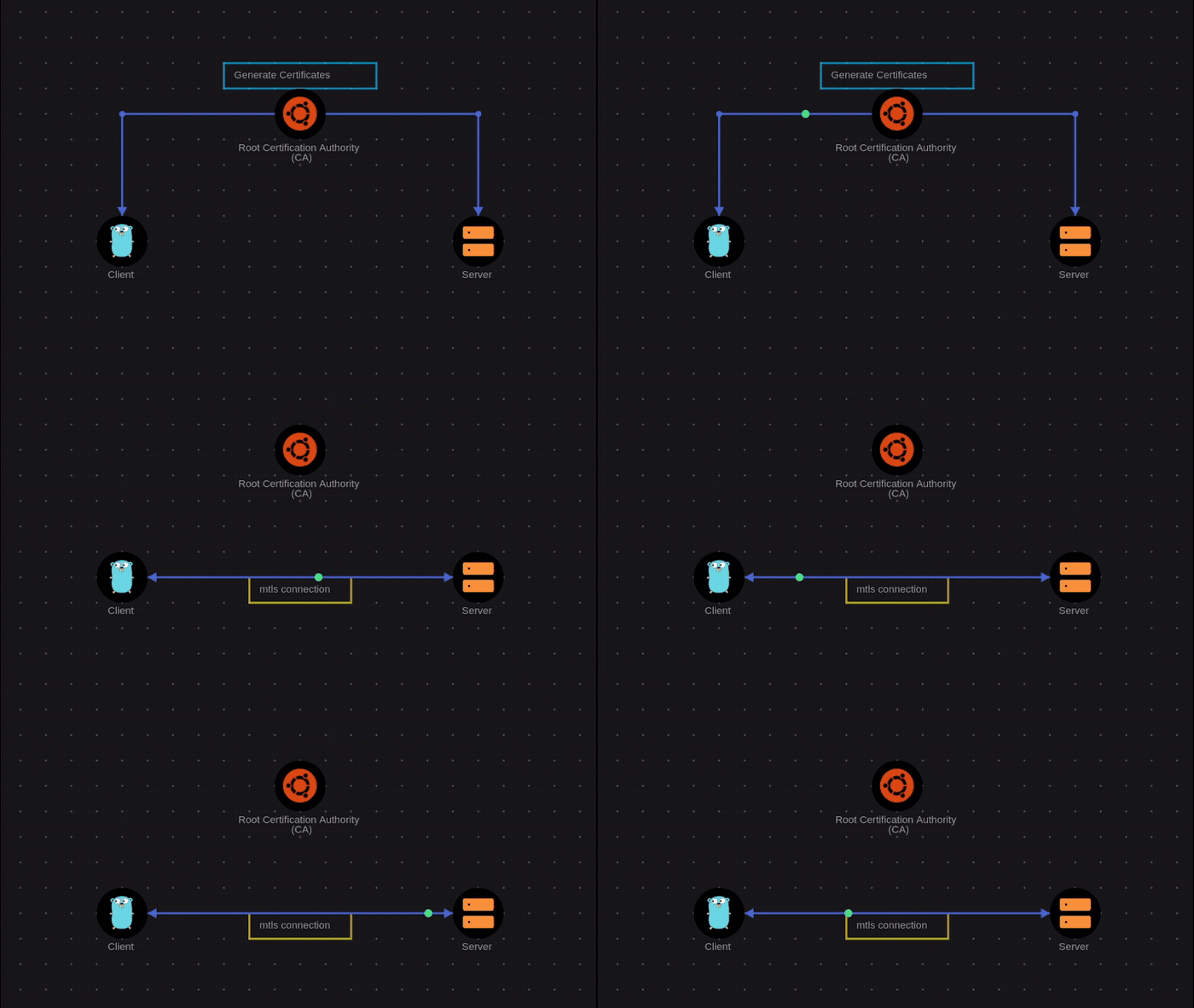
Diagram created with https://savnet.co
What is mTLS and Why Does It Matter?
mTLS (Mutual TLS) is an extension of the standard TLS protocol that adds mutual authentication. While in traditional TLS only the server presents a certificate, in mTLS both the client and the server must authenticate each other.
Key Benefits:
- Strong authentication: Both ends of the communication are verified
- MITM attack prevention: Makes man-in-the-middle attacks significantly harder
- Zero Trust: Aligns perfectly with Zero Trust architectures
- Microservices security: Ideal for service-to-service communications
Common Use Cases:
- Internal APIs between microservices
- Service-to-service communication in Kubernetes
- Payment system connections
- Secure B2B communications
- Sensitive API access
Step 1: Set Up the Environment
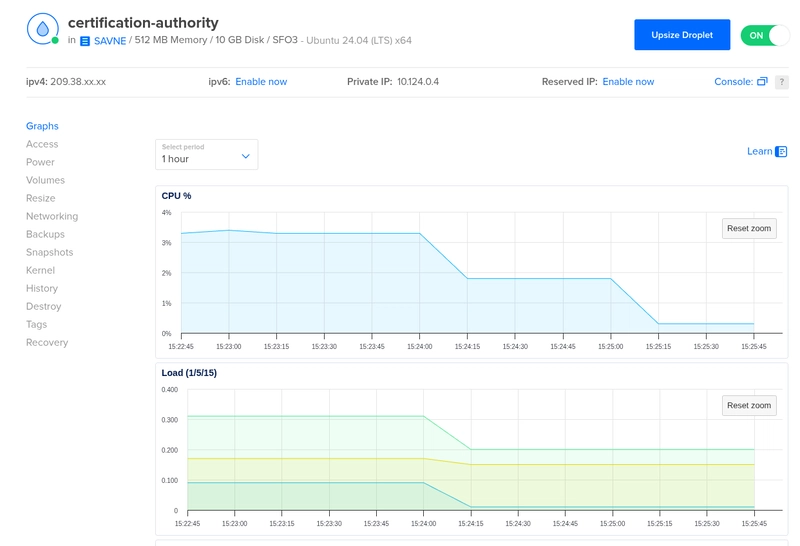
For this tutorial, we'll work on an Ubuntu server that will act as our certificate generator and Certificate Authority (CA). We only need a small server with 512MB RAM and 1 CPU, enough to generate and manage certificates.
We'll need some basic tools:
# Update system
sudo apt update && sudo apt upgrade -y

# Install OpenSSL (if not already installed)
sudo apt install -y openssl curl wget

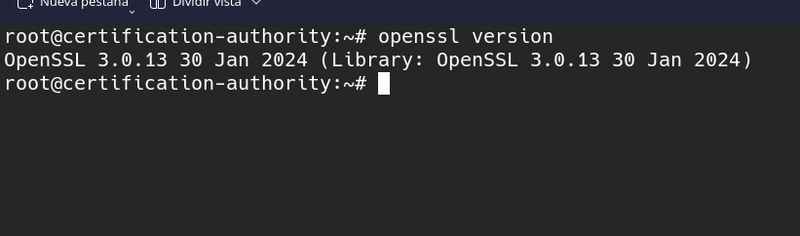
# Verify OpenSSL version
openssl version
For other operating systems, make sure OpenSSL is installed.
Step 2: Create the Certificate Authority (CA)
The CA is the entity that will issue and sign all our certificates. Let's create a private CA.
2.1 Create working directory
mkdir -p ~/mtls-ca
cd ~/mtls-ca
mkdir -p ca/private ca/certs ca/newcerts
mkdir -p server/private server/certs
mkdir -p client/private client/certs

# Set secure permissions
chmod 700 ca/private server/private client/private
2.2 Generate CA private key and certificate
# Generate CA private key (password-protected)
openssl genrsa -aes256 -out ca/private/ca.key 4096

# Generate self-signed CA certificate
openssl req -new -x509 -days 7300 -sha256 \
  -key ca/private/ca.key \
  -out ca/certs/ca.crt \
  -subj "/C=US/ST=California/L=San Francisco/O=MyCompany/OU=IT/CN=MyCA-Root/emailAddress=admin@mycompany.com"
Explanation of the -subj parameter:
-
/C=US: Country code (2 letters) -
/ST=California: State or province -
/L=San Francisco: Locality or city -
/O=MyCompany: Your organization name -
/OU=IT: Organizational unit -
/CN=MyCA-Root: Common name of the CA -
/emailAddress=admin@mycompany.com: Contact email
Customize these values with your actual information.
During the process you'll be prompted for:
- A password for the private key (store it in a safe place)
2.3 Verify the CA certificate
openssl x509 -in ca/certs/ca.crt -text -noout
You should see detailed information about your CA, including:
- Issuer: Your own CA
- Validity: 20 years (7300 days)
- Key usage: Certifying other keys
Step 3: Generate Server Certificates
Now let's create certificates for our server.
3.1 Create server private key and CSR
cd ~/mtls-ca

# Generate server private key
openssl genrsa -out server/private/server.key 2048

# Create Certificate Signing Request (CSR)
openssl req -new -sha256 \
  -key server/private/server.key \
  -out server/server.csr \
  -subj "/C=US/ST=California/L=San Francisco/O=MyCompany/OU=Web/CN={YOUR DOMAIN OR IP WHERE YOUR WEB APP RUNS}"
Customize the -subj parameter:
-
/C=US: Your country code -
/ST=California: Your state or province -
/L=San Francisco: Your locality or city -
/O=MyCompany: Your organization -
/OU=Web: Organizational unit (e.g., Web, API, etc.) -
/CN=api.mydomain.com: IMPORTANT: Your server's domain or IP
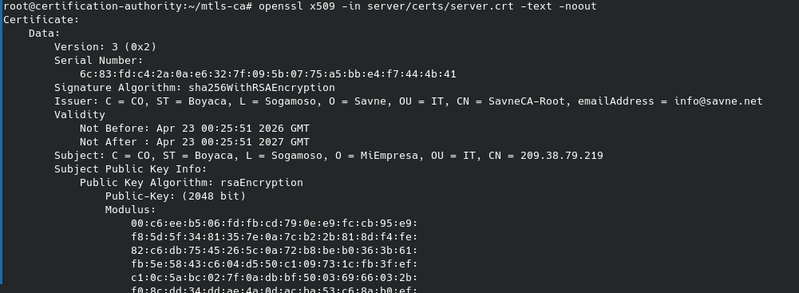
3.2 Sign the server certificate with the CA
# Sign the server certificate
openssl x509 -req -days 365 -sha256 \
  -in server/server.csr \
  -CA ca/certs/ca.crt \
  -CAkey ca/private/ca.key \
  -CAcreateserial \
  -out server/certs/server.crt \
  -extfile <(echo -e "basicConstraints=CA:FALSE\nkeyUsage=digitalSignature,keyEncipherment\nextendedKeyUsage=serverAuth")

# Verify the signed certificate
openssl x509 -in server/certs/server.crt -text -noout
3.3 Create certificate chain file
# Create certificate chain for the server
cat server/certs/server.crt ca/certs/ca.crt > server/certs/server-chain.crt
Step 4: Generate Client Certificates
Let's repeat the process for the client.
4.1 Create client private key and CSR
# Generate client private key
openssl genrsa -out client/private/client.key 2048

# Create CSR for the client
openssl req -new -sha256 \
  -key client/private/client.key \
  -out client/client.csr \
  -subj "/C=US/ST=California/L=San Francisco/O=MyCompany/OU=Clients/CN=app-client-01"
Customize the -subj parameter:
-
/C=US: Your country code -
/ST=California: Your state or province -
/L=San Francisco: Your locality or city -
/O=MyCompany: Your organization -
/OU=Clients: Organizational unit (e.g., Clients, Apps, etc.) -
/CN=app-client-01: IMPORTANT: Unique client identifier
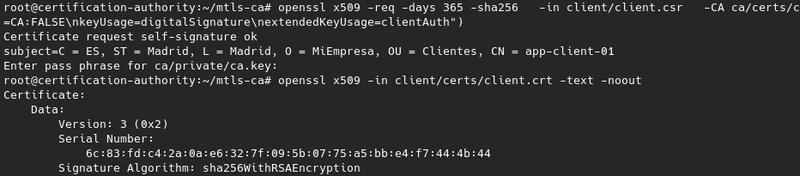
4.2 Sign the client certificate
# Sign the client certificate
openssl x509 -req -days 365 -sha256 \
  -in client/client.csr \
  -CA ca/certs/ca.crt \
  -CAkey ca/private/ca.key \
  -CAcreateserial \
  -out client/certs/client.crt \
  -extfile <(echo -e "basicConstraints=CA:FALSE\nkeyUsage=digitalSignature\nextendedKeyUsage=clientAuth")

# Verify the client certificate
openssl x509 -in client/certs/client.crt -text -noout
4.3 Create PKCS#12 file for the client
# Create PKCS#12 (p12/pfx) file for easy import
openssl pkcs12 -export \
  -inkey client/private/client.key \
  -in client/certs/client.crt \
  -certfile ca/certs/ca.crt \
  -out client/certs/client.p12
Step 5: Deploy a "Hello World" with Docker Compose and mTLS
Let's create a simple example using Docker Compose with an Nginx server that responds "Hello World" and is protected with mTLS. Remember, this web app must be deployed using the same domain or IP used when generating the server keys in step 3.1.
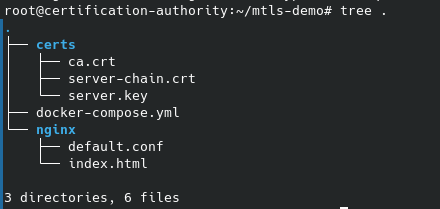
5.1 Project structure
Create the following directory structure on your server:
mkdir -p ~/mtls-demo/nginx
cd ~/mtls-demo
5.2 Copy the generated certificates
Copy the certificates we generated in the previous steps:
# Create certificate directory in the project
mkdir -p ~/mtls-demo/certs

# Copy server certificates (in our case they're on the same server)
cp ~/mtls-ca/server/certs/server-chain.crt ~/mtls-demo/certs/
cp ~/mtls-ca/server/private/server.key ~/mtls-demo/certs/

# Copy CA (for client verification)
cp ~/mtls-ca/ca/certs/ca.crt ~/mtls-demo/certs/
5.3 Create the HTML page
Create the file ~/mtls-demo/nginx/index.html:
<!DOCTYPE html>
<html lang="en">
<head>
    <meta charset="UTF-8">
    <meta name="viewport" content="width=device-width, initial-scale=1.0">
    <title>mTLS - Hello World</title>
    <style>
        body {
            font-family: 'Segoe UI', Tahoma, Geneva, Verdana, sans-serif;
            display: flex;
            justify-content: center;
            align-items: center;
            height: 100vh;
            margin: 0;
            background: linear-gradient(135deg, #667eea 0%, #764ba2 100%);
            color: white;
        }
        .container {
            text-align: center;
            background: rgba(255, 255, 255, 0.1);
            padding: 3rem;
            border-radius: 20px;
            backdrop-filter: blur(10px);
            box-shadow: 0 8px 32px rgba(0, 0, 0, 0.1);
        }
        h1 { font-size: 3rem; margin-bottom: 0.5rem; }
        .cert-info {
            background: rgba(255, 255, 255, 0.15);
            padding: 1rem;
            border-radius: 10px;
            margin-top: 1.5rem;
            font-size: 0.9rem;
        }
        .badge {
            display: inline-block;
            background: #4CAF50;
            color: white;
            padding: 0.3rem 1rem;
            border-radius: 20px;
            font-size: 0.8rem;
            margin-top: 1rem;
        }
    </style>
</head>
<body>
    <div class="container">
        <h1>🔒 Hello World!</h1>
        <p>Secure connection established via <strong>mTLS</strong></p>
        <div class="cert-info">
            <p><strong>Authenticated client:</strong> <span id="client-cn">---</span></p>
            <p><strong>Protocol:</strong> TLS 1.3</p>
        </div>
        <div class="badge">✅ mTLS Enabled</div>
    </div>
</body>
</html>
5.4 Configure Nginx with mTLS
Create the file ~/mtls-demo/nginx/default.conf:
server {
    listen 8443 ssl;
    server_name localhost;

    # Server certificates
    ssl_certificate /etc/nginx/certs/server-chain.crt;
    ssl_certificate_key /etc/nginx/certs/server.key;

    # Modern SSL configuration
    ssl_protocols TLSv1.2 TLSv1.3;
    ssl_ciphers HIGH:!aNULL:!MD5;
    ssl_prefer_server_ciphers off;
    ssl_session_cache shared:SSL:10m;
    ssl_session_timeout 10m;

    # mTLS: verify client
    ssl_client_certificate /etc/nginx/certs/ca.crt;
    ssl_verify_client on;
    ssl_verify_depth 2;

    # Document root
    root /usr/share/nginx/html;
    index index.html;

    location / {
        # Reject if client certificate is not valid
        if ($ssl_client_verify != SUCCESS) {
            return 403 "Access denied: client certificate required\n";
        }

        # Pass client information to the app
        add_header X-Client-CN $ssl_client_s_dn always;
        add_header X-Client-Verify $ssl_client_verify always;

        try_files $uri $uri/ =404;
    }

}
5.5 Create the Docker Compose file
Create the file ~/mtls-demo/docker-compose.yml:
version: '3.8'

services:
  mtls-server:
    image: nginx:alpine
    container_name: mtls-nginx
    ports:
      - "8443:8443"
    volumes:
      - ./nginx/default.conf:/etc/nginx/conf.d/default.conf:ro
      - ./nginx/index.html:/usr/share/nginx/html/index.html:ro
      - ./certs/server-chain.crt:/etc/nginx/certs/server-chain.crt:ro
      - ./certs/server.key:/etc/nginx/certs/server.key:ro
      - ./certs/ca.crt:/etc/nginx/certs/ca.crt:ro
    restart: unless-stopped
5.6 Deploy the service
cd ~/mtls-demo

# Start the container
docker compose up -d

# Verify it's running
docker compose ps

# View logs
docker compose logs -f

# Stop the container
docker compose down
5.7 Verify the deployment
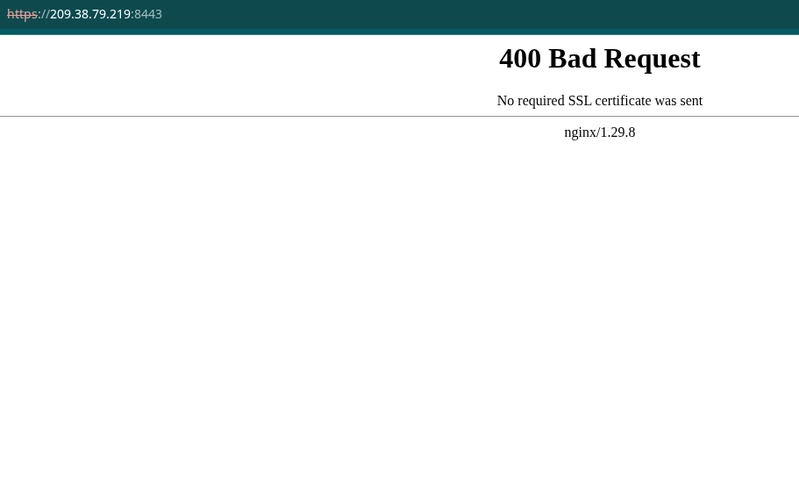
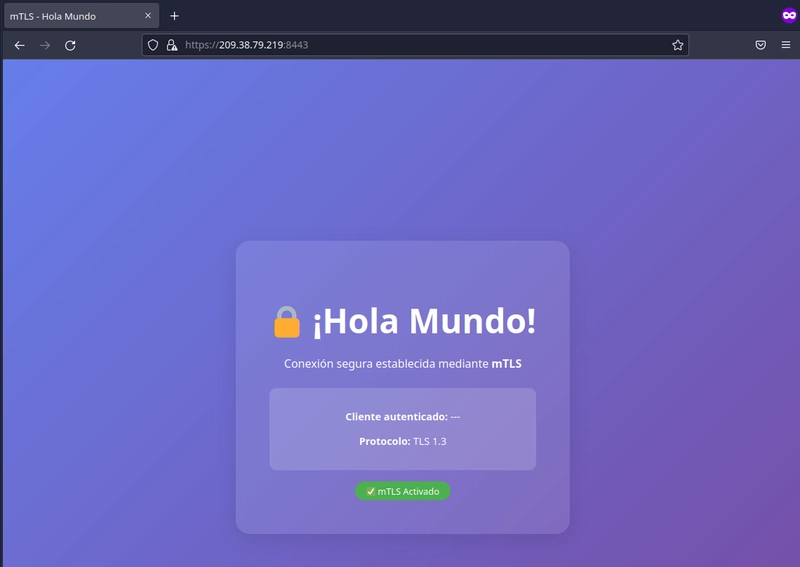
Go to your browser and navigate to https://YOUR_WEB_IP_OR_DOMAIN:8443. You should see a 400 error since we haven't configured the browser to send the client certificate yet.
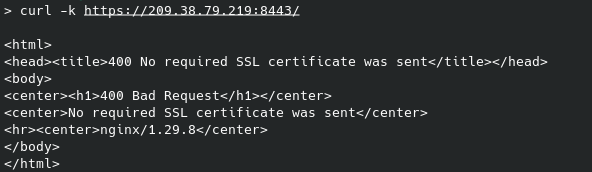
If we test with curl, we'll get a similar result:
Step 6: Successful Tests
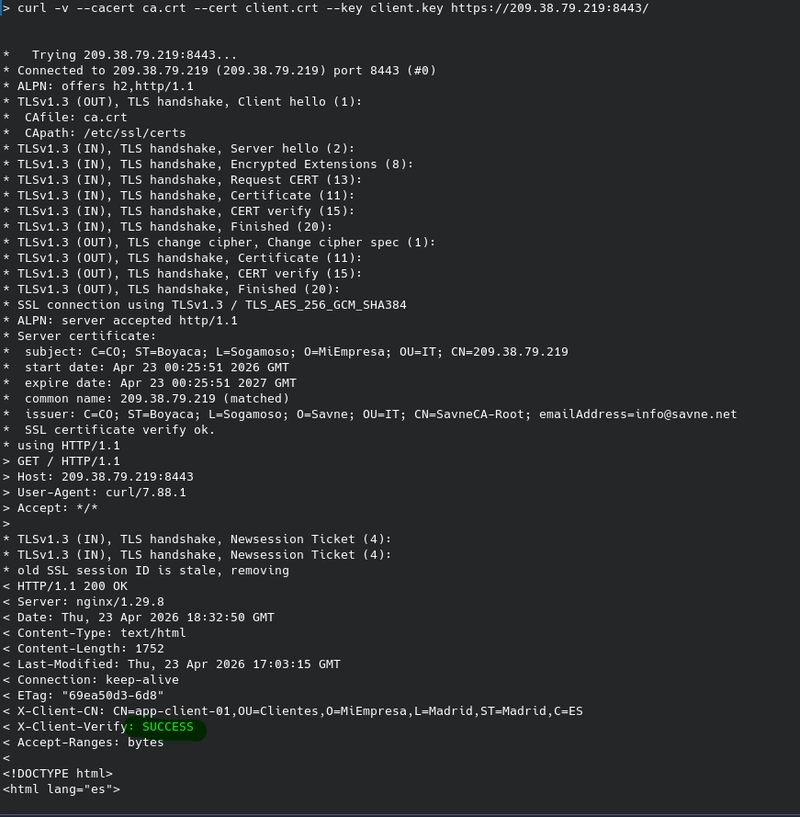
6.1 CURL with client certificate
curl -v \
  --cacert ca.crt \
  --cert client.crt \
  --key client.key \
  https://YOUR_WEB_IP_OR_DOMAIN:8443/
You need to save these files in the path where you'll run the curl command. You can get them from the following server paths:
- ca.crt => ~/mtls-ca/ca/certs/ca.crt
- client.crt => ~/mtls-ca/client/certs/client.crt
- client.key => ~/mtls-ca/client/private/client.key
6.2 Chrome with client certificate
Chrome and other browsers can use client certificates for mTLS authentication. To test this, you first need to import the .p12 certificate at the operating system level, since Chrome no longer allows importing them directly from its settings.
Download the certificate from the server:
scp root@server_ip:/root/mtls-ca/client/certs/client.p12 ./client.p12
Import according to your operating system:
On macOS (Keychain Access):
open client.p12
Keychain Access will open. Enter the password you set when creating the PKCS#12 file, and the certificate will be available for Chrome.
On Windows (Certificate Manager):
certmgr.msc
- Go to "Personal" → "Certificates"
- Right-click → "All Tasks" → "Import..."
- Select
client.p12and enter the password
On Linux:
# Convert .p12 to .pem
openssl pkcs12 -in client.p12 -out client.pem -nodes

# Start Chrome with system certificate support
google-chrome --enable-features=PlatformCertificateProvider
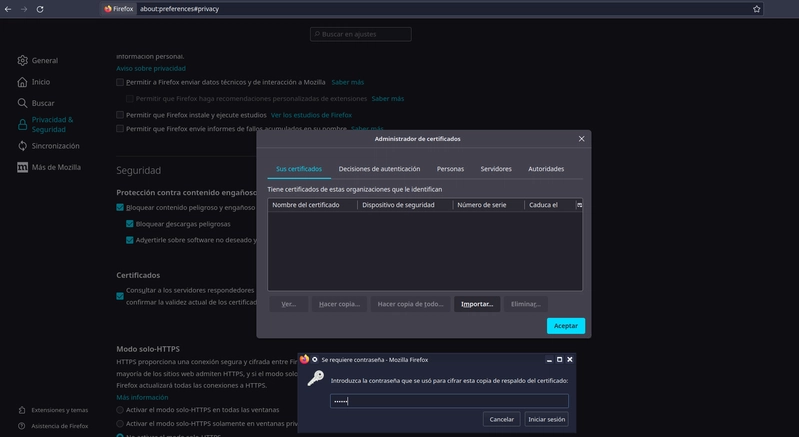
You might get an error initially, so it's best to test in an incognito tab or restart the browser so it picks up the newly installed certificate.
Conclusion
Implementing mTLS is one of the best security investments you can make to protect communications between services. With this practical Docker Compose example, you've seen how to:
- Create a private CA and generate certificates
- Configure Nginx with mTLS in a Docker container
- Test with curl with and without a certificate
- Test with Chrome by importing the client certificate
This same pattern applies to production environments, Kubernetes microservices, internal APIs, and any communication requiring mutual authentication.
Additional Resources
Did you enjoy this tutorial? Share your experiences implementing mTLS or ask questions in the comments. What other security topics would you like to see in future articles?
Need a server for testing? You can create a Droplet on DigitalOcean using this link and get additional credit: https://m.do.co/c/2c579acd7121