


En el mundo de la seguridad de aplicaciones modernas, mTLS (Mutual TLS) se ha convertido en un estándar fundamental para proteger comunicaciones entre servicios. A diferencia del TLS tradicional donde solo el servidor se autentica, mTLS requiere que ambas partes (cliente y servidor) presenten certificados válidos, creando una capa de seguridad mucho más robusta.
En este artículo te mostraré cómo implementar mTLS paso a paso, desde la generación de certificados hasta la configuración en aplicaciones reales.
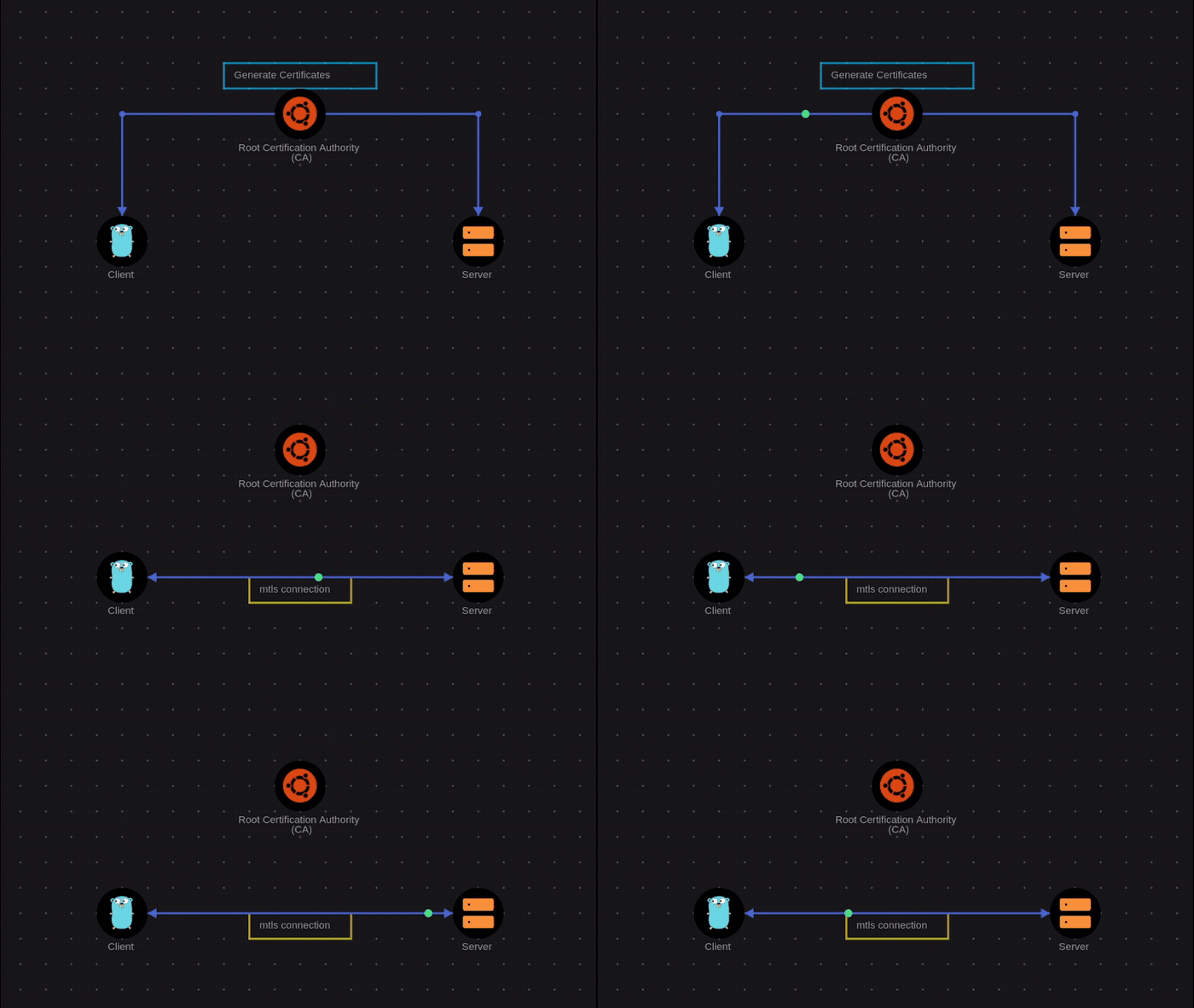
Diagrama realizado con https://savnet.co
¿Qué es mTLS y por qué es importante?
mTLS (Mutual TLS) es una extensión del protocolo TLS estándar que añade autenticación mutua. Mientras que en TLS tradicional solo el servidor presenta un certificado, en mTLS tanto el cliente como el servidor deben autenticarse mutuamente.
Beneficios clave:
- Autenticación fuerte: Ambos extremos de la comunicación se verifican
- Prevención de ataques MITM: Dificulta los ataques de intermediario
- Zero Trust: Se alinea perfectamente con arquitecturas Zero Trust
- Seguridad en microservicios: Ideal para comunicaciones entre servicios
Casos de uso comunes:
- APIs internas entre microservicios
- Comunicaciones entre servicios en Kubernetes
- Conexiones entre sistemas de pago
- Comunicaciones B2B seguras
- Acceso a APIs sensibles
Paso 1: Configurar el entorno
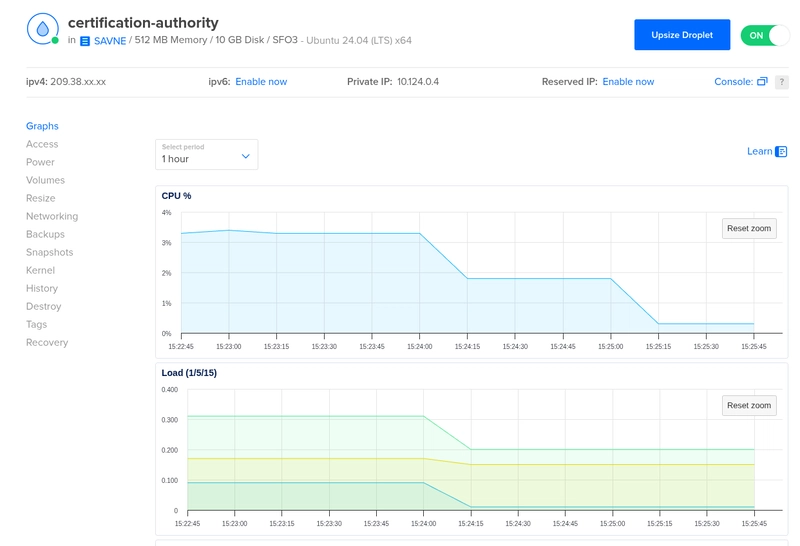
Para este tutorial, trabajaremos sobre un servidor Ubuntu que funcionará como nuestro generador de certificados y Autoridad Certificadora (CA). Solo necesitamos un pequeño servidor con 512MB de RAM y 1 CPU, suficiente para generar y gestionar certificados.
Necesitaremos algunas herramientas básicas:
# Actualizar sistema
sudo apt update && sudo apt upgrade -y

# Instalar OpenSSL (si no está instalado)
sudo apt install -y openssl curl wget

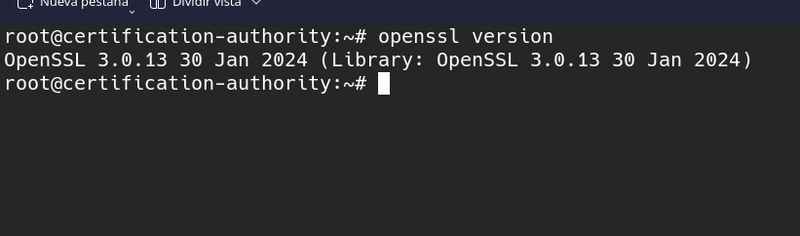
# Verificar versión de OpenSSL
openssl version
Para otros sistemas operativos, asegúrate de tener OpenSSL instalado.
Paso 2: Crear la Autoridad Certificadora (CA)
La CA es la entidad que emitirá y firmará todos nuestros certificados. Vamos a crear una CA privada.
2.1 Crear directorio de trabajo
mkdir -p ~/mtls-ca
cd ~/mtls-ca
mkdir -p ca/private ca/certs ca/newcerts
mkdir -p server/private server/certs
mkdir -p client/private client/certs

# Configurar permisos seguros
chmod 700 ca/private server/private client/private
2.2 Generar clave privada y certificado de la CA
# Generar clave privada de la CA (protegida con contraseña)
openssl genrsa -aes256 -out ca/private/ca.key 4096

# Generar certificado autofirmado de la CA
openssl req -new -x509 -days 7300 -sha256 \
  -key ca/private/ca.key \
  -out ca/certs/ca.crt \
  -subj "/C=ES/ST=Madrid/L=Madrid/O=MiEmpresa/OU=IT/CN=MiCA-Root/emailAddress=admin@miempresa.com"
Explicación del parámetro -subj:
-
/C=ES: Código de país (2 letras) -
/ST=Madrid: Estado o provincia -
/L=Madrid: Localidad o ciudad -
/O=MiEmpresa: Nombre de tu organización -
/OU=IT: Unidad organizativa -
/CN=MiCA-Root: Nombre común de la CA -
/emailAddress=admin@miempresa.com: Email de contacto
Personaliza estos valores con tu información real.
Durante el proceso se te pedirá:
- Contraseña para la clave privada (guárdala en un lugar seguro)
2.3 Verificar el certificado de la CA
openssl x509 -in ca/certs/ca.crt -text -noout
Deberías ver información detallada sobre tu CA, incluyendo:
- Emisor: Tu propia CA
- Validez: 20 años (7300 días)
- Uso clave: Certificar otras claves
Paso 3: Generar certificados para el servidor
Ahora crearemos certificados para nuestro servidor.
3.1 Crear clave privada y CSR del servidor
cd ~/mtls-ca

# Generar clave privada del servidor
openssl genrsa -out server/private/server.key 2048

# Crear solicitud de firma de certificado (CSR)
openssl req -new -sha256 \
  -key server/private/server.key \
  -out server/server.csr \
  -subj "/C=ES/ST=Madrid/L=Madrid/O=MiEmpresa/OU=Web/CN={ACA DOMINIO O IP DONDE ESTA TU APP WEB}"
Personaliza el parámetro -subj:
-
/C=ES: Tu código de país -
/ST=Madrid: Tu estado o provincia -
/L=Madrid: Tu localidad o ciudad -
/O=MiEmpresa: Tu organización -
/OU=Web: Unidad organizativa (ej: Web, API, etc.) -
/CN=api.midominio.com: IMPORTANTE: El dominio o IP de tu servidor
3.2 Firmar el certificado del servidor con la CA
# Firmar el certificado del servidor
openssl x509 -req -days 365 -sha256 \
  -in server/server.csr \
  -CA ca/certs/ca.crt \
  -CAkey ca/private/ca.key \
  -CAcreateserial \
  -out server/certs/server.crt \
  -extfile <(echo -e "basicConstraints=CA:FALSE\nkeyUsage=digitalSignature,keyEncipherment\nextendedKeyUsage=serverAuth")

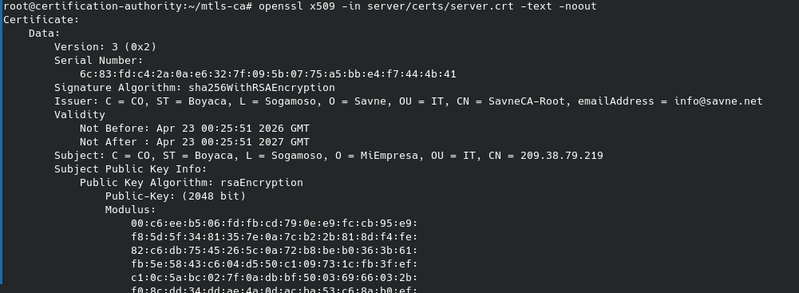
# Verificar el certificado firmado
openssl x509 -in server/certs/server.crt -text -noout
3.3 Crear archivo de cadena de certificados
# Crear cadena de certificados para el servidor
cat server/certs/server.crt ca/certs/ca.crt > server/certs/server-chain.crt
Paso 4: Generar certificados para el cliente
Repetimos el proceso para el cliente.
4.1 Crear clave privada y CSR del cliente
# Generar clave privada del cliente
openssl genrsa -out client/private/client.key 2048

# Crear CSR para el cliente
openssl req -new -sha256 \
  -key client/private/client.key \
  -out client/client.csr \
  -subj "/C=ES/ST=Madrid/L=Madrid/O=MiEmpresa/OU=Clientes/CN=app-client-01"
Personaliza el parámetro -subj:
-
/C=ES: Tu código de país -
/ST=Madrid: Tu estado o provincia -
/L=Madrid: Tu localidad o ciudad -
/O=MiEmpresa: Tu organización -
/OU=Clientes: Unidad organizativa (ej: Clientes, Apps, etc.) -
/CN=app-client-01: IMPORTANTE: Identificador único del cliente
4.2 Firmar el certificado del cliente
# Firmar el certificado del cliente
openssl x509 -req -days 365 -sha256 \
  -in client/client.csr \
  -CA ca/certs/ca.crt \
  -CAkey ca/private/ca.key \
  -CAcreateserial \
  -out client/certs/client.crt \
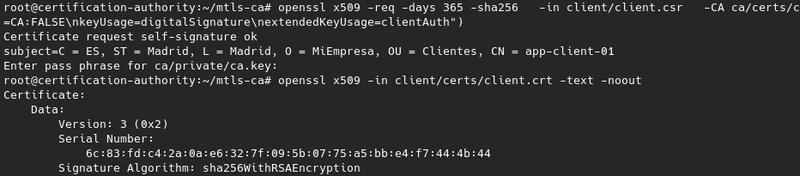
  -extfile <(echo -e "basicConstraints=CA:FALSE\nkeyUsage=digitalSignature\nextendedKeyUsage=clientAuth")

# Verificar el certificado del cliente
openssl x509 -in client/certs/client.crt -text -noout
4.3 Crear archivo PKCS#12 para el cliente
# Crear archivo PKCS#12 (p12/pfx) para fácil importación
openssl pkcs12 -export \
  -inkey client/private/client.key \
  -in client/certs/client.crt \
  -certfile ca/certs/ca.crt \
  -out client/certs/client.p12
Paso 5: Desplegar un "Hola mundo" con Docker Compose y mTLS
Vamos a crear un ejemplo simple de una web usando Docker Compose con un servidor Nginx que responde "Hola mundo" y está protegido con mTLS. Recuerda, esta web debe ser desplegada con el mismo dominio o ip que se uso al generar las llaves del server en el punto 3.1.
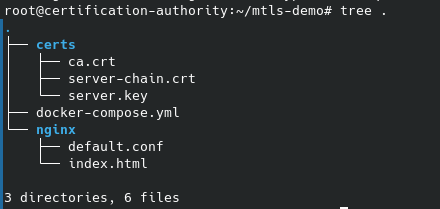
5.1 Estructura del proyecto
Crea la siguiente estructura de directorios en tu servidor:
mkdir -p ~/mtls-demo/nginx
cd ~/mtls-demo
5.2 Copiar los certificados generados
Copia los certificados que generamos en los pasos anteriores:
# Crear directorio para certificados en el proyecto
mkdir -p ~/mtls-demo/certs

# Copiar certificados del servidor, en nuestro caso están en el mismo servidor
cp ~/mtls-ca/server/certs/server-chain.crt ~/mtls-demo/certs/
cp ~/mtls-ca/server/private/server.key ~/mtls-demo/certs/

# Copiar CA (para verificar clientes)
cp ~/mtls-ca/ca/certs/ca.crt ~/mtls-demo/certs/
5.3 Crear la página HTML
Crea el archivo ~/mtls-demo/nginx/index.html:
<!DOCTYPE html>
<html lang="es">
<head>
    <meta charset="UTF-8">
    <meta name="viewport" content="width=device-width, initial-scale=1.0">
    <title>mTLS - Hola Mundo</title>
    <style>
        body {
            font-family: 'Segoe UI', Tahoma, Geneva, Verdana, sans-serif;
            display: flex;
            justify-content: center;
            align-items: center;
            height: 100vh;
            margin: 0;
            background: linear-gradient(135deg, #667eea 0%, #764ba2 100%);
            color: white;
        }
        .container {
            text-align: center;
            background: rgba(255, 255, 255, 0.1);
            padding: 3rem;
            border-radius: 20px;
            backdrop-filter: blur(10px);
            box-shadow: 0 8px 32px rgba(0, 0, 0, 0.1);
        }
        h1 { font-size: 3rem; margin-bottom: 0.5rem; }
        .cert-info {
            background: rgba(255, 255, 255, 0.15);
            padding: 1rem;
            border-radius: 10px;
            margin-top: 1.5rem;
            font-size: 0.9rem;
        }
        .badge {
            display: inline-block;
            background: #4CAF50;
            color: white;
            padding: 0.3rem 1rem;
            border-radius: 20px;
            font-size: 0.8rem;
            margin-top: 1rem;
        }
    </style>
</head>
<body>
    <div class="container">
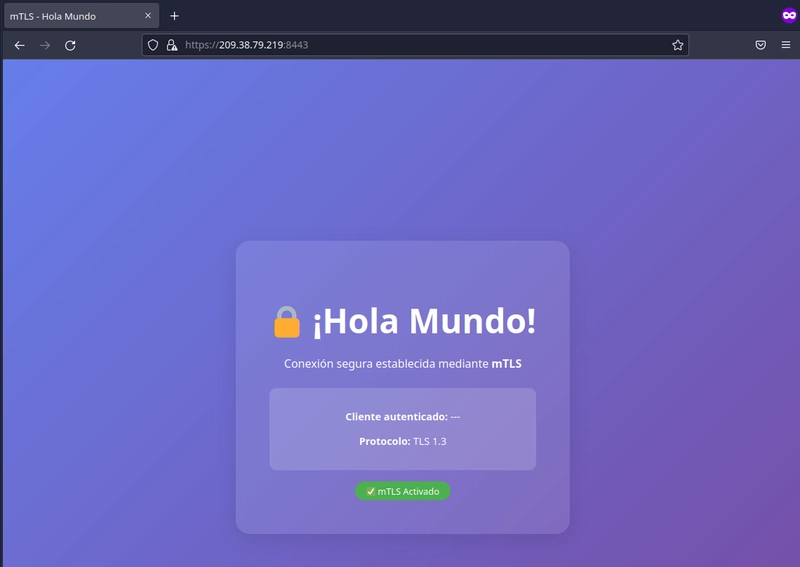
        <h1>🔒 ¡Hola Mundo!</h1>
        <p>Conexión segura establecida mediante <strong>mTLS</strong></p>
        <div class="cert-info">
            <p><strong>Cliente autenticado:</strong> <span id="client-cn">---</span></p>
            <p><strong>Protocolo:</strong> TLS 1.3</p>
        </div>
        <div class="badge">✅ mTLS Activado</div>
    </div>
</body>
</html>
5.4 Configurar Nginx con mTLS
Crea el archivo ~/mtls-demo/nginx/default.conf:
server {
    listen 8443 ssl;
    server_name localhost;

    # Certificados del servidor
    ssl_certificate /etc/nginx/certs/server-chain.crt;
    ssl_certificate_key /etc/nginx/certs/server.key;

    # Configuración SSL moderna
    ssl_protocols TLSv1.2 TLSv1.3;
    ssl_ciphers HIGH:!aNULL:!MD5;
    ssl_prefer_server_ciphers off;
    ssl_session_cache shared:SSL:10m;
    ssl_session_timeout 10m;

    # mTLS: verificar cliente
    ssl_client_certificate /etc/nginx/certs/ca.crt;
    ssl_verify_client on;
    ssl_verify_depth 2;

    # Raíz de documentos
    root /usr/share/nginx/html;
    index index.html;

    location / {
        # Rechazar si el certificado del cliente no es válido
        if ($ssl_client_verify != SUCCESS) {
            return 403 "Acceso denegado: certificado de cliente requerido\n";
        }

        # Pasar información del cliente a la app
        add_header X-Client-CN $ssl_client_s_dn always;
        add_header X-Client-Verify $ssl_client_verify always;

        try_files $uri $uri/ =404;
    }

}
5.5 Crear el Docker Compose
Crea el archivo ~/mtls-demo/docker-compose.yml:
version: '3.8'

services:
  mtls-server:
    image: nginx:alpine
    container_name: mtls-nginx
    ports:
      - "8443:8443"
    volumes:
      - ./nginx/default.conf:/etc/nginx/conf.d/default.conf:ro
      - ./nginx/index.html:/usr/share/nginx/html/index.html:ro
      - ./certs/server-chain.crt:/etc/nginx/certs/server-chain.crt:ro
      - ./certs/server.key:/etc/nginx/certs/server.key:ro
      - ./certs/ca.crt:/etc/nginx/certs/ca.crt:ro
    restart: unless-stopped
5.6 Desplegar el servicio
cd ~/mtls-demo

# Iniciar el contenedor
docker compose up -d

# Verificar que está corriendo
docker compose ps

# Ver logs
docker compose logs -f

# Bajar contenedor
docker compose down
5.7 Verificar el despliegue
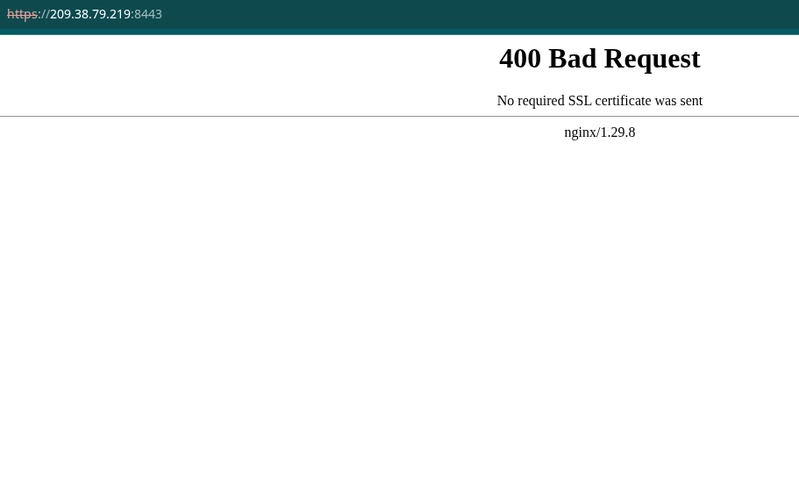
Ve al navegador e ingresa a https://IP_O_DOMOINIO_DE_TU_WEB:8443 , deberás ver un error 400 ya que aún no hemos configurado el navegador para enviar el certificado de cliente.
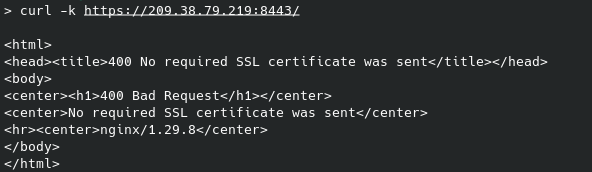
Si probamos con curl nos pasará algo parecido
Paso 6: Pruebas exitosas
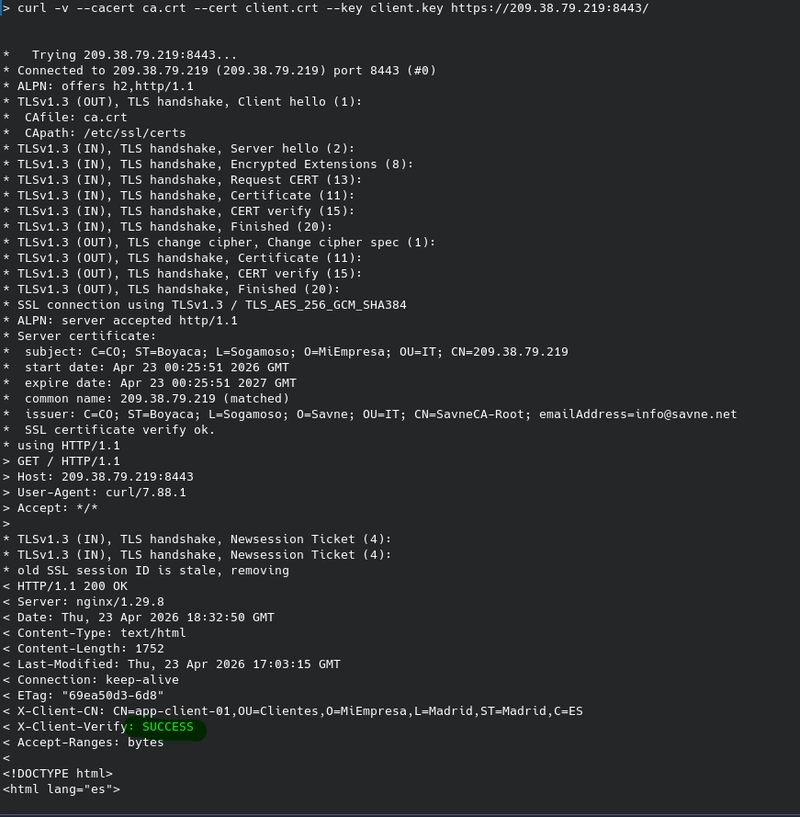
6.1 CURL Con certificado de cliente
curl -v \
  --cacert ca.crt \
  --cert client.crt \
  --key client.key \
  https://IP_O_DOMOINIO_DE_TU_WEB:8443/
Los archivos debes guardarlos en la ruta donde ejecutarás el comando curl y los obtienes de las siguientes rutas del servidor:
- ca.crt=> ~/mtls-ca/ca/certs/ca.crt
- client.crt=> ~/mtls-ca/client/certs/client.crt
- client.key=> ~/mtls-ca/client/private/client.key
6.2 Chrome Con certificado de cliente
Chrome y otros navegadores pueden usar certificados de cliente para autenticación mTLS. Para probarlo, primero debes importar el certificado .p12 a nivel del sistema operativo, ya que Chrome ya no permite importarlos directamente desde su configuración.
Descargar el certificado desde el servidor:
scp root@ip_servidor:/root/mtls-ca/client/certs/client.p12 ./client.p12
Importar según tu sistema operativo:
En macOS (Keychain Access):
open client.p12
Se abrirá Keychain Access. Introduce la contraseña que pusiste al crear el PKCS#12 y el certificado quedará disponible para Chrome.
En Windows (Administrador de certificados):
certmgr.msc
- Ve a "Personal" → "Certificados"
- Haz clic derecho → "Todas las tareas" → "Importar..."
- Selecciona
client.p12e introduce la contraseña
En Linux:
# Convertir .p12 a .pem
openssl pkcs12 -in client.p12 -out client.pem -nodes

# Iniciar Chrome con soporte de certificados del sistema
google-chrome --enable-features=PlatformCertificateProvider
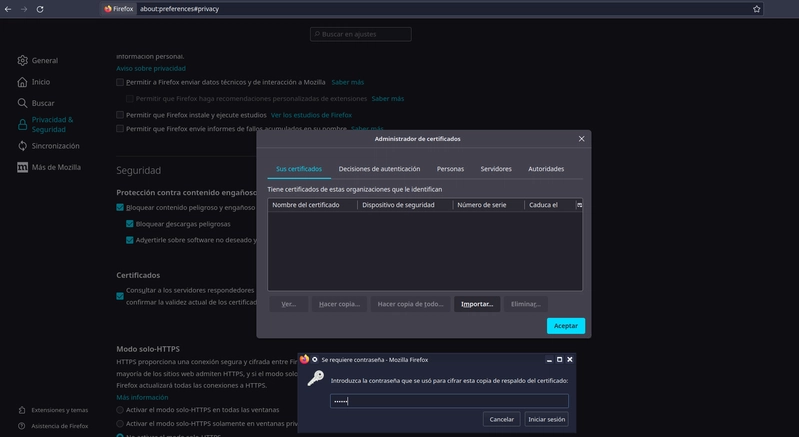
Es probable que te genere error al inicio así que lo mejor es probarlo en una pestaña incógnita o reiniciar el navegador para que tome el nuevo certificado instalado.
Conclusión
Implementar mTLS es una de las mejores inversiones en seguridad que puedes hacer para proteger las comunicaciones entre servicios. Con este ejemplo práctico de Docker Compose has visto cómo:
- Crear una CA privada y generar certificados
- Configurar Nginx con mTLS en un contenedor Docker
- Probar desde curl con y sin certificado
- Probar desde Chrome importando el certificado de cliente
Este mismo patrón se aplica a entornos de producción, microservicios en Kubernetes, APIs internas y cualquier comunicación que requiera autenticación mutua.
Recursos adicionales
- Documentación oficial de OpenSSL
- mTLS en Nginx
- Guía de mTLS de Cloudflare
- Docker Compose instalación
¿Te gustó este tutorial? Comparte tus experiencias implementando mTLS o haz preguntas en los comentarios. ¿Qué otros temas de seguridad te gustaría ver en futuros artículos?
¿Necesitas un servidor para tus pruebas? Puedes crear un Droplet en DigitalOcean usando este enlace y obtener crédito adicional: https://m.do.co/c/2c579acd7121