



惯性聚合 高效追踪和阅读你感兴趣的博客、新闻、科技资讯
阅读原文 在惯性聚合中打开

推荐订阅源

C
Check Point Blog
Microsoft Security Blog
aimingoo的专栏
aimingoo的专栏
V
V2EX
博客园 - 【当耐特】
T
Tailwind CSS Blog
Apple Machine Learning Research
量子位
MyScale Blog
MyScale Blog
Hugging Face - Blog
Hugging Face - Blog
大猫的无限游戏
大猫的无限游戏
The Cloudflare Blog
月光博客
月光博客
I
InfoQ
WordPress大学
WordPress大学
Martin Fowler
Martin Fowler
T
The Blog of Author Tim Ferriss
爱范儿
爱范儿
小众软件
小众软件
罗磊的独立博客
Recent Announcements
Blog — PlanetScale
Blog — PlanetScale
J
Java Code Geeks
Cyber Security Advisories - MS-ISAC

DEV Community

Authentication Security Deep Dive: From Brute Force to Salted Hashing (With Java Examples) Why AI Systems Don’t Fail — They Drift Spilling beans for how i learn for exam😁"Reinforcement Learning Cheat Sheet" I Replaced Chrome with Safari for AI Browser Automation. Here's What Broke (and What Finally Worked) How Python Borrows Other People's Work The $40 Architecture: Processing 1 Billion API Requests with 99.99% Uptime Vibe Coding: A Workflow Guide (From Zero to SaaS) Most webhook security guides protect the wrong side. The scary part is delivery. Headless CMS for TanStack Start: Build a Blog with Cosmic EU Age Verification App "Hacked in 2 Minutes" — What Actually Happened Comfy Cloud’s delete function does not actually remove files Running AI Models on GPU Cloud Servers: A Beginner Guide Event-driven media intelligence with AWS Step Functions and Bedrock I scored 500 AI prompts across 8 quality dimensions — here's what broke How to Call Google Gemini API from Next.js (Free Tier, No Backend Needed) The Portal Protocol: Reclaiming Human Connection in the Age of AI How to Fix Your Team's Scattered Knowledge Problem With a Self-Hosted Forum Intro to tc Cloud Functors: A Graph-First Mental Model for the Modern Cloud Designing Multi-Tenant Backends With Both Ownership and Team Access I Built a Neumorphic CSS Library with 77+ Components — Here's What I Learned PostgreSQL Performance Optimization: Why Connection Pooling Is Critical at Scale Cómo construí un SaaS multi-rubro para gestionar expensas en Argentina con FastAPI + Vue 3 🚀 I Built an Ethical Hacking Scanner Tool – Open Source Project I Replaced /usage and /context in Claude Code With a Single Statusline A Pythonic Way to Handle Emails (IMAP/SMTP) with Auto-Discovery and AI-Ready Design I Collected 8.9 Million Polymarket Price Points — Here's What I Found About How Markets Really Move EcoTrack AI — Carbon Footprint Tracker & Dashboard Everyone's Using AI. No One Agrees How. 5 self-hosted ebook managers worth trying in 2026 Building Your First AI Agent with LangChain: From Chatbot to Autonomous Assistant
Pick your shadcn base, your style, your icons
shadcncraft · 2026-04-28 · via DEV Community

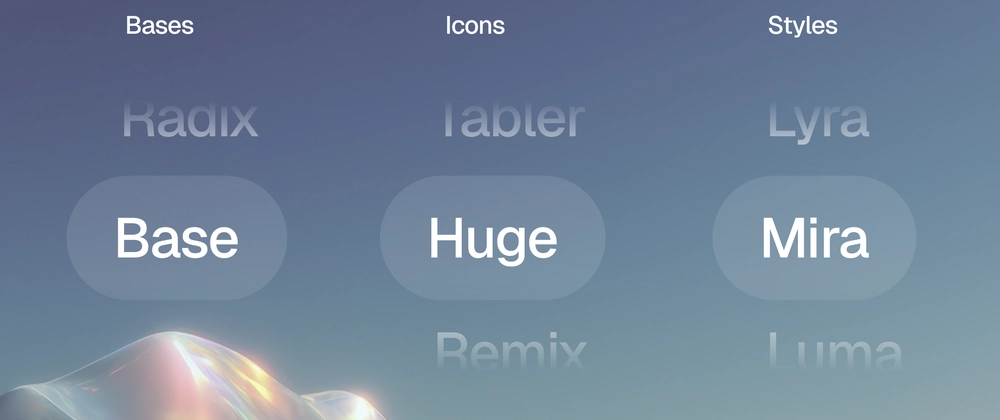
shadcncraft now supports Base UI, all seven shadcn styles, multiple icon libraries, and a new customizer for previewing combinations before install.

shadcncraft now adapts to your setup.

Choose your base, style, and icon library, and everything follows. A new customizer lets you preview combinations live.

Until now, every component shipped with fixed defaults: Radix UI, the standard shadcn look, and Lucide icons. If your project used something else, you had to adjust it after install.

That is no longer the case. shadcncraft now respects your project config from the start.

Your project defines the defaults

Your setup is the source of truth. The registry reads what you've chosen and installs components to match:

  • Base — Radix UI and Base UI, both fully supported.
  • Style — all seven shadcn presets.
  • Icons — Lucide, Tabler Icons, Hugeicons, Phosphor Icons, and Remix Icon.

Tokens, fonts, radius, and themes remain unchanged. Nothing gets overridden.

Built on shadcn styles

These styles come directly from shadcn. Same presets, same output.

  • Vega — classic shadcn look.
  • Nova — tighter spacing, more compact.
  • Maia — softer and more rounded.
  • Lyra — sharp and structured.
  • Mira — dense and product-focused.
  • Luma — softer and more fluid.
  • Sera — editorial and typographic.

If your project already uses one of these, shadcncraft follows it. If not, you can try them across the library.

Custom styles from shadcn create also work.

Preview every combination

Each component and block page now includes a live customizer.

You can:

  • Switch between Radix and Base UI
  • Change styles
  • Swap icon libraries
  • Adjust fonts and radius
  • Apply shadcn or tweakcn themes

This is the same model as shadcn create, applied to every component and block.

You can see exactly what you'll get before installing anything.

Works across the library

Support is library-wide. Components and blocks are built to follow your config.

Some older blocks may not support every option yet. We're updating those over time and will surface support more clearly on each component and block page.

One-line migration

Nothing breaks if you're already using shadcncraft.

To enable style-aware install, change one line in components.json:

{
  "registries": {
    "@shadcncraft": {
-     "url": "https://shadcncraft.com/r/{name}",
+     "url": "https://shadcncraft.com/r/{style}/{name}",
      "headers": {
        // ... your existing headers ...
      }
    }
  }
}

Enter fullscreen mode Exit fullscreen mode

That's it.

Try it

Try the customizer on a live pro block. You can test different bases, styles, icons, and themes in our pro components and blocks before installing.

Where this is going

This brings shadcncraft closer to how shadcn create works.

Same styles. Same structure. Same expectations.

The goal is simple: your design system behaves the same in Figma and in code.

More updates coming soon.