





Welcome to the Third DEV LOG!
Welcome to the third Dev Log of my full stack application called EasyPollVote (EasyPV)!
What is EasyPollVote (EasyPV)?
A Next.js application where the ultimate goal is having the convenience to create your own poll and share it for others to vote on your custom poll!
For example, a user can create their own poll. Their poll can be something like "Do you like Cats or Dogs?" following the two options users can vote on "Cats" or "Dogs". Then, they will be able to send the private link to anyone and the voters can vote on it without the need to create an account!
That is the whole goal. Do note that this goal may change as time goes on!
The current goal is to learn about the use of Supabase!
Current Progress
Made small progress. Still fixing the issue of the End Date where it is inconsistent. Speaking of timing, I need to fix the PokeAPI, so it can update on the appropriate date.
Anyway, added a Title on the front page :)
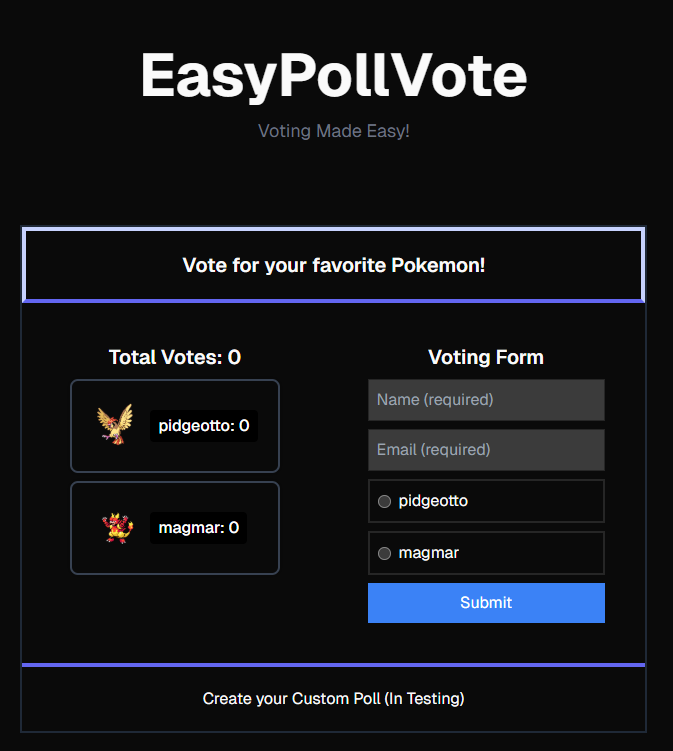
Also, thank you @sylwia-lask for the feedback on the responsive issue!
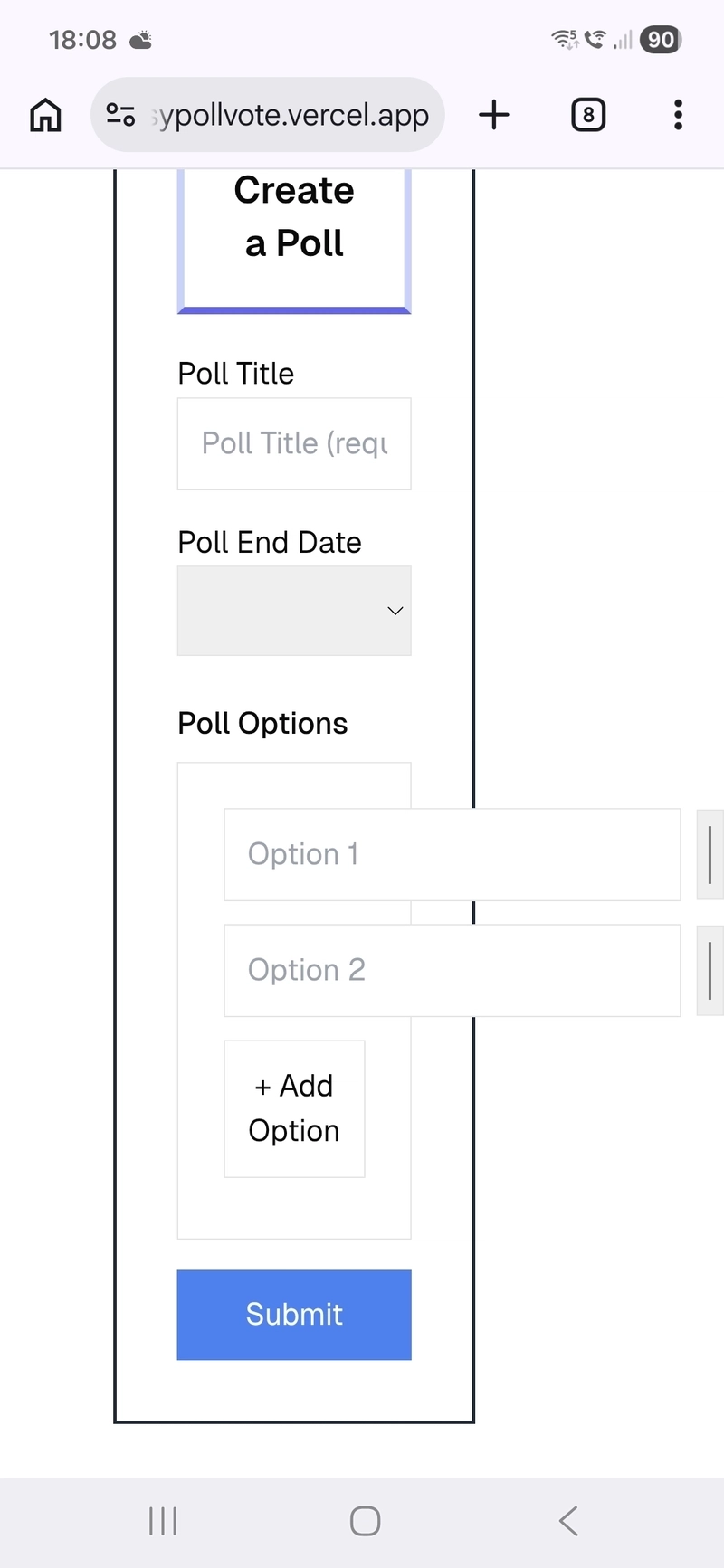
The issue should be fixed now! :D
With the changes made, I did mention I will get into detail on how the front page (Voting your Pokemon form) functionality work. Do note the solution I have is not perfect and I had ChatGPT to assist me on this project. Feedback is greatly appreciated :)
Demo Voting Poll in detail!
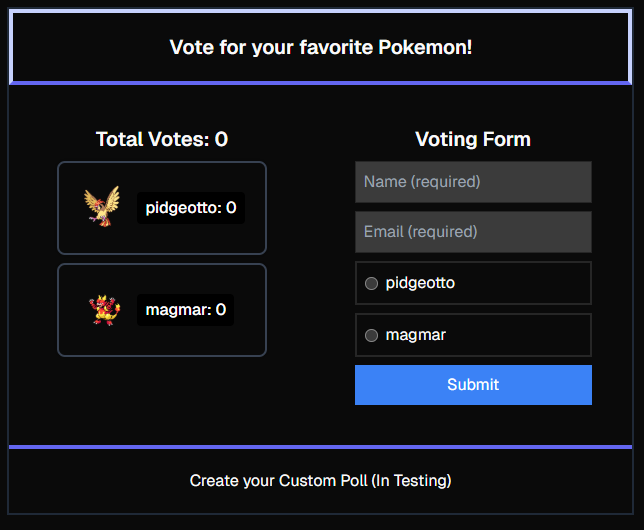
I will be discussing on this demo poll. The main functionality is when you start to submit the form. This is the current structure:
{/* Form */ }
<form onSubmit={handleSubmit} className="flex flex-col gap-2 p-10">
    <h1 className="text-center text-xl font-semibold">
        Voting Form
    </h1>
    <input
        name="name"
        placeholder="Name (required)"
        value={formData.name}
        onChange={handleChange}
        className="p-2 border"
        required
    />

    <input
        name="email"
        placeholder="Email (required)"
        value={formData.email}
        onChange={handleChange}
        className="p-2 border"
        required
    />

    {pokemonList.map((pokemon, index) => (
        <label key={index} className="flex items-center gap-2 p-2 border-2 cursor-pointer hover:bg-gray-50 dark:hover:bg-gray-700">
            <input
                type="radio"
                name="vote"
                value={pokemon.name}
                onChange={handleChange}
            />
            {pokemon.name}
        </label>
    ))}

    <button disabled={loading} className="bg-blue-500 text-white p-2">
        Submit
    </button>

    {message && <p>{message}</p>}
</form>
You may notice the two big variables: handleChange and handleSubmit.
For handleChange, nothing really big is going on. It is basically updating the formData variable based on the user's input. So when the user click submit, the formData will be sent to the database.
const [formData, setFormData] = useState({
    name: "",
    email: "",
    vote: "",
    // Not uploaded to the Database. This is used for route.ts switch case
    action: "Demo",
});


...


// Handles anything Input related on the Voting Demo Form
const handleChange = (e: any) => {
    setFormData({ ...formData, [e.target.name]: e.target.value });
};
For the handleSubmit, this is where the main functionality takes place!
// When the Form is submitted
const handleSubmit = async (e: any) => {
    e.preventDefault();
    setMessage("");

    // If the user did not vote a specific pokemon, error message is shown
    if (!formData.vote) {
        setMessage("Error: Please select a Pokémon to vote for.");
        return;
    }

    // If all inputs are entered, perform a POST request in the route.ts where we head to the "Demo" switch statement
    const res = await fetch("/api/vote", {
        method: "POST",
        headers: {
            "Content-Type": "application/json",
        },
        body: JSON.stringify({
            name: formData.name,
            email: formData.email,
            vote: formData.vote,
            action: "Demo", // Not uploaded to the Database. This is used for route.ts switch case
        }),
    });

    const data = await res.json();

    if (!res.ok) {
        setMessage(data?.error || "Error: Form submission failed.");
    } else {
        setMessage("Vote submitted successfully!");
        setFormData({
            name: "",
            email: "",
            vote: "",
            action: "Demo", // Not uploaded to the Database. This is used for route.ts switch case
        });
    }
};
When the user clicks "Submit", it checks to see if the user selected their vote. If not, it prompts the error to the user that they need to vote:
// If the user did not vote a specific pokemon, error message is shown
if (!formData.vote) {
    setMessage("Error: Please select a Pokémon to vote for.");
    return;
}
If the check is all good, it performs a POST request on /api/vote and sending it to the database. After that, the form clears out:
// If all inputs are entered, perform a POST request in the route.ts where we head to the "Demo" switch statement
const res = await fetch("/api/vote", {
    method: "POST",
    headers: {
        "Content-Type": "application/json",
    },
    body: JSON.stringify({
        name: formData.name,
        email: formData.email,
        vote: formData.vote,
        action: "Demo", // Not uploaded to the Database. This is used for route.ts switch case
    }),
});

const data = await res.json();

if (!res.ok) {
    setMessage(data?.error || "Error: Form submission failed.");
} else {
    setMessage("Vote submitted successfully!");
    setFormData({
        name: "",
        email: "",
        vote: "",
        action: "Demo", // Not uploaded to the Database. This is used for route.ts switch case
    });
}
That's pretty much what's happening on the client side. You may also notice this part:
action: "Demo", // Not uploaded to the Database. This is used for route.ts switch case
In the api/vote folder, I have multiple PUT requests in where inside of the PUT request, there is a switch case. I won't be able to go into detail now, but one thing to note that it is used to identify which code to execute. In this case, it's "Demo":
case "Demo": {
    const { name, email, vote } = body;

    if (!name || !email || !vote) {
        return NextResponse.json(
            { error: "Missing name, email, or vote" },
            { status: 400 }
        );
    }

    // Insert the row that contains their name, email, and the vote they voted for
    const { error } = await supabase
        .from("VoteDemo")
        .insert([
            {
                Name: name,
                Email: email,
                Vote: vote,
            },
        ]);

    if (error) {
        console.log("Supabase insert error (VoteDemo):", error);

        return NextResponse.json(
            { error: error.message },
            { status: 500 }
        );
    }

    return NextResponse.json({
        success: true,
        message: "Vote saved successfully in VoteDemo",
    });
}
Simply put, it does an insert statement to the "VoteDemo" table of the Name, Email, and Vote (yes @bingkahu, I saw your many votes. on that database).
That is pretty much it for that page. Next week, I will discuss more detail on how the Custom Polls work!
Official Website
If you would love to see the project yourself, feel free to check out the link here: https://easypollvote.vercel.app
I recommend to put a fake email and a fake name if you are using the app. Everything works as intended! Check it out and feedback is greatly appreciated!
Note: This post is monitored by the University and therefore the repository is currently private until the early Summer!