









Overview
This AWS DataSync solution transfers data from an EC2-hosted NFS share in VPC A (us-east-1) to an Amazon EFS file system in VPC B (us-west-2). The two VPCs are connected through a peering connection. This setup simulates a typical on-premises to cloud data migration scenario.
An NFS server uses the NFS protocol to share files and directories over a network.
Amazon EFS is a fully managed, serverless cloud file storage service that provides elastic, shared file storage for Linux-based workloads and applications running on AWS services like EC2.
AWS DataSync, a fully managed, high-speed data transfer service, communicates with both storage locations via VPC endpoints, utilizing a private, fast and secure connection to accomplish the transfer.
VPC Endpoints provide private interface entry points to AWS services from within a VPC. While many AWS services have public endpoints that can be accessed over the internet, it is a best practice to use VPC endpoints to communicate with AWS services securely from within a VPC.
Architecture Diagram
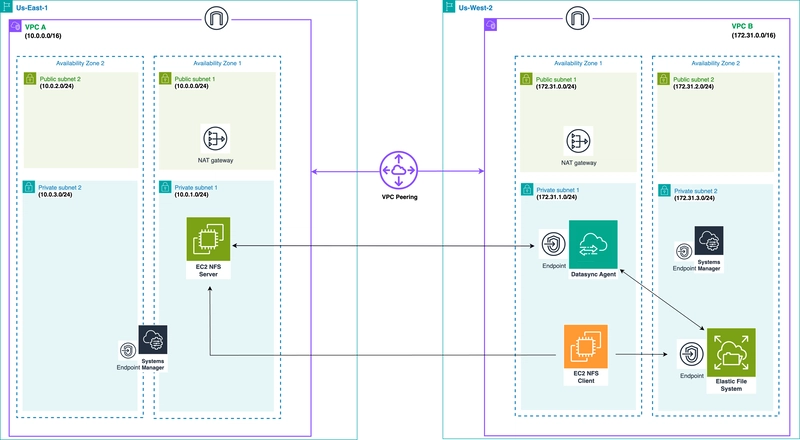
US-EAST-1
VPC A
- Create a VPC A in us-east-1 with 10.0.0.0/16 Cidr.
- Create two public subnets and an internet gateway.
- Create two private subnets and a nat gateway.
- Create an SSM Endpoint security group with the following rules:
- Inbound:
- HTTPS from VPC A.
- Outbound
- All traffic to VPC A.
- Inbound:
- Set up SSM Default Host Management Configuration to enable Session Manager to access the NFS server. You can optionally use a bastion host to access the NFS server.
- Use the default Host Management role or create and attach an EC2 role to the NFS server for session manager to work. Attach the following AWS managed policies to the EC2 role:
- AmazonSSMManagedEC2InstanceDefaultPolicy
- AmazonSSMManagedInstanceCore
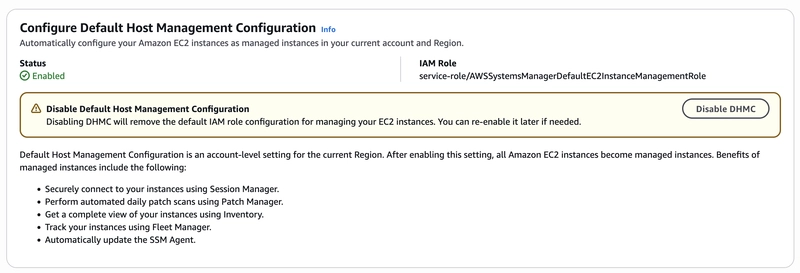
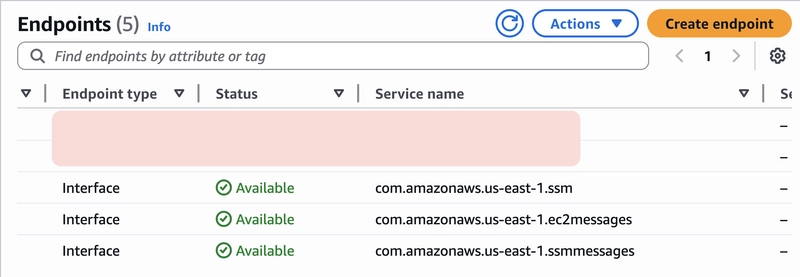
VPC A Endpoints
Create a VPC endpoint each for SSM, EC2-Messages, and SSM-Messages as follows:
- Create endpoint.
- Optional name.
- Choose “AWS services” type.
- Type “ssm” and search.
- Select the first option com.amazonaws.us-east-1.ssm. The name varies according to the service.
- Next, select VPC A.
- Check “Enable private DNS name”.
- DNS record IP type: IPv4.
- Subnets. Check the first two Availability Zones in the list. Under Subnet ID, select both private subnets.
- IP address type: IPv4.
- Security groups: Use the SSM Endpoint Security Group created earlier. You will use this security group for all VPC endpoints in region A.
- Policy: Full access.
NFS Server
Create the NFS server with the following specifications:
- Launch instances.
- Amazon Linux AMI.
- t2.micro instance type.
- Proceed without a key pair.
- PrivateSubnetA.
- Auto-assign public IP disabled.
-
Create NFS server security group:
- Inbound:
- HTTPS from SSM Endpoint.
- NFS from VPC B.
- ICMP from VPC B.
- Outbound
- All traffic to VPC A and B.
- Inbound:
- 8 GB gp3 EBS volume.
- User data for NFS server. Creates and exports NFS share, generates files for the transfer.
#!/bin/bash
set -e
sleep 180
# Check if the secondary drive exists
if ! lsblk /dev/xvdb &>/dev/null; then
    echo “/dev/xvdb not found. Exiting.”
    exit 1
fi

mkfs.ext4 /dev/xvdb
mkdir -p /mnt/data
mount /dev/xvdb /mnt/data
echo ‘/dev/xvdb /mnt/data ext4 defaults,nofail 0 2’ | sudo tee -a /etc/fstab

# Create and set up NFS share directory
TARGET_DIR=”/mnt/data/nfs_share”
PREFIX=”test”
EXT=”.txt”
mkdir -p $TARGET_DIR
chown -R nobody:nobody $TARGET_DIR
chmod 777 $TARGET_DIR

# Function to generate files
generate_files() {
local start=$1
local end=$2
local size_range=$3
local block_size=$4
local group_label=$5

local start_time=$(date +%s)
echo “Starting generation of $group_label at $(date)”

for i in $(seq -f “%04g” $start $end); do
    FILE=”${TARGET_DIR}/${PREFIX}${i}${EXT}”
    SIZE=$((RANDOM % size_range + 1))
    dd if=/dev/urandom of=”$FILE” bs=$block_size count=$SIZE status=none &
done
wait

local end_time=$(date +%s)
echo “Finished generation of $group_label at $(date)”
local elapsed_time=$((end_time - start_time))
echo “Time taken for $group_label: ${elapsed_time} seconds”
}

# Generate file groups with time tracking
generate_files 1 1000 100 1K “1000 files (1KB to 100KB)” &
generate_files 1001 1100 100 1M “100 files (1MB to 100MB)” &

wait
echo “File generation complete in $TARGET_DIR”

sed -i “\|^$TARGET_DIR |d” /etc/exports
echo “$TARGET_DIR *(rw,sync,no_root_squash,no_all_squash)” | sudo tee -a /etc/exports > /dev/null
systemctl start nfs-server
systemctl enable nfs-server
exportfs -rav
Verify that you can connect to the NFS server via Session Manager.
US-WEST-2
VPC B
- Create a target VPC in us-west-2 with 172.31.0.0/16 Cidr.
- Create two public subnets and an internet gateway.
- Create two private subnets and a NAT gateway.
- Follow the same steps as in Region A to enable Session Manager to access the NFS client.
-
Create and attach an SSM Endpoint Security Group to all the endpoints:
- Inbound:
- HTTPS from DataSync agent.
- NFS from VPC B.
- 1024 – 1064 from DataSync agent.
- Outbound
- All traffic to VPC B.
- Inbound:
Attach the same EC2 role created from VPC A to the NFS client if you are in the same account. For different accounts, you need to create a new EC2 role for the NFS client.
-
Create and attach an EC2 role to the DataSync agent. Attach the following AWS managed policies to the role:
- AWSDataSyncFullAccess
- AmazonSSMManagedEC2InstanceDefaultPolicy
- AmazonSSMManagedInstanceCore
DataSync Agent
Create the DataSync agent using the specifications below:
- DataSync latest AMI.
- t3.micro instance type.
- Proceed without a key pair.
- PrivateSubnetA.
- Auto-assign public IP disabled.
- Create a DataSync agent security group as follows:
- Inbound:
- HTTPS from VPC B.
- HTTP from NFS client.
- ICMP from NFS client.
- Outbound
- All traffic to VPC A and B.
- Inbound:
- 20 GB gp3 EBS volume.
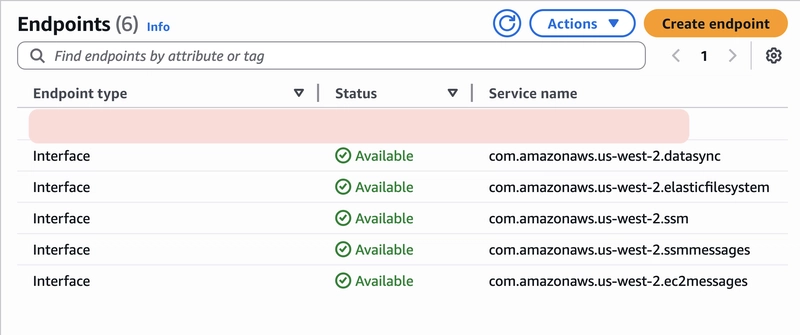
VPC B Endpoints
Follow similar procedures from US-EAST-1 to create VPC endpoints for:
- SSM.
- EC2-Messages.
- SSM-Messages.
- EFS.
- DataSync.
NFS Client
Create the NFS client EC2 as shown below:
- Launch instances.
- Amazon Linux AMI.
- t2.micro instance type.
- Proceed without a key pair.
- PrivateSubnetA.
- Create an NFS client security group:
- Inbound:
- HTTPS from VPC B.
- Outbound
- All traffic to VPC A and B.
- Inbound:
- 8 GB gp3 EBS volume.
EFS file system
- Create an EFS Security Group with the following rules:
- Inbound:
- NFS traffic from VPC B.
- NFS traffic from NFS Client.
- NFS traffic from DataSync agent.
- NFS traffic from SSM Endpoint.
- HTTPS from VPC B and SSM Endpoint.
- ICMP from NFS client.
- Outbound
- All traffic to VPC B.
- Inbound:
- Create file system.
- Select the target VPC.
- Keep the recommended settings and Create file system.
- Click on the file system ID.
- Go to the Network tab.
- Manage.
- For the two mount points, edit the security groups to use only the earlier created EFS Security Group.
VPC Peering
- Create peering connection.
- Optional name.
- VPC ID (Requester): VPC A ID.
- Select another VPC to peer with: My account.
- Region: Another Region.
- VPC ID (Accepter): VPC B ID.
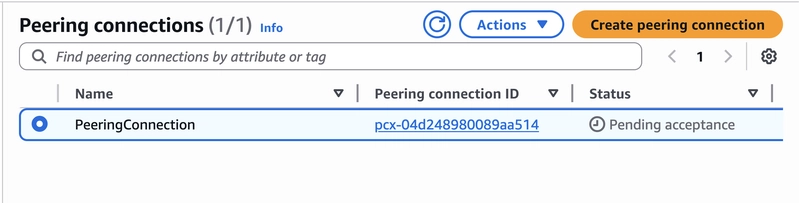
- From Region B (us-west-2) Peering Connections, select the peering connection available.
- From the “Actions” menu, Accept request. Confirm.
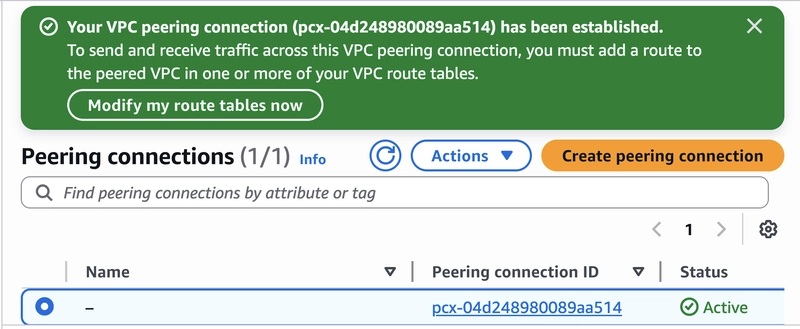
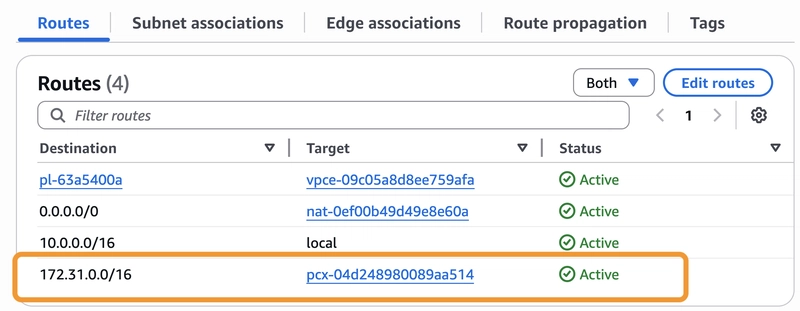
- Update the private route table for VPC A to forward Region B traffic to the peering connection.
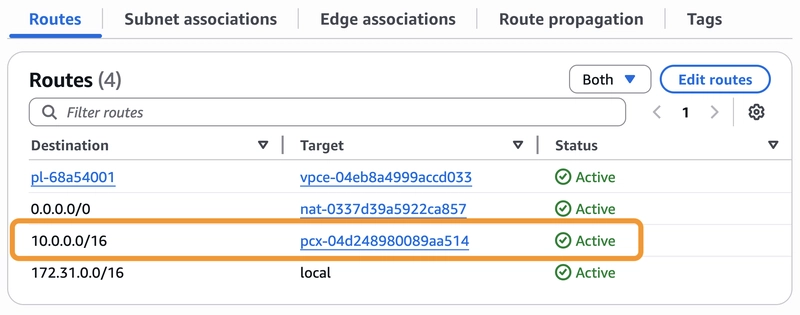
- Update the private route table for VPC B to forward Region A traffic to the peering connection.
Systems Setup
Mount the NFS share
Connect to the NFS client via Session Manager.
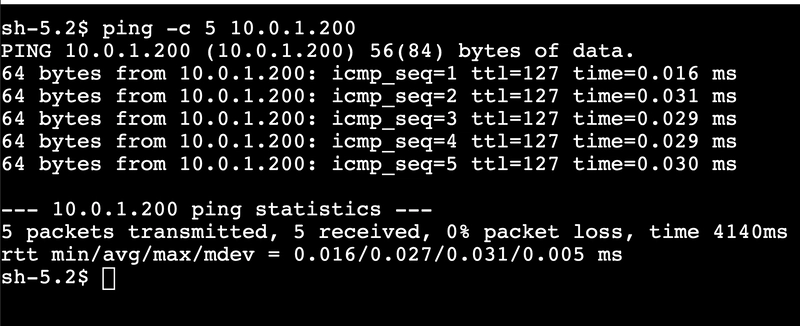
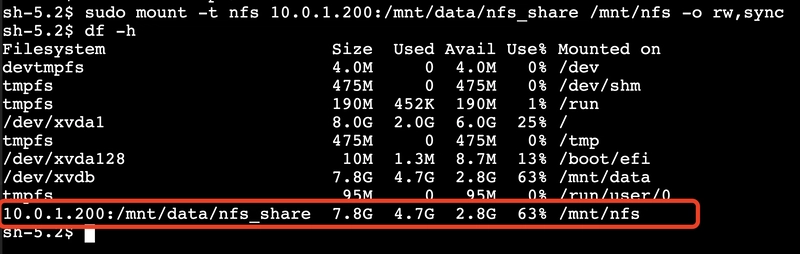
Mount the NFS share from the NFS client over the peering connection.
# Ping the NFS server to verify connection
ping -c 5 10.0.x.x

# Mount NFS server
sudo mkdir -p /mnt/nfs
sudo mount -t nfs 10.0.x.x:/mnt/data/nfs_share /mnt/nfs -o rw,sync
Mount the EFS file system
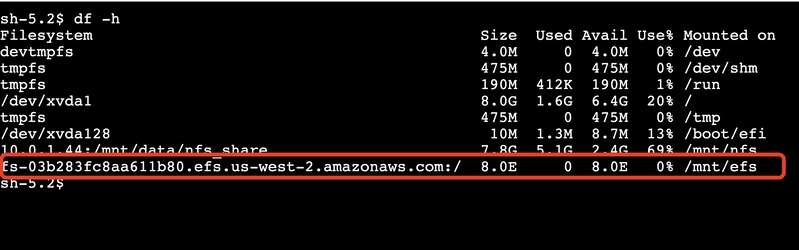
Mount the EFS file system from the NFS client.
# Mount EFS file system
sudo mkdir -p /mnt/efs

sudo mount -t nfs4 -o nfsvers=4.1,rsize=1048576,wsize=1048576,hard,timeo=600,retrans=2,noresvport fs-xxxxxxxxxxxxxxx.efs.us-west-2.amazonaws.com:/ /mnt/efs
OR
sudo mount -t nfs4 -o sudo mount -t nfs4 -o nfsvers=4.1,rsize=1048576,wsize=1048576,hard,timeo=600,retrans=2,noresvport 172.31.x.x:/ /mnt/efs
DataSync agent
Obtain the activation code of the DataSync agent from the NFS client.
# Test connectivity to the agent
nc -vz 172.31.x.x 80

# Obtain activation code
sudo curl “http://<datasync-agent-ip>/?gatewayType=SYNC&activationRegion=us-west-2&privateLinkEndpoint=<datasync-vpce-ip>&endpointType=PRIVATE_LINK&no_redirect”

# NB: Replace <datasync-agent-ip> and <datasync-vpce-ip> with actual values
Activate the DataSync agent using the activation key.
aws datasync create-agent \
    --agent-name “datasync-agent” \
    --activation-key “xxxxx-xxxxx-xxxxx-xxxxx-xxxxx” \
    --vpc-endpoint-id “vpce-xxxxxxxxxxxxxxxxx” \
    --subnet-arns “arn:aws:ec2:us-west-2:accountId:subnet/subnet-xxxxxxxxxxx” \
    --security-group-arns “arn:aws:ec2:us-west-2:accountId:security-group/sg-xxxxxxxxxxxx”
Create the NFS location.
aws datasync create-location-nfs \
    --server-hostname “10.0.x.x” \
    --subdirectory “/mnt/data/nfs_share” \
    --on-prem-config AgentArns=”arn:aws:datasync:us-west-2:accountId:agent/agent-xxxxxxxxxxx”
Create the EFS location.
aws datasync create-location-efs \
    --efs-filesystem-arn “arn:aws:elasticfilesystem:us-west-2:accountId:file-system/fs-xxxxxxxxxxxxx” \
    --ec2-config SubnetArn=”arn:aws:ec2:us-west-2:accountId:subnet/subnet-xxxxxxxxxxxxx”,SecurityGroupArns=”arn:aws:ec2:us-west-2:accountId:security-group/sg-xxxxxxxxxxxxxxx”
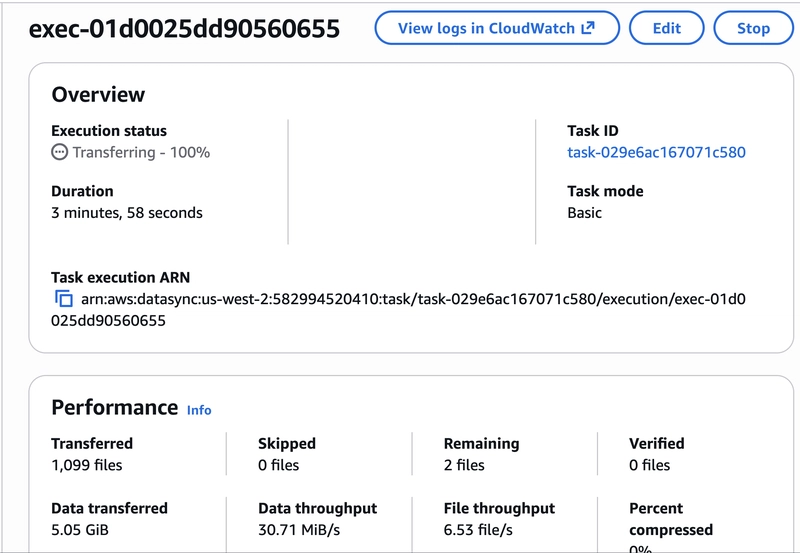
Create a task that connects both locations and start the task.
aws datasync create-task \
    --source-location-arn “arn:aws:datasync:us-west-2:accountId:location/loc-xxxxxxxxxxxxxx” \
    --destination-location-arn “arn:aws:datasync:us-west-2:accountId:location/loc-xxxxxxxxxxxxxx”
YouTube Tutorial
References
- https://docs.aws.amazon.com/datasync/latest/userguide/what-is-datasync.html.
- https://docs.aws.amazon.com/efs/latest/ug/whatisefs.html.
- https://docs.aws.amazon.com/systems-manager/latest/userguide/fleet-manager-default-host-management-configuration.html.
- https://docs.aws.amazon.com/systems-manager/latest/userguide/session-manager.html.
- https://docs.aws.amazon.com/datasync/latest/userguide/datasync-network.html.