







In the rising era of artificial intelligence and information processing speeding up everywhere, I needed to slow down to force myself to deliberately practice and think. I wonder if cognitive skill atrophy will be a big thing or just a minor issue long term that can be justified by performance gains.
To prevent atrophy I decided to go with yet another project, like I did many times in the past. This time I started a micro app for planning common time for hanging out with friends. There are existing projects both commercial and free but often bloated or limited with features and I wanted something simpler. No login, no registration. Just create an event, add time slots and send it to friends so they can vote. That's all. The technology I chose is half known to me and half new. For the client side I chose React. I work with React and React Native daily. For the backend I decided to go with Golang. I used to work with Golang for around two years in the past. Since then I haven't touched it. So it's time to go back to the gopher's world. As for the database, regular Postgres. Probably even simpler SQLite or even a file-based database would be enough, but I wanted to experiment with sqlc and goose tools.
Full source code is available here GitHub
Mobile part of the app consist on two main containers. Home.tsx and Calendar.tsx. Home is the first view user sees when opening app to create new event. As stated in the paragraph before I wanted to make this app super quick to use so decided to allow as little data as none for planning. Everything is optional. You can literally just click create new event and it will prefill with generic title, description and time slots for the upcoming week.
// ...
const calendar = await createCalendar({
  title: title || "Hangout",
  description,
  password
}).unwrap();

if (timeSlots.length === 0) {
  const newTimeSlots = generateTimeSlots({
    dailyStartTime: "08:00",
    dailyEndTime: "24:00",
    duration: 1,
    startDate: dayjs().format("YYYY-MM-DD"),
    endDate: dayjs().add(7, "day").format("YYYY-MM-DD"),
    isOverlapping: false,
    isWholeDay: false,
  });

  timeSlots.push(...newTimeSlots);
}

await createCalendarTimeSlots({
  calendar_id: calendar.id,
  admin_token: calendar.admin_token,
  time_slots: timeSlots.map(slot => ({
    start_date: dayjs(slot.startDate).toISOString(),
    end_date: dayjs(slot.endDate).toISOString(),
  })),
}).unwrap();
// ...
You can be more specific and choose metadata on your own. Also create precise time slots or generate repeating time slots for example only for afternoon everyday between 16:00 and 24:00 with two hour overlapping time slots. By default calendars are not password protected but you can add password to protect from unwanted use.
import dayjs from "dayjs";
import { useState } from "react";
import type { TimeSlot } from "../types";

export const useTimeSlotModal = () => {
  const [isModalOpen, setIsModalOpen] = useState(false);
  const [editingId, setEditingId] = useState<string | null>(null);
  const [modalData, setModalData] = useState({
    date: "",
    startTime: "",
    endTime: "",
  });

  const handleOpenModal = () => {
    setEditingId(null);
    setModalData({ date: "", startTime: "", endTime: "" });
    setIsModalOpen(true);
  };

  const handleOpenEditModal = (slot: TimeSlot) => {
    setEditingId(slot.id);
    const startDate = new Date(slot.startDate);
    const endDate = new Date(slot.endDate);
    setModalData({
      date: startDate.toISOString().split("T")[0],
      startTime: startDate.toTimeString().split(" ")[0].substring(0, 5),
      endTime: endDate.toTimeString().split(" ")[0].substring(0, 5),
    });
    setIsModalOpen(true);
  };

  const handleCloseModal = () => {
    setIsModalOpen(false);
    setEditingId(null);
    setModalData({ date: "", startTime: "", endTime: "" });
  };

  const handleSaveTimeSlot = (
    onSave: (slot: TimeSlot) => void,
  ) => {
    onSave({
      id: editingId || crypto.randomUUID(),
      startDate: dayjs(`${modalData.date}T${modalData.startTime}:00`).toDate(),
      endDate: dayjs(`${modalData.date}T${modalData.endTime}:00`).toDate(),
    });

    handleCloseModal();
  };

  const isFormValid = modalData.date && modalData.startTime && modalData.endTime;

  return {
    isModalOpen,
    modalData,
    setModalData,
    editingId,
    handleOpenModal,
    handleOpenEditModal,
    handleCloseModal,
    handleSaveTimeSlot,
    isFormValid,
  };
};
At first I had this idea to add also time frame for accepting votes and location for weather but ditched this later as timeframe will give low benefits to end user - my friends as the natural end date is beginning of time slots. For location and weather it was difficult choose to include or not. There is great open weather api that I could integrate with but I was afraid it may make ui bloated with data. Eventually I may step back and add it again.
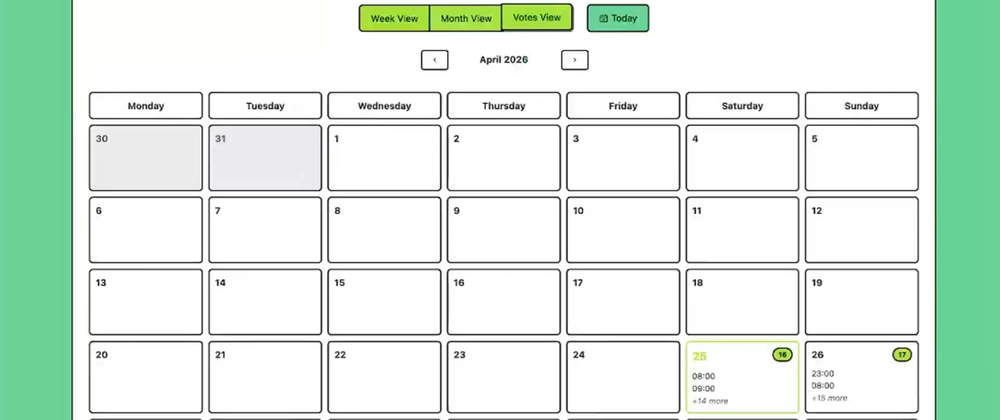
The second view is the calendar. This is where voters can vote on individual time slots and see votes given by others. For that I made three views: weekly, monthly and votes. The weekly view, as the name suggests, shows all slots in a column layout for the whole week.
import dayjs from "dayjs";
import { useResponsive } from "../hooks/useResponsive";
import { useWeekData } from "../hooks/useWeekData";
import type { TimeSlot } from "../types";
import { TimeSlotCard } from "./TimeSlotCard";

export const WeekView = ({
  timeSlots,
  currentWeek,
  onTimeSlotClick,
}: {
  timeSlots: TimeSlot[];
  currentWeek: Date;
  onTimeSlotClick: (timeSlotId: string) => void;
}) => {
  const weekDays = useWeekData(timeSlots, currentWeek);
  const { screenSize } = useResponsive();

  const getGridColumns = () => {
    if (screenSize === "mobile") return "1fr";
    if (screenSize === "tablet") return "repeat(2, 1fr)";
    return "repeat(7, 1fr)";
  };

  return (
    <div className="week-view-container">
      <div
        className="d-grid"
        style={{
          gridTemplateColumns: getGridColumns(),
          gap: "0.5rem",
        }}>
        {weekDays.map((dayData) => {
          const isToday = dayjs().isSame(dayData.date, "day");
          const sortedSlots = [...dayData.slots].sort((a, b) =>
            dayjs(a.startDate).diff(dayjs(b.startDate))
          );

          const formattedDate = screenSize === "desktop"
            ? dayData.dayNumber.toString()
            : dayjs(dayData.date).format("MMM D");

          return (
            <div
              key={dayData.dateString}
              className={`card ${isToday ? "border-primary border-2" : ""}`}>
              <div
                className={`card-header text-center fw-bold ${isToday ? "bg-white text-primary" : ""}`}>
                <div>{dayData.dayName}</div>
                <div className="fs-5">{formattedDate}</div>
              </div>
              <div className="card-body p-2">
                <div className="d-flex flex-column gap-2">
                  {sortedSlots.length > 0
                    ? sortedSlots.map((slot) => (
                      <TimeSlotCard
                        key={slot.id}
                        timeSlot={slot}
                        onClick={onTimeSlotClick}
                      />
                    ))
                    : (
                      <div className="text-muted text-center small py-3">
                        No slots
                      </div>
                    )}
                </div>
              </div>
            </div>
          );
        })}
      </div>
    </div>
  );
};
The monthly view does the same but with a grid layout for the whole month. In the calendar I mostly use the weekly view as it's natural for me, but I know some people prefer the big picture so they can choose. For the monthly view, because of the dense design, only up to three time slots are visible instantly. The remaining ones are visible on the list for the day in detail.
import { useMonthGridData } from "../hooks/useMonthGridData";
import { useResponsive } from "../hooks/useResponsive";
import type { TimeSlot } from "../types";
import { MonthDayCell } from "./MonthDayCell";

const WEEKDAY_LABELS = ["Monday", "Tuesday", "Wednesday", "Thursday", "Friday", "Saturday", "Sunday"];

export const MonthGridView = ({
  timeSlots,
  currentMonth,
  onDayClick,
}: {
  timeSlots: TimeSlot[];
  currentMonth: Date;
  onDayClick: (slots: TimeSlot[], date: string) => void;
}) => {
  const weeks = useMonthGridData(timeSlots, currentMonth);
  const { screenSize } = useResponsive();

  const getGridColumns = () => {
    if (screenSize === "mobile") return "1fr";
    if (screenSize === "tablet") return "repeat(2, 1fr)";
    return "repeat(7, 1fr)";
  };

  const showHeaders = screenSize === "desktop";

  const handleDayClick = (slots: TimeSlot[], date: string) => {
    if (slots.length > 0) {
      onDayClick(slots, date);
    }
  };

  return (
    <div className="month-grid-container">
      {showHeaders ? <div
        className="d-grid"
        style={{
          gridTemplateColumns: getGridColumns(),
          gap: "0.5rem",
        }}>
        {WEEKDAY_LABELS.map((label) => (
          <div
            key={label}
            className="bg-white text-center fw-bold p-2 border rounded">
            {label}
          </div>
        ))}
      </div> : null}

      <div
        className="d-grid mt-2"
        style={{
          gridTemplateColumns: getGridColumns(),
          gap: "0.5rem",
        }}>
        {weeks.map((week) =>
          week.days.map((dayData) => (
            <MonthDayCell
              key={dayData.dateString}
              dayData={dayData}
              onDayClick={(slots, date) => { handleDayClick(slots, date); }}
            />
          ))
        )}
      </div>
    </div>
  );
};
A third mode for this view displays votes. They can be sorted by date and time or by number of votes.
import dayjs from "dayjs";
import { useState } from "react";

export const VotesView = ({
  votes
}: {
  votes: {
    id: string;
    calendar_id: string;
    username: string;
    time_slot: {
      id: string;
      start_date: string;
      end_date: string;
    };
  }[];
}) => {
  const [sortBy, setSortBy] = useState<"date" | "votes">("votes");

  const groupedTimeSlots = new Map<string, {
    startDate: string;
    endDate: string;
    votes: {
      id: string;
      username: string;
    }[];
  }>();

  votes.forEach(vote => {
    const slotId = vote.time_slot.id;
    if (!groupedTimeSlots.has(slotId)) {
      groupedTimeSlots.set(slotId, {
        startDate: vote.time_slot.start_date,
        endDate: vote.time_slot.end_date,
        votes: [],
      });
    }
    groupedTimeSlots.get(slotId)?.votes.push({
      id: vote.id,
      username: vote.username,
    });
  });

  const sortedVotes = Array.from(groupedTimeSlots.values()).sort((a, b) => {
    if (sortBy === "date") {
      return dayjs(a.startDate).diff(dayjs(b.startDate));
    } else {
      return b.votes.length - a.votes.length;
    }
  });

  return (
    <div>
      <div className="d-flex gap-2 mb-3 align-items-center">
        <span>Sort by:</span>
        <div className="btn-group">
          <button
            className={`btn btn-sm ${sortBy === "date" ? "btn-primary" : "btn-outline-primary"}`}
            onClick={() => { setSortBy("date"); }}>
            Date
          </button>
          <button
            className={`btn btn-sm ${sortBy === "votes" ? "btn-primary" : "btn-outline-primary"}`}
            onClick={() => { setSortBy("votes"); }}>
            Number of votes
          </button>
        </div>
      </div>

      {sortedVotes.map((vote, index) => (
        <div
          key={vote.startDate + vote.endDate}
          className="card mb-2">
          <div className="card-header d-flex align-items-center">
            <b className="me-1">#{index + 1}</b>
            <div className="d-flex align-items-center">
              {dayjs(vote.startDate).format("DD-MM-YYYY")} {dayjs(vote.startDate).format("HH:mm")} - {dayjs(vote.endDate).format("HH:mm")}
            </div>
          </div>

          <div className="card-body">
            <div className="gap-1 d-flex flex-column">
              {vote.votes.map(v => (
                <div
                  key={v.id}
                  className="d-flex align-items-center">
                  <div className="bg-info avatar me-1" />
                  <div>
                    {v.username}
                  </div>
                </div>
              ))}
            </div>
          </div>
        </div>
      ))}
    </div>
  );
};
The backend is quite simple. It consists of one HTTP controller with multiple endpoints. It can serve built React files as well. Typical endpoint is deceptive because people dismiss it as trivial CRUD, but it's where a lot of foundational judgment lives. Field validation, error responses, what gets exposed, what doesn't, naming, edge cases. How to shape certain logic to prevent repetitive code? How to make it secure? What edge cases can happen?
type GetCalendarVotesResponse struct {
    ID         string           `json:"id"`
    CalendarID string           `json:"calendar_id"`
    Username   string           `json:"username"`
    TimeSlot   TimeSlotResponse `json:"time_slot"`
}

func (h *Handler) GetCalendarVotesEndpoint(w http.ResponseWriter, r *http.Request) {
    calendarID := r.PathValue("calendar_id")
    password := r.URL.Query().Get("password")

    calendarUUID, ok := h.authorizeCalendarAccess(w, r, calendarID, password)
    if !ok {
        return
    }

    votes, retrievalError := h.CalendarService.GetCalendarVotes(r.Context(), calendarUUID)
    if retrievalError != nil {
        RespondError(w, http.StatusInternalServerError, "Failed to retrieve votes for calendar", &retrievalError)
        return
    }

    responseVotes := make([]GetCalendarVotesResponse, 0, len(votes))
    for _, vote := range votes {
        responseVotes = append(responseVotes, GetCalendarVotesResponse{
            ID:         vote.ID.String(),
            CalendarID: vote.CalendarID.String(),
            Username:   vote.Username,
            TimeSlot: TimeSlotResponse{
                ID:        vote.CalendarTimeSlotID.String(),
                StartDate: vote.StartDate.Time.Format(time.RFC3339),
                EndDate:   vote.EndDate.Time.Format(time.RFC3339),
            },
        })
    }

    RespondJSON(w, http.StatusOK, responseVotes)
}
For database instead of directly accessing data with raw queries, I put a thin layer of sqlc in between. It's a fascinating tool that allows writing SQL queries and then generating a fully typed function to execute with proper input and output. That way I could spot missing columns, wrong names and type mismatches instantly instead of praying not to overlook anything.
version: "2"

sql:
  - engine: "postgresql"
    schema: "internal/db/migrations/*.sql"
    queries: "internal/db/queries"
    gen:
      go:
        package: "sqlc"
        out: "internal/db/sqlc"
        sql_package: "pgx/v5"
        emit_json_tags: true
        emit_interface: true
        emit_empty_slices: true
        emit_pointers_for_null_types: true
And then typical query:
-- name: GetCalendarByID :one
SELECT
  id,
  title,
  description,
  created_at,
  updated_at
FROM calendars
WHERE id = $1;
become go code like this:
const getCalendarByID = `-- name: GetCalendarByID :one
SELECT
  id,
  title,
  description,
  created_at,
  updated_at
FROM calendars
WHERE id = $1
`

type GetCalendarByIDRow struct {
    ID          pgtype.UUID        `json:"id"`
    Title       string             `json:"title"`
    Description *string            `json:"description"`
    CreatedAt   pgtype.Timestamptz `json:"created_at"`
    UpdatedAt   pgtype.Timestamptz `json:"updated_at"`
}

func (q *Queries) GetCalendarByID(ctx context.Context, id pgtype.UUID) (GetCalendarByIDRow, error) {
    row := q.db.QueryRow(ctx, getCalendarByID, id)
    var i GetCalendarByIDRow
    err := row.Scan(
        &i.ID,
        &i.Title,
        &i.Description,
        &i.CreatedAt,
        &i.UpdatedAt,
    )
    return i, err
}
For migrations I could skip this part, but hey, I have to make a good system. So I went for goose. It's as simple as plaintext files with two declarations for up and down and basic commands to execute them. More than enough for the project.
-- +goose Up
ALTER TABLE calendars
  ADD COLUMN salt text NOT NULL DEFAULT gen_random_uuid(),
  ADD COLUMN admin_token text NOT NULL DEFAULT gen_random_uuid();

-- +goose Down
ALTER TABLE calendars
  DROP COLUMN salt,
  DROP COLUMN admin_token;
The whole app can be compiled to a tiny executable file that can be run without a layer of virtualisation. I love how simple cross-compilation is in Go.
The whole process took me around 14 hours. Usually around one or two hours per week in the evenings. I recorded the process to have a nice timelapse and to avoid cutting corners. After a few recordings I also had coding sessions I did while sitting for example on the train. You can find the video below.
All in all, I recommend trying out this tiny project and maybe you will find some value in it for yourself. Just do not expect anything rocket science. It was, after all, a project to force myself to carefully work like a caveman - three years ago - before the AI era. It was a nice journey to code an app using Golang from scratch and use more traditional forms of searching and problem solving. It felt little different to what is with AI agent. I’m not even talking about fire and forget agent prompting. But even reviewing process feels very different than thoughtfully planning each step on your own. I will surely do this again. Cross-compilation, tiny output size and a rich standard library make it an excellent choice for such projects.
This post was crossposted here by me and originally published at the blog: https://pilotpirxie.github.io/2026/04/26/hangout-planner.html