









Most AI agent frameworks can browse the web. Open a URL, read some HTML, click a button, fill a form. This works because browsers expose their internals through well-defined protocols — Chrome DevTools Protocol (CDP), DOM APIs, JavaScript injection.
But here's the problem: the majority of professional work doesn't happen in a browser.
CAD engineers work in SolidWorks. Video editors work in DaVinci Resolve. Data analysts switch between Excel, custom BI dashboards, and terminal sessions. System administrators navigate native configuration panels. Designers use Figma's desktop app, Photoshop, Blender.
None of these expose a DOM. None of them speak CDP. And most of the "AI automation" ecosystem simply cannot reach them.
This article examines the three main technical approaches to GUI automation, explains why the vision-only approach matters for breaking the browser boundary, and looks at measured results on cross-application benchmarks.
Three Approaches to GUI Automation
Approach 1: CDP and HTML Parsing
The Chrome DevTools Protocol gives programmatic access to Chromium-based browsers. You can:
- Query the DOM tree
- Execute JavaScript in page context
- Intercept network requests
- Simulate clicks and keyboard input at the DOM element level
Frameworks like Playwright, Puppeteer, and most browser-based AI agents use this approach. It's precise, fast, and reliable — within its domain.
Strengths:
- Pixel-perfect element targeting via CSS selectors
- Access to hidden elements, shadow DOM, iframe contents
- Can read and modify page state programmatically
- Low latency (no screen capture needed)
Limitations:
- Browser-only. CDP doesn't exist outside Chromium. Firefox has a partial equivalent; Safari's is limited. Native desktop apps, mobile apps, and OS-level UI are completely out of scope.
- Site-specific fragility. CSS selectors break when websites update their markup. A class name change, a restructured component tree, or a switch from server-rendered to client-rendered content can silently break automation scripts.
- SPA complexity. Modern single-page applications with dynamic rendering, lazy loading, and virtual scrolling create timing dependencies that are hard to handle reliably.
- Anti-automation measures. Many sites actively detect and block CDP-based automation through bot detection, CAPTCHAs, and behavioral analysis.
For browser-based tasks, CDP is the right tool. But framing "AI automation" as "browser automation" leaves most of the desktop untouched.
Approach 2: Accessibility APIs
Operating systems provide accessibility APIs (UI Automation on Windows, Accessibility API on macOS, AT-SPI on Linux) that expose a tree of UI elements with their roles, labels, and states. Screen readers use these APIs. So can automation frameworks.
Strengths:
- Works across native applications, not just browsers
- Semantic information (button labels, text field values, checkbox states)
- Standardized per-OS (once you handle the platform API, it works across apps)
- Doesn't require visual rendering — works even on headless systems
Limitations:
- Inconsistent implementation. Application developers implement accessibility support to varying degrees. A well-built macOS app might expose a complete accessibility tree. A cross-platform Electron app might expose a flat, unlabeled hierarchy. A legacy Qt application might expose nothing useful.
- Custom controls are invisible. Rendered canvases (games, CAD viewports, video timelines, terminal emulators with custom rendering) don't have accessibility tree entries for their internal elements. A 3D modeling tool's viewport is a single opaque rectangle to the accessibility API.
- Platform fragmentation. Each OS has its own API, data model, and quirks. Code written for macOS accessibility doesn't transfer to Windows or Linux.
- Performance overhead. Querying the full accessibility tree of a complex application can be slow — hundreds of milliseconds for apps with deep hierarchies.
Accessibility APIs are genuinely useful and underappreciated in the automation space. But they have a fundamental coverage gap: they can only see what developers explicitly expose, and many interfaces — especially professional tools with custom rendering — aren't fully accessible.
Approach 3: Vision-Only Understanding
The third approach skips the application's internal representation entirely. Instead of querying DOM trees or accessibility APIs, the agent looks at what's on screen — raw pixels — and reasons about what it sees.
This is how humans interact with computers. We don't parse HTML to find the "Submit" button. We see a rectangle that looks like a button, read its label, and click it.
Strengths:
- Universal coverage. If a human can see it on screen, the agent can see it. Native apps, web apps, terminals, games, remote desktops, virtual machines — all the same to a screenshot.
- No application cooperation required. The agent doesn't need hooks, APIs, or special access. Screen capture is a standard OS capability.
- Resilient to UI changes. A button that moves from the left sidebar to the top toolbar still looks like a button. Visual understanding is inherently more robust to layout changes than coordinate-based or selector-based targeting.
- Cross-platform by default. Screenshots are screenshots, regardless of OS. The same model that automates macOS can automate Windows or Linux without platform-specific code.
Limitations:
- Requires capable vision models. The agent needs to accurately parse dense UIs, read small text, distinguish between similar-looking elements, and understand spatial relationships. This is a hard computer vision problem.
- Higher computational cost. Processing a full screenshot through a vision model is more expensive than querying a DOM tree. This is where model optimization and edge deployment become critical.
- Occlusion and overlaps. Dropdown menus, tooltips, and modal dialogs can cover important UI elements. The agent needs to handle these states.
- No hidden state access. The agent can't see what's behind a collapsed menu or in an unscrolled region. It has to navigate to make information visible, just like a human would.
The trade-off is clear: vision-only gives you universal reach at the cost of requiring a strong vision model. The question is whether today's models are good enough to make that trade worthwhile.
Breaking the Browser Boundary
Let's make this concrete. Consider a workflow that's common in any organization:
"Pull Q1 sales data from the CRM, cross-reference it with the finance spreadsheet on the shared drive, and create a summary slide deck for the Monday meeting."
A browser-based agent can maybe handle the CRM part (if it's a web app). But the finance spreadsheet might be in a native Excel window. The slide deck is in PowerPoint or Keynote. The shared drive might be mounted as a local folder or accessed through a native file manager.
This is one task that touches three or four applications. A CDP-based agent taps out after step one. An accessibility-based agent might handle two of the three but struggle with Excel's complex grid rendering. A vision-based agent can navigate all of them — it sees what you see, clicks where you'd click, types what you'd type.
The same principle applies to more specialized work:
- DevOps: Switching between a terminal, a monitoring dashboard (Grafana), a cloud console (AWS), and a ticket system (Jira) — mixing web and native UIs.
- Design: Moving assets between Figma, Photoshop, and a file manager, with each tool having its own UI paradigms.
- Data science: Interacting with Jupyter notebooks, database GUIs, Excel, and custom visualization tools.
- System administration: Navigating OS settings panels, network configuration tools, and hardware management interfaces that have no web equivalent.
These aren't edge cases. They're the normal workday for millions of professionals. The browser boundary isn't a minor limitation — it's a wall that separates "AI demo" from "AI tool."
Measured Results on Cross-Application Benchmarks
Mano-P (GUI-Aware Agent Model for Edge Devices, open-source under Apache 2.0) uses the vision-only approach. The name stands for "Mano" (Spanish for "hand") and "P" (Person & Party).
Here's the architecture:
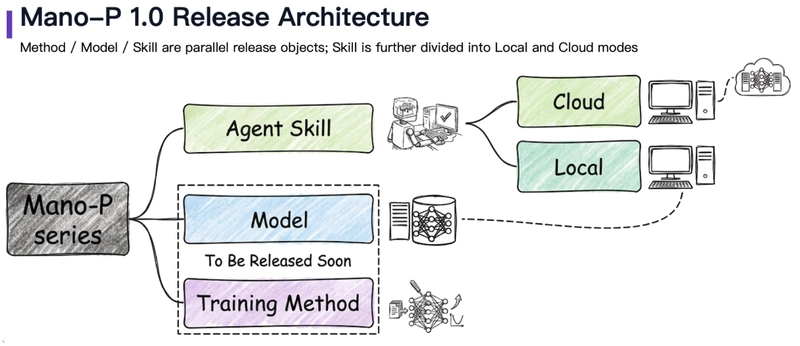
The model takes screenshots as input and outputs action sequences — click coordinates, keystrokes, scroll directions, and multi-step plans. No DOM parsing. No accessibility tree queries. Just pixels in, actions out.
On OSWorld — a benchmark specifically designed to test agents on real desktop environments across different operating systems and applications — the results look like this:
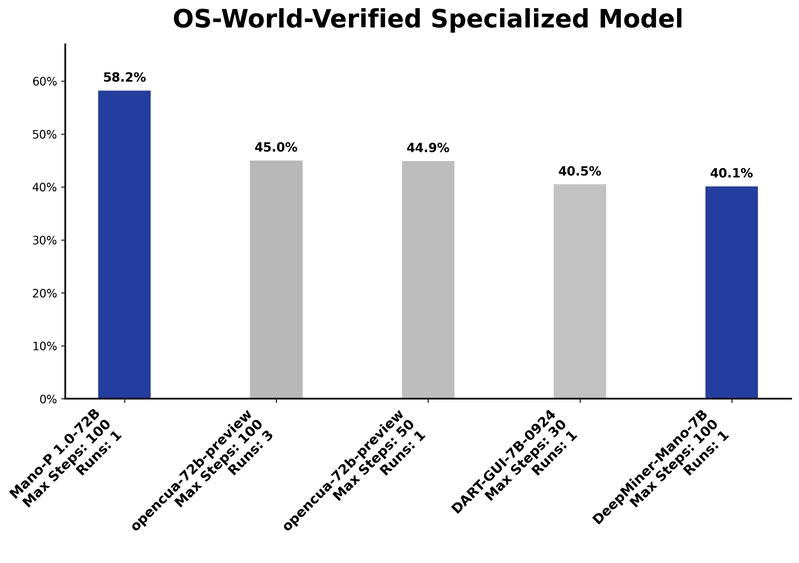
Mano-P achieves a 58.2% success rate on OSWorld, compared to 45.0% for the second-place model. This benchmark includes tasks spanning file management, office applications, web browsing, system configuration, and multi-application workflows — exactly the kind of cross-boundary work where vision-only approaches should theoretically shine.
On web-specific benchmarks, the vision-only approach remains competitive. On WebRetriever Protocol I, Mano-P scores 41.7 NavEval, ahead of Gemini 2.5 Pro (40.9) and Claude 4.5 (31.3). This is notable because web benchmarks should favor approaches that can access the DOM directly — yet the vision-only model still leads.
Why Vision-Only Can Win on the Web Too
This counterintuitive result — a vision model beating DOM-aware models on web tasks — has a plausible explanation.
Modern web pages are designed for human eyes, not for programmatic parsing. A typical SaaS dashboard might have:
- Dynamically loaded content with JavaScript-rendered elements
- Canvas-based charts and visualizations
- Complex CSS layouts where the visual hierarchy doesn't match the DOM hierarchy
- Shadow DOM components that hide internal structure
- Iframes embedding third-party content
A DOM parser sees the structural complexity. A vision model sees the rendered result — the same clean layout the designer intended for human users. In many cases, the rendered output is actually easier to reason about than the underlying markup.
This doesn't mean vision-only is universally better for web tasks. DOM access provides exact text content (no OCR errors), hidden metadata, and element state information. But for navigation and interaction tasks — "find the settings button and change this option" — visual understanding can be more robust than structural parsing.
Running on the Edge
A vision-based agent is computationally demanding. Processing high-resolution screenshots through a vision-language model requires significant inference capacity. This is where model design and hardware optimization become critical.
Mano-P uses a 4B parameter model with w4a16 quantization (4-bit weights, 16-bit activations). On an Apple M4 Pro with 32GB RAM:
- Prefill: 476 tokens/s (ingesting the screenshot and context)
- Decode: 76 tokens/s (generating the action sequence)
- Peak memory: 4.3 GB
These numbers mean the full perception-reasoning-action loop completes in under a second for typical interactions. The 4.3 GB memory footprint leaves plenty of room for the applications being automated to run alongside the agent.
Running locally also eliminates the latency of uploading screenshots to a cloud API. A screenshot from a 4K display can be several megabytes — sending that to a remote server for every action step adds meaningful delay, especially on typical upload speeds.
The local execution model also means screenshots and task data never leave the device. For workflows involving sensitive information — financial data, medical records, proprietary designs — this is often a hard requirement, not a nice-to-have.
The Training Challenge: Teaching a Model to See and Act
Building a vision-only agent that works across diverse applications requires solving several interconnected problems:
Visual grounding: The model must map regions of a screenshot to semantic UI elements. "The blue button in the top-right corner that says 'Save'" needs to become a precise coordinate.
Action planning: Given a goal ("rename this file to quarterly-report-v2.pdf"), the model must generate a sequence of actions: right-click the file → click "Rename" → select all text → type the new name → press Enter.
Error recovery: UI automation in real environments is noisy. Menus take time to open. Dialog boxes appear unexpectedly. Actions sometimes fail. The model needs to verify outcomes and adapt.
Mano-P addresses these through a three-stage training pipeline:
- Supervised Fine-Tuning (SFT) on curated GUI interaction datasets builds foundational visual understanding and action generation.
- Offline Reinforcement Learning on collected trajectories teaches multi-step planning from both successful and failed interactions.
- Online Reinforcement Learning with a think-act-verify loop develops robustness — the model learns to check its work and recover from failures in live environments.
A technique called GS-Pruning (Gradient-based Structured Pruning) then compresses the model, removing redundant capacity to hit the 4B parameter target without proportional capability loss.
Implications for Agent Architecture
The vision-only approach has second-order effects on how agent systems are designed:
Simpler integration. Adding a new application to the agent's capabilities doesn't require building an adapter, writing selectors, or mapping accessibility trees. If the app has a GUI, the agent can use it.
Cross-system workflows. Tasks that span multiple applications — copying data from a web CRM into a native spreadsheet, then attaching it to an email — don't require different automation strategies for each app. The agent uses the same perception-action loop throughout.
Long-task planning. Because the agent perceives the full screen state at each step, it can maintain context across complex, multi-step workflows. The think-act-verify training means it checks whether each step succeeded before proceeding.
Reduced maintenance burden. Selector-based automation scripts break when UIs update. Vision-based automation is inherently more resilient because it relies on visual patterns rather than structural identifiers.
Current Limitations and Honest Assessment
Vision-only GUI automation is not a solved problem. Current limitations include:
- Small text and dense UIs. Spreadsheets with tiny fonts, code editors with many similar-looking lines, and dashboards with packed metrics are still challenging.
- Speed-sensitive interactions. Drag-and-drop, real-time canvas manipulation, and rapid sequential inputs are harder than discrete click-and-type actions.
- Verification ambiguity. Sometimes it's hard to tell from a screenshot alone whether an action succeeded (e.g., a background save operation with no visual confirmation).
- Training data coverage. The model performs best on application types well-represented in training data. Niche or custom enterprise software may require fine-tuning.
These are active research areas, not fundamental barriers. As vision models improve in resolution handling, temporal reasoning, and few-shot adaptation, the coverage gap will narrow.
Getting Started
Mano-P is open-source under Apache 2.0 with a three-phase release plan:
- Phase 1 (released): Skills — task-specific capability modules
- Phase 2: Local models and SDK — the inference runtime and integration tools
- Phase 3: Training methods — the full pipeline for community extension
The code and documentation are at github.com/Mininglamp-AI/Mano-P.
If you're building agent workflows that stop at the browser boundary, it might be time to give your AI hands that can reach the rest of the desktop.