









How We Built Assistly — A Role-Based Community Service Platform
By Nagalla Thanvi, Nikhil Kumar Panigrahi, Bakshi Suhas, Sai Manohari Godavarty
Developed under the guidance of Professor Chanda Raj Kumar, and we are thankful for his valuable support throughout this project.
The Problem We Set Out to Solve
We built Assistly because we were genuinely frustrated with how fragmented community support is. Someone needs help, someone else wants to volunteer, and somehow they never find each other. We'd seen it happen around us and figured why not just build the fix ourselves. So we did.
One platform where residents can raise requests, volunteers can pick them up, and admins can actually see what's happening without the chaos.
Three Roles, Three Experiences
The core idea behind Assistly is that different people need different views. So we made the entire platform role-based from day one.
| Role | What they can do |
|---|---|
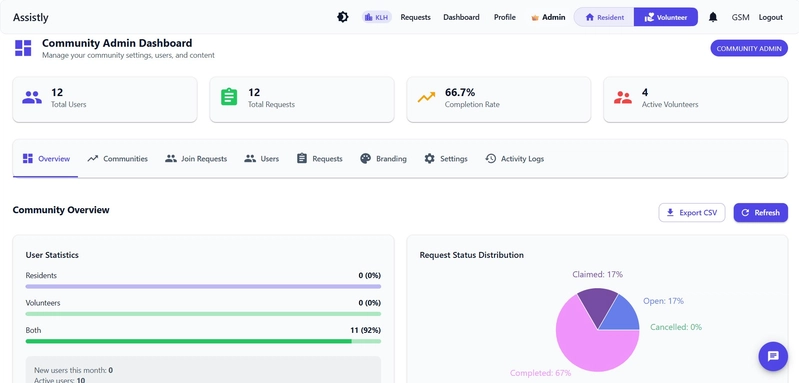
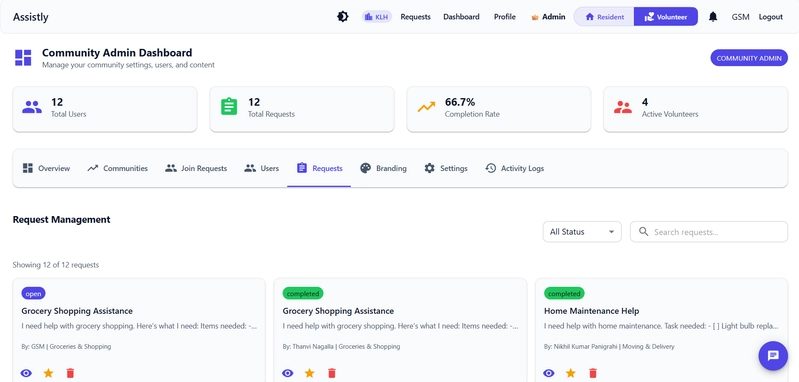
| Admin | Manage users, communities, and requests. Monitor analytics and platform health. |
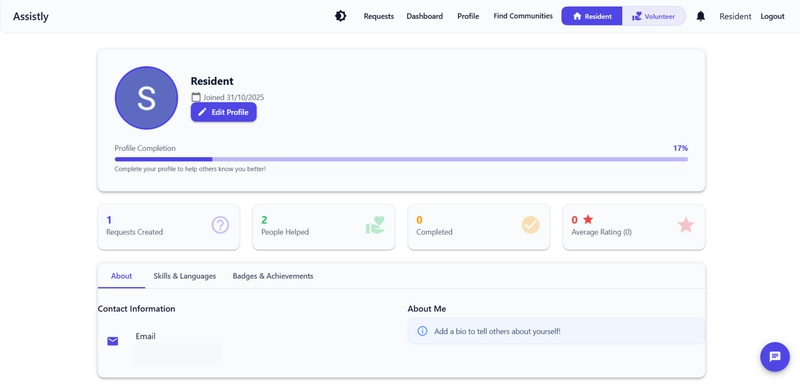
| Resident | Create and track service requests end to end. |
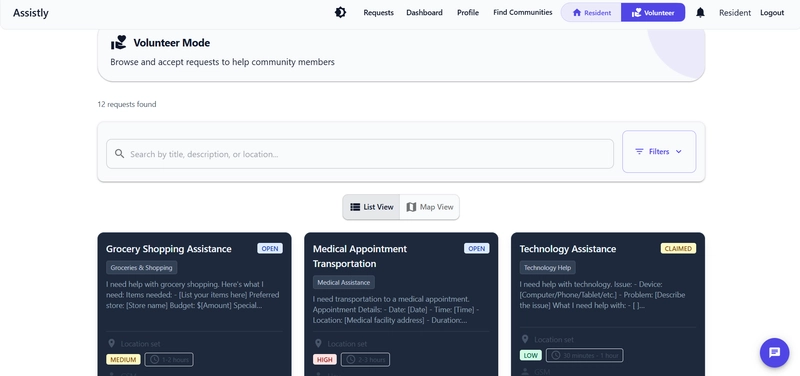
| Volunteer | Browse open requests, accept tasks, and mark them complete. Cannot accept their own requests. |
No cluttered dashboards. No irrelevant options. Every user sees exactly what matters to them.
Admin Dashboard
Resident Mode
Volunteer Mode
Communities: Because Support is Local
One thing we learned early on — a single global feed of requests doesn't work. It gets noisy fast, and relevance drops.
So we built a Communities module. Users browse and join communities. Requests live within those communities. Volunteers only see requests from communities they're part of.
This one actually came from a testing disaster. Early on everyone could see everyone else's requests and it was completely chaotic. We added communities as a quick fix and then realised — wait, this is actually the best feature in the app.
MongoDB at the Core
We chose MongoDB early, and it turned out to be the right call.
The three roles in Assistly naturally produce very different kinds of data — a resident's request looks nothing like a volunteer's task history, which looks nothing like an admin's analytics view. Trying to force all of that into rigid relational tables would have been painful.
MongoDB felt like the right fit from the start. With three roles producing completely different data shapes, a document model just made more sense than forcing everything into a fixed schema. It let us move fast without fighting the database every step of the way.
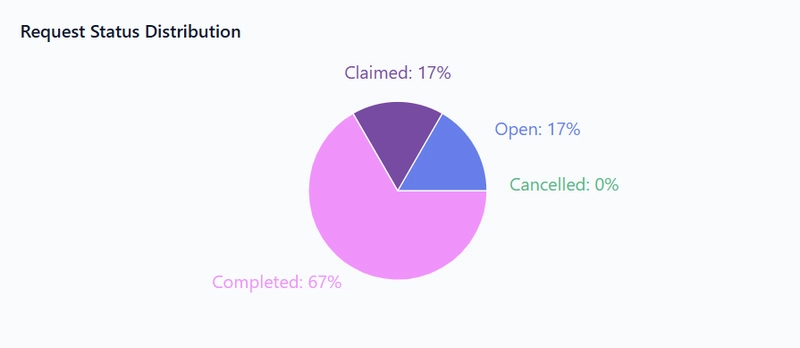
Here's the pipeline we used for request status distribution in the admin dashboard:
[
  { "$match": { "created_at": { "$gte": ISODate("2026-03-27T00:00:00Z") } } },
  { "$group": { "_id": "$status", "count": { "$sum": 1 } } },
  { "$sort": { "count": -1 } }
]
MongoDB powers everything from CRUD workflows to lifecycle transitions (Open → In Progress → Completed) to the assistant's context retrieval.
Analytics Dashboard
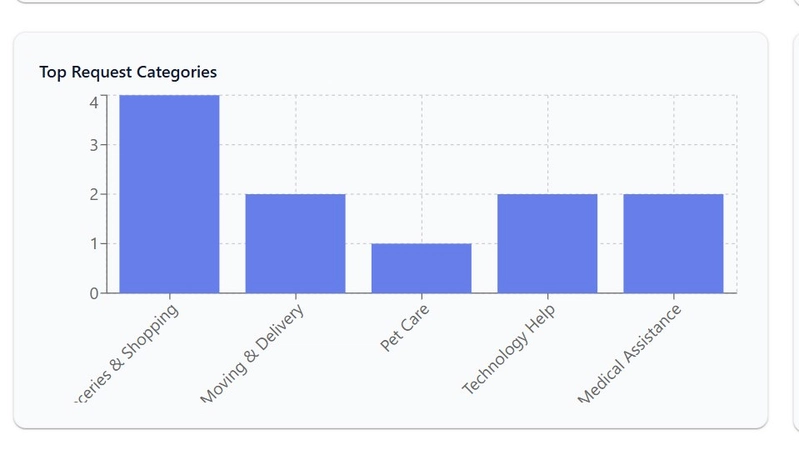
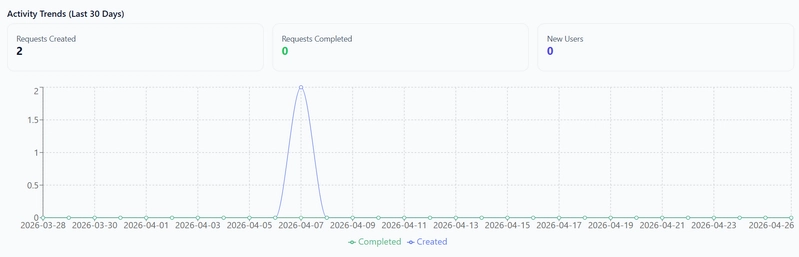
We built a proper analytics layer for admins — not just counts, but trends and breakdowns they could actually act on.
Key metrics we track:
- Completion Rate — Completed Requests ÷ Total Requests × 100
- Role Share — What percentage of users are residents vs volunteers vs admins
- Status Distribution — How requests are spread across Open, In Progress, and Completed
- Average Completion Time — Mean time in hours from request creation to completion
For the charts, we integrated MongoDB Atlas Charts via embed URLs. When Atlas is configured, the dashboard renders Atlas iframes directly. When it's not, the app falls back to local Chart.js charts — so nothing breaks.
Atlas embed snippet:
<div class="atlas-chart-wrap">
  <iframe
    title="Request Status Distribution"
    src="{{ atlas_charts.status_url }}"
    width="100%"
    height="340"
    frameborder="0"
    loading="lazy"
    allowfullscreen>
  </iframe>
</div>
Chart.js fallback for status distribution and activity trends:
// Status Distribution (Doughnut)
new Chart(document.getElementById("statusChart"), {
  type: "doughnut",
  data: {
    labels: statusData.map(item => item.status),
    datasets: [{
      data: statusData.map(item => item.count),
      backgroundColor: ["#bd8af7", "#7f9cf5", "#79c8a7", "#f4b266", "#94a3b8"]
    }]
  }
});

// Activity Trends (Line)
new Chart(document.getElementById("activityTrendChart"), {
  type: "line",
  data: {
    labels: dailyActivity.map(item => item.date),
    datasets: [
      { label: "Created", data: dailyActivity.map(item => item.requests), borderColor: "#4f6ef7", tension: 0.35 },
      { label: "Completed", data: dailyActivity.map(item => item.completed), borderColor: "#18b26a", tension: 0.35 }
    ]
  }
});
The Chatbot: Intent-Driven and Fallback-Safe
We built an assistant that goes beyond simple keyword matching. It uses a lightweight intent model service to understand what the user is actually asking.
The flow looks like this:
- Predict intent from the message
- Normalize it into a workflow-level prompt
- Generate a response through deterministic business logic
- Fall back to baseline rule logic if confidence is low
intent_result = {"intent": "unknown", "confidence": 0.0}
normalized_message = ""

try:
    intent_result = get_intent_model().predict(message)
    normalized_message = _normalize_message_from_intent(intent_result.get("intent", "unknown"))
except Exception:
    intent_result = {"intent": "unknown", "confidence": 0.0}
    normalized_message = ""

response = _build_assistant_response(
    current_app.db,
    current_user.id,
    str(current_user.name or "there"),
    mode,
    normalized_message or message,
)
The assistant also supports voice input and voice output — which we found surprisingly useful for accessibility during testing.
Training data is lightweight and easy to extend:
{
  "version": 1,
  "intents": [
    {
      "name": "request_summary",
      "samples": [
        "show my request summary",
        "my request status",
        "how many requests do i have"
      ]
    },
    {
      "name": "create_request",
      "samples": [
        "create request",
        "i want to raise a request",
        "submit request"
      ]
    }
  ]
}
Location Intelligence
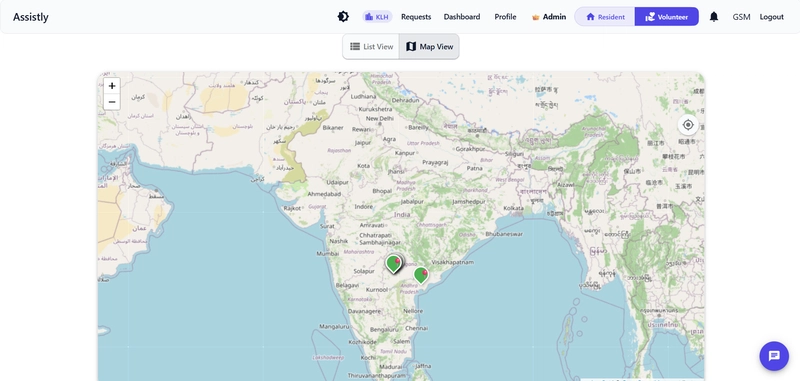
Requests can be pinned to a map — either manually or using the browser's current location API. We integrated Leaflet.js to handle this.
This opens up a few things we're planning to push further: nearby volunteer matching, locality-aware prioritization, and faster on-ground coordination when time matters.
Tech Stack
Backend
- Python Flask + Flask-Login
Frontend
- HTML + Jinja2, Bootstrap 5, JavaScript
- Leaflet.js (maps), Chart.js (charts)
Database & Analytics
- MongoDB, MongoDB Atlas Charts
AI / NLP
- Lightweight intent model service
- Confidence-based fallback strategy
- Voice input/output support
Deployment
- Gunicorn on Render
The Hard Parts
A few things that took more time than expected:
- Role-based routing and authorization — making sure users could only access what they were supposed to, without it becoming a maintenance nightmare
- Request lifecycle integrity — preventing edge cases like a volunteer accepting their own request, or a completed request being re-opened incorrectly
- Chatbot reliability — the model + fallback combination took a few iterations to feel smooth
- Multi-dashboard architecture — three different dashboards with shared data but separate concerns was a design challenge
- Merge conflicts — four people, one repo, strong opinions. That was its own challenge.
What We Learned
Nikhil spent two days getting the aggregation pipeline right. Suhas rewrote the auth flow more times than he'd like to admit. Thanvi kept the architecture from going sideways every time we added something new. Manohari caught a chatbot bug that would have completely embarrassed us in the demo.
The technical stuff Flask, MongoDB, NLP and we figured out as we went. What actually surprised us was how much of building something real is just deciding what NOT to build and shipping anyway.
What's Next
- Smarter volunteer recommendation engine
- Nearby helper suggestions using location history
- Real-time notifications
- Mobile app support
- Predictive analytics for admins
Try It Yourself
🎬 Demo Video
We're four students who built something we're actually proud of. It's not perfect, the chatbot still gets confused sometimes, the maps feature needs more work. But it solves a real problem, it works, and that felt really good to ship.