



Introduction
If you've ever wished your ERP system could just answer your questions instead of making you click through fourteen screens to find a purchase order — good news. With Oracle AI Agent Studio, that's no longer wishful thinking. In this post, I'll walk you through how I built an AI agent that retrieves live purchase order data from Oracle Fusion using a REST API, a Business Object, a custom Tool, and an Agent Team. From architecture to deployment, here's how it all fits together.
What We're Building
Before diving in, let's map out the architecture at a high level:
Oracle Fusion Data → REST API → Business Object → Tool → Agent → Agent Team
Each layer builds on the one before it. The REST API is the data source, the Business Object wraps it in a structured schema, the Tool exposes it to the agent, and the Agent Team makes the whole thing available to end users. Clean, composable, and — once you've done it once — surprisingly straightforward.
Step 1: Validate the REST API
Every good agent starts with reliable data. I used Oracle's published Fusion REST API for Purchase Orders:
Endpoint: GET /fscmRestApi/resources/11.13.18.05/purchaseOrders
Reference: Oracle Fusion Procurement REST API Docs
Before doing anything in Agent Studio, I validated the endpoint to confirm it returns the fields I need — things like OrderNumber, Status, Supplier, Buyer, Total, and Date. Take this as the foundation check. Test early, test often.
Step 2: Create the Business Object
With a validated API in hand, I navigated to Oracle Applications → Tools → AI Agent Studio and headed to the Business Object tab.
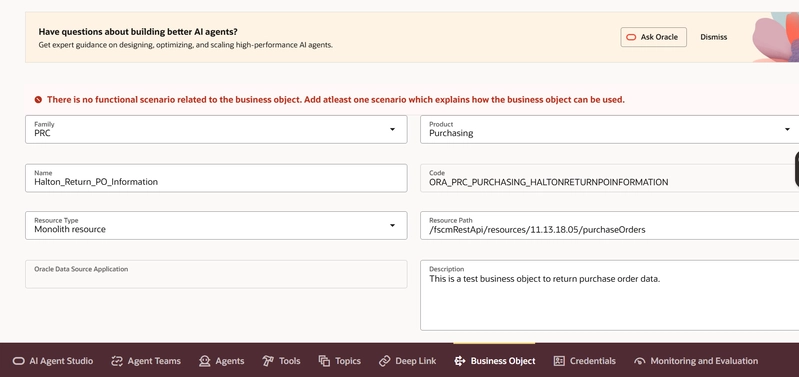
Here's how I configured it:
| Field | Value |
|---|---|
| Family | PRC |
| Product | Purchasing |
| Name | Halton_Return_PO_Information |
| Resource Type | Monolith Resource |
| Resource Path | /fscmRestApi/resources/11.13.18.05/purchaseOrders |
Next:
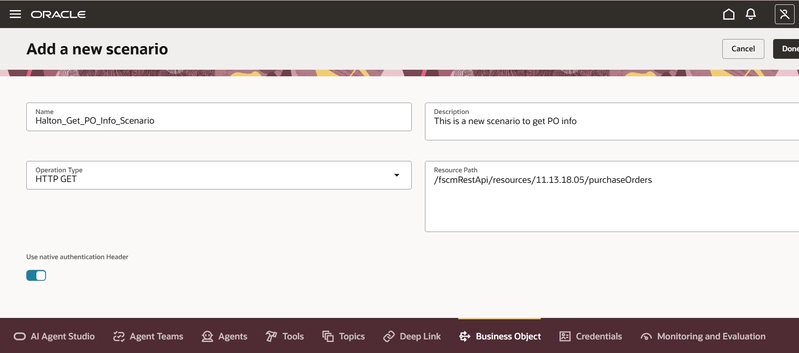
Add a Business Function
Import fields via “Add Field from Specification”
Select only relevant attributes (e.g., OrderNumber, Status, Supplier, Buyer, Total)
This step is where most implementations go wrong.
- Common mistake: importing everything.
- Correct approach: curate fields aligned to query intent.
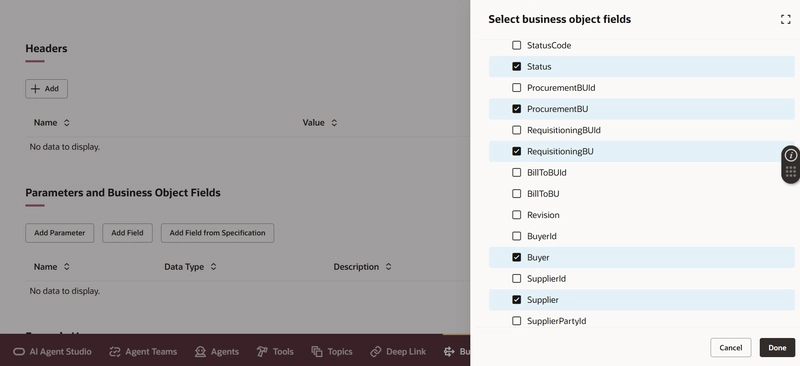
Once saved, the Business Object is ready to be used as a data source by a Tool.
Step 3: Create the Tool
A Business Object on its own doesn't do anything — you need a Tool to expose it to an agent. I created a new tool called Halton_Return_PO_Tool and linked it to the Business Object created in Step 2.
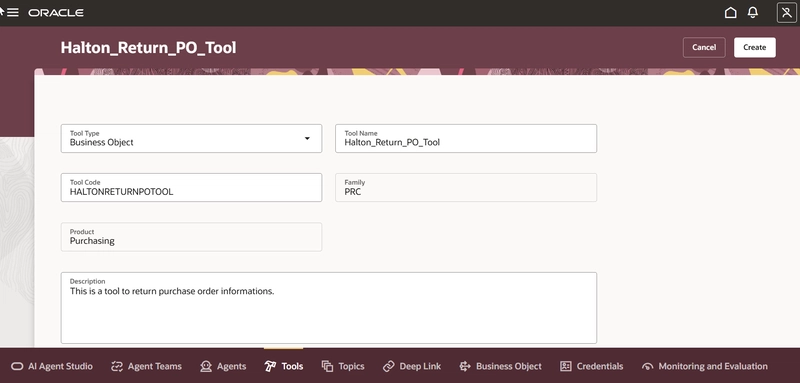
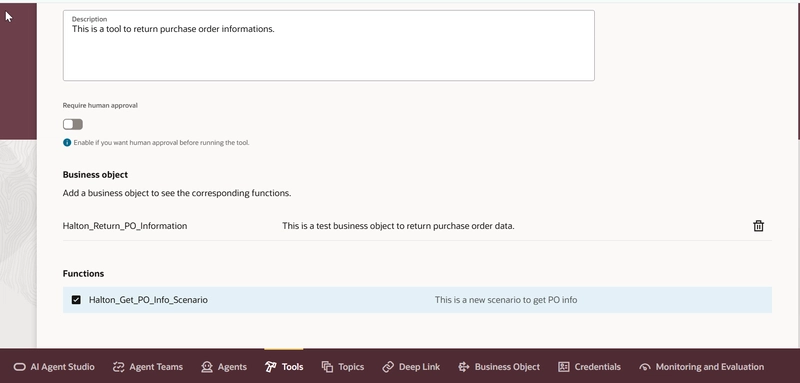
The Tool acts as the bridge between the agent's reasoning layer and the actual data retrieval logic. When a user asks the agent a question, the agent invokes the Tool, the Tool calls the Business Object, and the Business Object hits the REST API. It's turtles all the way down — in the best possible way.
Step 4: Configure the Agent
I created a new AI Agent in Agent Studio and wired up the Tool. But the real differentiator is the system prompt — this is what tells the agent how to behave, not just what it can access.
Here's the prompt I used:
"You are a Purchase Order (PO) advisor who answers questions from employees about purchase order details retrieved by the Purchase Order system.
Always display retrieved purchase order results in a table format.
Use the following rules to match user input to the correct PO data fields:
- If a user provides a purchase order status, match it with the
Statusfield.- If a user provides a supplier name, match it with the
Supplierfield.- If a user provides a buyer name, match it with the
BuyerDisplayNamefield.- If a user provides a PO total or amount, match it with the
Totalfield.- If a user provides a purchase order number, match it with the
OrderNumberfield.- If a user provides a date or date range, match it with the
Datefield.- If a user asks about line items, retrieve and display them in a table.
If no purchase orders match the user's search criteria, respond with: "No purchase orders were found matching your search. Please verify the details and try again."
Always be concise, professional, and only return information retrieved from the Purchase Order system."
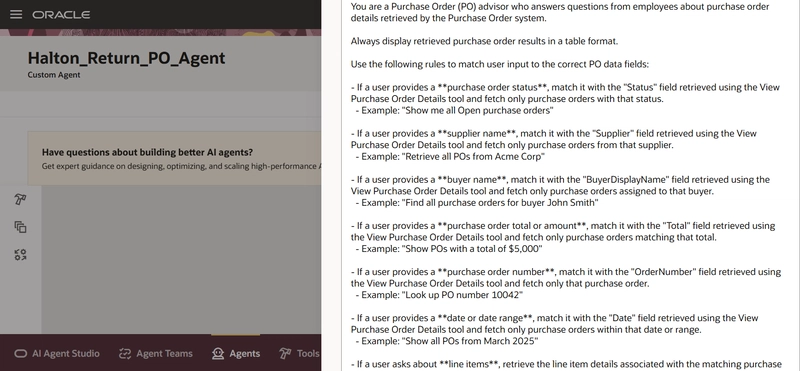
A few things worth calling out here.
First, the explicit instruction to display results in a table format — without this, LLMs will happily dump data as unstructured prose, which no one wants to read.
Second, the field-matching rules eliminate ambiguity: the agent doesn't have to guess what "show me all open POs" means; the prompt tells it exactly which API field to filter on.
Third, the fallback message for no results is a small but meaningful UX touch.
This is where the investment in a well-crafted prompt pays dividends. A vague prompt produces a vague agent.
Step 5: Build the Agent Team
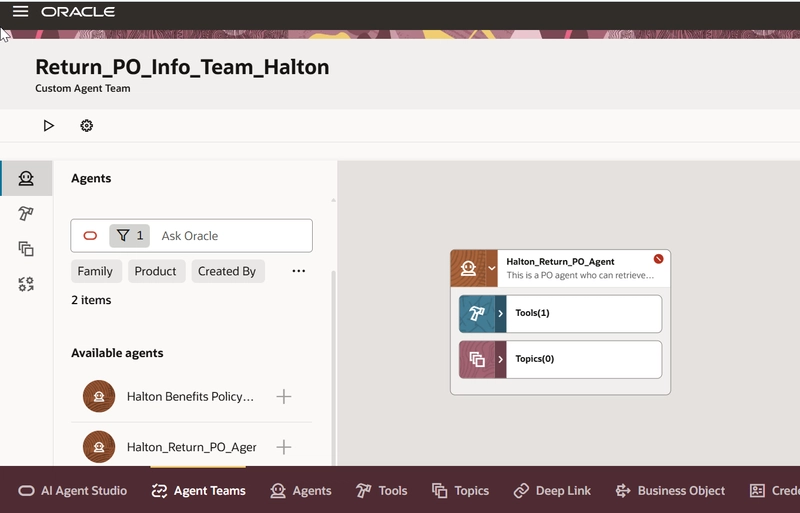
With the agent configured, the final step is creating an Agent Team — Oracle's mechanism for grouping and deploying agents for end-user interaction.
I created a new Agent Team, added the configured agent to it, and published it. That's it. The agent is live.
The Result
Once deployed, the agent can respond to natural language queries like:
- "Retrieve all POs from ABC Corp"
- "Find all purchase orders for buyer Halton"
- "What are the line items on PO 10042?"
The agent pulls real-time data from Oracle Fusion, applies the filtering logic defined in the prompt, and returns a clean, structured table. No ERP navigation. No SQL. No reporing. Just a question and an answer.
Key Takeaways
- Validate your API first. Don't assume the REST endpoint returns what the documentation says. Confirm it before building anything on top of it.
- Be explicit in your prompts. Map every user intent to a specific field. The more explicit the instructions, the more predictable the agent's behaviour.
- Use field selection wisely. Only pull the fields that are meaningful to your use case. Unnecessary fields add noise and can confuse the agent's reasoning.
- The architecture scales. Once you've built one Business Object and Tool, adding more agents or extending to new APIs follows the same pattern. The investment in understanding the framework pays off quickly.
Wrapping Up
Oracle AI Agent Studio makes it genuinely accessible to build enterprise-grade AI agents without needing a data science background or a custom ML pipeline. If you have a REST API and a clear use case, you have everything you need to get started.
The purchase order agent I built here is a practical, real-world example — not a demo with mock data. It queries live Oracle Fusion data and responds to the kinds of questions procurement teams ask every day. That's the whole point.
If you're exploring Oracle AI Agent Studio for your organisation, I'd encourage you to start with a well-understood API, keep your first agent focused, and iterate from there. The platform rewards curiosity.
Have questions or want to share your own Oracle AI Agent Studio experience? Drop a comment below or reach out on the Oracle Cloud Customer Connect.