







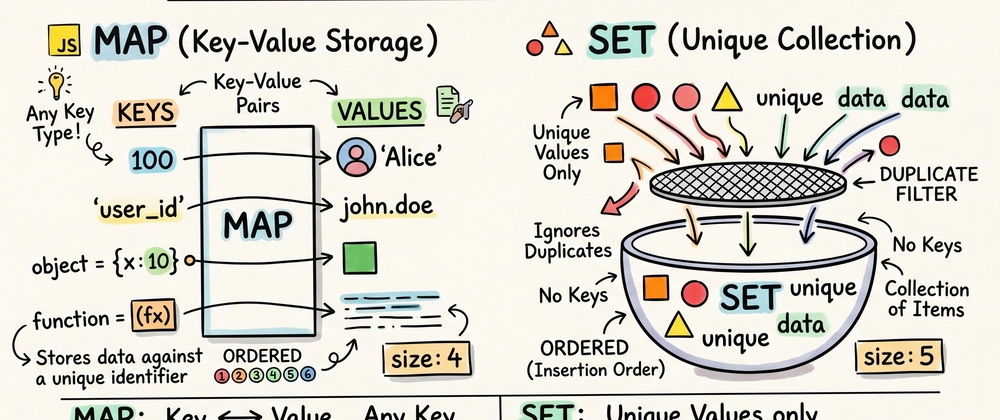

Javascript comes from a long days where we manage everything with just objects and arrays, in ES6 a map and set data structures are introduced which provide more specialized ways to handle data collections.
Here are break down of how they work and why they matters:
Content List
- What Map is
- What Set is
- Difference between Map and Object
- Difference between Set and Array
- When to use Map and Set
What Map is
A Map is a collection of keyed data items, very similar to object. The most basic differences is map allow keys of any types including functions, objects, and primitives.
In a Map a data items stored in a [key, value] pairs, and it remeber the original insertion order of keys.
Key Features of Map
- You can use object as a keys which is impossible in a standard objects (which would stringify it like
"[object object]"). - In map you can get the number of items using
.size. - Map are the iterable which means you can directly loop over them without extra step.
Common Methods of Map
-
map.set(key, value): store the value by key. -
map.get(key): return the value by key. -
map.has(key): returntrueif the key exists. -
map.delete(key): remove the element by the key.
const apiCache = new Map();

async function fetchData(url) {
  // Check if we already have the data in our 'Map'
  if (apiCache.has(url)) {
    console.log("Returning cached data for:", url);
    return apiCache.get(url);
  }

  // If not in cache, fetch it
  const response = await fetch(url);
  const data = await response.json();

  // Save the result in the Map for next time
  apiCache.set(url, data);
  return data;
}
What Set is
A Set is a special type of collection: collection of values (wihout key), where each value may occur only once.
If you try to add duplicates values to a set, it simply ignore your request. This makes it ultimate tool for ensure uniqueness in your data.
Key Features of Set
- It automatically filter out the duplicates values.
- just like a map it also maintain insertion order.
- checking a specific values exist in a set is significantly faster then searching in array.
Common Methods of Set
-
set.add(value): add a value and returns the set itself. -
set.delete(value): remove the value. -
set.has(value): returntrueif value exist. -
set.clear(): removes everything from set.
// A list of tags entered by a user with duplicates
const rawTags = ["javascript", "webdev", "javascript", "react", "webdev"];

// Convert to a Set to remove duplicates instantly
const uniqueTags = new Set(rawTags);

// Convert back to an array to use it elsewhere
const cleanTagList = [...uniqueTags];
// Result: ['javascript', 'webdev', 'react']
Difference between Map and Object
While they looks similar but they server different masters.
Key Types: in object you can only use strings or symbols types but map allow to use any data types like function, object, and primitives.
Order: object not strictly gurantee is they maintaing insertion order but map are strictly maintain insertion order.
Size: getting size of object need manual code but map has a builtin property
.size.Performance: optimized for small static records, but map provide better performance for frequent addtion and removals.
Iteration: map required to use
Object.keys()orfor...inloops but map are directly iterable withfor...ofloop.
Difference between Set and Array
If you are wondering why we should not use array for everything, here is how they stack up:
Duplicats: array allowd to add duplicates value but set ignore you duplicate values.
Access: can use index in array but in set you don't have access, for it you need to use iterators or
.has().Searching: in array you can use
includes()orindexOf()methods but it has O(n) time complexity which is slower for large dataset, but withhas()in set is much faster it provide O(1) constant time complexity.Use Cases: array used to store ordered list where duplicates are allowed but sets used for collection where you need unique items.
When to use Map and Set
Knowing the syntax is one thing, but knowing when to reach for them is what makes you an expert.
Use Map When
The key are not strings: if you need to associate data with DOM element or functions.
You need to preserve order: when the sequance of entries matter for you ui.
Frequent updates: maps are more performent than object when you are constantly adding or removing key valus pairs.
Use Set When
You need a unique list: for examples when you need to maintain a user ID's or tags on a blogs posts.
High performanc searching: if you have a massive list and you need to constancly check "is this item in here" the set will crush an array in term of speed.
Data de-duplication: the easiest way to remove duplicates from array is use set
const uniqu = = [... new Set(myArray)];.
Summary
JavaScript Maps are ordered key-value collections allowing any key type, offering more flexibility than Objects. Sets store unique values with high-performance existence checks, unlike Arrays. Use Map for complex keys or ordered data, and reach for Set to eliminate duplicates and ensure efficient membership testing in large datasets.