






Every time a feature had the word "real-time" in it, my brain would jump straight to WebSockets. It felt like the right, serious, production-grade choice. Turns out, it's often overkill. And understanding why has changed how I think about building things.
The Question Nobody Asks First
Before anything else, ask this:
Does the client need to send data back to the server through this connection?
That's it. That's the question.
WebSockets give you a two-way channel, the server can talk to the client, and the client can talk back, over the same persistent connection. But most of the "real-time" features we build are actually one-way:
- A notification badge that updates when you get a new message
- A live score updating on a sports page
- A progress bar for a background job
- A feed that shows new posts as they come in
In all of these cases, the server is pushing data to you. You're just watching. The client never needs to send anything back through that connection. A regular HTTP request handles user interactions just fine.
So why are we opening a two-way connection?
What WebSockets Actually Cost
I used to think WebSockets were basically free - just open a connection and listen. But there's real complexity on both sides.
On the client, you're suddenly responsible for a lot of things which HTTP handles for you automatically.
- Reconnection logic: WebSocket connections drop. Networks are flaky, mobile users switch between WiFi and cellular, and you have to write code to detect disconnects and retry with backoff.
- Connection state: is the socket open, connecting, or closed? You have to track this and decide what to show the user.
- Auth: HTTP requests carry your cookies and headers automatically. WebSockets don't work that way, so you end up handling auth separately, which is messier than it sounds.
The server side has its own cost too. HTTP is stateless, a request comes in, gets handled, and it's done. The server moves on. WebSockets are the opposite. Every connected client is a persistent, open connection the server has to keep alive. That means memory. Not a huge amount per connection, but it adds up - if you have 10,000 users with your app open, that's 10,000 connections sitting there consuming RAM, even when nothing is happening.
All of this is manageable. But for a notification badge? That's a lot of weight to carry for something pretty simple.
Server-Sent Events: The Simpler Way to Push Data
SSE (Server-Sent Events) is an HTTP-based way for the server to push updates to the client. It's built into the browser. No library needed.
const stream = new EventSource('/api/notifications/stream');

stream.onmessage = (event) => {
  const data = JSON.parse(event.data);
  updateNotificationBadge(data.count);
};

stream.onerror = (err) => {
  // the browser will auto-reconnect
  console.error('Stream error', err);
};
That's the entire client-side code. The browser handles reconnection automatically - it's part of the spec. If the connection drops, it retries, and the server knows where to pick up.
On the surface it might look similar to a WebSocket, but the key difference is: it's just HTTP. Your cookies work, your auth headers work, it goes through your existing middleware - everything composes naturally. And because each SSE connection is still a regular HTTP request under the hood, the server isn't holding some special stateful relationship with the client. Much lighter.
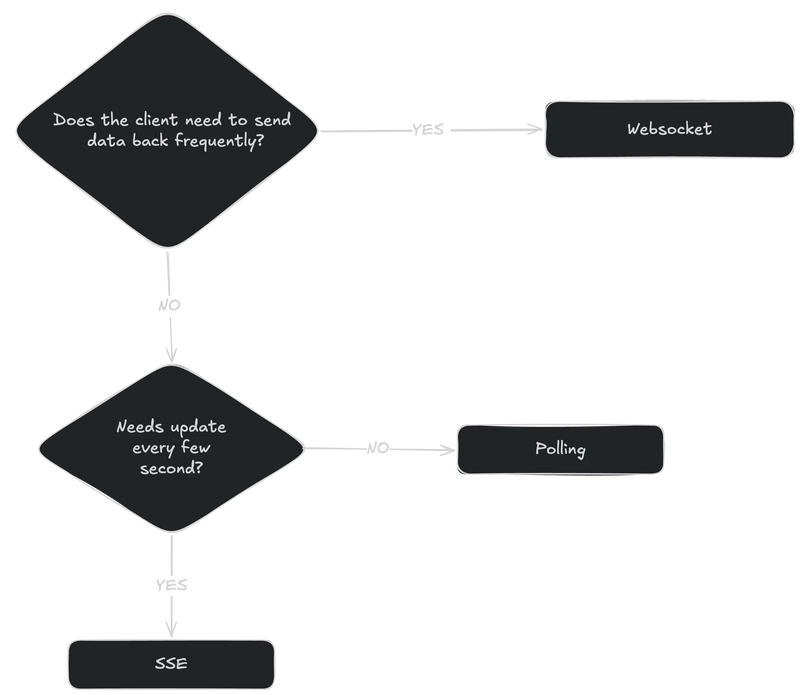
The limitation is that it's one-way. The client can only receive. But for notifications, live feeds, and progress updates - that's all you need. When the user takes an action, you fire a normal fetch() POST. Simple.
Good Old Polling: Simpler Than You Think
Polling feels almost too simple. But simple is underrated.
async function checkNotifications() {
  const res = await fetch('/api/notifications/count');
  const { count } = await res.json();
  updateBadge(count);
}

// Check every 30 seconds
setInterval(checkNotifications, 30_000);
If your feature doesn't need updates faster than every 30–60 seconds, this is genuinely fine. It's stateless, it's easy to debug, it works everywhere, and there's almost no way it breaks in a weird way at 2am.
So When Are WebSockets Actually the Right Call?
When both of these are true:
- The client needs to send data frequently - not just occasional user actions
- That communication needs to be low-latency and continuous
Real examples:
- Chat — you're sending and receiving messages constantly
- Collaborative editing - like a shared doc where multiple users type simultaneously
- Multiplayer games - fast, continuous state sync in both directions
The pattern is high-frequency, bidirectional communication. If you have that, WebSockets make sense. If you don't, you're adding complexity without a real reason.
A Simple Way to Think About It
What Changed For Me
I kept running into this assumption that "real-time = WebSockets." But real-time just means the user sees updates quickly. How you deliver those updates is a separate question.
SSE and polling aren't the beginner options you graduate away from. They're legitimate tools with real strengths. Picking the right one for the job - instead of defaulting to the most complex option - is actually what good system design looks like.
Next time a feature says "real-time," ask whether the client really needs to talk back. The answer will point you to the right tool.