


This article was written by Darshan Jayarama.
When you type something like db.orders.find({ status: "pending", customerId: 1042 }) and the results come back in milliseconds, it feels simple… almost instant.
But behind that one line, MongoDB is doing a lot more than just “searching a collection.”
During my time as a Senior TSE at MongoDB, I spent most of my days deep in query performance and indexing issues, working closely with both customers and the engineering team. It may look simple, but internally, a lot is happening when a find() executes.
Most engineers understand it at a surface level. But once you start digging into what actually happens under the hood, that’s when things change. You begin to see why some queries are fast, why others are painfully slow, and how indexes truly make or break performance.
So let’s break it down — step by step — what really happens inside MongoDB when a query runs. No shortcuts, nothing skipped.
The full journey of a find() query (quick overview)
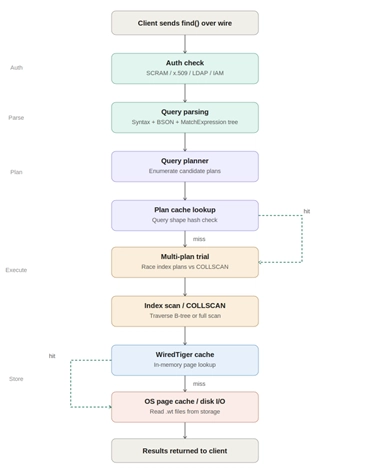
Before we go step by step, here’s the big picture. Every find() query goes through a series of steps in the mentioned order.
There are also two “fast paths” (shown as green arrows):
• When MongoDB can reuse a plan from the plan cache
• When the data is already in memory (WiredTiger cache)
Getting your queries to use these fast paths is what good MongoDB performance tuning is all about.
Stage 1: The Client Sends a Query Over the Wire
Before MongoDB even sees your query, your driver prepares it.
Whether you’re using PyMongo, the Node.js driver, or mongosh, your query is converted into BSON (a binary version of JSON) and sent over a network connection to MongoDB.
MongoDB uses the Wire Protocol to communicate, which is basically a structured way of sending messages between your app and the database.
Since MongoDB 3.6, most operations use a format called OP_MSG.
This message includes:
• which database and collection you’re querying
• the actual filter (your query conditions)
• extra options like projection, sort, limit, skip, hints, and read preferences
# PyMongo serializes this to BSON OP_MSG internally

db.orders.find(
   { "status": "pending", "customerId": 1042 },
   projection={"_id": 0, "amount": 1},
   sort=[("createdAt", -1)],
   limit=10
)
The query lands at the mongod process. The network listener accepts the connection and hands it off to a worker thread from the connection pool.
Stage 2: Authentication Check
The first thing MongoDB does — even before looking at any data — is check who is making the request.
MongoDB supports different ways to authenticate users, but in most real-world cases, this step is already handled. Drivers usually keep connections open and authenticated, so this check happens almost instantly
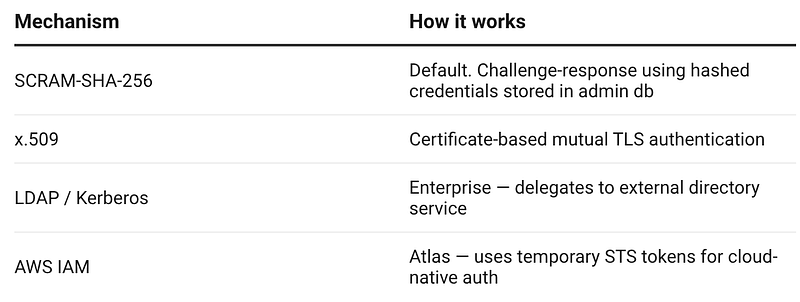
MongoDB just verifies the session linked to that connection.
- If authentication fails, the query stops right there.
- You’ll see an error like: “Authentication failed”, and the query never even reaches the database engine.
Stage 3: Authorization — Can You Read This Collection?
Authentication tells MongoDB who you are. Authorization decides what you’re allowed to do. MongoDB uses role-based access control (RBAC). It checks whether your user has permission to run a find() on that specific database and collection.
This could come from built-in roles like read or readAnyDatabase, or from custom roles with specific permissions.
If you don’t have access, the query stops there. You’ll see an error like: “not authorized to execute command”. The good part? This check is extremely fast — it’s just a quick in-memory lookup, not a database scan.
Stage 4: Query Parsing and BSON Validation
At this point, your query is sitting in memory as a BSON document. Now MongoDB starts understanding it.
It does two main things:
1. Checks if the query is valid
MongoDB makes sure your query is written correctly — valid operators like $eq, $in, $gt, $elemMatch, proper structure, and no invalid combinations. If something is wrong, the query fails right here with an error.
2. Converts it into an internal format:
MongoDB rewrites your query into a standard internal structure (think of it like a tree). This is why the order of fields doesn’t matter.
For example, these two are treated exactly the same:
{ a: 1, b: 2 }
{ b: 2, a: 1 }
Internally, MongoDB sees it more like:
AND
├── status = "pending"
└── customerId = 1042
In short, MongoDB first checks that your query is valid, then rewrites it into a format it can efficiently work with.
Stage 5: The Query Planner Enumerates Candidate Plans
This is where MongoDB actually starts making smart decisions. The query planner takes your parsed query and determines the best way to get the data. It doesn’t just pick one way — it tries out multiple options.
For every useful index, MongoDB creates a possible plan. It also always keeps one backup option: scanning the whole collection (COLLSCAN).
Each plan is basically a step-by-step approach to fetch the data.
For example:
Using index on status:
 FETCH
  └─ scan index { status: 1 }
Using index on customerId:
 FETCH
  └─ scan index { customerId: 1 }
Using compound index (status + customerId):
 scan index { status:1, customerId:1 }
 (no FETCH needed — everything is in the index)
No index:
 scan entire collection
MongoDB also thinks about a few important things here:
• Can it avoid sorting by using an index?
• Can it return results directly from the index (covered query)?
• Can it combine multiple indexes if needed?
In short, MongoDB tries different ways to run your query and prepares multiple plans before choosing the best one.
Stage 6: Plan Cache Lookup — The Fast Path
Before MongoDB tries out different plans, it first checks something called the plan cache.
The plan cache stores the best plan from previous runs of similar queries. So if MongoDB has already seen a query like yours before, it can skip all the extra work and reuse the same plan.
What matters here is the query shape — basically the structure of the query, not the actual values.
For example, these two queries are treated the same:
db.orders.find({ status: "pending", customerId: 1042 })
db.orders.find({ status: "shipped", customerId: 9999 })
Because structurally, they are identical:
{ status: <eq>, customerId: <eq> }
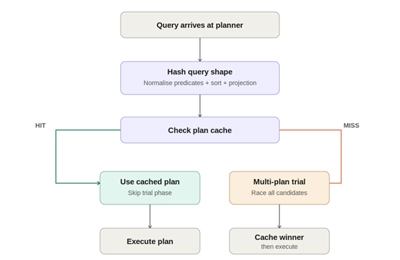
Now two things can happen:
• Cache hit → MongoDB already knows the best plan, so it skips all the trial work and runs it directly (this is the fast path)
• Cache miss → MongoDB doesn’t have a saved plan, so it tries multiple options to find the best one
A few important things to know about the plan cache:
• It’s stored in memory (not on disk)
• It’s maintained per collection
• It gets cleared when MongoDB restarts
• It’s also reset if the indexes change or the collection changes a lot
You can even inspect or clear it manually:
// See cached plans
db.orders.getPlanCache().list()
// Clear cache (forces MongoDB to re-evaluate plans)
db.orders.getPlanCache().clear()
In short, if your query has been seen before, MongoDB can skip straight to execution — which is why repeated queries are usually much faster 🚀
Stage 7: Multi-Plan Trial — The Index Race
If MongoDB doesn’t find a plan in the cache, it tries something really interesting.
Instead of guessing the best plan, it tests all possible plans simultaneously. This is called the multi-plan stage.
Each plan is given a chance to run for a few steps, one after the other — kind of like a race.
For example:
Round 1:
Plan A → small progress
Plan B → small progress
Plan C → small progress
Round 2:
Plan A → more progress
Plan B → more progress
Plan C → more progress
This continues until one plan clearly outperforms the others.
The winner is the plan that:
• returns the first ~100 results fastest, or
• finishes scanning the data quickest
Once a plan wins, MongoDB:
→ uses it for the current query
→ saves it in the plan cache for next time
What about full collection scans (COLLSCAN)?
They usually lose… but not always.
• If there are no useful indexes → COLLSCAN wins
• If the collection is very small → COLLSCAN can actually be faster than using an index
If you want to see how this decision was made, you can run:
db.orders.find({ status: "pending", customerId: 1042 })
        .explain("allPlansExecution")
Stage 8: Index Scan (IXSCAN) or Collection Scan (COLLSCAN)
Now that MongoDB has picked the best plan, it finally executes the query.
If an index is used (IXSCAN)
MongoDB uses indexes that work like a tree structure. It quickly navigates this tree to find matching entries.
Once it finds a match, it uses a reference (called RecordId) to go and fetch the actual document from the collection.
Think of it like:
— find the entry in the index
— then go grab the full document
There’s also something called a covered query: If all the fields you need are already in the index, MongoDB doesn’t even need to look at the actual documents.
- It returns results directly from the index
- This is the fastest possible way to read data
If no index is used (COLLSCAN)
If there’s no useful index, MongoDB has no choice — it reads every document one by one.
So if your collection has 10 million documents, it will scan all 10 million.
That’s definitely slow.
How to spot a problem
When you run explain(), watch for this:
db.orders.find({ status: "pending" }).explain("executionStats")
// Red flags to look for:
// "stage": "COLLSCAN"          ← no index used
// "totalDocsExamined": 9847321  ← scanned 9.8M docs
// "nReturned": 142              ← returned only 142
// Ratio: 69,000:1               ← extremely inefficient
Red flags:
-
"stage":"COLLSCAN"→ no index is being used - Very high
"totalDocsExamined" - Very low
"nReturned" - scanned ~9.8 million documents
- returned only 142
That’s a huge gap, and a clear sign your query is inefficient
Simple rule
If MongoDB is reading way more documents than it returns, you probably need a better index.
Stage 9: The Storage Layer — WiredTiger Cache and Disk
Once MongoDB knows which documents it needs, the next question is: Where does it actually read the data from?
There are three possible sources, and the speed depends on where the data is found.
1. WiredTiger cache (in-memory — fastest)
MongoDB uses WiredTiger as its storage engine, which keeps frequently accessed data in memory.
By default, it uses about 50% of the available RAM.
If the required data is already in this cache, MongoDB can return it almost instantly. This is the ideal scenario.
2. OS page cache (still fast)
If the data is not in MongoDB’s own cache, it checks the operating system’s page cache.
The OS may already have the data in memory from recent reads. Since MongoDB memory-maps its data files, this check is efficient.
This is slightly slower than the WiredTiger cache, but still very fast.
3. Disk (slowest)
If the data is not present in either cache, MongoDB has to read it from disk.
The performance here depends on the type of storage:
- NVMe SSD: fastest among disks
- SATA SSD: moderate
- HDD: significantly slower
At scale, disk access becomes the main bottleneck, especially when queries access data randomly across large datasets. If your working data set fits in memory, queries remain fast. If MongoDB frequently needs to read from disk, query performance drops significantly. This is why working set size is critical in MongoDB performance tuning — your frequently accessed data should ideally fit in RAM.
Checking cache performance
You can inspect cache behavior using:
db.serverStatus().wiredTiger.cache
// 'pages read into cache'       ← total cache misses (disk reads)
// 'pages requested from cache'  ← total requests
// Hit ratio = 1 - (read/requested)
// Target: > 95%
Key metrics:
-
pages read into cache→ disk reads (cache misses) -
pages requested from cache→ total requests
A good system typically has a cache hit ratio above 95%.
Stage 10: Results Returned to the Client
Here’s what happens:
- Applies projection: Removes any fields you didn’t ask for and keeps only what’s needed
- Applies skip and limit: Skips the first N documents (if specified) and limits how many results are returned
- Converts back to BSON: Turns the in-memory document into a format that can be sent over the network
- Creates response batches: MongoDB doesn’t send everything at once. The first batch contains up to 101 documents or 16MB of data (whichever comes first)
- Sends the response: The data is sent back to your application over the same connection
What if there’s more data?
If your query returns more than one batch, MongoDB doesn’t send everything in one go.
Instead, it returns a cursor ID.
Your driver then automatically requests the next batch using getMore commands. This happens behind the scenes, so you usually don’t notice it.
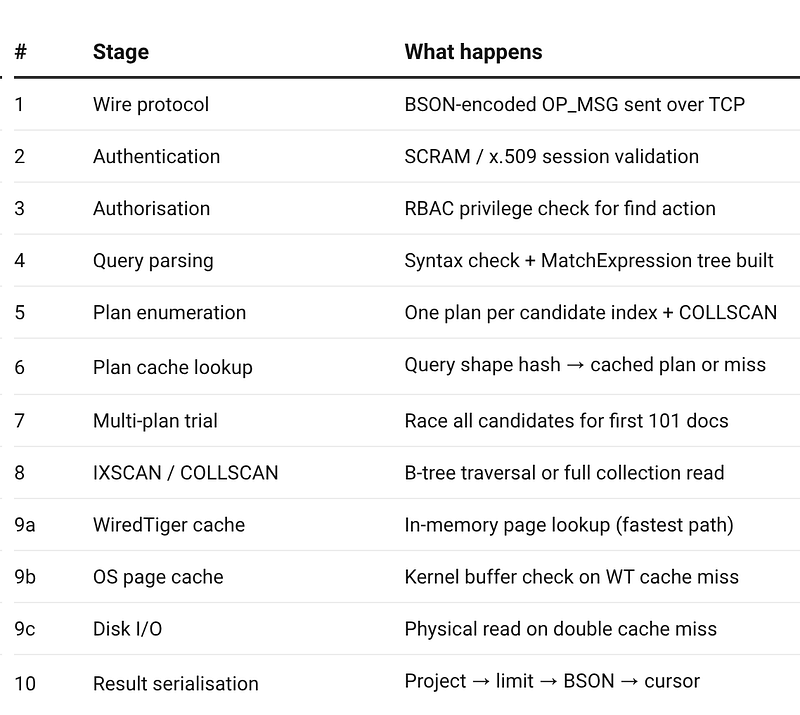
The Complete Picture — All 10 Stages
Closing notes: Key Takeaways for Production
-
Always check your
explain()output - Useexplain("executionStats")to see exactly how your query ran — which plan was used, how many documents were scanned vs returned, and whether the plan came from cache. -
Design indexes based on query patterns, not just fields -Think about how your queries are written. For example, a compound index like
{ status: 1, customerId: 1 }is usually much more effective than having separate indexes on each field. It can even avoid extra steps like fetching documents if the query is covered. - Keep an eye on cache efficiency - Monitor your WiredTiger cache hit ratio. If it drops below ~90%, it usually means your frequently accessed data no longer fits in memory. At that point, you may need to add more RAM, shard the data, or rethink how your application accesses data.
-
Be aware of plan cache issues - If a query suddenly becomes slow after something like a bulk insert, the plan cache might be the cause. MongoDB may have picked a suboptimal plan after re-evaluating. In such cases, clear the cache and check the query again with
explain().
// Your daily driver for query diagnostics
db.orders.find({ status: "pending" }).explain("executionStats")

// Key fields to read:
// executionStats.executionTimeMillis    ← total time
// executionStats.totalDocsExamined      ← docs touched
// executionStats.totalKeysExamined      ← index keys scanned
// executionStats.nReturned              ← docs returned
// queryPlanner.winningPlan.stage        ← IXSCAN or COLLSCAN