








Stop hardcoding! Use AWS Parameter Store instead (Hands-On)
This article is a practical guide for DevOps engineers who want to manage configuration and secrets the right way on AWS.
Introduction
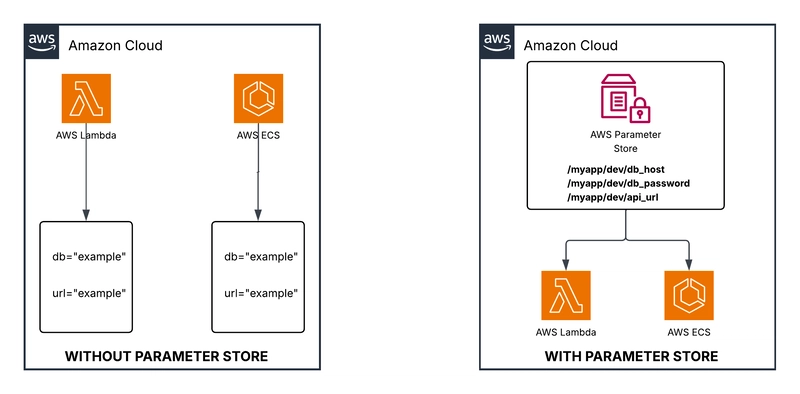
If you have a database hostname, a password, and an API URL your application needs to call, where do you put them? The wrong answer is “environment variables hardcoded into your Lambda function”. The issue is: different environments (dev, prod) need different values, rotating a password means redeploying every service that uses it, and hardcoding config eventually ends up in Git (you don’t want that, trust me).
AWS has multiple services for managing configuration and secrets, but today we will focus on AWS Systems Manager Parameter Store.
AWS Parameter Store gives you a central, secure, hierarchical place to store configuration and secrets, and any AWS service can read from it at runtime without you changing a line of application code. Think of it as a managed configuration database where you store both, plain config values and encrypted secrets, organized in a folder-like structure.
In this article, we will create a set of parameters in Parameter Store and build a Lambda function that uses them. Changing a parameter value will change what the Lambda does, with no redeployment needed.
Prerequisites
Create an AWS Account.
-
Console access with permissions for: System Manager, Lambda, and IAM.
**NOTE: **Everything in this guide is free or within free tier limits.
What is AWS System Manager Parameter Store?
Per AWS, Parameter Store is a tool in AWS Systems Manager that provides secure, hierarchical storage for configuration data management and secrets management. You can store data such as passwords, database strings, Amazon Machine Image (AMI) IDs, and license codes as parameter values. You can store values as plain text or encrypted data. You can reference Systems Manager parameters in your scripts, commands, SSM documents, and configuration and automation workflows by using the unique name that you specified when you created the parameter.
Parameter Types
Parameter Store supports three types of values:
String — plain text. Use this for non-sensitive config like hostnames, URLs, or feature flag values.
StringList — a comma-separated list of strings. Useful for storing a list of IPs, ARNs, or environment names in a single parameter.
SecureString — the value is encrypted at rest using AWS KMS. Use this for passwords, tokens, and any sensitive data.
Parameter Tiers
Parameter Store has different size limits for parameter values depending on the parameter tier you use. Standard parameters: Maximum value size of 4 KB, and Advanced parameters: Maximum value size of 8 KB.
Hierarchy
Parameters are organized using forward-slash paths — similar to a file system:
/myapp/dev/db_host
/myapp/dev/api_url
/myapp/prod/db_host
/myapp/prod/api_url
This makes it easy to retrieve all configuration for a specific environment at once, and it simplifies IAM policies — you can grant access to **/myapp/prod/ **without listing every individual parameter.
Key Characteristics
Free on the Standard tier — no per-parameter cost
Encrypted secrets using AWS KMS (SecureString type)
Full version history — every update creates a new version
Tight integration with Lambda, ECS, CloudFormation, and CodePipeline
Write operations (create, update, delete) are logged in AWS CloudTrail by default. Read operations require enabling data event logging in CloudTrail separately.
Parameter Store vs AWS Secrets Manager
AWS has more than one service that can store configuration and secrets. Before jumping into the hands-on, it is worth understanding where Parameter Store fits and when you should reach for something else.
**Secrets Manager** is the other AWS service most commonly compared to Parameter Store. Both can store secrets, but they are designed for different needs.
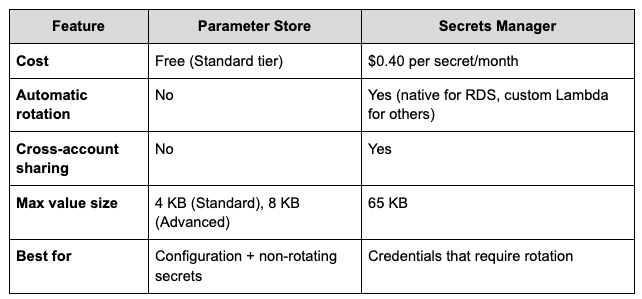
Use Parameter Store for configuration and static secrets. Use Secrets Manager when you need automatic credential rotation — database passwords, API keys that expire, and OAuth tokens.
Parameter Store vs AWS AppConfig
AppConfig is a separate service built on top of Parameter Store, designed specifically for feature flags and application configuration with deployment controls.
AppConfig is a separate service built on top of Parameter Store, designed specifically for feature flags and application configuration with deployment controls.
Choose AppConfig when you need:
Gradual rollouts (deploy config to 10% of instances first, then 100%)
Automatic rollback if a bad config causes errors
Configuration validation before deployment
Choose Parameter Store when you need:
Simple key-value config without deployment strategy complexity
Secrets (AppConfig is not designed for sensitive values)
Free storage with no additional overhead
Creating the Parameters
We will create three parameters that our Lambda function will use. They cover the most common types you will encounter in real projects.
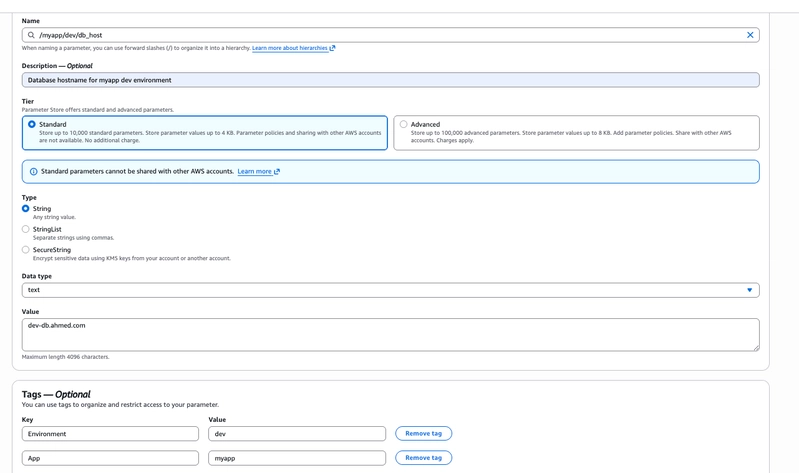
Parameter I — Database hostname (string)
A plain-text configuration value. Nothing sensitive, so no encryption needed.
Go to **Parameter Store **in the console
Click Create parameter
Fill in:
Name: /myapp/dev/db_host
Description: Database hostname for myapp dev environment
Tier: Standard
Type: String
Value: dev-db.ahmed.com
Data type: text
Add tags: Environment = dev, App = myapp
Click Create parameter
Parameter II — API URL (String)
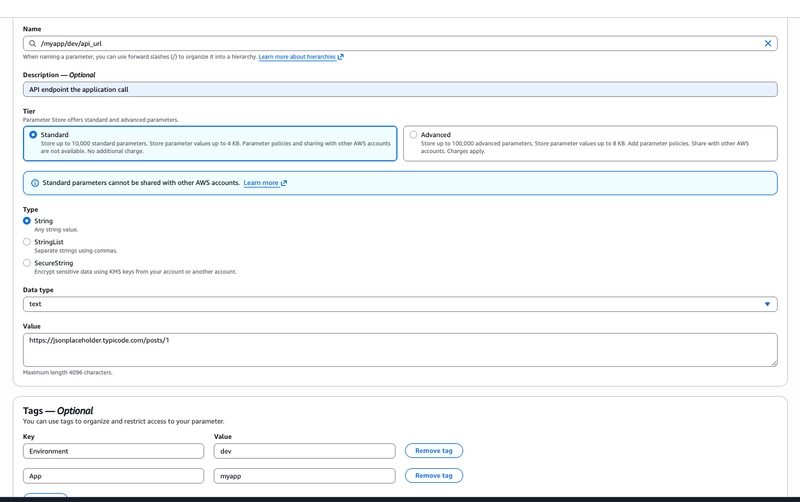
This is the parameter the Lambda function will actively read and act on. The function will call whatever URL is stored there. Change the URL, the Lambda will call a different endpoint on the next run — no code change needed.
Go to **Parameter Store **in the console
Click Create Parameter
Fill in
Name: /myapp/dev/api_url
Description: API endpoint the application calls
Tier: Standard
Type: String
Value: https://jsonplaceholder.typicode.com/posts/1
Data type: text
Add tags: Environment = dev, App = myapp
-
Click Create parameter
NOTE: JSONPlaceholder is free public REST API for testing — no account or API key needed.
What have we created?
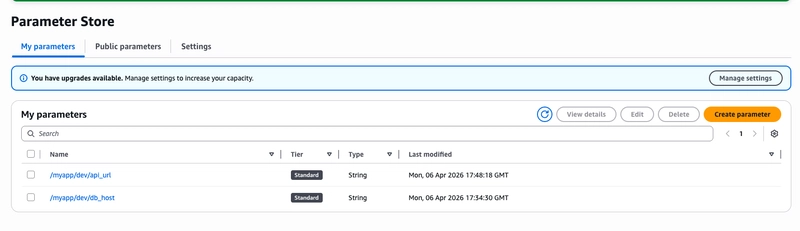
We created three parameters, and they are all for dev. Search for **/myapp/dev/ **in the Parameter Store list. All three parameters appear together, filtered by their path prefix.
In a real application, this means one API call loads all configuration for an environment — your app asks for */myapp/dev/ **and gets back every key under that path at once. For example, if we promote to production, it reads */myapp/prod/ **instead. Same code, different parameters
Using the Parameters — Lambda function
Now we put the parameters to work. The Lambda function will:
-
Read /myapp/dev/db_host and /myapp/dev/api_url from Parameter Store in a single call
- Make a real HTTP request to the API URL
- Return the database host and the API response together
Step I — Create the Lambda function
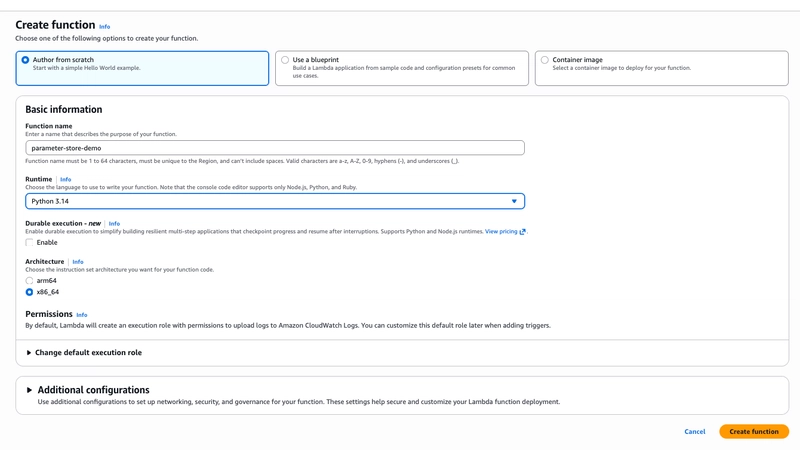
Select Author from scratch
Fill in:
**Function name: **parameter-store-demo
Runtime: Python 3.14
- Leave permissions as default and click Create function
Step II — Grant Permission to read from Parameter store
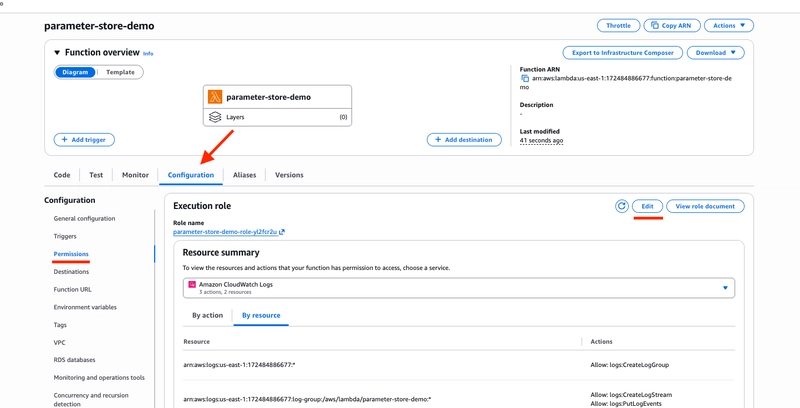
By default the Lambda execution role only has CloudWatch Logs access. We need to add SSM read permission.
- Click the Configuration tab > Permissions > Edit
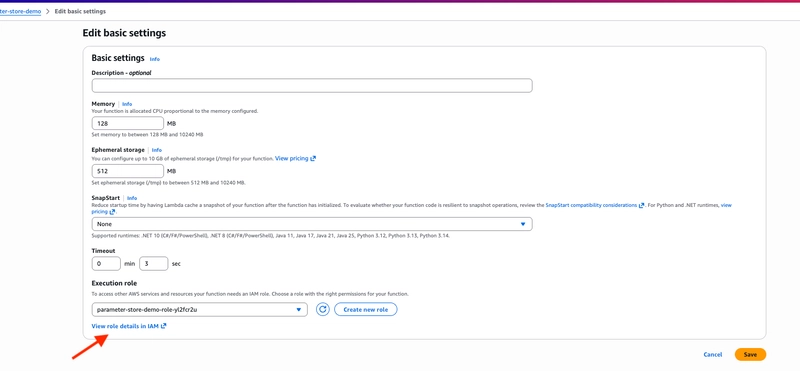
- Click View role details in IAM
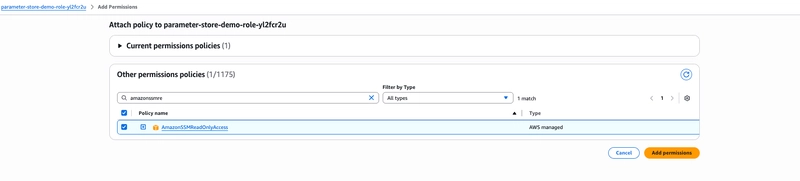
Click Add permissions > Attach policies
Search for AmazonSSMReadOnlyAccess and attach it
Step III — Write the code
-
Click the Code tab in Lambda
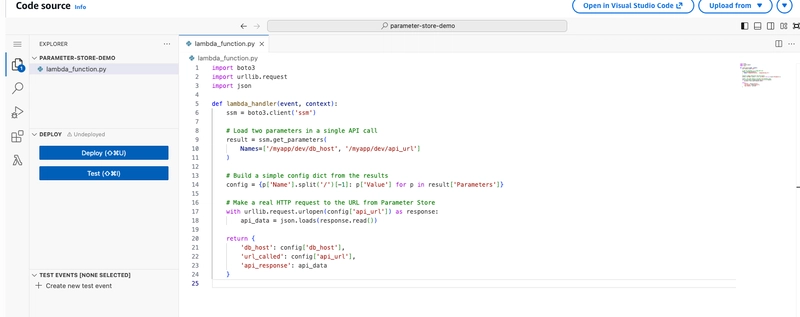
- Replace the entire contents of lambda_function.py with:
import boto3
import urllib.request
import jsondef lambda_handler(event, context):
ssm = boto3.client('ssm')# Load two parameters in a single API call result = ssm.get_parameters( Names=['/myapp/dev/db_host', '/myapp/dev/api_url'] ) # Build a simple config dict from the results config = {p['Name'].split('/')[-1]: p['Value'] for p in result['Parameters']} # Make a real HTTP request to the URL from Parameter Store with urllib.request.urlopen(config['api_url']) as response: api_data = json.loads(response.read()) return { 'db_host': config['db_host'], 'url_called': config['api_url'], 'api_response': api_data }NOTE: get_parameters (plural) fetches multiple parameters in one API call — more efficient than calling get_parameter once per value.
The code has no hardcoded URLs or hostnames. It asks Parameter Store, then acts on whatever it gets back.
Important: Lambda and the parameters must be in the same AWS region. A region mismatch produces a ParameterNotFound error even if the parameter name is correct.
Step IV — Test
Click Deploy to deploy the code
Click Test to create the test
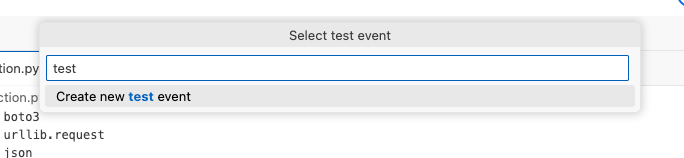
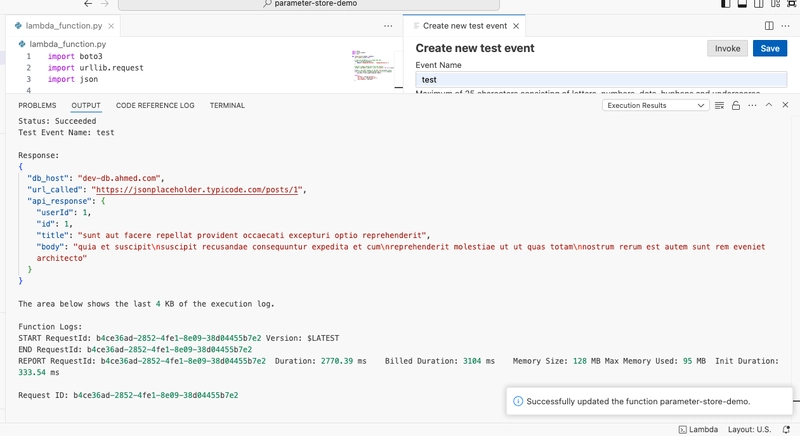
- Create new test event and name it test
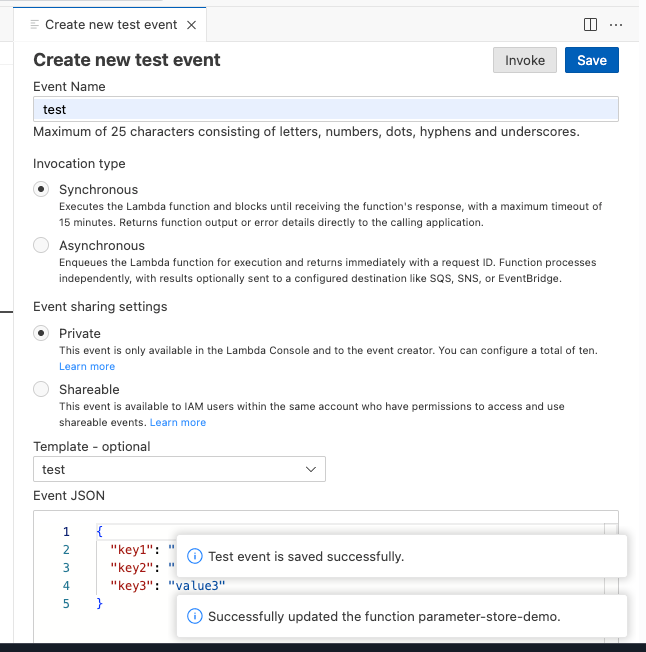
- Save it and click the Invoke
- The Lambda loaded both parameters and returned a real API response. No hardcoded values anywhere in the code. Which means, everything is working correctly.
Update the API URL
This is where Parameter Store shows its value. We will update both parameters — the Lambda behavior changes instantly, with no redeployment.
Update the API URL:
Go to Parameter Store > /myapp/dev/api_url
Click Edit >change the value to https://jsonplaceholder.typicode.com/posts/5
Click Save changes
Update the database host (simulating a failover to a new database server):
Open /myapp/dev/db_host
Click Edit >change the value to dev-db.ahmed.srebrenica.com
Click Save changes
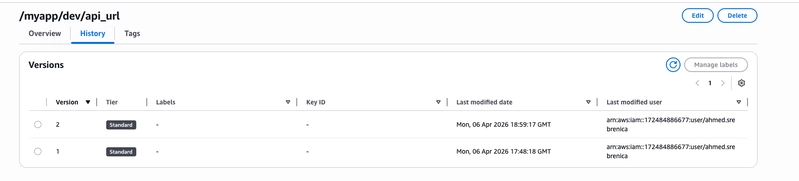
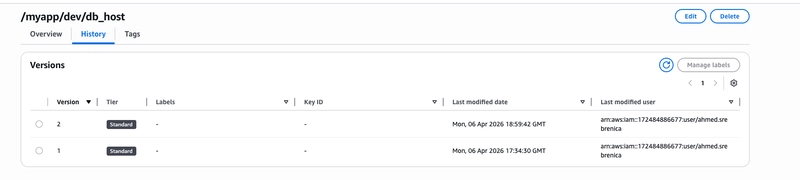
Now open either parameter and click the History tab and you will see Version 1 and Version 2 with timestamps. Parameter Store keeps a full history of every change automatically.
Back in Lambda, click Test again:
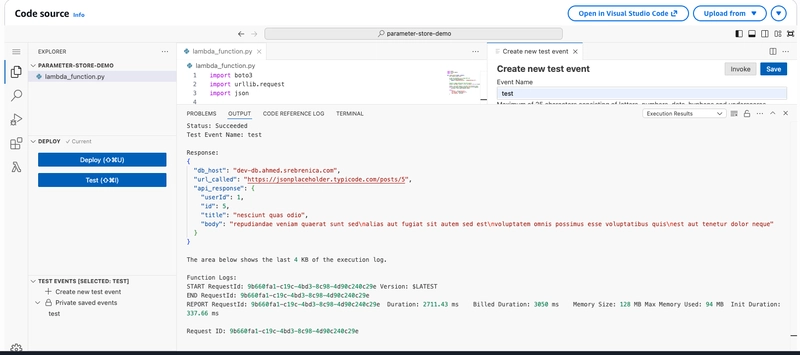
Both values updated! The Lambda code is identical to what we deployed. This is the core value of Parameter Store — application’s behavior is controlled by configuration, not by code.
Best practices
The hands-on above uses shortcuts that are fine for a demo, but shouldn’t go into production. Here is what to do differently in a real environment.
- Never use broad managed policies on your roles
In this hands-on, we attached AmazonSSMReadOnlyAccess to the Lambda role for convenience. In production, this is too permissive; it grants read access to every parameter in your account, including parameters that belong to other applications or contain sensitive data. Instead, create a custom inline policy scoped to only the path your function needs.
2. Always encrypt sensitive values with SecureString
Any parameter that contains a password, token, API key, or any value you would not want to expose in logs should be stored as SecureString, not String. SecureString encrypts the value at rest using AWS KMS.
For production, go one step further: use a **customer-managed KMS key (CMK) instead of the default **alias/aws/ssm. A CMK gives you full control; you can rotate the key, restrict which roles can use it, and audit every decrypt operation.
3. Never log parameter values
The application will read SecureString parameters and decrypt them. Make sure those values never appear in CloudWatch Logs. A single **print(password) **or an unhandled exception that dumps local variables can expose your secrets in plain text in your log stream.
4. Design your naming hierarchy before you start
It is much harder to rename parameters after services depend on them. Agree on a convention before you create the first parameter:
/team/environment/service/key
/platform/prod/payments/db_host
/platform/prod/payments/api_url
A consistent hierarchy makes IAM policies easier, bulk reads cleaner, and environment promotion predictable.
5. Tag Every Parameter
Tags make it easy to understand who owns a parameter, filter by environment, and set up cost allocation:
Environment = prod
App = payments
Team = backend
ManagedBy = terraform (if using IaC)
Conclusion
In this article, we went from zero to a working Parameter Store setup entirely from the AWS Console.
We created two parameters, a database hostname and an API URL — organized under a **/myapp/dev/ **hierarchy. We then built a Lambda function that reads both parameters at runtime and makes a real HTTP request to the URL stored in Parameter Store. Finally, we updated both parameters and ran Lambda again without touching a single line of code, the behavior changed instantly.
That last step is the whole point. Application stops caring about specific values. It asks Parameter Store, and you control the answer from one central place.
A few things to take with you:
The hierarchy (/app/env/key) is not optional — design it from day one, it makes environment promotion and IAM policies much easier.
SecureString exists for anything sensitive — passwords, tokens, API keys — encrypted at rest with KMS.
The Standard tier is free — there is no reason not to start using this today.
All parameter changes are logged in CloudTrail — every update is auditable.
If you like this story, please clap and follow me.
Check out my website for basic information about me: ahmedsrebrenica.com.