
惯性聚合 高效追踪和阅读你感兴趣的博客、新闻、科技资讯
阅读原文 在惯性聚合中打开

推荐订阅源

N
Netflix TechBlog - Medium
Blog — PlanetScale
Blog — PlanetScale
月光博客
月光博客
freeCodeCamp Programming Tutorials: Python, JavaScript, Git & More
CTFtime.org: upcoming CTF events
爱范儿
爱范儿
量子位
博客园 - 聂微东
Engineering at Meta
Engineering at Meta
WordPress大学
WordPress大学
GbyAI
GbyAI
MyScale Blog
MyScale Blog
IT之家
IT之家
P
Proofpoint News Feed
M
MIT News - Artificial intelligence
The Cloudflare Blog
H
Hackread – Cybersecurity News, Data Breaches, AI and More
Hugging Face - Blog
Hugging Face - Blog
The Register - Security
Microsoft Security Blog
博客园_首页
MongoDB | Blog
MongoDB | Blog
F
Fortinet All Blogs
博客园 - 三生石上(FineUI控件)
Y
Y Combinator Blog
雷峰网
雷峰网
V
Visual Studio Blog
酷 壳 – CoolShell
酷 壳 – CoolShell
Last Week in AI
Last Week in AI
博客园 - 叶小钗
D
DataBreaches.Net
B
Blog
B
Blog RSS Feed
大猫的无限游戏
大猫的无限游戏
aimingoo的专栏
aimingoo的专栏
让小产品的独立变现更简单 - ezindie.com
The GitHub Blog
The GitHub Blog
云风的 BLOG
云风的 BLOG
Recent Announcements
阮一峰的网络日志
阮一峰的网络日志
小众软件
小众软件
腾讯CDC
T
Threat Research - Cisco Blogs
SecWiki News
SecWiki News
Martin Fowler
Martin Fowler
D
Docker
Cisco Talos Blog
Cisco Talos Blog
T
Tenable Blog
Webroot Blog
Webroot Blog
宝玉的分享
宝玉的分享

WhatIs

Strategic IT outlook: Tech conferences and events calendar | TechTarget 8 AI use cases in manufacturing Enterprises are making an AI native transformation Generative AI ethics: 16 biggest concerns and risks Zero trust in the IT ops stack: Securing hybrid workloads How algorithmic value sets enhance clinical decision-making Top methods for collecting customer feedback Build a data governance team that delivers results How to calculate the total cost of ownership of ERP software Communities call for transparency in AI data center deals Scalable IT infrastructure: Balancing speed with stability How health systems are tackling 'Kill the Clipboard' obstacles Understanding the science behind AI-based hiring assessments Tape's strategic role in modern data protection How to choose an HR software system in 2026: A complete guide The UC stack gets the policy job Top zero-trust use cases in the enterprise 13 top IT infrastructure conferences in 2026 SNMP vs. CMIP: What's the difference? 3 essential network analytics use cases AI Security Risks Force CIOs to Rethink Strategy Red Hat Summit 2026 news and conference guide | TechTarget What is HR technology (human resources tech)? Understand, optimize and track customer journey touchpoints Should IT use Apple Business Manager without MDM? Build and organize an effective machine learning team The storage modernization imperative in a fast-changing IT landscape Procurement automation use cases for CSCOs to consider 3 steps for health system leaders to drive patient safety culture What is DevOps? Meaning, methodology and guide Enterprises Face New Storage Bottlenecks as AI Grows A guide to Intune Suite licensing for endpoint management Epic controls 42% of the US EHR market. Does that help or hurt interoperability? SAP Sapphire 2026 news, trends and analysis | TechTarget How to develop a data governance strategy: 7 key steps 12 generative AI tools for marketing and sales teams Top 9 smart contract platforms to consider in 2026 Top 8 e-signature software providers for 2026 Rise with SAP vs. S/4HANA Cloud: What are the differences? How businesses use KPIs to measure AI's performance 5 clues your network has shadow AI How do digital signatures work? Collaboration security and governance must be proactive Compare SAP greenfield vs. brownfield approach for S/4HANA Merck, Home Depot tap Gemini Enterprise for AI agent development Rural challenges may dampen digital healthcare's potential Build an ethical AI framework: 12 top resources The great workload reshuffle: Choices for AI and analytics Cisco unveils quantum network advancements 3 BYOD security risks and how to prevent them 10 of the top carbon accounting software 8 trends powering machine learning's dynamic new roles Network engineers must take the lead to push DDI to the cloud How does Microsoft 365 Copilot pricing and licensing work? ONC highlights behavioral health EHR adoption trends, data exchange barriers LLMs struggle with clinical reasoning, study finds Democratizing AI in business: The good, bad and ugly What can organizations do to address BYOD privacy concerns? Fix the service path before you optimize it with AI How AI reshapes upselling in customer experience platforms When collaboration starts becoming operational drag Balancing health AI management with growing vendor sprawl Career cure for AI phobia: Be a beekeeper, not a worker bee 16 top applicant tracking systems for 2026 How a rural community hospital deploys AI to detect heart disease 8 examples of document version control Guide to 30+ sustainability certifications for professionals AI agents are only as smart as the data that feeds them AI could earn trust in transactional work first How to fix keyboard connection issues on a remote desktop How to add and enroll devices to Microsoft Intune 11 DevSecOps best practices to prioritize in 2026 6 key components of a successful data strategy How to enable Copilot in Microsoft 365: A step-by-step guide What CIOs need to know about Meta's proposed CEO AI agent Top AI recruiting tools and software of 2026 How contact centers detect and prevent fraud 10 essential skills for modern contact center agents Beyond the chatbot: Engineering the agentic enterprise AI in business intelligence: How to manage it effectively Why legacy networks are a growing liability Failure is an option as an IT leadership tool How HR can create a successful change management strategy HR AI is becoming a change management story Digital transformation: Balancing speed and governance RSAC 2026 Conference: Key news and industry analysis | TechTarget 8 best practices for a bulletproof IAM strategy 5 customer journey phases businesses should understand 12 top HR software and tool options to consider in 2025 6 contact center trends shaping the future of customer service Contact center monitoring best practices for CX leaders Cloud vs. local backup: Which is right for your organization? 6 steps for when remote desktop credentials are not working How governance maturity affects M&A integration outcomes Inside the push to turn AI agents into suite functionality How should contact centers use AI today? Accenture global health lead on scaling AI in healthcare with governance and intent 10 best free DevOps certifications and training courses in 2026 What is compensation management? What CIOs must know about bossware strategy
How to remove a device from Intune enrollment
2026-04-23 · via WhatIs

Article 4 of 4

Part of: Adding and managing accounts and devices to Intune

When a Windows device leaves service, IT should choose the right Intune removal action based on whether it must preserve personal data, retire access, or fully reset the endpoint.

Peter van der Woude

By

Published: 23 Apr 2026

Any Windows device management plan must account for the full lifecycle of the endpoint, from enrollment and active use to reassignment, loss, compromise and retirement.

In Microsoft Intune, removing a device is not a single action. IT teams have several removal and reset options, and the right choice depends on whether the goal is to preserve personal data, cut off corporate access, prepare the device for reuse or fully erase it.

The 5 ways to remove Windows devices from Microsoft Intune

Before IT admins remove or retire Windows devices from Microsoft Intune, they should learn the different options to achieve that. IT has several options for removing Windows devices from Intune, and all of these options have their own pros and cons. Often, the best option depends on the reason for removing that specific device. For Windows devices, the following options are available:

    1. Autopilot reset. IT can use Autopilot reset to restore a Windows device to its original settings while removing personal files, apps and settings. It is most useful when the organization plans to keep the device in service.
    2. Delete. Admins can use Delete to remove a device from Intune management. Microsoft also describes this action as removing company data and retiring the device.
    3. Fresh Start. Intune administrators can use Fresh Start to reinstall the latest version of Windows and remove apps installed by the manufacturer.
    4. Retire. IT teams can use Retire to remove company data, settings and managed apps while leaving personal data intact. This makes it especially relevant for personally owned devices.
    5. Wipe. The Wipe action restores a device to factory settings and removes all data and settings, unless the selected options specify otherwise.

    How to remove Windows devices from Microsoft Intune

    Within Microsoft Intune, there are two different approaches to remove Windows devices, and each of these approaches can account for the five types of device removal.

    Either the IT administrator can remotely trigger an action to remove the device via Intune, or the user can locally trigger an action to remove the device.

    Removing Windows devices from Microsoft Intune as an IT administrator

    The first option for removing Windows devices Microsoft Intune is as an IT administrator. The IT administrator can remotely trigger any of the earlier described actions by using the Microsoft Intune admin center portal:

    1. Open the Microsoft Intune admin center portal, and navigate to Devices > Windows.
    2. On the Windows | Windows devices page, select the device that should be removed from Microsoft Intune.
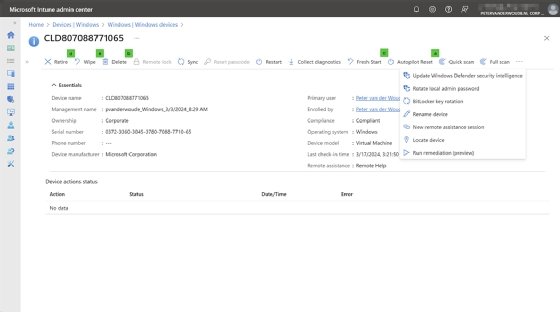
    3. Select the remote action by choosing the action that is applicable to the scenario for removing that device from Microsoft Intune (Figure 1).
      The Intune admin center showing the details of a specific Windows device
      Figure 1. The Microsoft Intune admin center with a specific device selected and several removal options highlighted
    4. Depending on the desired removal action, admins need to complete the requisite follow-up actions:
      1. Autopilot reset. When performing an Autopilot reset action, click Yes to confirm the action.
      2. Delete. When performing a Delete action, click Yes to confirm the action.
      3. Fresh Start. When performing a Fresh Start action, choose whether or not to retain the user data, and click Yes to confirm the action.
      4. Retire. When performing a Retire action, click Yes to confirm the action.
      5. Wipe. When performing a Wipe action, choose the type of wipe action that should be performed, and click Yes to confirm the action.

    Removing Windows devices from Microsoft Intune as a user

    The second option for removing Windows devices from Microsoft Intune is a device's user triggering the action. For this option, one prerequisite is that the IT department has not blocked users from unenrolling devices from Intune. When the user is allowed to perform this action, the user can enact the following steps to remove the device from Microsoft Intune:

    1. Open the Settings app, and navigate to Accounts > Access work or school.
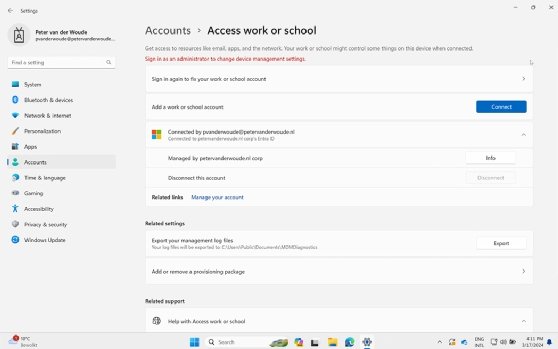
    2. On the Access to work or school page, select the connected account that should be removed, and click Disconnect (Figure 2).
    3. On the confirmation dialog box, select Yes to confirm the removal of the device.
    indows Settings app showing the Access work or school page with a connected work account and the Disconnect option.
    Figure Figure 2. A Windows device can be removed locally through Accounts > Access work or school when IT allows unenrollment.

    Besides directly using the Settings app, the user could also use the Company Portal app to remove their Windows device from Intune. This approach also requires that IT has not blocked the option to remove.

    What does removing a device from Intune do?

    After a user unenrolls a Windows device from Intune, the device is removed from Company Portal, the user can no longer install apps from Company Portal and access to work or school resources is reduced or removed. Depending on the configuration, device settings that Intune enforced are no longer required, and the user might also lose access to work Wi-Fi or VPN connections.

    If the Intune client software is installed on the device, Microsoft says that software is also removed during unenrollment.

    The Company Portal app can still store local diagnostic logs and cached support files after removal. To clear that residual data, uninstall the Company Portal app or reset it in Windows.

    Editor's note: This article was originally published in 2024 and was updated in 2026 to reflect current Intune device-removal actions, user unenrollment effects and Microsoft terminology.

    Peter van der Woude works as a mobility consultant and knows the ins and outs of the ConfigMgr and Microsoft Intune tools. He is a Microsoft MVP and a Windows expert as well.


    Next Steps

    Understanding MDM vs. MAM in Microsoft Intune

    Top 6 unified endpoint management software vendors in 2026

    How to remove a work profile from an Android device

    How to disable the Windows Hello feature with Intune

    Microsoft Configuration Manager vs. Intune key comparisons

    Dig Deeper on Windows OS and management

    Part of: Adding and managing accounts and devices to Intune

    Article 4 of 4

    Up Next