




From remote employees in different time zones to rising demand for 24/7 omnichannel support, the modern workforce is pushing IT teams to their limits. In response, many enterprises are adopting modern IT service management platforms, often delivered as SaaS, to automate service desk workflows and improve operational efficiency across hybrid environments.
Service desk automation is a core capability of modern IT service management (ITSM) platforms, which increasingly embed AI capabilities to streamline support tasks and workflows. Enterprise environments are adopting strategies that combine generative AI (GenAI), workflow automation (approvals, routing, escalations) and employee self-service portals.
Looking ahead, CIOs, IT directors and CTOs are expected to focus on roadmaps that extend beyond incremental automation toward intelligent service management and emerging agentic AI capabilities.
As IT leaders define automation strategies that align AI-driven service desk capabilities with business goals, they face a critical decision: Which IT service desk processes should be automated, and which should remain manual -- or at least include a human in the loop? Is automation improving work or merely shifting it?
Few organizations are willing to invest in expensive AI capabilities without clear evidence of operational transformation through cost savings, improved efficiency and higher employee satisfaction. With increasing pressure to justify technology investments, IT leaders need proof that AI-enabled service desk initiatives are delivering measurable improvements in service quality, operational performance and business outcomes.
Why service desk automation matters for IT leaders
Service desk automation refers to the use of system integrations, rules-based workflows and increasing AI capabilities to automate IT service desk processes across the incident lifecycle, including ticket intake, classification, routing, resolution and escalation, often integrating with monitoring systems to enable faster and more consistent service delivery.
IT directors face increasing pressure to reduce support costs while maintaining high service quality across distributed environments that span on-premises infrastructure and cloud services. This requires expanding service desk automation in a controlled manner, using risk-based models to determine which request types -- password resets, standard access provisioning and routine service requests -- can be safely automated through predefined workflows.
Higher-risk activities involving production changes, privileged access or infrastructure often require human approval or policy-based governance controls.
At the same time, IT organizations are being asked to rapidly adopt AI capabilities, including AI copilots and automated resolution tools, without degrading UX. Modern service desk automation strategies increasingly focus on AI-enabled automation that's tightly coupled with governance frameworks, ensuring that efficiency gains are balanced with auditability, control and service reliability.
Key benefits of service desk automation
IT service automation enables enterprises to streamline service delivery by using predefined workflows, robotic process automation (RPA) and AI-driven self-service to resolve routine IT issues, route and escalate incidents and reduce reliance on manual support.
By reducing manual intervention in routine support processes, organizations can lower operational costs, improve mean time to resolution (MTTR), increase first-contact resolution rates and scale support capacity without increasing staffing.
Many tools, such as ServiceNow ITSM, Atlassian Jira Service Management and BMC Helix ITSM, now support AI chatbots and virtual agents that handle a large percentage of routine IT service requests by automatically categorizing and resolving tickets. According to Gartner, by 2027, IT service desk analysts will interact with AI as frequently as they do with business users.
Common service desk automation use cases
The following use cases demonstrate how service desk automation can help IT leaders improve IT service delivery through greater efficiency, consistency and operational performance.
AI virtual agents
ITSM is evolving from the first generation of rules-based chatbots, often built using RPA, to AI agents that can support more dynamic and context-aware automation across IT operations.
According to Forrester's "Predictions 2025: Automation" report, more than half of successful GenAI initiatives in 2025 focused on employee support, particularly the automation of operational processes. This shift is evident in financial services and healthcare organizations.
For IT directors, however, these implementations present significant execution challenges. They involve mapping multiple sources of enterprise and customer data that's often siloed, securely integrating with other systems and training employees on new processes. As Forrester noted in its report, these transformations are complex and require disciplined governance and operational planning.
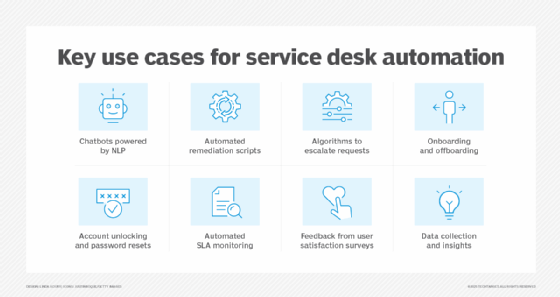
Virtual assistants that use natural language processing are continuously updated and refined to improve their ability to understand technical issues and improve user support experiences. These updates typically include ongoing AI model improvements, changes based on user feedback and deeper integration with automated workflows and ITSM platforms. In many organizations, AI virtual agents serve as the primary point of interaction for users, enabling ticket deflection by resolving issues through self-service before they escalate to human support teams.
There's significant investment in ITSM to reduce internal IT staff requirements, said Craig Le Clair, vice president and principal analyst at Forrester. When an employee has a problem with their laptop or printer, for example, they submit a help desk ticket. "A lot of that is moving to AI agents," he added.
Account unlocking and password reset automation
One of the more common requests from help desk ticketing systems is account access and password resets. If, for example, an employee or outside contractor with access to internal systems uses the wrong password more than once, they're denied access to the network. Account lockouts can happen at the worst times -- after hours, for instance, with a major sales presentation scheduled for early the next morning.
For IT directors, account unlocking and password reset automation represent a low-risk, high-frequency use case that offers the fastest ROI.
Businesses use automation, self-service portals and AI to quickly handle these requests without human intervention. Some companies use web- and mobile-based self-service portals that integrate with Active Directory (AD), Lightweight Directory Access Protocol and cloud services. They have multifactor authentication in place to verify user identity and allow users to reset passwords. ITSM automation tools and RPA bots can access AD and identity and access management systems to assist employees with password resets and account unlocks.
Employee onboarding and offboarding automation
High turnover and today's hybrid workforce have increased technology challenges and security risks for IT. More enterprises have implemented identity lifecycle automation to streamline the process of adding new hires and contractors to their networks and, to a lesser extent, removing people who no longer need access to the organization's systems.
Onboarding new user identities to a network can involve provisioning accounts and device setup, HR and payroll integrations, role- and group-based permissions, training and compliance. But finding the right tools and automating these workflows, which starts with defining the processes across domains based on policies and conditions, can prove challenging for IT leaders. It's not unusual for large enterprises to have hundreds of SaaS and cloud-based applications.
Selective automation can also ease offboarding by handling tasks such as deactivating Slack, Teams and user accounts; sending alerts to IT and other departments; and forwarding the former employee's emails to a manager or the appropriate department. Companies report losing up to 10% of technology assets -- namely, laptops and phones -- when employees exit the company.
With complex infrastructures, it can be hard to successfully deprovision and prevent unauthorized access to data and cloud applications. Automating all or part of the offboarding process can lower costs by reducing IT workloads, eliminating unnecessary software licenses and improving security.
Automated remediation for recurring IT incidents
IT service departments use automated remediation -- software scripts, workflows and AI-driven systems -- to solve a range of recurring IT problems related to network connectivity, system and application performance, hardware and device management and security and compliance, often without the need for human intervention.
Automated remediation is commonly used to reconnect VPN sessions and address DNS issues, such as flushing the cache. It's also applied to patch management, account lockouts and incident logging and response.
Often, automated remediation reduces downtime and operational overhead by enabling faster incident detection and resolution, improving MTTR and service reliability. Organizations can implement these capabilities using infrastructure automation platforms such as Ansible, RPA tools and programming languages such as Python, PowerShell and Bash. AIOps platforms use machine learning and big data analytics to analyze logs, detect anomalies and trigger automated or semi-automated remediation workflows, helping IT teams improve incident response consistency while maintaining governance and control.
Escalation management
Sometimes a service request needs to be routed to a higher authority or to someone with more technical expertise. Escalation management uses predefined rules and procedures to help IT teams manage incidents, exceptions and unresolved requests. This type of workflow governance enables IT directors to implement automated processes that handle exceptions and trigger human intervention when necessary.
The escalation automation system -- often an ITSM tool -- can be configured to support a hierarchy ranging from technical support staff to IT management, time-based service-level agreements (SLAs), service request or incident severity or priority levels and the workload of customer service or IT personnel.
An ITSM system typically logs the service request or incident, routes it based on predefined escalation rules, sends notifications to the appropriate parties using email or SMS and manages the ticket-routing process through resolution or further escalation.
Escalation management is used to automate workflows for IT help desks and security operations centers. AI-based systems can apply predictive analytics to help reduce the need for escalation by identifying and addressing potential issues before they occur.
Automated SLA monitoring
As companies shift from on-premises to cloud computing environments, SLAs have become standard enterprise practice. Once thresholds have been established for uptime, latency, performance, security policies, compliance and more, automated SLA monitoring can alert IT leaders to potential configuration and resource issues.
Used in conjunction with ITSM tools, automated SLA monitoring can escalate incident-related tickets and track response time, time to resolution and escalation rate to prevent an SLA breach. These automation tools can also assist with reporting and analytics required for SLA compliance, and they can provide performance and historical data for SLA adjustments if changes are needed.
For IT directors, the lack of end-to-end visibility across automated business processes, data centers and cloud environments remains a major challenge. This lack of visibility can increase the risk of SLA breaches and compliance failures. In many environments, the use of multiple automation and observability platforms can also lead to alert fatigue, as high volumes of redundant or low-priority alerts make it difficult to identify and respond to critical incidents.
Challenges of service desk automation
Integration remains one of the most significant challenges in service desk automation, particularly in hybrid IT environments that span legacy systems, cloud platforms and distributed infrastructure.
Effective automation typically depends on orchestration layers that connect identity management, endpoint management, observability tools and enterprise applications through APIs and workflow engines. However, many organizations struggle with fragmented operational data, inconsistent configuration management database records and poor asset visibility, all of which can reduce automation accuracy and limit the effectiveness of AI-driven workflows.
Legacy ITSM platforms can also introduce friction due to architectural constraints and limited extensibility. As a result, organizations frequently evaluate platform modernization strategies or adopt integration and automation layers to reduce complexity and improve scalability.
IT leaders should be prepared to standardize and, in many cases, redesign service desk workflows before applying automation at scale. Automating legacy or inconsistent processes often fails to deliver the expected improvements in cost, speed or service quality, and can instead embed inefficiencies into digital systems. Many organizations encounter challenges when IT teams attempt to automate fragmented or non-standardized workflows without first reengineering them for AI-driven automation.
"More than 70% of companies are still taking a low-risk approach to 'everyday' AI," said Frances Karamouzis, analyst and group chief of research at Gartner. Businesses are using Microsoft 365 Copilot, developer coding assistants and tools such as ChatGPT to access the entire knowledge base of trouble tickets. "This allows you to solve trouble tickets in a shorter time frame," she explained.
How to implement service desk automation successfully
Service desk automation implementation typically involves challenges related to process standardization, integration across heterogeneous IT environments, data quality in configuration management systems and organizational change management.
To address these challenges, IT directors should begin with a current-state assessment before implementing service desk automation initiatives. This assessment generally includes evaluating workflow maturity, governance models, integration readiness and data quality across the IT environment.
Following the core ITSM deployment, organizations focus on workflow orchestration, enterprise integration and AI readiness to support more advanced AI capabilities. At this stage, IT leaders typically prioritize workflow design, governance frameworks and operational alignment.
As automation is rolled out incrementally, IT leaders can use analytics to provide insights for optimization and continuous improvement. Over time, analytics and operational telemetry can help identify bottlenecks, optimize workflows and drive ongoing service improvement.
How to measure success
Finally, senior IT leadership must demonstrate that service desk automation initiatives deliver measurable ROI through lower support costs, improved operational efficiency and better employee service experiences.
A Gartner survey of 782 infrastructure and operations leaders conducted in late 2025 found that only 28% of AI use cases met ROI expectations. Among those successful deployments, 53% involved GenAI applied to ITSM and cloud operations. Gartner attributed the strongest outcomes to organizations that integrated AI into existing workflows and secured executive support for implementation.
Metrics and KPIs help organizations determine whether investments in AI and automation are delivering meaningful operational transformation rather than simply adding costly new features. Common measures include labor savings, productivity gains, reduced downtime, lower support outsourcing costs, faster employee onboarding and improved incident prevention.
Service desk automation is also expanding beyond traditional operational metrics. Although ticket volume, MTTR, first-contact resolution rates and SLA compliance remain foundational indicators, AI-driven service management is introducing new performance measures focused on employee experience and automation effectiveness. These measures increasingly include user satisfaction, routing accuracy, time saved per employee, cost per interaction and autonomous resolution rates.
Kathleen Richards is a freelance journalist and industry veteran. She's a former features editor for TechTarget's Information Security magazine.