
BYOD programs can improve employee flexibility and reduce hardware costs, but they also force IT, security and business leaders to define clear privacy boundaries on devices the organization does not fully own.
The real privacy question is not whether IT can manage a personal device at all. It is how much visibility and control the organization actually needs to protect corporate data, maintain compliance and respond to events such as employee departure, device loss or suspicious access.
Modern BYOD programs now have more options than they did a few years ago. Organizations can use privacy-preserving enrollment models, work containers and app-level protections to secure corporate data without treating every personal phone like a fully managed company asset.
BYOD can also blur the line between work and personal life. If employees feel pressure to stay connected after hours, privacy concerns often overlap with work-life balance, support expectations and compensation questions such as stipends or mobile-data reimbursement.
The challenges with privacy and BYOD
BYOD privacy concerns usually come down to a few recurring tradeoffs between security, control and employee autonomy, including the following:
- company data security vs. employee device and information privacy;
- employee access to work data vs. work-life balance;
- forcing security compliance measures such as OS updates vs. device freedom; and
- employer cost savings vs. employee compensation for using personal mobile data plans to access corporate resources.
Security and privacy concerns factor into every decision that an organization makes, especially when taking the unique risks that come with BYOD into account. For example, allowing email on a personal device is a seemingly simple decision. However, it can be difficult to enable proper security controls such as data loss prevention (DLP) and restrictions on data sharing between corporate and personal apps. While organizations must take steps to secure corporate data, employees are often concerned about how much personal data their company can see and control on their devices.
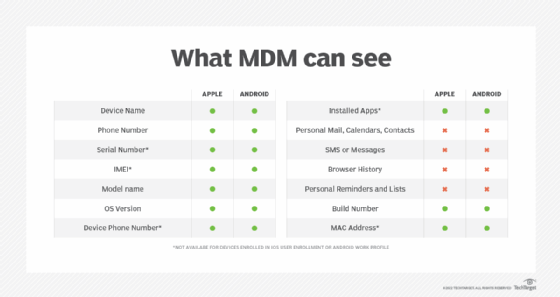
IT administrators often use MDM, UEM or app-management tools to distribute apps, enforce policies and protect corporate data on personal devices. The privacy concern is not just that these tools exist. It is whether employees understand what the organization can actually see and control.
That visibility now varies significantly by platform and enrollment method. In privacy-preserving BYOD models, organizations can usually see and manage work-related settings, managed apps, device compliance state and certain basic device details. They can also remove corporate apps and data through selective wipe.
What organizations generally cannot see in these models is just as important. On Apple User Enrollment, IT manages only the organization's accounts, settings and provisioned information, not the user's personal account. On Android work profiles, the organization can manage the work profile, but personal apps, data and usage details remain private. Microsoft likewise tells users that Intune enrollment does not expose personal information, though administrators can still see limited device inventory such as model and serial number.
This is why BYOD privacy policy should not stop at saying that MDM is in place. It should explain the enrollment method, what data IT can view, what actions IT can take and when selective wipe or other controls apply.
Actions organizations can take
Organizations can reduce BYOD privacy concerns by making three decisions explicit: what the policy requires, what management model the business will use and what IT can and cannot see on a personal device.
Those decisions work together. A written BYOD policy sets the privacy and security rules, the enrollment or app-protection model determines how much control IT applies, and transparent communication helps employees understand how work data will be separated, protected and removed if needed.
Build a BYOD policy
The first thing that any organization should do after deciding to allow the corporate use of employee-owned devices is create a BYOD policy. That policy should define mobile security requirements, privacy boundaries, enrollment expectations, support responsibilities and the organization's rights to remove corporate data.
IT teams should also build clear enrollment procedures and user-facing documentation. Employees should know how enrollment works, what data IT can view, what happens if a device is lost or the employee leaves, and whether the organization expects off-hours access or offers any reimbursement for personal-device use.
Policy considerations can include the following:
- supported device types and minimum OS requirements;
- approved enrollment or app-protection models;
- privacy boundaries and corporate visibility;
- lost, stolen or damaged devices;
- selective wipe and employee departure procedures; and
- stipends, reimbursement and off-hours expectations.
Remember that BYOD does not mean Bring Your Own Everything
While BYOD smartphones make sense for many organizations, BYOD should not mean employees can use any aging device, account or service they prefer. Unsupported devices create both security risk and privacy complications because IT may need to apply stricter controls when supportability is weak.
Organizations should define minimum OS versions, supported enrollment methods and eligibility rules for devices that access corporate data. A recommended device list can still help, but the more important question is whether the endpoint can support the organization's chosen privacy-preserving BYOD model.
For Android, the Android Enterprise Recommended program remains a useful starting point because Google verifies devices against enterprise requirements. Current requirements call for security updates within 90 days and five years of security update availability from the initial ship date.
Implement selective management, not blanket control
Implement selective management, not blanket control
Many organizations still need MDM or UEM to enforce device compliance, distribute certificates, apply restrictions and support selective wipe. But full-device enrollment is no longer the only path for BYOD.
In many cases, organizations can reduce privacy concerns by pairing app protection with identity-based access controls and privacy-preserving enrollment models such as Apple User Enrollment or Android work profiles. That gives IT a way to protect corporate data without applying the same level of control it would use on a company-owned endpoint.
When IT does enroll a personal device, it should be deliberate about which controls are justified. Selective wipe, managed app controls and minimum compliance requirements usually make sense. More invasive controls, such as aggressive restrictions or full-device actions, require clearer justification and stronger user communication.
Editor's note: This article was originally published in 2022 and was updated in 2026 to reflect current BYOD privacy practices, enrollment models and app-protection approaches.
Michael Goad is a freelance writer and solutions architect with experience handling mobility in an enterprise setting.