Demand for cloud-based unified communications continues to rise. Nearly all vendors in the market offer UC-as-a-service platforms and meet enterprise cloud needs.
UCaaS platforms provide a variety of communication and collaboration services using a cloud delivery model. In addition, moving to UCaaS can help organizations reduce Capex compared to deploying an on-premises platform.
Organizations considering moving UC to the cloud should understand the architecture options and core features of UCaaS platforms. IT decision-makers should also become aware of the additional capabilities some vendors offer. Let's examine the different architecture types, features and additional capabilities of UCaaS platform offerings.
UCaaS architecture options
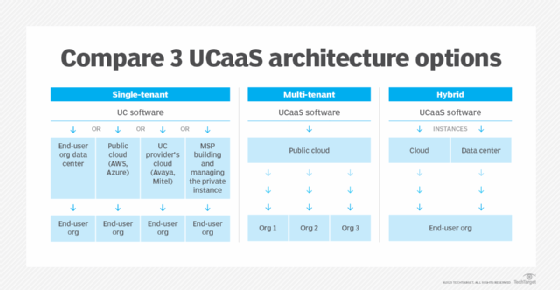
Organizations have three UCaaS architecture options to consider when planning a cloud migration: single-tenant, multi-tenant and hybrid. It's important for IT leaders to prioritize the architecture decision early on to ensure a quality UC experience, said Metrigy analyst Irwin Lazar.
IT leaders should determine whether they want to build and run a communications platform in their own data centers or whether they want to rely on a subscription-based managed service to do the work, Lazar said. Often, the decision comes down to concerns around security, privacy and data retention. Most organizations that put a high value on data security will opt to run their own platform, explained Lazar.
The second deciding factor is based on cost, noted Lazar. For example, it could be more cost-effective for smaller companies to use open-source software, with each phone system running in its own data center, Lazar said.
For organizations that want to maintain control of some portions of a UCaaS deployment, vendors like Cisco and Zoom offer hybrid architecture options, Lazar said. Ultimately, the decision for evaluating communication platforms depends on which architecture works best based on an organization's requirements, he said.
Let's explore the three UCaaS architecture options, their advantages, disadvantages and use cases.
Single-tenant UCaaS
Organizations are the only users, or tenants, of a given software instance. Companies that value customization often prefer single tenancy. Once the tenant purchases the platform, the vendor can customize it to fit the customer's specific needs. The user controls the data, where it lives, what features are rolled out, as well as security policies and integrations, Lazar said.
With single-tenant architecture, users have the option of a hosted offering, where the private software instance is run by an MSP, Lazar said. Those most likely to opt for single-tenant architecture are regulated companies concerned about cyber threats, such as utility, healthcare, government and financial services organizations, Lazar said.
Multi-tenant UCaaS
More than one tenant uses the same software application in a multi-tenant architecture. This architecture offers limited customization flexibility but provides cost savings. Updates and maintenance costs for the platform are shared by all tenants, rather than a single tenant bearing the full cost. Multi-tenant users often find this architecture to be lower cost than single-tenant and enables faster access to different features.
Hybrid UCaaS
This architecture offers the flexibility and customization of a single-tenant architecture, but with the same level of features as a multi-tenant architecture. The UCaaS vendor puts the software in an organization's data center, which ensures network performance and enables the organization to keep important data internal. Since the data is stored locally, calls, for example, won't be bounced out to external data centers, Lazar said.
Features of a UCaaS platform
Typical features incorporated into a UCaaS platform include the following:
Voice over IP. VoIP delivers voice and multimedia communications using a network or internet connection. Calls travel between two endpoints as data packets, and once the packets reach their destination, they are reassembled in the correct order. Organizations using VoIP need to consider call volume to determine how much bandwidth they need to maintain VoIP call quality.
Video conferencing. As more organizations support hybrid workers, video conferencing helps connect remote users with on-site teams. UCaaS enables employees to connect with any remote person using an internet connection and a video-enabled device.
Team collaboration. Team collaboration tools include instant messaging, file sharing, scheduling, project coordination, as well as voice and video chat. Most UCaaS platforms include dedicated channels for real-time one-on-one and group chat, as well as persistent virtual workspaces for collaboration. Team collaboration features in a UCaaS platform may also include online whiteboards and the ability to co-author documents.
Enterprise mobility. UCaaS platforms are built to be mobile-friendly, and, with the rise of remote work, a heavy emphasis must be placed on easy access to tools and applications, regardless of a worker's location. UCaaS supports remote access to tools and applications, giving workers the flexibility needed to work from anywhere. Some UCaaS providers also offer fixed-mobile convergence capabilities for more advanced mobility.
Artificial Intelligence. Nearly all UCaaS vendors offer generative AI capabilities, such as intelligent meeting summaries, action items and content creation. UCaaS vendors are also introducing agentic AI capabilities that can automate certain tasks and personalize employee workflows.
Additional capabilities
In addition to the features included in a UCaaS platform, most vendors offer other capabilities, such as communications platform as a service, CRM and contact centers, with their cloud UC offerings.
Communications platform as a service. CPaaS provides organizations with real-time communications applications delivered through the cloud. CPaaS applications are easily integrated into business applications through APIs.
Customer relationship management. CRM is a mix of strategies and technologies used to analyze customer interactions and data. CRM compiles data from all points of customer contact. The data gathered is then used to improve the customer experience through automated processes and better access to information.
Contact centers. A growing number of UCaaS providers now offer contact centers in addition to UCaaS platforms. As customers change how they communicate, contact centers have evolved to be more than just call centers, making use of UCaaS features like email, VoIP and messaging.
Some UCaaS vendors are offering UCaaS and contact center as a service as a single, integrated platform. Consolidating these services gives IT only one system to manage, one policy for data collection and storage, and a single structure for security services. Organizations seeking a seamless UC experience may wish to explore partnering with vendors that have integrated contact centers as part of their UCaaS offerings.
Editor's note: This article was updated to expand information and improve the reader experience.
Mélanne Ghahraman is a former student co-op from Northeastern University who worked as an editorial assistant covering unified communications.
Micah Levine is a former associate site editor for TechTarget Unified Communications. She previously worked at The Daily Collegian as a contributor and at The Amherst Wire as a writer and editor.