Understanding how GPOs and Intune interact | TechTarget
Brien Posey·2026-06-18·via WhatIs
Article 2 of 3
Part of:When to use Group Policy for desktop management
Group Policy and Microsoft Intune are both mature device management technologies with enterprise use cases. IT should know how to pick between these tools, or when to use both.
It's always important for IT to harden devices against attacks and user tampering, and Microsoft offers two main options for applying device security settings: Group Policy and Microsoft Intune.
Although both can secure devices effectively, the two management options are not created equally. IT administrators should evaluate the strengths of each tool and determine when to use each offering and even when to use both.
What is Group Policy, and how does it work?
Group Policy is sometimes regarded as a legacy technology because it has existed since the introduction of Windows 2000. However, Microsoft has managed to keep it relevant by introducing new policy settings on an as-needed basis.
The primary advantage of using Group Policy to apply security settings to devices is that it's extremely granular in its scope. There are a lot of individual policy settings that collectively enable an organization to lock down its devices to whatever extent it deems to be appropriate.
Unfortunately, Group Policy does have one major shortcoming: It only applies to Windows devices. Other OSes, such as Linux or macOS, are simply not supported.
To get the most out of Group Policy, the Windows devices within an organization must be domain-joined. If an organization needs to lock down standalone -- or non-domain-joined -- Windows devices, it can use local security policies. These local policies are nearly identical to Group Policy, but they are not based on Active Directory (AD).
With local security policies, an organization can apply most of the same security settings as with Group Policy. The difference, however, is that IT admins cannot centrally manage and apply these policies as they can with Group Policy.
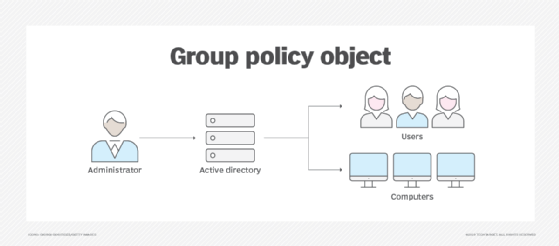
Group Policy is hierarchical in nature, meaning IT can apply Group Policy Objects (GPOs) at various levels of the hierarchy, and all the relevant GPOs combine to form the resultant policy. These GPOs can contain computer and user settings, and admins can apply them at the domain, site and organizational unit level of AD. Local security policies are also included within the Group Policy hierarchy, and some organizations use both local security policies and Group Policy together. The reason for this practice is that if someone were to tamper with Group Policy and delete critical security settings, then the domain-joined PCs stay protected by the local security policies. This is only true, however, as long as the appropriate settings are in place and not overridden by higher-level Group Policy settings.
What is Microsoft Intune, and how does it work?
Microsoft Intune is a cloud-based device management platform, and the primary advantage to using Intune is that it's not Windows-specific. Microsoft Intune can apply security settings to a wide variety of device types and OSes. These devices do not have to be domain-joined. However, they do have to be enrolled for IT to manage them with Intune.
Another major benefit of using Microsoft Intune is that it supports users working from personal devices quite well. Users are able to open the Intune portal through their device's web browser and complete the simple enrollment process themselves without requiring a touch from the IT department. Any time that a user wants to work from a new or additional device, they simply enroll the device, and then it's ready to use.
Intune also works well within hybrid work environments in which some users choose to work remotely. Because Intune is a cloud-based management system, it can apply security settings to a device, regardless of where the device is in use via the internet. By comparison, a user who is working remotely using a domain-joined device might not always be able to connect to AD to download the latest Group Policy settings. In a situation like that, the machine's local security policies need to be sufficient to keep the machine secure in the absence of AD connectivity. With Intune, however, IT can designate it to push out policy settings -- or even updates to policy settings -- to end users' devices in real time.
Some organizations take a hybrid approach to device security, using both Group Policy and Intune.
Although Intune can manage devices without them being domain-joined, Intune uses Entra ID, formerly known as Azure AD. Intune can take advantage of directory-enabled capabilities, such as Conditional Access policies or multifactor authentication.
In spite of its many benefits, there can be some drawbacks to using Microsoft Intune. One potential drawback is the cost. Because Intune is a cloud-based service, Microsoft sells it on a subscription basis. Another possible disadvantage is the learning curve associated with using Intune for device management. While there's nothing overly difficult about using Intune, the process is quite a bit different from the Group Policy management techniques that seasoned administrators could be used to.
Finally, Intune does not offer the same level of granularity as Group Policy. GPOs can include vast numbers of settings, and Intune lacks that depth. Intune provides enough management in many use cases, but IT administrators need to review the available settings to verify whether Intune provides enough control.
How to choose Group Policy, Microsoft Intune or both
Both Intune and Group Policy have their advantages and disadvantages, and neither technology is the superior choice in every situation. Group Policy is a better fit for Windows environments in which users work mostly on-premises. Intune tends to be a better fit for organizations that use a variety of device types and in which users often work remotely and from personal devices.
Some organizations take a hybrid approach to device security, using both Group Policy and Intune. For example, consider an organization with a collection of cloud-based virtual desktops where users access those virtual desktops from personal devices. Such an organization might apply Group Policy settings to the virtual desktops and use Intune to secure the physical devices. It can create some issues, however, if these two policies conflict in any way.
What happens when Group Policy and Intune have conflicting policies?
If an organization uses both Group Policy and Intune, it's important for IT admins to learn what could happen if -- by human error or technical issues -- a GPO and an Intune policy conflict with one another.
According to Microsoft, when a conflict happens, the domain-level Group Policy setting takes precedence over the Intune setting. However, Windows 10 -- 1803 and above -- and Windows 11 contain a policy setting called MDMWinsOverGP. When enabled, this policy ensures that, in the event of a conflict, the Intune setting takes precedence over the Group Policy setting.
Brien Posey is a 22-time Microsoft MVP and a commercial astronaut candidate. In his over 30 years in IT, he has served as a lead network engineer for the U.S. Department of Defense and as a network administrator for some of the largest insurance companies in America.