
BYOD can lower hardware costs and give workers more flexibility, but it also pushes corporate data onto endpoints the business does not fully own.
The modern BYOD security question is not simply whether a personal phone can reach work resources. It is how the organization will protect identities, apps and data on a device that also contains personal accounts, personal apps and personal cloud services.
That requires a more layered control model than older BYOD programs used. Organizations can now combine app protection, Conditional Access, privacy-preserving enrollment methods, minimum OS requirements and selective wipe rather than relying only on full-device control.
Why BYOD presents unique risks
BYOD creates unique risk because work data, personal apps and personal accounts all sit on the same endpoint. The threat model is not limited to malware. It also includes oversharing through personal cloud services, unauthorized apps, weak identity controls and inconsistent patch levels across personal devices.
The three biggest BYOD risks usually show up in these areas: unclear security protocols and shadow IT, data leakage through unmanaged or malicious apps, and device loss, theft or compromise.
Unclear security protocols
Many BYOD breaches start with behavior, not malware. Employees use unapproved apps because they are convenient, reuse personal identities and sign in from devices that may not meet corporate security or patch standards. That makes shadow IT, oversharing and credential theft just as important as classic device compromise.
Organizations should not rely on policy documents alone. They should pair user training with enforcement, including strong authentication, approved-app guidance and access controls that block unsupported clients or require app protection before users reach corporate resources.
In Microsoft environments, Conditional Access can require app protection before access is granted, and Intune app protection policies can keep work data protected even when the device itself is not fully managed. That lets organizations reduce risk without assuming every personal device must be treated like a company-owned endpoint.
Mobile malware
Malware targeting mobile devices remains a risk, but unmanaged apps and personal cloud sync are just as dangerous in BYOD environments. The problem is not only whether an app is malicious. It is also whether work data can move into personal storage, personal messaging or consumer apps that the organization does not control.
Modern BYOD controls should focus on containment as much as detection. App protection policies can restrict copy and paste, data sharing and save-as behavior inside managed apps. Apple User Enrollment and Android work profiles can also separate work from personal data so organizations manage the work side without exposing personal apps and usage.
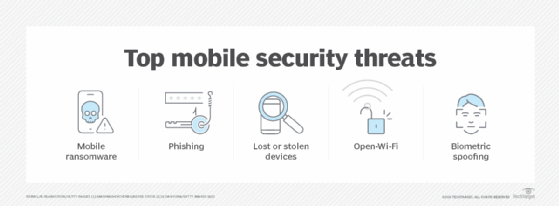
Device hacking, loss or theft
Lost, stolen or compromised devices still demand a clear response plan.
BYOD devices are easy to lose and hard to recover, and the risk is worse when work and personal data are mixed together. Security teams need a response plan for lost devices, employee departure and devices that fall out of compliance.
That plan should cover encryption, screen-lock requirements, minimum OS or patch levels, selective wipe rights and the point at which stronger device action becomes justified. Employees should know in advance what the business can remove, how quickly IT may act and what steps they must take when a device disappears.
How to manage BYOD security risks
BYOD security is no longer just a device-management problem. Organizations need controls at three layers: identity and access, app and data protection, and device compliance and response.
For some organizations, app protection, Conditional Access and selective wipe will be enough. Others will still need deeper MDM or UEM enrollment to meet compliance and reporting expectations. The key is to make that control model explicit in policy, communicate it clearly to employees and use the least invasive approach that still protects corporate data.
Editor's note: This article was originally published in 2022 and was updated in 2026 to reflect current BYOD security controls, app-protection practices and privacy-preserving enrollment models.