Cloud backup has made it possible for organizations of any size to improve their data protection. At the same time, traditional local backup still has its place in the storage world. The decision to use one or the other -- or, in some instances, both -- comes down to an organization's specific needs.
In the cloud backup vs. local backup debate, both options have their advantages and disadvantages.
Cloud-based workloads have seen a huge surge in popularity. Not only are established vendors adding more cloud capabilities, but new cloud storage and backup vendors are appearing. The simplicity and scale of cloud computing can provide a backup solution for organizations that need protection.
However, local backup providers are not sitting still. Disk speeds continue to get faster, and tape storage capacities are growing. In addition, if an organization has used local backup for a long time, it can be a burden to move to the cloud. IT and executives should ask several questions about such a move, including whether the move makes sense operationally and financially, and whether they should consider a partial migration and keep some local backup.
Many organizations, especially enterprises, have a mix of cloud and local backup. Both have pros and cons. For example, local file backup can be quicker for recovery purposes, but the cloud provides that off-site location in the event of a primary data center disaster. Local backup typically requires more in-house management and staff time.
To decide which method is best for your organization, weigh the pros and cons of cloud and local backups and how they match with your existing infrastructure.
Cloud backup basics
Cloud backup involves copying data over a network to an off-site storage server, typically hosted by a service provider. The cloud backup vendor charges the customer based on elements such as capacity, bandwidth, number of users and data egress.
Cloud data backup options include backing up directly to a public cloud such as AWS, Google or Microsoft Azure, or backing up to a service provider's private cloud. The newer cloud-to-cloud backup involves backing up data that originates in the cloud -- in SaaS applications, such as Salesforce and Microsoft 365 -- to another cloud.
Understanding local backup
Local backups are a longstanding form of backing up data at an organization's primary site. Organizations typically use disk-based hardware for this backup. Backup software manages the copying of data to the hardware. Sometimes that software is integrated with the hardware, or it runs separately. Data reduction features, such as deduplication, decrease the amount of data backed up on the disk.
Tape was the more common traditional backup medium before disk took over in the early 2000s. In the tape backup process, an organization moves data to a tape cartridge that resides in a library. Organizations still use tape today, typically for immutable offline protection against ransomware and other cyber attacks, or for long-term archiving. LTO-10, the latest version of the Linear Tape-Open format, offers 75 TB of compressed capacity per cartridge.
A new twist to the cloud backup vs. local backup story involves backing up SaaS data to a local device. In this case, data originating in the cloud -- such as Microsoft 365 emails -- is backed up to local storage.
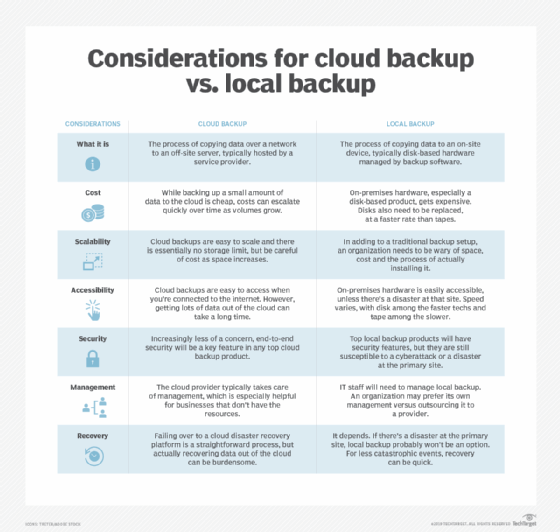
Advantages and disadvantages of cloud backup
Overall, cloud backup provides an additional layer of protection with minimal burden on staff. Although cloud backup is a popular mode of data protection with many advantages, pay attention to the disadvantages to make sure your organization is covered. Some areas of advantage can be considered disadvantageous in different situations.
The advantages of cloud backup include the following:
- Low entry costs. Backing up to the cloud, especially in the beginning, is a cheap form of data protection. Although local backup storage devices could run in the thousands of dollars, the cost in money and time to set up a cloud backup account is minimal. Cloud backup is especially attractive to an organization that doesn't have the funds or resources for a separate disaster recovery site.
- Wide-ranging accessibility. A cloud backup is accessible from any internet-connected device, which is especially handy when an organization's primary site is down. Accessing a small amount of data is a quick process.
- An array of security features. Cloud backup products offer a range of features to keep data safe.
- Easy scalability. Cloud storage is essentially unlimited. Organizations can add cloud backup capacity with just a couple of clicks. In contrast, local backup requires acquiring and setting up another physical piece of hardware.
- Easy management. Cloud backup management generally takes less time and effort than local data backup, depending on the organization's needs and requests. Organizations just need to make sure they are OK with leaving management of the storage hardware in the hands of a service provider.
- Simple disaster recovery. If there's a failure or data loss event at a primary site, organizations can easily fail over to cloud-based disaster recovery as a service (DRaaS). This option provides disaster recovery to businesses that couldn't previously afford it.
The following are some potential downsides of cloud backup:
- Cost accumulations. Although a small amount of data is cheap, a lot of data stored over a long period of time steadily increases costs. A company must pay for its data backup storage every month. It's critical to keep a close eye on cloud backup expenses.
- Latency. The cloud can cause latency, especially if many users are trying to access the same data or cloud, or if an organization is trying to get a large volume of data out of the cloud.
- Security issues. Some organizations are still worried about the safety of keeping data in the cloud. Confirm that a cloud backup product has the necessary security elements, such as end-to-end encryption. In addition, just because a backup is in the cloud, that doesn't mean it's safe from cyber attacks, so be wary of a false sense of security.
- Slow, costly restores. Although DRaaS is fast and efficient, actually restoring data from the cloud can be a time-consuming and costly process, especially when it involves large volumes. Data egress fees can quickly make restorations expensive.
Advantages and disadvantages of local backup
Organizations must consider their data protection needs when comparing cloud and local backup options. While the cloud is a popular option and offers benefits, local backups might be a better choice for some organizations. The benefits of local backup include the following:
- On-site accessibility. It doesn't get much more accessible than having the backup data at your primary site. Disk-based backups in particular are typically continuous throughout the day, so a user can go back to a specific point in time.
- Speed. On-site disk is fast for backup and recovery operations.
- Security control. An organization has more control over local backup than data that's in the hands of a cloud provider.
The following are some drawbacks of local backup:
- High initial cost. In comparing cloud backup vs. local backup, the expense of on-site hardware is generally far more than preparing for a cloud-based platform. Disks are expensive, so adding them can make a significant dent in the budget. In addition, the lifespan and durability of disk requires replacement from time to time as well as routine maintenance.
- Scalability difficulties. With local backup, the process of adding space is more labor-intensive because the organization needs to acquire the additional storage and install it. Physically storing more data backups is more of a burden than just adding storage space in the cloud.
- High maintenance. Local backup requires dedicated staff to maintain and manage it. When an organization uses cloud computing, IT staff is freed up to focus on other important tasks besides backup maintenance.
- Cybersecurity issues. If a cyber attack hits the primary data center, an organization should use an off-site backup -- whether it be on tape or in the cloud -- to make sure the restore is clean.
- Disaster recovery issues. If there's a disaster at the primary site, a local backup will not be helpful. However, if your organization has moved tapes off-site, those backups are valuable for disaster recovery.
Bottom line: Which should you choose?
When your organization analyzes cloud backup vs. local backup, consider all these positives and negatives and address the specific needs of the business.
Cloud backup clearly continues to gain traction in the market, and there are many options for businesses of any size. There are numerous reported cases of businesses ditching their legacy data backup platforms for a cloud-based product. However, the opposite is also true: Some organizations are choosing to repatriate cloud backups back on-site.
Though not to the extent of cloud backup products, local backup options are evolving as well. If you need a certain size of hardware for your data center, you can probably find it.
In many cases, and if the budget and resources are adequate, a hybrid backup approach is appropriate. This combination of cloud and local backup provides strong data protection.
Make sure you carefully assess your organization's backup and recovery needs, research potential products and make a careful, informed decision about your backup platform. This includes consideration of data retention and recovery needs. The survival of your business could depend on it.
Paul Crocetti is editorial director of Informa TechTarget's Infrastructure sites, which include SearchStorage, SearchDataCenter and SearchITOperations. Since starting at then-TechTarget in 2015, he has also served as editor on the SearchStorage, SearchDataBackup and SearchDisasterRecovery sites.
Stephen J. Bigelow, senior technology editor at TechTarget, has more than 30 years of technical writing experience in the PC and technology industry.