
For IT leaders, it's important to understand not just what Intune Suite does, but whether its expanded capabilities and licensing model fit their organization's roadmap.
With Microsoft planning licensing shifts in 2026 and continuing to integrate Intune more deeply into Microsoft 365 and its security stack, understanding how Plan 1, Plan 2 and the Suite align with an organization's device strategy, budget and operational model is essential.
What is the Microsoft Intune Suite?
Intune Suite is a collection of advanced endpoint management and security services that Microsoft offers as an add-on to its core Intune platform. Intune Suite bundles these services into a unified, centrally managed platform that builds on and expands the basic platform.
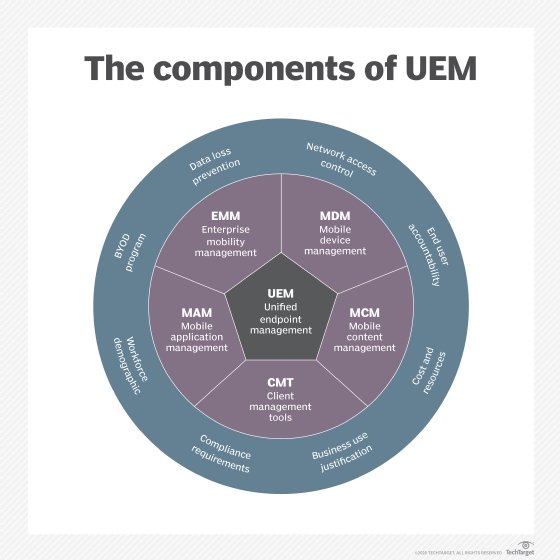
Microsoft promotes Intune as a unified endpoint management (UEM) platform for managing, assessing and protecting devices and their apps. IT teams carry out their administrative tasks through a centralized management console called the Microsoft Intune admin center.
Organizations can use the admin center to manage and monitor a range of endpoint devices, including laptops, desktops, servers, smartphones, tablets and virtual machines. To this end, Intune supports Windows, macOS, Linux, iOS, iPadOS and Android devices.
The basic Intune service includes the following core capabilities:
- Cross-platform endpoint management for on-premises, cloud, mobile, desktop and virtual endpoint systems.
- Mobile application management (MAM) without requiring device enrollment or interfering with user productivity.
- Endpoint analytics that provide device and app health scores and data-driven recommendations for improving productivity and UX.
- Support for specialty and shared devices through features such as maintenance windows, shared device mode and specialty device management.
Intune Suite expands on these core capabilities by adding a set of advanced endpoint management and security tools. The suite also offers better support for remote workers and for users accessing on-premises resources. To provide these capabilities, Intune Suite currently includes the following services:
- Advanced Analytics. Provides IT administrators with data-driven insights and metrics about their endpoint devices, helping them to better understand and improve the user experience.
- Cloud PKI. Provides a cloud‑based public key infrastructure service that automates certificate issuance, renewal and revocation for managed devices.
- Endpoint Privilege Management. Lets IT administrators provide Windows standard users with controlled, temporary security elevation so they can carry out tasks that require higher permissions. At the same time, it enables administrators to apply least privileged access to the broader user base.
- Enterprise Application Management. Provides a catalog of prepackaged, Microsoft‑curated applications and automated tools for deploying, updating and managing Win32 apps across the organization.
- Firmware-over-the-air (FOTA) updates. Enables organizations to deploy, manage and automate firmware updates for supported devices directly through Intune.
- Remote Help. Enables help desk personnel to establish secure connections with their users to provide remote assistance and troubleshoot managed devices.
- Specialty device management. Offers IT teams a set of device management and protection features for specialized devices such as conference room meeting equipment, virtual reality headsets or large smart-screen devices.
- Tunnel for Mobile Application Management. Provides organizations with a micro-VPN that lets users access corporate resources from their personal iOS, iPadOS or Android devices, without requiring device enrollment.
How does Intune licensing work for Microsoft's endpoint management?
To understand how licensing works for Intune Suite, it's important to first understand how Intune licensing works in general. The licensing structure currently consists of three plans:
- Intune Plan 1. Includes the platform's core capabilities, such as cross-platform endpoint management, mobile application management and built-in endpoint security. Advanced Analytics, Cloud PKI, Endpoint Privilege Management, Enterprise Application Management and Remote Help are available as optional add-ons to this plan.
- Intune Plan 2. An add-on to Plan 1 that provides FOTA updates, specialty device management and Tunnel for MAM.
- Intune Suite. An add-on to Plan 1 that includes Advanced Analytics, Cloud PKI, Endpoint Privilege Management, Enterprise Application Management, FOTA updates, Remote Help, specialty device management and Tunnel for MAM. Intune Suite is also integrated with Microsoft Security and Microsoft 365, providing customers with data science and AI features.
Microsoft includes Intune Plan 1 with Microsoft 365 E3, E5, F1, F3 and Business Premium. The vendor also provides Plan 1 with Enterprise Mobility + Security (EMS) E3 and E5, Microsoft 365 Government G3 and G5, and Microsoft 365 Education A3 and A5. Microsoft has announced that some Intune Suite capabilities will be incorporated into Microsoft 365 E3/E5 and EMS E3/E5 later in 2026, which means the current licensing boundaries might shift as those changes roll out.
Customers who want to acquire Intune through one of these bundles should first evaluate the features and licensing for each applicable product:
- Enterprise Mobility + Security. EMS E3 and E5 include identity and access management, endpoint management, information protection and identity-driven security. EMS E5 offers additional features, such as risk-based conditional access, intelligent data classification and labeling, and Microsoft Defender for Cloud Apps. Current EMS E3 pricing is $10.60 per user, per month; EMS E5 pricing is $16.40 per user, per month.
- Microsoft 365. Microsoft 365 bundles can vary substantially and should be carefully assessed before choosing a plan. For example, Microsoft 365 E3 and E5 include Microsoft 365 apps, email and calendar, meetings and voice, device and app management, social and intranet support, access to files and content, work management, advanced analytics, identity and access management, information protection, security management, and compliance management. Microsoft 365 E5 includes additional capabilities on top of these features, while Microsoft 365 F1, F3 and Business Premium provide only a subset of these features. Currently, the pricing for each service is on a per-user, per-month basis: E3 for $36, E5 for $57, F1 for $2.25, F3 for $8, and Business Premium for $22. Prices for E3 and E5 are set to increase by $3 in July 2026.
Most of the bundles that include Intune Plan 1 also grant the rights to use Microsoft Configuration Manager, although customers might still require Microsoft Entra ID for co-management. Customers who don't subscribe to any of these bundles can get Plan 1 as a standalone license. In addition, Microsoft offers a standalone license for devices that are not tied to specific users, such as kiosks or shared computers.
Because Intune Plan 2 and Intune Suite are add-ons to Intune Plan 1, customers must already have Plan 1 before they can subscribe to Plan 2 or Intune Suite. The two add-ons come with additional subscription fees. Currently, the pricing for Plan 2 is $4 per user, per month, and Intune Suite is $10 per user, per month.
Customers can acquire the Plan 2 add-on or Intune Suite add-on from any of the following sources:
- Microsoft 365 Admin Center.
- Microsoft Volume License Servicing Center.
- Microsoft partner or reseller.
According to Microsoft, each Intune add-on has its own requirements for how many licenses customers must purchase. For specifics about license minimums, volume discounts or other Intune licensing details, customers should contact Microsoft or a qualified partner or reseller.
Customers should also carefully evaluate which Intune features they need before deciding on a plan. For example, if Endpoint Privilege Management is the only capability they want in addition to the core services, they're usually better off paying for the add-on of $3 per user, per month than paying $10 for the entire Intune Suite. On the other hand, Intune Suite offers capabilities not available to Plan 1 or Plan 2, in which case, that plan might be the only option that can meet an organization's requirements.
Editor's note: This article was updated in April 2026 to reflect changes in Microsoft Intune features and pricing.
Robert Sheldon is a freelance technology writer. He has written numerous books, articles and training materials on a wide range of topics, including big data, generative AI, 5D memory crystals, the dark web and the 11th dimension.