Configuring folder redirection works with roaming profiles
Jo Harder·2026-05-21·via WhatIs
Article 3 of 3
Part of:Basics of roaming profiles in the enterprise
Folder redirection helps keep user files out of roaming profiles, improving consistency and reducing profile bloat in virtual desktop environments.
Virtual desktop users often need to store files that should remain available after they log off. Folder redirection is one way to centralize user data storage so important files are not lost when a nonpersistent virtual desktop session ends.
Virtual desktop administrators often configure roaming profiles and folder redirection together as part of a user personalization strategy. Roaming profiles store user settings, while folder redirection moves selected user folders, such as Documents or Desktop, to a centralized location. Used together, they can improve user experience and reduce profile bloat, but they also require planning around storage, network performance and backup.
In modern virtual desktop environments, folder redirection should be evaluated alongside profile containers and other profile management tools. It can still be useful with roaming profiles, but environments that use Azure Virtual Desktop, nonpersistent desktops or Microsoft 365 app data might rely on FSLogix profile containers instead of, or in addition to, traditional roaming profile designs.
A home folder is not the same as folder redirection. Both use centralized storage, but they work differently. A home folder is a shared drive that maps at logon and gives the user a place to store personal files. Folder redirection automatically redirects specific Windows folder contents, such as Documents or Desktop, to a target location that IT defines through Group Policy.
When IT admins configure home folders for a virtual desktop environment, they should configure them specifically for Remote Desktop Services. To do so, they will need this Group Policy Object (GPO): Computer Configuration > Policies > Administrative Templates > Windows Components > Remote Desktop Services > Remote Desktop Session Host > Profiles > Set Remote Desktop Services User Home.
Benefits of folder redirection for virtual desktops
Without folder redirection, saving files on a virtual desktop can present difficulties. For example, users might get confused if they see several options for saving files from a virtual desktop or lose hours of work if they save files on a nonpersistent virtual desktop. Instead, IT can use folder redirection to automate and safely store files in a centralized repository. This way, users don't need to worry about where the virtual desktop stores their files.
Folder redirection is beneficial for virtual desktop environments because user data is centralized and easily accessible. In addition, IT can automate antivirus scans and data backups because the files are centralized within the storage repository. This can improve the organization's overall security posture.
Centralized files can also make it easier to plan user profile backup and recovery processes.
Additionally, folder redirection can reduce roaming profile size because large user files do not have to travel with the profile during sign-in and sign-out. That can be especially important in nonpersistent virtual desktop environments, where users expect their files and settings to follow them even though the virtual desktop itself resets between sessions.
Folder redirection options
IT administrators use folder redirection to designate a centralized storage repository for all 13 folders eligible for redirection, which include the following:
AppData/Roaming.
Contacts.
Desktop.
Documents.
Downloads.
Favorites.
Links.
Music.
Pictures.
Saved Games.
Searches.
Start Menu.
Videos.
IT must configure folder redirection for each folder; the redirected location does not need to be the same for all redirected folders.
The Documents and Desktop folders are most commonly redirected to centralized repositories. These two folders contain the largest amount of user-created files such as documents, spreadsheets and presentations. These are the files that users generally find most critical in their day-to-day work. Most users store these files within the Documents folder, but some prefer to keep them on the Desktop for quick access. As such, redirecting both of these folders ensures a better user experience.
Some organizations redirect the Downloads folder, but this isn't always the best approach. Downloads can grow quickly when users save files they don't need in the long term. IT should monitor user behavior and determine whether downloaded files must persist after the session ends. In many environments, users need downloaded files only during the current virtual desktop session.
Many organizations don't redirect Music, Pictures, Saved Games or Videos folders because these files can consume significant storage and often don't serve a business-critical purpose. Administrators can also use GPOs to restrict whether users save certain file types. However, IT should treat media-heavy roles separately. Employees who work with video, audio, design files or other large assets might need a different storage and redirection strategy than the average user.
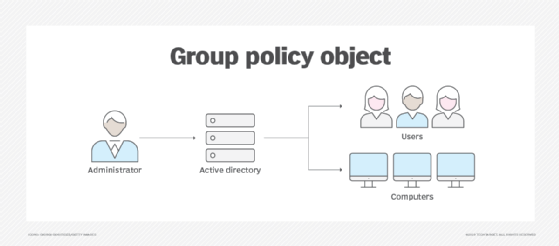
Figure 1. Group Policy can redirect selected user folders to centralized storage so files persist across virtual desktop sessions.
IT typically doesn't redirect the Searches, Start Menu, Favorites, Contacts and Links folders for several reasons. Primarily, the data content files within these folders are quite minimal, and the storage benefits are negligible. In addition, the desktop might refer to this data frequently within the user session and would create latency as the data traverses the network. As a result, these files are more often housed within the roaming user profile.
Folder redirection can reduce roaming profile size because large user files do not have to travel with the profile during sign-in and sign-out.
IT rarely redirects the AppData/Roaming folder because it stores many app settings. For example, if an application stores custom settings in the AppData/Roaming folder, each time a user queries one of these settings, the read request traverses the network to the centralized repository. This could cause latency with the application and have a negative effect on UX. Many applications make these types of calls frequently because there are no delays for these operations in a traditional desktop environment. In addition, many applications store temporary or recovered files in the AppData/Roaming folder, and some of these files are quite large. As a result, the AppData/Roaming folder is not a prime candidate for redirection.
How to set up folder redirection alongside roaming profiles
When virtual desktop admins configure roaming profiles and folder redirection together, they should configure folder redirection first. If IT enables folder redirection before roaming profiles, user data is redirected to the designated centralized storage location and doesn't become part of the roaming profile. If IT enables folder redirection after the roaming profile setting, existing user data might remain inside the roaming profile, increasing profile size and creating inconsistent results.
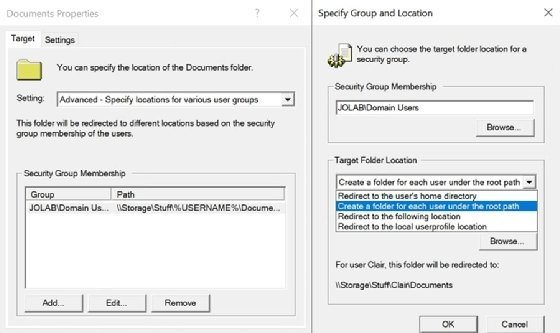
The process to configure folder redirection is straightforward. Within the designated GPO, the administrator should access User Configuration > Policies > Windows Settings > Folder Redirection. Once IT admins right-click the desired folders and select Properties, they can view the configuration options. The most common approach is to select the Advanced setting and designate the Target Folder Location as Create a folder for each user under the root path (Figure 2).
Figure 2. Admins can choose folder redirection settings and create a folder for each user under a root path.
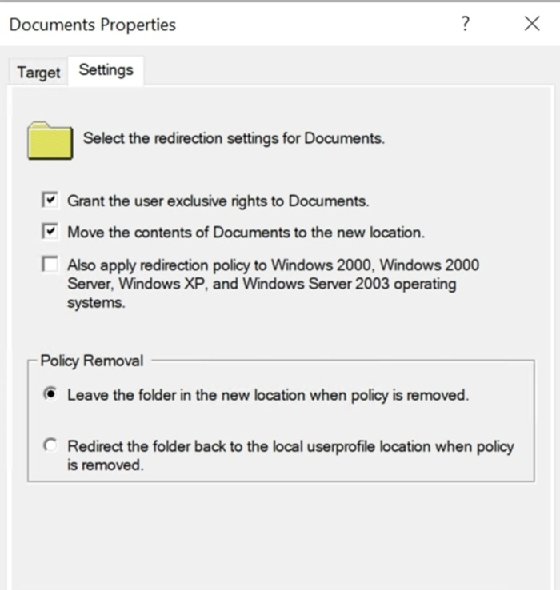
When an IT admin designates a home directory for the user, redirecting the target folder to the home directory might be a valid option (Figure 3). Redirecting to the local user profile location would not be wise in a virtual desktop environment because the local user profile is discarded when the nonpersistent virtual desktop is deleted at the end of the session.
Figure 3. Folder redirection settings let admins define how selected folders are redirected and how content is handled.
Generally, IT should keep the default configuration contained within the Settings tab. Once again, it would not be prudent to redirect the folder back to the local user profile location when the policy is removed because the local user profile would not be preserved.
When an IT admin configures roaming profiles and folder redirection, that admin must be a member of the Domain Admin group, the Enterprise Admin group or the Group Policy Creator Owners group. Testing is important to confirm the desired outcome once the admin configures the folder redirection GPOs. A lab environment can help avoid production impact, and a small group of pilot users can further validate results.
Once folder redirection is enabled, administrators should closely monitor storage use, backup behavior, network performance and UX. Storage requirements can increase quickly, especially if IT redirects large folders, or if users store more files than expected. If storage reaches its upper limit, performance can slow, and users might lose access to redirected folder data.
Editor's note:This article was updated in May 2026 to reflect current virtual desktop profile management considerations, including roaming profiles, folder redirection, storage planning and FSLogix alternatives.
Jo Harder has been involved with virtualization for over 19 years. She focuses on Citrix virtualization solutions and has been a Citrix Technology Professional (CTP) for four years.
Next Steps
Dig Deeper on Virtual and remote desktop strategies