













Introduction
In recent years, Small Language Models (SLMs) have become increasingly important. SLMs are language models with far fewer parameters and use significantly fewer resources than their Large Language Model (LLM) counterparts, while still achieving comparable performance in specific tasks. SLMs are ideal for environments where resources are constrained, speed is paramount, or where internet access may be limited. Examples include:
- Edge devices – e.g., IoT sensors, smartphones, and embedded systems where compute power and memory are limited.
- On-premise deployments – where organisations have privacy or latency requirements but limited GPU/CPU capacity.
- Offline or low-connectivity settings – e.g., field operations, remote research stations, or military applications where internet access is intermittent.
- Browser or mobile applications – where models must run efficiently on-device to reduce API calls and ensure responsiveness.
- Cost-sensitive production systems – where serving large LLMs continuously would be too expensive to be feasible.
- Low-latency applications – e.g., real-time customer support or conversational agents that must respond instantly.
Function calling techniques can be applied to SLMs to allow them to interface with external services. For example, a smartphone interacting with its apps (“Turn on flash and take a photo“), or Heating, Ventilation, and Air Conditioning (HVAC) controls within a car (“I can’t see out of the windscreen“). With function calling, the SLM is provided with a JSON specification of functions (or tools) that it can call. Based on the user’s prompt, the model can choose to call one or more of the functions by providing the names and arguments of each function in JSON format, for example:
User Prompt: “I want to take a photo.”
Model Output:
[{"name": "open_application", "arguments": {"name": "Camera"}}]The SLM’s output is then parsed by the application and each function is called within the application code:
open_application(name="Camera")If the model calls the wrong function, uses the wrong arguments, or even attempts to call a function that does not exist, the application may behave unexpectedly. Ensuring that these models reliably call the correct functions with proper arguments is critical for operational safety, efficiency and for a good end-user experience.
To achieve more accurate function calls, models can be further fine-tuned to support function calling for specific scenarios. This is done by providing a dataset of user prompts and the expected function calls, and modifying the model’s parameters to better align with the expected outputs.
For more information on fine-tuning SLMs, such as Phi-4, please refer to the microsoft/PhiCookBook.
When fine-tuning, it is important to evaluate the performance of the new model by calculating metrics related to the model’s function calling capabilities. This helps to build confidence in a model’s performance before it is deployed.
This post details how to use the Azure AI Evaluation SDK to:
- Evaluate a model’s function calling performance by calculating function calling metrics.
- View and compare results in Microsoft Foundry.
This example was run using a Standard_NC24ads_A100_v4 VM powered by a NVIDIA A100 PCIe GPU, available on Azure.
Running the code
If running the code as a script, the code should be wrapped inside a main() function and run as follows:
def main():
    ...

if __name__ == "__main__":
    main()
Model
Within this post, we use Phi-4-mini-instruct, which is available on Hugging Face. Phi-4-mini-instruct supports function calling by passing the function specifications within the system prompt, as explained in the model card.
To begin with, install the required dependencies using pip:
pip install 'accelerate==1.6.0' 'azure-ai-evaluation==1.13.7' 'datasets==3.5.1' 'huggingface_hub[cli]==0.30.2' 'torch==2.7.0' 'transformers==4.51.3'We use the transformers library to load the model and its tokenizer.
import torch
from transformers import AutoModelForCausalLM, AutoTokenizer, pipeline

torch.random.manual_seed(0)  # Optional: Set the random seed for reproducible results

MODEL_NAME = "microsoft/Phi-4-mini-instruct"

# Download the model and tokenizer from Hugging Face
model = AutoModelForCausalLM.from_pretrained(
    MODEL_NAME,
    device_map="auto",
    torch_dtype="auto",
    trust_remote_code=True,
)
tokenizer = AutoTokenizer.from_pretrained(MODEL_NAME)
Dataset
To perform an evaluation, we first need a dataset that can be used as an input to the SLM, from which we can compare the model outputs to the expected function calls. A valid dataset may be sourced from multiple locations, including:
- Private company data
- Public data sources (e.g. Hugging Face)
- Synthetic data (e.g. using an LLM)
This post uses the Salesforce/xlam-function-calling-60k dataset, which is available for use under the CC-BY-4.0 licence. The data was collected by APIGen, as presented in the paper APIGen: Automated Pipeline for Generating Verifiable and Diverse Function-Calling Datasets.
In a real-world scenario, the dataset would likely be split into separate sets for training, validation and testing. However, for this example, we only require a single test set to evaluate the model’s performance. We take the first 100 rows from the dataset to reduce the time taken to run the full evaluation.
As the dataset is gated, you will need to accept the dataset conditions and log in to the Hugging Face CLI before loading it.
from datasets import Dataset, load_dataset

DATASET = "Salesforce/xlam-function-calling-60k"

# Download the dataset from Hugging Face
# The dataset contains one split, named `train`, of which we take the first 100 rows
dataset = load_dataset(DATASET, split="train[:100]")
The dataset includes the following headers:
id: The row ID.query: The user query.answers: The expected model output containing the function calls and arguments (ground truth) in JSON format.tools: The JSON function schemas of the tools available to the model. This includes each function’s name, description and parameters, including parameter names, types, descriptions and default values.
Each row in the dataset needs to be transformed into messages which will be passed to the SLM and formatted according to the model’s chat template. We use a generator so that the entire dataset does not need to be loaded into memory at once, as the dataset may be large.
def get_inputs(dataset: Dataset):
    for data in dataset:
        yield [
            {
                "role": "system",
                "content": "You are a helpful assistant with some tools.",
                "tools": data["tools"],
            },
            {
                "role": "user",
                "content": data["query"],
            },
        ]
Inference
With the model and dataset prepared, we can run inference using the SLM. We iterate through the model outputs, combine the generated text with the data from the dataset, and save this to a temporary file. We use a temporary file, as the results file is only an intermediate file that is then passed to the evaluation.
import json
import tempfile

# Create a pipeline to use for inference, based on the model and tokenizer
pipe = pipeline(
    task="text-generation",  # Phi-4 is a model of task type `text-generation`
    model=model,
    tokenizer=tokenizer,
)

# Full set of generation arguments can be found at https://huggingface.co/docs/transformers/en/main_classes/text_generation
generation_args = {
    "max_new_tokens": 500,
    "return_full_text": False,
    "do_sample": False,
}

outputs = pipe(get_inputs(dataset), **generation_args)

with tempfile.NamedTemporaryFile(mode="w", suffix=".jsonl", delete=False) as tmp:
    for i, output in enumerate(outputs):
        print(f"{i}: {output}")
        data = dataset[i] | output[0]  # Combine the dataset row with the model output
        tmp.write(json.dumps(data) + "\n")

print(f"Inference results saved to {tmp.name}")
Metrics
Before running the evaluation on our inference results, we need to create an evaluator to calculate the metrics related to function calling.
Within the Azure AI Evaluation SDK, an evaluator can be either a function or a callable class which computes and returns metrics. The SDK includes many evaluators out of the box, however for this example we create a custom evaluator for the following metrics:
valid_json- Checks whether the model generated a tool call which can be parsed as JSON.
- If the response cannot be parsed, the system will fail before execution, regardless of whether the model understood the query or not.
exact_function_call- Checks whether the generated function call matches the expected function call in the dataset.
- It reflects how well the model interprets the natural-language query and chooses the correct function(s) to call with the correct arguments.
valid_function_names- Checks whether each function name in the generated tool call is a valid function name within the provided tools.
- It shows how closely the model adheres to the provided function specifications, and shows if the model is attempting to call functions that do not exist.
- This metric is more specific than
exact_function_call, and is one of many possible metrics that could be used to identify the exact reason whyexact_function_callmay be failing.
Each metric will have a value of either 0 or 1.
It is possible to create and use multiple evaluators, with each evaluator calculating one or multiple metrics. In this example, we have one evaluator which calculates all three metrics.
The
FunctionCallEvaluatorclass should be defined in a separate file, for examplefunction_call_evaluator.py.
# function_call_evaluator.py
import json
import re
from dataclasses import dataclass
from typing import Literal

@dataclass
class Result:
    valid_json: int = 0
    valid_function_names: int = 0
    exact_function_call: int = 0

class FunctionCallEvaluator:
    def __init__(self):
        pass

    def parse_function_call(self, text: str) -> str | None:
        # This format is specific to Phi-4 function calling
        match = re.fullmatch(r"<\|tool_call\|>(.*)<\|/tool_call\|>", text)

        return match and match.group(1)

    def __call__(self, answers: str, tools: str, generated_text: str) -> Result:
        function_calls = self.parse_function_call(generated_text)

        if function_calls is None:
            return Result()

        return Result(
            valid_json=self.valid_json(function_calls),
            valid_function_names=self.valid_function_names(function_calls, tools),
            exact_function_call=self.exact_function_call(function_calls, answers),
        )

    def valid_json(self, function_calls: str) -> Literal[0, 1]:
        try:
            # Check if the JSON can be parsed
            json.loads(function_calls)
            return 1
        except json.JSONDecodeError:
            return 0

    def exact_function_call(self, function_calls: str, answers: str) -> Literal[0, 1]:
        answers_list = json.loads(answers)

        try:
            # Check if the generated function calls are the same as the `answers` from the dataset
            if json.loads(function_calls) == answers_list:
                return 1
        except json.JSONDecodeError:
            pass

        return 0

    def valid_function_names(self, function_calls: str, tools: str) -> Literal[0, 1]:
        tools_list: list[dict] = json.loads(tools)
        tool_names: list[str] = [tool["name"] for tool in tools_list]

        try:
            function_calls_list = json.loads(function_calls)

            # Check if every tool call function name is present in the provided tools
            if all(call["name"] in tool_names for call in function_calls_list):
                return 1
        except (json.JSONDecodeError, KeyError, TypeError):
            pass

        return 0
There are many other metrics that could be calculated, such as checking for required parameters, adherence to the function schema, etc., as well as non-functional metrics such as overall latency and time to first token.
Evaluation
With our metrics defined and inference completed, we can now use the evaluate() function from the Azure AI Evaluation SDK to run our evaluation and calculate the function calling metrics.
The azure_ai_project variable is used to specify the details of the Microsoft Foundry project where the results will be uploaded.
Choose either the Foundry format or the hub-based format, depending on your type of project.
from datetime import datetime, UTC

from azure.ai.evaluation import evaluate

from function_call_evaluator import FunctionCallEvaluator  # Import the evaluator from the function_call_evaluator.py file

# For Foundry projects
azure_ai_project = "https://<AZURE_FOUNDRY_NAME>.services.ai.azure.com/api/projects/<AZURE_FOUNDRY_PROJECT_NAME>"

# For hub-based projects
azure_ai_project = {
    "subscription_id": "<AZURE_SUBSCRIPTION_ID>",
    "resource_group_name": "<AZURE_RESOURCE_GROUP_NAME>",
    "project_name": "<AZURE_FOUNDRY_PROJECT_NAME>",
}

results = evaluate(
    data=tmp.name,
    evaluation_name=f"{MODEL_NAME}-eval-{datetime.now(UTC).strftime('%Y%m%d-%H%M%S')}",
    evaluators={
        "function_calling": FunctionCallEvaluator(),
    },
    azure_ai_project=azure_ai_project,
    output_path="./results.json",
)
The evaluate() function orchestrates the evaluation by taking the dataset in JSON lines format. For each row in the dataset, it calls each evaluator function to calculate metrics for that particular row. The evaluation results are saved to a file and returned as a dict to the results variable, allowing further results processing as required.
By providing Microsoft Foundry project details, we can also view the evaluation results in Microsoft Foundry.
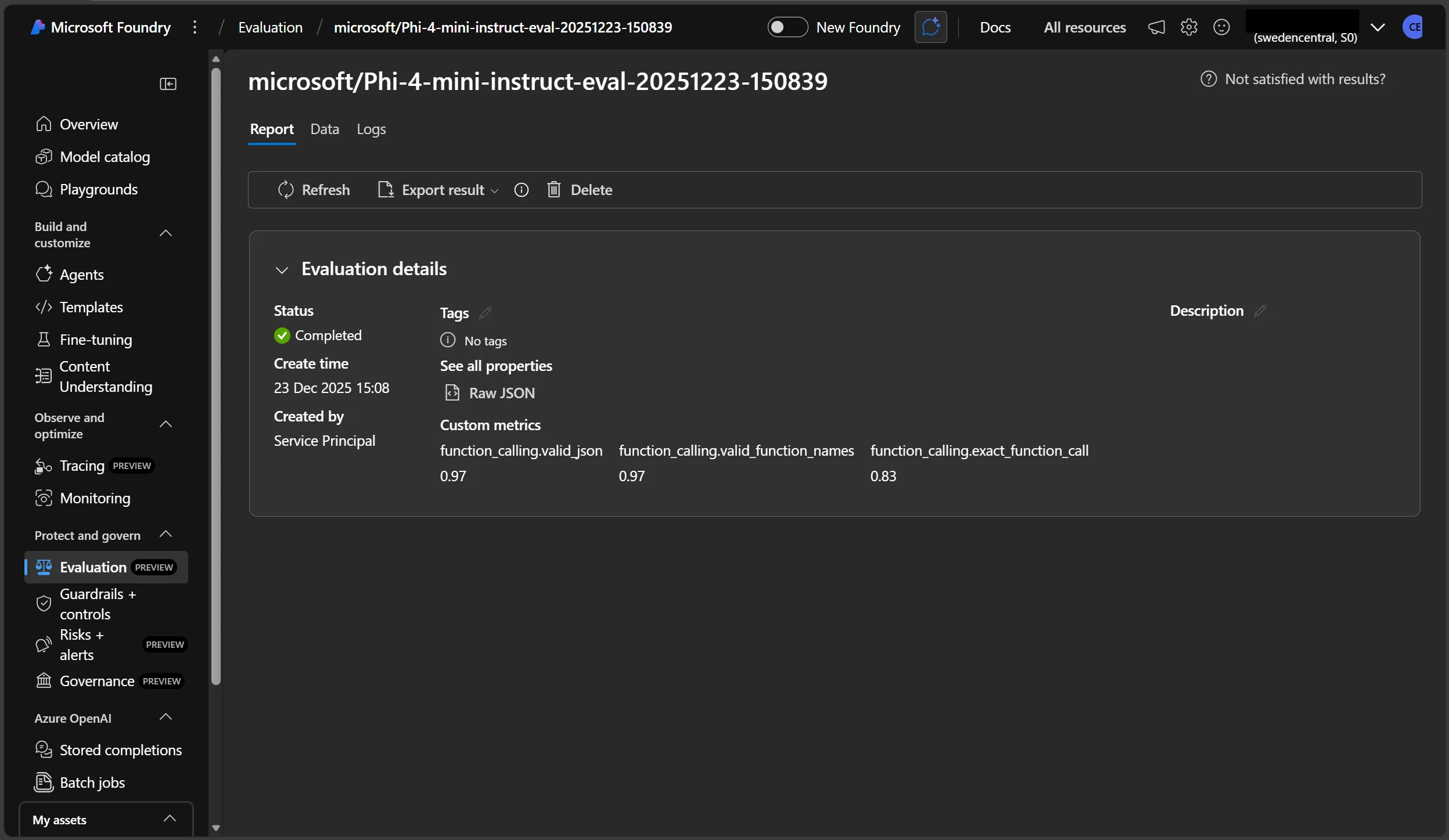
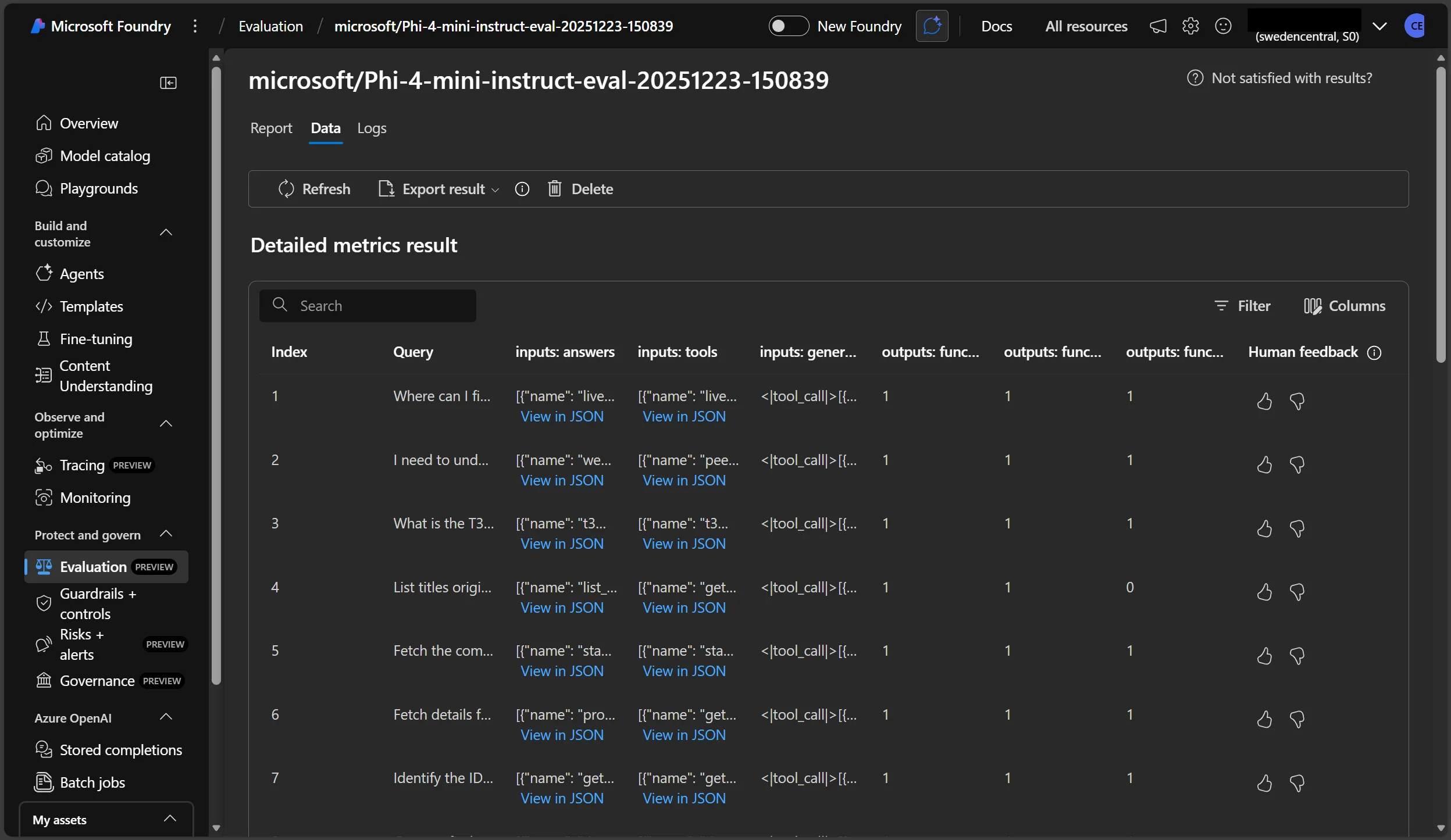
We can see the overall average value for each metric, as well as the breakdown of each row in the dataset.
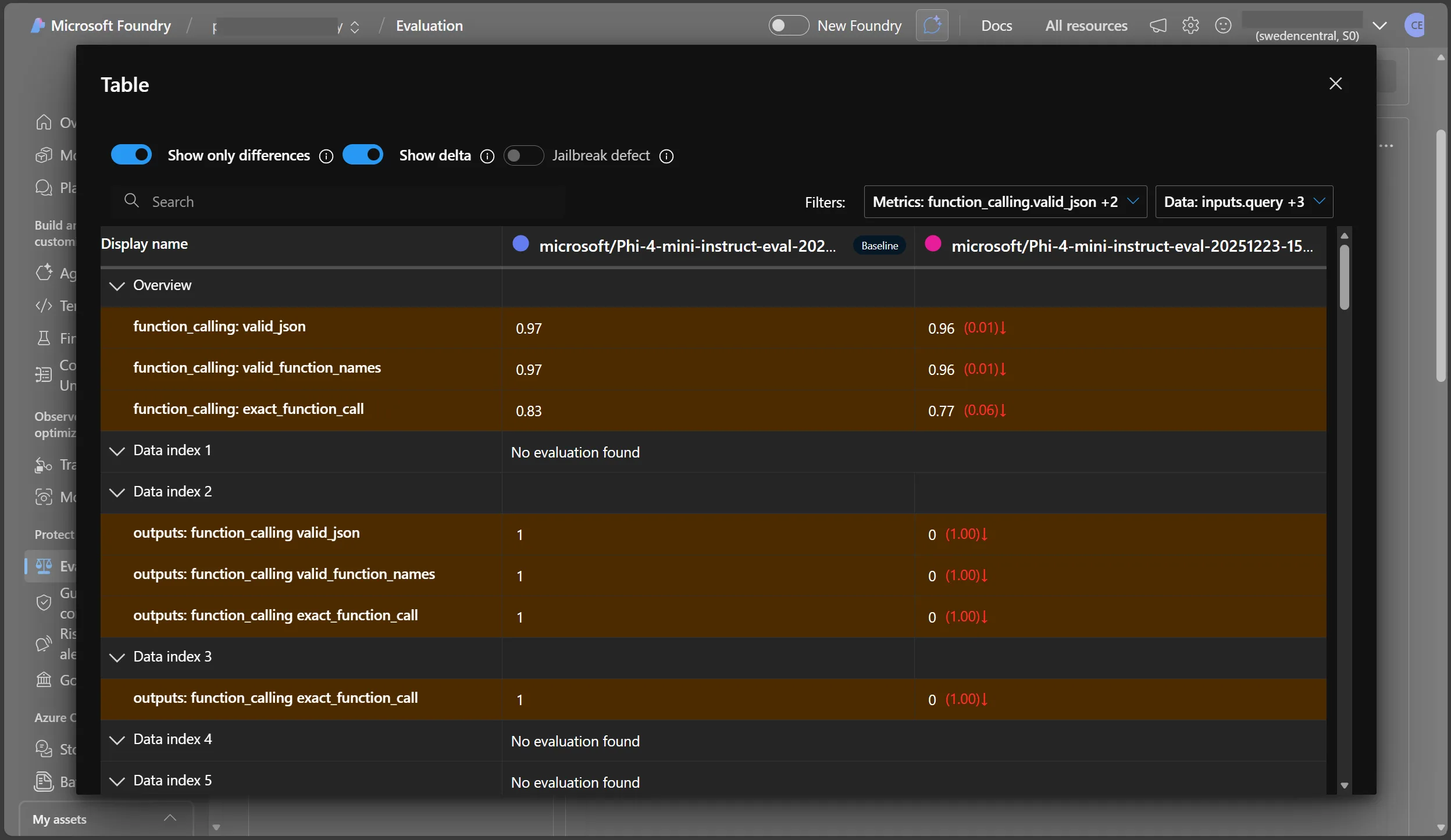
Microsoft Foundry also allows the comparison of multiple runs, which can be useful when experimenting with different generation parameters or different models.
Conclusion
A systematic and robust evaluation framework is critical for ensuring SLMs reliably perform function calling in production, helping teams build confidence in fine-tuned models and catch issues before deployment. An evaluation framework also serves as a regression testing suite, ensuring that any further modifications to the model, prompts, function schemas etc. do not degrade model performance. The Azure AI Evaluation SDK is a powerful tool that can be used to augment such a framework by helping to easily assess the performance of generative AI applications, including using SLMs for function calling. Its integration with Microsoft Foundry allows for easy visualisation and comparison of results, aiding experimentation and evaluation, and also facilitates collaboration between team members. This post includes a simple example of how to use the SDK to evaluate Phi-4-mini-instruct. The same approach can be built upon to evaluate other base and fine-tuned models, as well as other metrics, datasets and even model runtimes, such as ONNX Runtime GenAI.