


Introduction: The Challenge
In the early days of Microsoft Copilot Studio, our team noticed a recurring pattern. Across customer engagements, organizations were consistently struggling to integrate copilots with Azure AI Search. Organizations were consistently struggling to integrate copilot with Azure AI Search – not because either product was inherently difficult to work with, but because the deployment and configuration steps existed in separate toolchains and workflows. In some cases, customers treated Copilot development and Azure AI Search development as separate tracks, even though solutions integrating the two systems are meant to operate as a single solution.
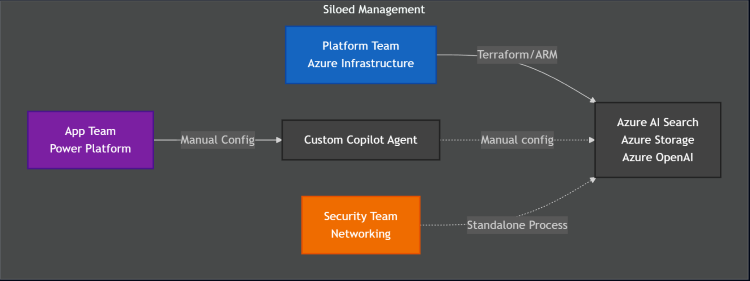
This disconnect created real friction. Platform teams tend to provision Azure infrastructure using Terraform or ARM templates. Application teams working in parallel configure Copilot Studio agents through Power Platform tools. As a result, questions about networking, authentication, and data source configuration landed in an integration no-man’s-land.
It became clear to us that customers didn’t need another document or step-by-step tutorial. They needed a unified solution that treated the entire integration as a single deployment – one that reflected the realities of modern enterprise architectures, where infrastructure, application, and configuration layers must work together seamlessly.
The Journey: Our Approach and Solution
During the 2024 Microsoft Global Hackathon, we built a Terraform-based prototype that showcased how the entire stack could be deployed from one tool. That prototype eventually evolved into the Copilot Studio with Azure AI Search template: a production-focused, end-to-end solution that demonstrates how organizations can deliver integrated AI workloads from a single, unified definition.
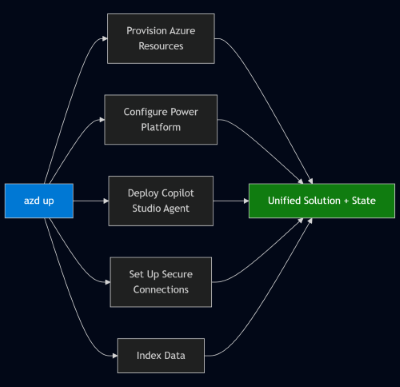
This solution’s foundation sets it apart: the Azure Developer CLI. Instead of asking teams to juggle Terraform, Power Platform CLI, Power Platform admin portals, and custom scripts, we use the Azure Developer CLI (azd) as the orchestration layer that unifies everything. A single “azd up” command can now provision Azure resources, configure Power Platform environments, deploy Copilot Studio agents, set up secure connections, and index data—complete with dependency management and rollback support. For a problem that previously spanned at least three toolchains, this level of cohesion is significant.
Security was the next design pillar. Instead of treating private endpoints and VNet injection as “advanced options” that organizations could add later, the template makes secure-by-default the baseline experience. Deploying the solution automatically creates private endpoints for Azure AI Search and storage accounts, applies Power Platform network injection policies, sets up private DNS zones, and configures secure network security group defaults. This approach flips the traditional model: you start private, and only introduce public access if you intentionally choose to.
Identities were treated with the same rigor. Every service communicates using managed identities where possible and service principals elsewhere. This leaves no secrets or API keys sitting in configuration files. The result is a clean, identity-first architecture where access is intentional and auditable.

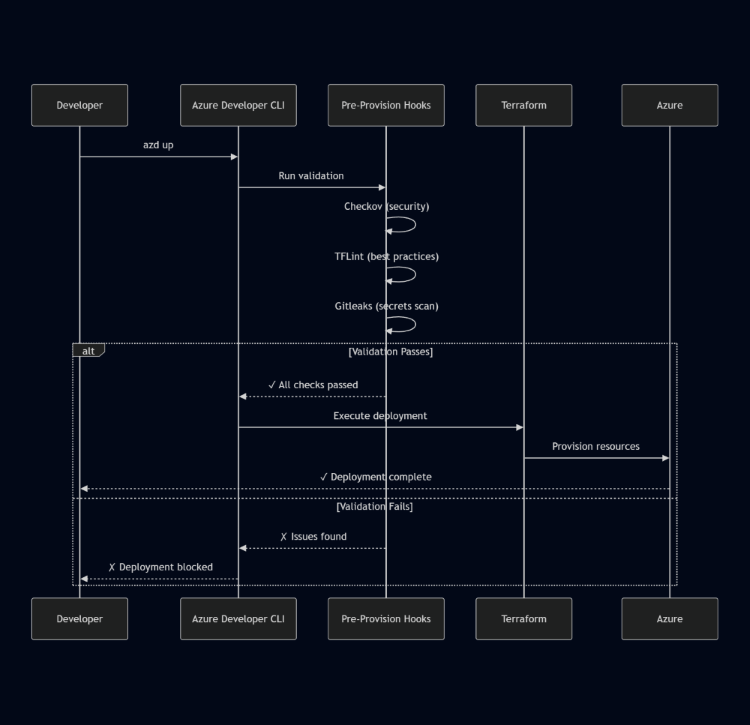
Even the infrastructure-as-code layer enforces best practices automatically. Deployments run Checkov, TFLint, and Gitleaks during pre-provision hooks, so insecure or noncompliant changes are caught before they ever touch any cloud resources. The solution is designed to prevent and explain deployments that fail these checks—an approach that prevents misconfigurations, rather than reacting to them later.
For organizations deploying through GitHub Actions, the solution includes first-class support for OIDC workload identity federation. This eliminates long-lived secrets in CI/CD, even when GitHub runners live inside private networks with no public IP addresses. Teams can adopt zero-trust deployment patterns without having to piece them together manually.
The template also acknowledges that multi-region reliability shouldn’t require the complexity or cost of active-active architecture. It offers a practical middle ground: automated deployment to both primary and backup regions, paired with a simple manual failover process. It’s a realistic DR strategy that works for most organizations without unnecessary overhead.
Finally, the solution ships with a complete end-to-end testing framework that exercises real integrations—not mocks. It authenticates with Azure, calls Copilot Studio APIs, and validates response behavior, giving teams confidence that their environment is functioning correctly before anyone uses it.
All of this has meaningful real-world impact. What once took multiple teams days to build now deploys in under an hour. Security is built in from the beginning, not bolted on after the fact. The template scales across enterprise constraints—custom VNets, bring-your-own resource groups, regulatory requirements—without sacrificing simplicity. And because the entire solution is infrastructure-as-code, platform teams can maintain and evolve it with confidence.
The Copilot Studio with Azure AI Search template shows that the gap between enterprise infrastructure and low-code development doesn’t have to be an obstacle. With the right orchestration layers, secure-by-default patterns, and a unified deployment model, organizations can integrate these technologies cleanly and predictably.
The solution is now open-source on GitHub, complete with architectural decision records, detailed security guidance, and clear extensibility points. It is also available directly as an AZD template at Awesome AZD, and as a solution in the AI gallery. We hope you give it a try and provide feedback through issues or even PRs on the repository.
This is the first post in a series on the Copilot + Azure AI Search solution. Over the next few posts, we’ll explore the solution’s innovative components in greater depth, such as:
- How azd hooks enable unified deployments
- How this solution integrates Power Platform with VNets (and why all customers should consider doing this)
- The critical role Azure Deployment Scripts play in configuring secured Azure resources in this solution
- How this solution relates to the broader Composable AI Reference Architecture (CAIRA) family of accelerators offered by Microsoft’s ISE team
A huge thank you to the many people who contributed to this project: Hassan Tariq, Kristen DeVore, Mateusz Wasilewski, Phong Cao, Hannah Kennedy, Neyissa Exilus, Cara MacLaughlin, Henry Watson, Matt Dotson, Hadwa Gaber, and Sergii Baidachnyi.
Resources: