


Introduction
This track is designed for developers and technical learners who want to build production-ready AI applications with OpenAI’s models and tools. Learn foundational concepts and how to incorporate them in your applications, evaluate performance, and implement best practices to ensure your AI solutions are robust and ready to deploy at scale.
Why follow this track
This track helps you quickly gain the skills to ship production-ready AI applications in four phases:
- Learn modern AI foundations: Build a strong understanding of AI concepts—like agents, evals, and basic techniques
- Build hands-on experience: Explore and develop applications with example code
- Ship with confidence: Use evals and guardrails to ensure safety and reliability
- Optimize for production: Optimize cost, latency, and performance to prepare your apps for real-world use
Prerequisites
Before starting this track, ensure you have the following:
- Basic coding familiarity: You should be comfortable with Python or JavaScript.
- Developer environment: You’ll need an IDE, like VS Code or Cursor—ideally configured with an agent mode.
- OpenAI API key: Create or find your API key in the OpenAI dashboard.
Phase 1: Foundations
Production-ready AI applications often incorporate two things:
- Core logic: what your application does, potentially driven by one or several AI agents
- Evaluations (evals): how you measure the quality, safety, and reliability of your application for future improvements
On top of that, you might make use of one or several basic techniques to improve your AI system’s performance:
- Prompt engineering
- Retrieval-augmented generation (RAG)
- Fine-tuning
And to make sure your agent(s) can interact with the rest of your application or with external services, you can rely on structured outputs and tool calls.
Core logic
When you’re building an AI application, there’s a good chance you are incorporating one or several “agents” to go from input data, action or message to final result.
Agents are essentially AI systems that have instructions, tools, and guardrails to guide behavior. They can:
- Reason and make decisions
- Maintain context and memory
- Call external tools and APIs
Instead of one-off prompts, agents manage dynamic, multistep workflows that respond to real-world situations.
Learn and build
Explore the resources below to learn essential concepts about building agents, including how they leverage tools, models, and memory to interact intelligently with users, and get hands-on experience creating your first agent in under 10 minutes. If you want to dive deeper into these concepts, refer to our Building Agents track.
Evaluations
Evals are how you measure and improve your AI app’s behavior. They help you:
- Verify correctness
- Enforce the right guardrails and constraints
- Track quality over time so you can ship with confidence
Unlike ad hoc testing, evals create a feedback loop that lets you iterate safely and continuously improve your AI applications.
There are different types of evals, depending on the type of application you are building.
For example, if you want the system to produce answers that can be right or wrong (e.g. a math problem, a classification task, etc.), you can run evals with a set of questions you already know the answers to (the “ground truth”).
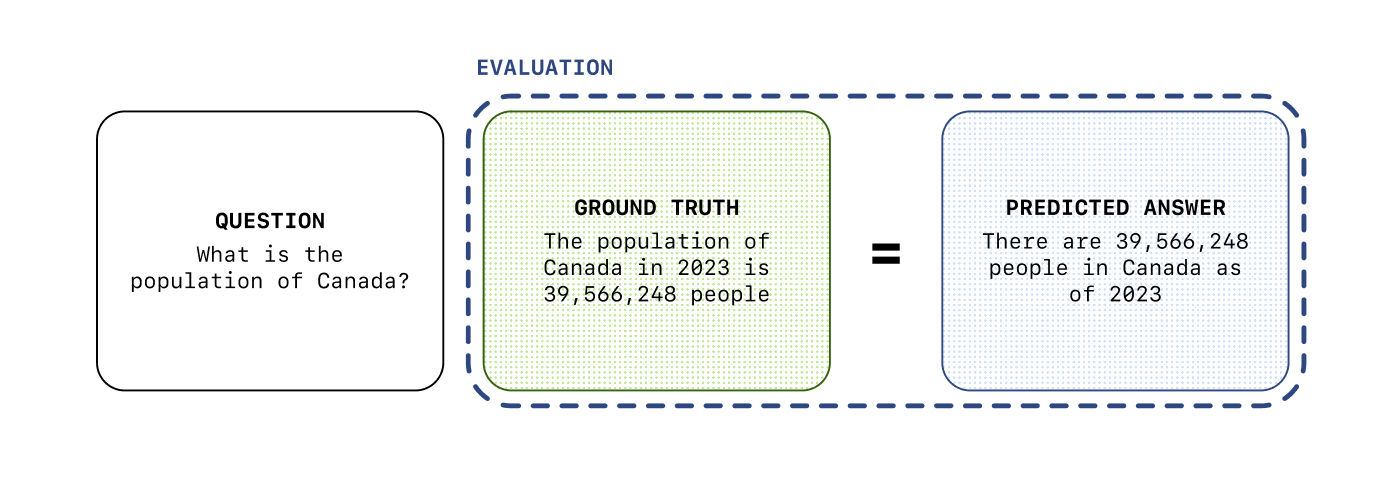
In other cases, there might not be a “ground truth” for the answers, but you can still run evals to measure the quality of the output—we will cover this in more details in Phase 3.
Basic techniques
The first thing you need to master when building AI applications is “prompt engineering”, or simply put: how to tell the models what to do.
With the models’ increasing performance, there is no need to learn a complex syntax or information structure.
But there are a few things to keep in mind, as not all models follow instructions in the same way.
GPT-5.5, our latest model, follows instructions very precisely, so the same prompt can result in different behaviors if you’re using gpt-5.5 vs gpt-4o, for example.
The results may vary as well depending on which type of prompt you use: system, developer or user prompt, or a combination of all of them.
Learn and build
Explore our resources below on how to improve your prompt engineering skills with practical examples.
Another common technique when building AI applications is “retrieval-augmented generation” (RAG), which is a technique that allows to pull in knowledge related to the user input to generate more relevant responses. We will cover RAG in more details in Phase 2.
Finally, in some cases, you can also fine-tune a model to your specific needs. This allows to optimize the model’s behavior for your use case.
A common misconception is that fine-tuning can “teach” the models about your data. This isn’t the case, and if you want your AI application or agents to know about your data, you should use RAG. Fine-tuning is more about optimizing how the model will handle a certain type of input, or produce outputs in a certain way.
Structured data
If you want to build robust AI applications, you need to make sure the model outputs are reliable.
LLMs produce non-deterministic outputs by default, meaning you can get widely different output formats if you don’t constrain them. Prompt engineering can only get you so far, and when you are building for production you can’t afford for your application to break because you got an unexpected output.
That is why you should rely as much as possible (unless you are generating a user-facing response) on structured outputs and tool calls.
Structured outputs are a way for you to constrain the model’s output to a strict json schema—that way, you always know what to expect. You can also enforce strict schemas for function calls, in case you prefer letting the model decide when to interact with your application or other services.
Phase 2: Application development
In this section, you’ll move from understanding foundational concepts to building complete, production-ready applications. We’ll dive deeper into the following:
- Building agents: Experiment with our models and tools
- RAG (retrieval-augmented generation): Enrich applications with knowledge sources
- Fine-tuning models: Tailor model behavior to your unique needs
By the end of this section, you’ll be able to design, build, and optimize AI applications that tackle real-world scenarios intelligently.
Experimenting with our models
Before you start building, you can test ideas and iterate quickly with the OpenAI Playground. Once you have tested your prompts and tools and you have a sense of the type of output you can get, you can move from the Playground to your actual application.
The build hour below is a good example of how you can use the playground to experiment before importing the code into your actual application.
Getting started building agents
The Responses API is your starting point for building dynamic, multi-modal AI applications. It’s a stateful API that supports our latest models’ capabilities, including things such as tool-calling in reasoning, and it offers a set of powerful built-in tools.
As an abstraction on top of the Responses API, the Agents SDK is a framework that makes it easy to build agents and orchestrate them.
If you’re not already familiar with the Responses API or Agents SDK or the concept of agents, we recommend following our Building Agents track first.
Learn and build
Explore the following resources to rapidly get started building. The Agents SDK repositories contain example code that you can use to get started in either Python or TypeScript, and the Responses starter app is a good starting point to build with the Responses API.
Inspiration
Explore these demos to get a sense of what you can build with the Responses API and the Agents SDK:
- Support agent: a simple support agent built on top of the Responses API, with a “human in the loop” angle—the agent is meant to be used by a human that can accept or reject the agent’s suggestions
- Customer service agent: a network of multiple agents working together to handle a customer request, built with the Agents SDK
- Frontend testing agent: a computer-using agent that requires a single user input to test a frontend application
Pick the one most relevant to your use case and adapt from there.
Augmenting the model’s knowledge
RAG (retrieval-augmented generation) introduces elements from a knowledge base in the model’s context window so that it can answer questions using that knowledge. It lets the model know about things that are not part of its training data, for example your internal data, so that it can generate more relevant responses.
Based on an input, you can retrieve the most relevant documents from your knowledge base, and then use this information to generate a response.
There are several steps involved in a RAG pipeline:
- Data preparation: Pre-processing documents, chunking them into smaller pieces if needed, embedding them and storing them in a vector database
- Retrieval: Using the input to retrieve the most relevant chunks from the vector database. Optionally, there are multiple optimization techniques that can be used at this stage, such as input processing or re-ranking (re-ordering the retrieved chunks to make sure we keep only the most relevant)
- Generation: Once you have the most relevant chunks, you can include them in the context you send to the model to generate the final answer
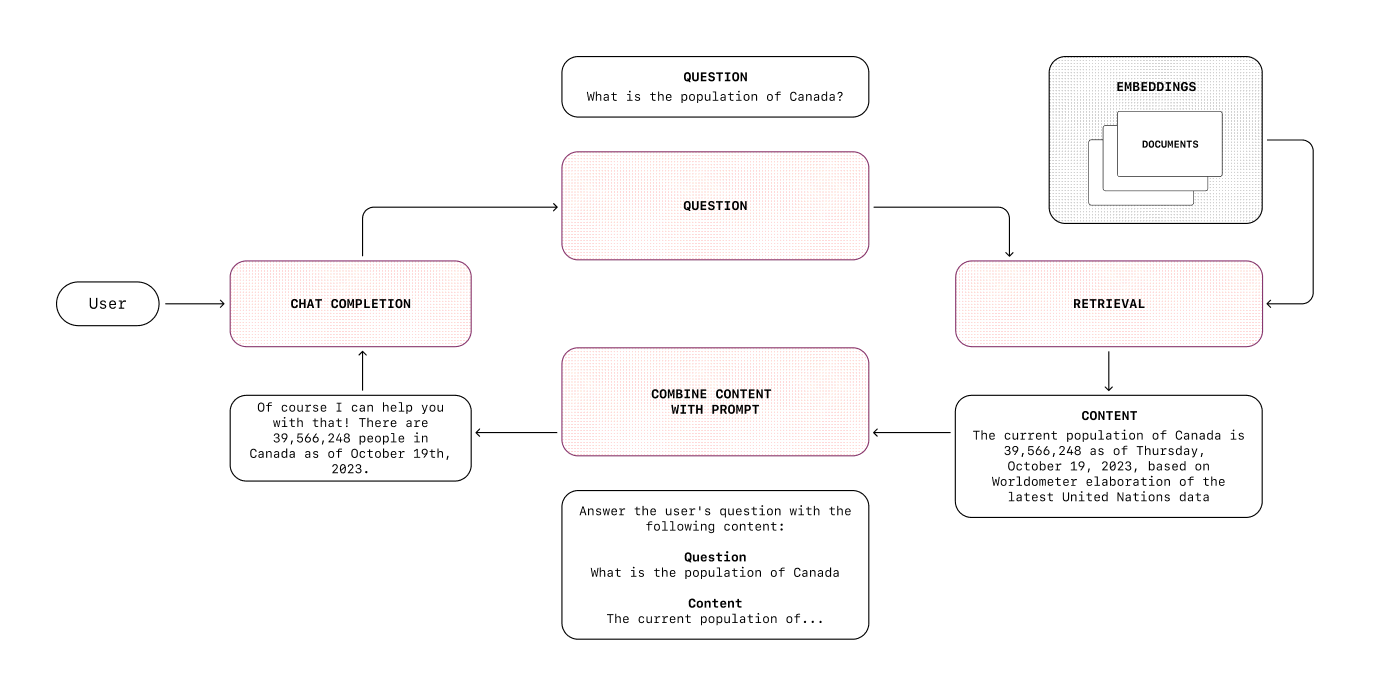
We could write an entire track on RAG alone, but for now, you can learn more about it in the guide below.
If you don’t have specific needs requiring to build a custom RAG pipeline, you can rely on our built-in file search tool which abstracts away all of this complexity.
Learn and build
Fine-tuning models
In some cases, your application could benefit from a model that adapts to your specific task. You can use supervised or reinforcement fine-tuning to teach the models certain behaviors.
For example, supervised fine-tuning is a good fit when:
- You want the output to follow strict guidelines for tone, style, or format
- It’s easier to “show” than “tell” how to handle certain inputs to arrive at the desired outputs
- You want to process inputs or generate outputs in a consistent way
You can also use Direct Preference Optimization (DPO) to fine-tune a model with examples of what not to do vs what is a preferred answer.
On the other hand, you can use reinforcement fine-tuning when you want reasoning models to accomplish nuanced objectives.
Learn and build
Explore the following resources to learn about core fine-tuning techniques for customizing model behavior. You can also dive deeper into fine-tuning with our Model optimization track.
Now that we’ve covered how to build AI applications and incorporate some basic AI techniques in the development process, we’ll focus on testing and evaluation, learning how to integrate evals and guardrails to confidently ship AI applications that are safe, predictable, and production-ready.
Phase 3: Testing and evaluation
Learn how to test, safeguard, and harden your AI applications before moving them into production. We’ll focus on:
- Constructing robust evals to measure correctness, quality, and reliability at scale
- Adding guardrails to block unsafe actions and enforce predictable behavior
- Iterating with feedback loops that surface weaknesses and strengthen your apps over time
By the end of this phase, you’ll be able to ship AI applications that are safe, reliable, and ready for users to trust.
Constructing evals
To continuously measure and improve your applications from prototype through deployment, you need to design evaluation workflows.
Evals in practice let you:
- Verify correctness: Validate that outputs meet your desired logic and requirements.
- Benchmark quality: Compare performance over time with consistent rubrics.
- Guide iteration: Detect regressions, pinpoint weaknesses, and prioritize fixes as your app evolves.
By embedding evals into your development cycle, you create repeatable, objective feedback loops that keep your AI systems aligned with both user needs and business goals.
There are many types of evals, some that rely on a “ground truth” (a set of question/answer pairs), and others that rely on more subjective criteria.
Even when you have expected answers, comparing the model’s output to them might not always be straightforward. Sometimes, you can check in a simple way that the output matches the expected answer, like in the example below. In other cases, you might need to rely on different metrics and scoring algorithms that can compare outputs holistically—when you’re comparing big chunks of text (e.g. translations, summaries) for example.
Example: Check the model’s output against the expected answer, ignoring order.
// Reference answer
const correctAnswer = ["Eggs", "Sugar"];

// Model's answer
const modelAnswer = ["Sugar", "Eggs"];

// Simple check: Correct if same ingredients, order ignored
const isCorrect =
  correctAnswer.sort().toString() === modelAnswer.sort().toString();

console.log(isCorrect ? "Correct!" : "Incorrect.");
Learn and build
Explore the following resources to learn evaluation-driven development to scale apps from prototype to production. These resources will walk you through how to design rubrics and measure outputs against business goals.
Evals API
The OpenAI Platform provides an Evals API along with a dashboard that allows you to visually configure and run evals. You can create evals, run them with different models and prompts, and analyze the results to decide next steps.
Learn and build
Learn more about the Evals API and how to use it with the resources below.
Building guardrails
Guardrails act as protective boundaries that ensure your AI system behaves safely and predictably in the real world.
They help you:
- Prevent unsafe behavior: Block disallowed or non-compliant actions before they reach users.
- Reduce hallucinations: Catch and correct common failure modes in real time.
- Maintain consistency: Enforce rules and constraints across agents, tools, and workflows.
Together, evals and guardrails form the foundation of trustworthy, production-grade AI systems.
There are two types of guardrails:
- Input guardrails: To prevent unwanted inputs from being processed
- Output guardrails: To prevent unwanted outputs from being returned
In a production environment, ideally you would have both types of guardrails, depending on how the input and output are used and the level of risk you’re comfortable with.
It can be as easy as specifying something in the system prompt, or more complex, involving multiple checks.
One simple guardrail to implement is to use the Moderations API (which is free to use) to check if the input triggers any of the common flags (violence, illegal ask, etc.) and stop the generation process if it does.
Example: Classify text for policy compliance with the Moderations API.
from openai import OpenAI
client = OpenAI()

response = client.moderations.create(
    model="omni-moderation-latest",
    input="I want to buy drugs",
)

print(response)
Learn and build
Explore the following resources to implement safeguards that make your AI predictable and compliant. Set up guardrails against common risks like hallucinations or unsafe tool use.
Now that you’ve learned how to incorporate evals into your workflow and build guardrails to enforce safe and compliant behavior, you can move on to the last phase, where you’ll learn to optimize your applications for cost, latency, and production readiness.
Phase 4: Scalability and maintenance
In this final phase, you’ll learn how to run AI applications at production scale—optimizing for accuracy, speed, and cost while ensuring long-term stability. We’ll focus on:
- Optimizing models to improve accuracy, consistency, and efficiency for real-world use
- Cost and latency optimization to balance performance, responsiveness, and budget
Performance optimization
Optimizing your application’s performance means ensuring your workflows stay accurate, consistent, and efficient as they move into long-term production use.
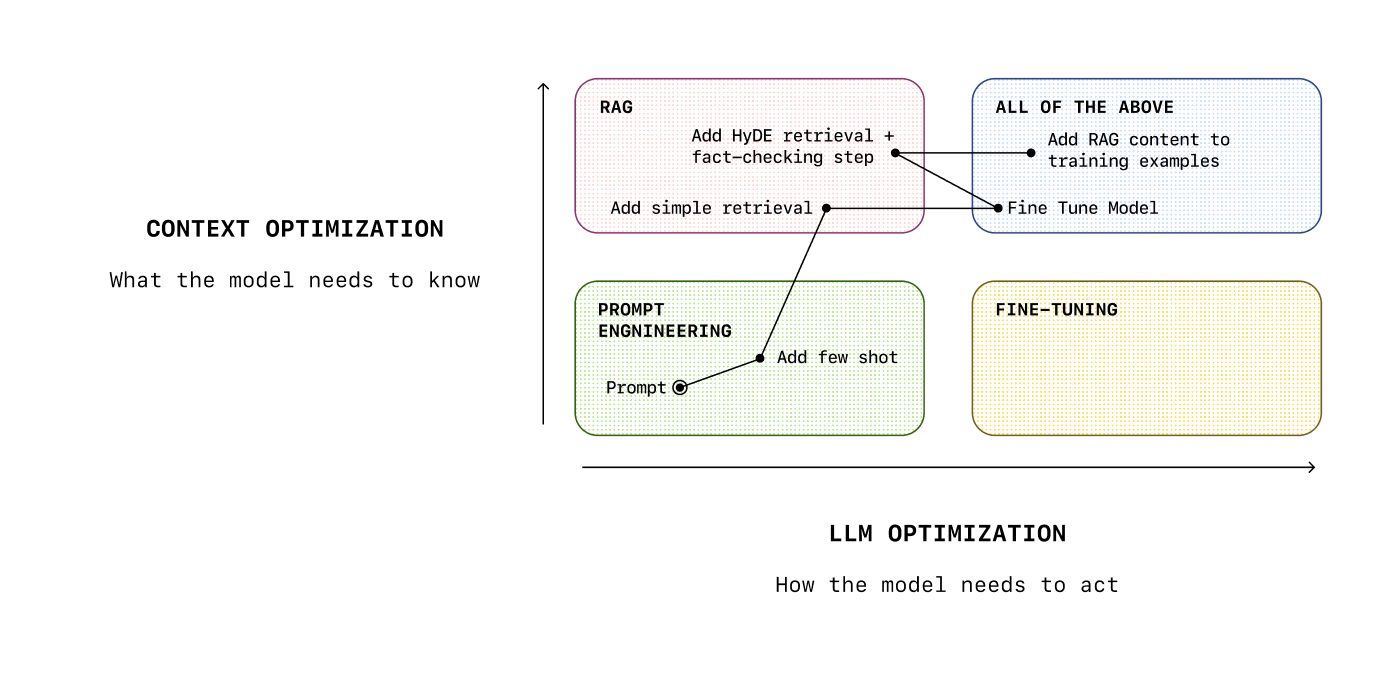
There are 3 levers you can adjust:
- Improving the prompts (i.e. prompt engineering)
- Improving the context you provide to the model (i.e. RAG)
- Improving the model itself (i.e. fine-tuning)
Deep-dive
This guide covers how you can combine these techniques to optimize your application’s performance.
Cost & latency optimization
Every production AI system must balance performance with cost and latency. Often, these two go together, as smaller and faster models are also cheaper.
A few ways you can optimize these areas are:
- Using smaller, fine-tuned models: you can fine-tune a smaller model to your specific use case and maintain performance (a.k.a. distillation)
- Prompt caching: you can use prompt caching to improve latency and reduce costs for cached tokens (series of tokens that have already been seen by the model)
If latency isn’t a concern, consider these options to reduce costs with a latency trade-off:
- Batch API: you can use the Batch API to group requests together and get a 50% discount (however this is only valid for async use cases)
- Flex processing: you can use flex processing to get lower costs in exchange for slower responses times
You can monitor your usage and costs with the cost API, to keep track on what you should optimize.
Set up your account for production
On the OpenAI platform, we have the concept of tiers, going from 1 to 5. An organization in Tier 1 won’t be able to make the same number of requests per minute or send us the same amount of tokens per minute as an organization in Tier 5.
Before going live, make sure your tier is set up to manage the expected production usage—you can check our rate limits in the guide below.
Also make sure your billing limits are set up correctly, and your application is optimized and secure from an engineering standpoint. Our production best practices guide will walk you through how to make sure your application is setup for scale.
Conclusion and next steps
In this track, you:
- Learned about core concepts such as agents and evals
- Designed and deployed applications using the Responses API or Agents SDK and optionally incorporated some basic techniques like prompt engineering, fine-tuning, and RAG
- Validated and safeguarded your solutions with evals and guardrails
- Optimized for cost, latency, and long-term reliability in production
This should give you the foundations to build your own AI applications and get them ready for production, taking ideas from concept to AI systems that can be deployed and scaled.
Where to go next
Keep building your expertise with our advanced track on Model optimization, or directly explore resources on topics you’re curious about.
Feedback
Share your feedback on this track and suggest other topics you’d like us to cover.